WhatsApp is configured to activate features that allow real-time voice chat with Meta AI, making interactions with chatbots more dynamic and accessible.
According to WabetainfoThe new features available to the latest WhatsApp beta tester for iOS 25.21.10.76 update are accessible via the TestFlight app for iOS, so it is set to roll out to more people in the coming weeks.
With the new feature,[チャット]Users can start an audio session by tapping the waveform icon on the tab.
Additionally, there is an option for voice settings to automatically start voice chat when opening Meta AI from this tab, but this feature is disabled by default, allowing users to maintain control over interaction.
Additionally, some users[コール]You can start an instant voice conversation with Meta AI directly from the tab, with additional steps required.
The updated interface includes pre-made and quick suggestions to help users start a conversation, addressing people who don't know what to ask or say.
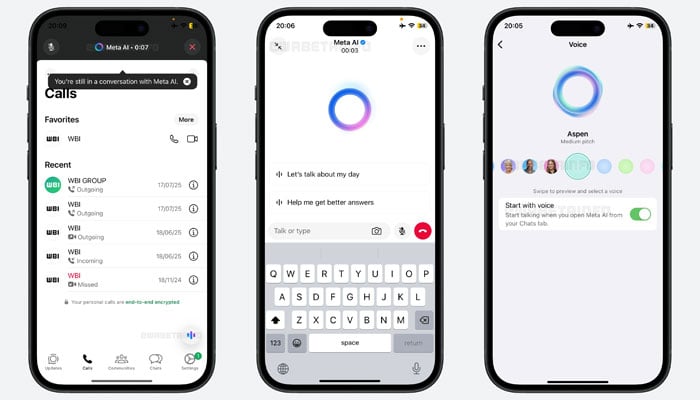
The interface also allows users to quickly attach and share photos from a gallery or camera within the text input area, providing visual support for queries or messages.
Voice chat with Meta AI can continue running when users tap the “Crop” icon to switch to another app. This allows Meta AI to listen and provide feedback as users can read notes aloud, browse websites, and create a natural phone-like experience with uninterrupted support.
It is important to note that privacy is emphasized throughout. Users can mute the microphone or manually terminate the audio session by tapping the Close button or returning to text chat.
On iOS devices, whenever the app is actively using the microphone, an orange dot appears in the top right corner of the screen, near the signal and battery icons.
This is part of Apple's built-in privacy protection, designed to fully inform users that the microphone is being used. This indicator is managed at the system level by iOS and cannot be controlled, hidden or changed in any app, including WhatsApp.
This new voice chat feature eliminates the need to type. It is especially useful for those with multitasking, driving, or mobility challenges.