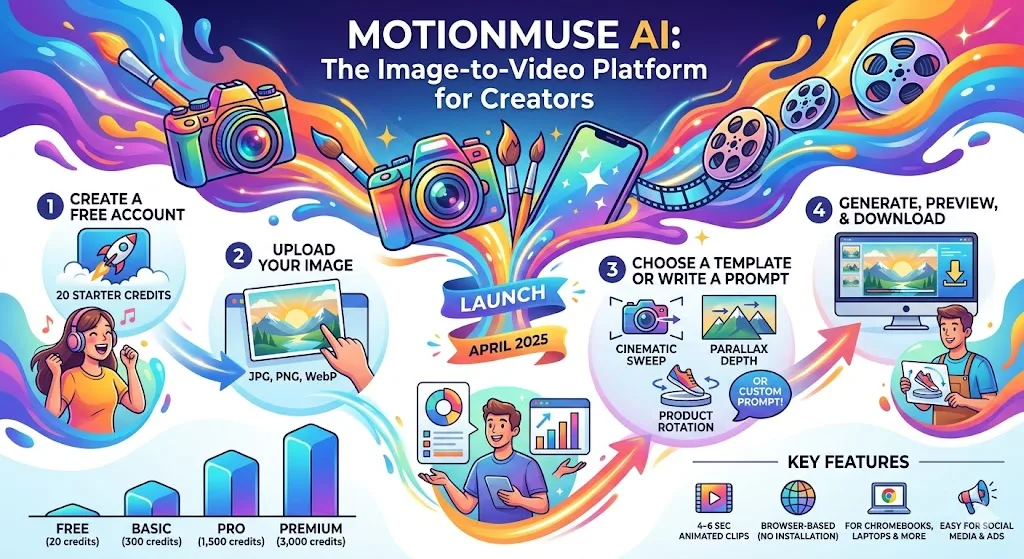
MotionMuse AI is a browser-based image-to-video platform that turns still photos into 4-6 second animation clips. No experience installing or editing software is required. According to Semrush, the platform was launched in April 2025 and recorded 16.61 million monthly visits by January 2026. Here’s how it works and whether it fits into your workflow.
What is MotionMuse AI?
MotionMuse AI is a web application that converts still photos into short animated video clips. Upload a photo, choose a motion style or enter a custom description, and the platform will generate a clip for you to download instantly. No experience installing or editing software is required.
The platform accepts JPG, PNG, and WebP uploads, analyzes the depth and structural information of each image, and applies motion accordingly. Two input methods are available: a daily updated preset template library and a free text prompt field for custom motion descriptions.
MotionMuse AI runs on a credit model. Each clip generated consumes a credit from your monthly balance. Chromebook users and those running a browser-first setup can access the platform out of the box. For a broader understanding of how browser-native AI tools perform on ChromeOS, our overview of AI image generators on ChromeOS covers important considerations.
How to use MotionMuse AI: Step by step
Step 1 — Create a free account
New users receive 20 Starter Credits upon registration. No credit card required to get started. The onboarding process takes less than 10 minutes from signing up to generating your first clip.
Step 2 — Upload the image
MotionMuse AI accepts JPG, PNG, and WebP formats. Higher resolution source images consistently improve animation quality. The platform analyzes components and depth to determine where and how movements are applied. Therefore, image quality directly affects output quality.
Step 3 — Choose a template or create a custom prompt
The preset library is updated daily across categories such as Movies, Abstract, Portraits, Trends, and more. Just select one and the generation is complete. No prompts required.
Free text prompt fields are another path. Inputting “a gentle breeze flowing through the trees, a slow, gentle sound” will produce a significantly different result than “dynamic camera push with particles”. Specific prompts are clearly better than vague prompts.
Step 4 — Generate, Preview, Download
Most generations complete within 3 minutes. Expert mode includes a real-time preview window that shows expected animation behavior before full rendering occurs, reducing wasted credits. Once completed, your clip will be downloaded with one click.
MotionMuse AI features important for content creators
Types of animations available on the platform
Parallax sweeps create depth by separating foreground and background layers. The product rotation effect circulates objects around a central axis. Portrait animation applies subtle facial and hair movement to headshots.
Simple mode removes the upload, selection, and generation interfaces. Expert mode exposes slider controls for speed and animation intensity. A real-time preview window shows the expected output before you commit the full render.
custom template training
Paid tiers include AI training utilities. Users upload short sample videos of their desired motion, and MotionMuse AI builds private templates that can be reused for new images. This is most important for creators who want to maintain a consistent visual style across their content.
Templates vs. Custom Prompts vs. Training
| approach | Best use case | keynote |
|---|---|---|
| template | Speed, social posts, daily volume | Updated daily. Select with one click |
| custom prompt | Specific direction of movement, unique effect | More specific = better output |
| custom training | Brand consistency, distinctive style | Paid level only. I need sample footage |
MotionMuse AI pricing plans
MotionMuse AI works on a freemium model. The free plan includes 20 credits and a basic template. The Basic plan costs $9.99 per month (or $4.99 if billed annually) and provides 300 credits each month. The Pro plan is available for $29.99 per month ($14.99 per year) with 1,500 credits. The premium plan for studios costs $49.99 per month ($24.99 per year) with 3,000 credits.
Monthly credits by plan — MotionMuse AI
Source: MotionMuse AI official pricing, 2026. Shows the annual billing fee for the paid tier.
Unused credits do not roll over. Monthly quotas expire at the end of each billing cycle. If needed, top-up purchases will replenish your monthly balance.
Single project fees from freelance motion designers often reach hundreds of dollars. At $4.99 per month, the annual Basic plan is well below this plan for users with moderate output needs.
Who uses MotionMuse AI?
Social media managers who publish video content regularly will get the most out of the platform. Animated clips that are 4-6 seconds long perform better than static images on most major platforms. Additionally, Pro and Premium tiers allow concurrent production requests through priority queue slots.
E-commerce sellers and marketers use MotionMuse AI to turn product photos into animated ads without the need for expensive videography sessions. Course creators and educators transform static diagrams and slide images into looping visual assets. Advertising professionals who run A/B tests on creatives can cycle through multiple animation styles without having to rebuild assets from scratch.
For those creating video content on a Chromebook, MotionMuse AI coexists naturally with other browser-based tools. This guide for video editors in 2026 describes compatible options that can be successfully combined with image-to-video steps within the same workflow.
MotionMuse AI limitations
Video length is fixed at 4-6 seconds for all tiers. This limit cannot be extended within the platform. If longer sequences are required, another tool is required.
Output quality depends on input quality. Compressed or low-resolution images will have weaker animations. This platform applies motion to existing source files rather than refining them.
MotionMuse AI is cloud-only. If your internet connection is unstable, generation will be interrupted. There is no offline mode and processing is handled entirely on the MotionMuse server. Creators who need local processing or frame-level control should consider a full video editor instead. It’s worth keeping this distinction in mind when choosing between a dedicated Chromebook video editor and a single-purpose animation tool.
MotionMuse AI Traffic Data
According to Semrush, MotionMuse AI recorded 16.61 million visits in January 2026, up from 16 million in September 2025. As of January 2026, direct traffic accounted for 84.84% of all visits.
MotionMuse AI — Monthly Visits (Semrush)
Source: Semrush data via commandlinux.com, 2026.
Average session duration reached 11 minutes and 30 seconds in October 2025, but decreased to 9 minutes and 28 seconds in January 2026. Both numbers indicate active usage rather than rapid bounces. The platform uses Cloudflare CDN, has no flags from ScamAdviser, and held a 95/100 trust score from an independent security analysis.
FAQ
What is MotionMuse AI used for?
MotionMuse AI turns static photos into 4-6 second animated video clips. It is used by social media creators, e-commerce sellers, marketers, and educators who need animated visual content without video production experience or software.
Is MotionMuse AI free?
yes. MotionMuse AI has a free plan with 20 starter credits. Paid plans start at $4.99 per month billed annually. Credits are consumed generationally and do not carry over at the end of each billing cycle.
How long are MotionMuse AI videos?
All generated clips run between 4 and 6 seconds. This limit applies to all subscription tiers (Free, Basic, Pro, Premium) and cannot be extended within the platform.
What image formats does MotionMuse AI support?
MotionMuse AI accepts JPG, PNG, and WebP formats. The higher the resolution you upload, the better the quality of your animation will be. The platform preserves the source resolution whenever possible, but compression may be applied during video delivery.
Does MotionMuse AI work with Chromebooks?
yes. MotionMuse AI runs entirely within your browser and requires no installation. Works on any Chrome-powered device, including Chromebooks, laptops, tablets, and desktops. Touchscreen controls are supported on compatible devices.