Agentic-AI has become essential for deploying production-ready AI applications, but many developers struggle with the complexity of manually configuring agent infrastructure across multiple environments. Infrastructure as code (IaC) facilitates the consistent, secure, and scalable infrastructure required for autonomous AI systems. Automated resource management and declarative templates minimize manual configuration errors and reduce deployment time from hours to minutes, while promoting infrastructure consistency across your environment and preventing unpredictable agent behavior. It provides version control and rollback functionality for quick recovery from problems, essential for maintaining agent system availability, and enables automatic scaling and resource optimization through parameterized templates that adapt from lightweight development to production-grade deployments. For agent applications that operate with minimal human intervention, IaC reliability, automated validation of security standards, and seamless integration into DevOps workflows are essential for robust autonomous operations.
To streamline resource deployment and management, the Amazon Bedrock AgentCore service is now supported by various IaC frameworks, including AWS Cloud Development Kit (AWS CDK), Terraform, and AWS CloudFormation templates. This integration brings IaC capabilities directly into AgentCore, allowing developers to provision, configure, and manage AI agent infrastructure. In this post, we will use a CloudFormation template to build an end-to-end application for a weather activity planner. Examples of using CDK and Terraform can be found in the GitHub sample library.
Building a weather-based activity planner agent
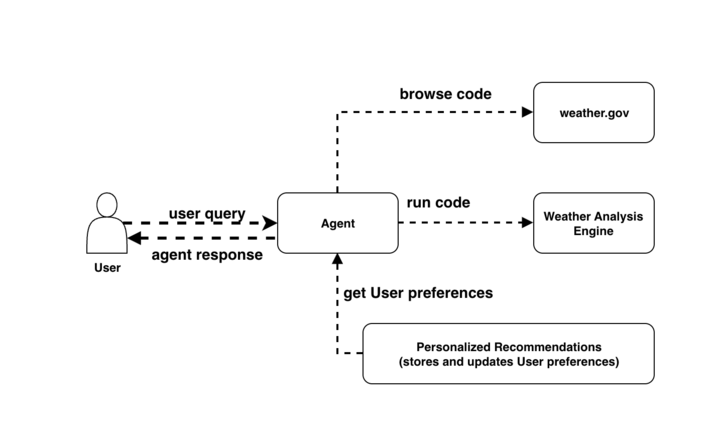
This sample creates a weather activity planner and demonstrates a practical application that processes real-time weather data to provide personalized activity recommendations based on locations of interest. The application consists of multiple integrated components.
- Real-time weather data collection – This application obtains current weather conditions from reliable weather sources such as weather.gov and collects important data points such as temperature measurements, predicted precipitation probability, wind speed measurements, and other relevant atmospheric conditions that affect the suitability of outdoor activities.
- weather analysis engine – The application processes raw weather data through customized logic and evaluates the day’s suitability for outdoor activities based on multiple weather factors.
- Temperature comfort scoring – Activity suitability score decreases when temperature drops below 50°F
- Precipitation risk assessment – Outdoor activity recommendations adjusted when chance of precipitation exceeds 30%
- Wind condition impact assessment – Wind speeds above 15 mph affect overall comfort and safety ratings for various activities
- personalized recommendation system – The application processes weather analysis results using user preferences and location-based recognition to generate customized activity suggestions.
This flow is shown in the figure below.
Now let’s see how to implement this using the AgentCore service.
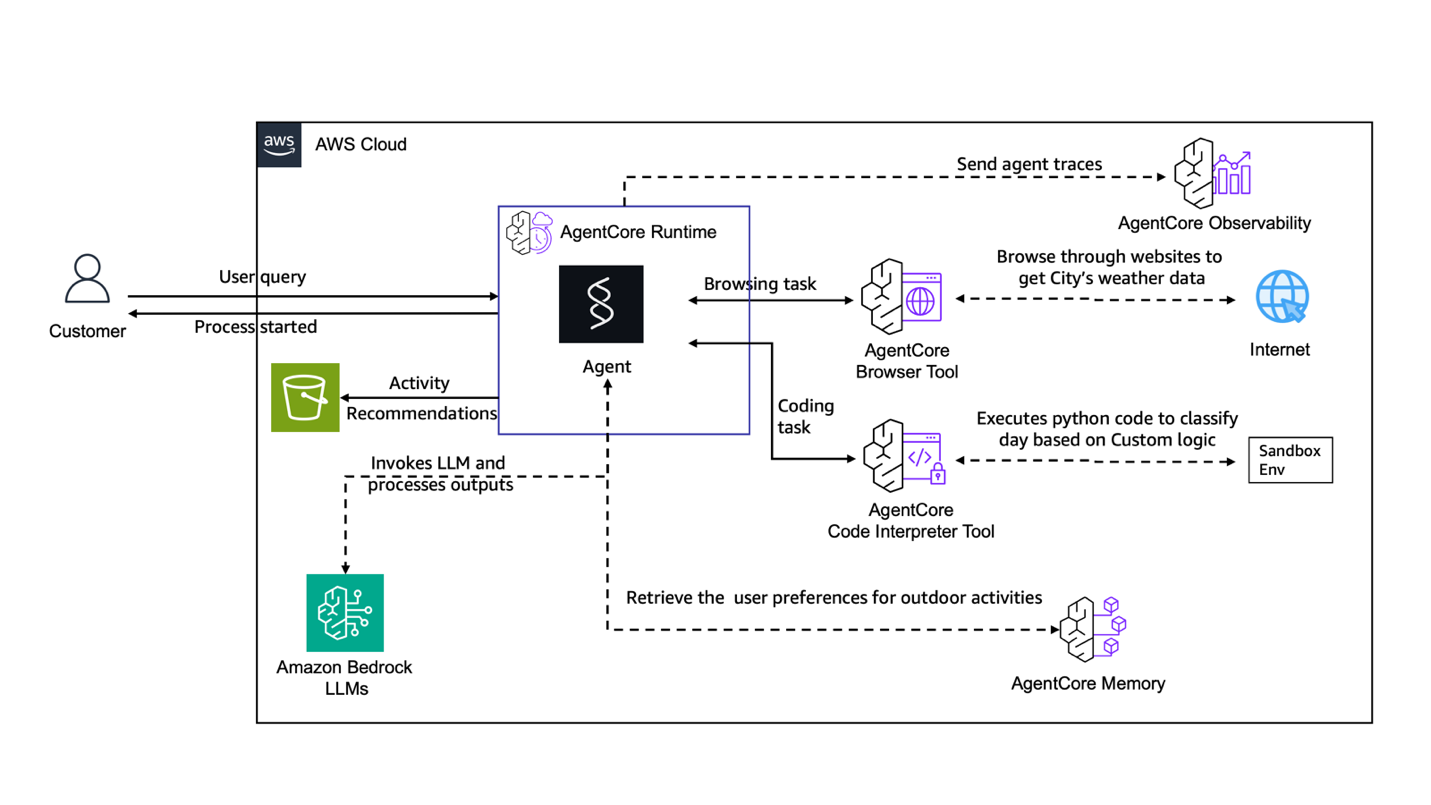
- agent core browser – For automatic lookup of weather data from sources such as Weather.gov
- AgentCore code interpreter – To run Python code that processes weather data, performs calculations, and implements scoring algorithms.
- agent core runtime – For hosting agents that coordinate application flows, manage data processing pipelines, and coordinate between various components
- agent core memory – To save user settings as long-term memory
The following diagram shows this architecture.
Deploying a CloudFormation template
- Download the End-to-End-Weather-Agent.yaml CloudFormation template from Github on your local machine.
- Open CloudFormation from the AWS console
- click Creating a stack → With new resources (standard)
- Select Template Source (File Upload) and select your template
- Enter the stack name and change the required parameters as needed
- Verify your configuration and verify IAM functionality
- click submit [イベント]Monitor the deployment progress in the tab
Here are visual instructions for deploying a CloudFormation template.
Running and testing the application
Adding observability and monitoring
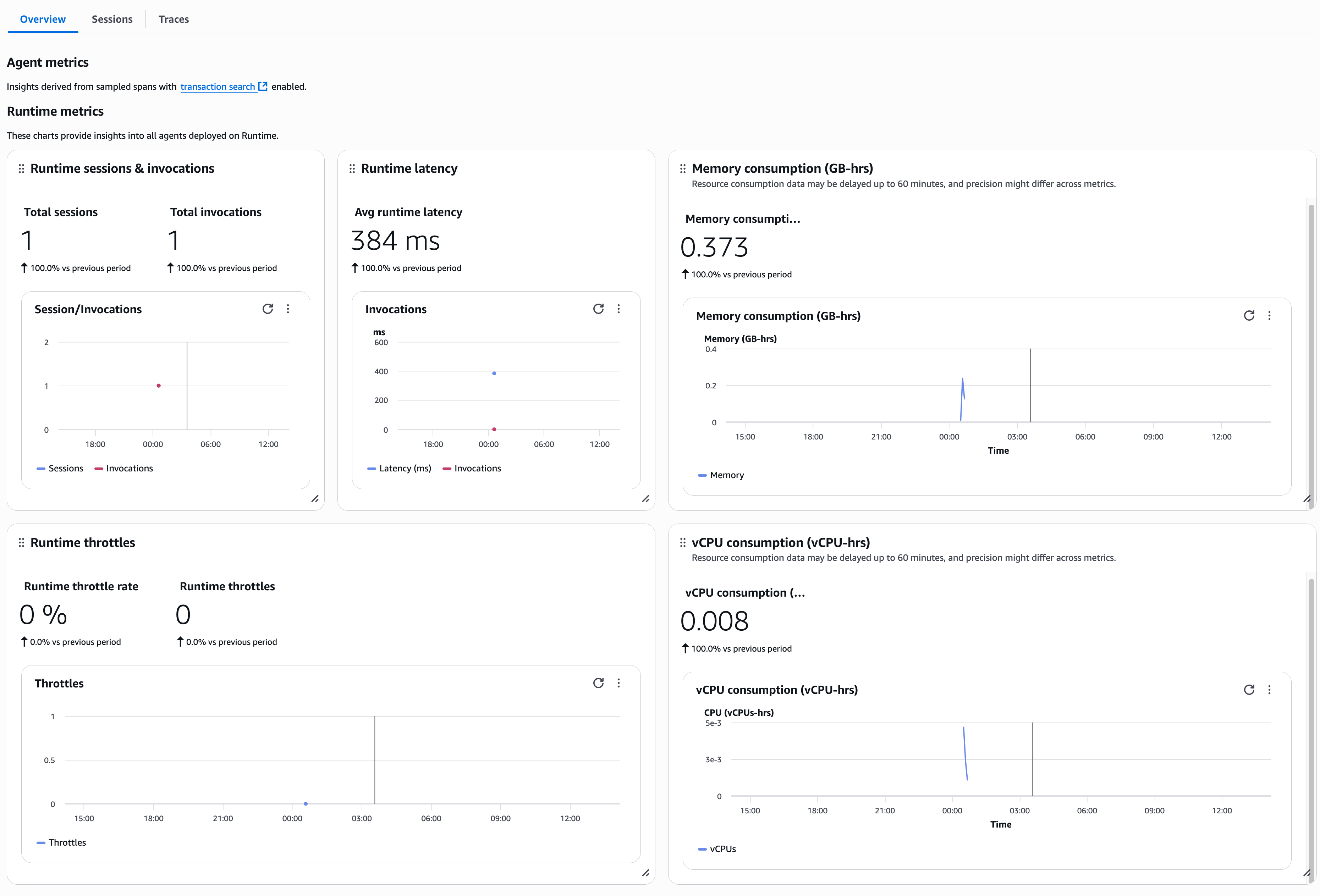
AgentCore Observability has important benefits. Deliver quality and confidence through detailed workflow visualization and real-time performance monitoring. Dashboards powered by Amazon CloudWatch speed your time to market, reduce manual data integration from multiple sources, and enable you to take corrective actions based on actionable insights. Integration flexibility with OpenTelemetry compatible formats to support existing tools like cloud watch, data dog, Arise phoenix, lang smithand langfuse.
The service provides end-to-end traceability across frameworks and foundation models (FM), captures important metrics such as token usage and tool selection patterns, and supports both automatic instrumentation of agents hosted on AgentCore Runtime and configurable monitoring of agents deployed on other services. This comprehensive observability approach enables organizations to build trusted AI agents at scale while achieving shorter development cycles, more reliable agent behavior, and increased operational visibility.
The following screenshot shows metrics in the AgentCore runtime UI.
Customization to suit your use case
The Weather Activity Planner AWS CloudFormation template is designed with modular components that can be seamlessly adapted to a variety of applications. For example, you can customize the AgentCore Browser tool to collect information from different web applications (such as financial websites for investment guidance, social media feeds for sentiment monitoring, and e-commerce sites for price tracking), modify AgentCore code interpreter algorithms to handle specific business logic (such as predictive modeling for sales forecasting, risk assessment for insurance, quality control for manufacturing, etc.), or modify relevant user preferences and business context. AgentCore memory components can be adjusted to store data (customer profiles, inventory levels, project requirements, etc.). Reconfigure Strands Agent tasks to tailor domain-specific workflows, such as supply chain optimization, customer service automation, and compliance monitoring.
Deployment best practices
We recommend the following practices for deployment:
- Modular component architecture – Design an AWS CloudFormation template with separate sections for each AWS service.
- Parameterized template design – Use AWS CloudFormation parameters for configurable elements to make it easier to reuse templates across your environment. For example, this is useful for associating the same base container with multiple agent deployments, specifying two different build configurations, or parameterizing the LLM you choose to power your agents.
- AWS identity and access management (IAM) Security and Least Privilege – Implement fine-grained IAM roles for each AgentCore component using specific resource Amazon Resource Names (ARNs). For security considerations for AgentCore, please see our documentation.
- Comprehensive monitoring and observability – Enable CloudWatch logs, custom metrics, AWS X-Ray distributed tracing, and alerts across components.
- Integrating version control with continuous integration and delivery (CI/CD) – Maintain templates on GitHub with AWS CloudFormation StackSets for automated validation, comprehensive testing, and consistent multi-region deployment.
You can find a more comprehensive set of best practices at CloudFormation Best Practices.
Clean up resources
To avoid future charges, delete the resources used by this solution.
- In the Amazon S3 console, manually delete the content in the bucket that you created for the template deployment, and then delete the bucket.
- In the CloudFormation console, stack Select the main stack in the navigation pane, erase.
conclusion
In this post, I introduced an automated solution for deploying the AgentCore service using AWS CloudFormation. These preconfigured templates allow you to quickly deploy powerful agent AI systems without complex manual component setup. This automated approach saves you time and facilitates consistent and repeatable deployment, so you can focus on building agent AI workflows that drive business growth.
Try some more examples from the Infrastructure as Code samples repository.
About the author
 Chintan Patel He is a Senior Solutions Architect at AWS and has extensive experience designing and developing solutions. He helps organizations across industries modernize their infrastructure, demystify Generative AI technologies, and optimize their cloud investments. Outside of work, I enjoy spending time with my kids, playing pickleball, and experimenting with AI tools.
 Shreyas Subramanian is a Principal Data Scientist who uses AWS services such as Amazon Bedrock and AgentCore to help customers solve business problems using generative AI and deep learning. Dr. Subramanian has contributed to cutting-edge research in deep learning, agentic AI, fundamental models, and optimization techniques with several books, papers, and patents to his name. In his current role at Amazon, Dr. Subramanian collaborates with a variety of scientific leaders and research teams both inside and outside of Amazon to guide customers in making the most of cutting-edge algorithms and technologies to solve business-critical problems. Outside of AWS, Dr. Subramanian is an expert reviewer of AI papers and has received funding through organizations such as Neurips, ICML, ICLR, NASA, and NSF.
 Kosti Vasilakakis At AWS, he is a Principal PM on the Agentic AI team and has led the design and development of several Bedrock AgentCore services from the ground up, including Runtime. He previously worked on Amazon SageMaker from its early days, launching AI/ML capabilities that are now used by thousands of companies around the world. Mr. Kosti was a data scientist early in his career. Outside of work, I enjoy building personal productivity automation systems, playing tennis, and exploring the great outdoors with my family.