
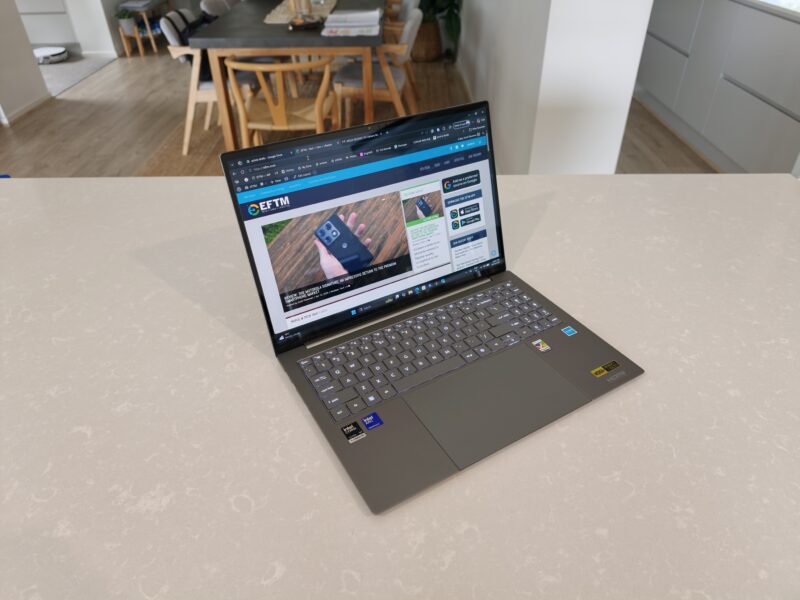

Acer’s new laptop, the Swift 16 AI, is an impressive machine. Not only does it have an impressive OLED touch display, but it also has the world’s largest tactile touchpad. However, with its impressive specs and useful design enhancements, there’s a lot more to it than that.
The ACER Swift 16 AI is a Copilot+ PC that combines premium design and performance, giving you multiple hardware options to work anywhere.
At the heart of ACER Swift 16 AI is the world’s largest haptic touchpad. This giant touchpad occupies the bottom deck of the laptop, featuring a vast 8.15-inch edge-to-edge touchpad covered in Corning Gorilla Glass for precise control, intuitive gestures, and seamless navigation with stylus support.


This laptop features a 16-inch 3K resolution OLED touchscreen built into an ultra-slim design that measures just 10.61 mm at its thinnest point, and comes with durable MIL-STD-810H build quality and a lay-flat 180° hinge.
The review laptop is equipped with an Intel Core Ultra Series 3 X7 processor, integrated Intel Arc B390 GPU, 120Hz 3K OLED touch display, 32GB Ram, and 1Tb SSD. Acer promises impressive battery life with these specs of up to 17 hours of video playback and up to 12.5 hours of web browsing, but we’ll have to wait and see if that lasts.

design
The Acer Swift 16 AI’s chassis is stylish and lightweight aluminum, and the lid continues this style with elegant lines and branding. It provides some style without being overdone.
It weighs only 1.55kg and is only 14.8mm thick at its thickest point, making it easy to carry despite its large size.
The laptop opens easily thanks to a lip and lid formed by the world’s largest trackpad. You can’t open it with one hand, but how many 16-inch laptops do you need?


The Swift 16 AI’s hinge is a 180-degree flat hinge, which clearly improves convenience. I’m not sure where you’ll use this flat area, perhaps to show the display to a small group of people? If this is the use case you’re looking for, a 360 degree hinge would be more convenient.
However, the hinge can do that, feels solid when moving into place, and stays in place no matter what angle you place it.

keyboard and trackpad
The keyboard is large and there is a numeric keypad on the right side of the laptop. I’m not a big fan of keyboards like this. You’ll end up moving your hands to the side or sitting next to your laptop.
If you want a number pad, it’s there, but how many people actually need one? Sure, some do, but why would any manufacturer insist on including a number pad? This isn’t a gaming laptop.
The keyboard itself is very comfortable to type on, with plenty of key travel, yet still large enough to leave plenty of space between each key for accuracy. The keys are also very quiet while typing, which is a very nice feature (or is it excluded?).


The keys themselves are flat keys, and although I’ve gotten used to them, they aren’t as precise as those with curves to fit my fingertips.
The keyboard is backlit and the brightness of the backlight can be customized using dedicated function keys.
As we’ve already mentioned several times, the trackpad is the world’s largest tactile touchpad. At 8.15 inches, it’s large and fills everything from the keyboard to the front of the laptop. I like the size, but why do I need a trackpad this big?

You can also use it for drawing with stylus support, in which case it would be great. It’s certainly good for basic sketching and drawing, but serious artists will definitely have dedicated drawing hardware.
The touchpad is made with Corning Gorilla Glass and has a premium, soft click sound and precise tactile feedback. I like it, but I wonder when I’ll ever need a touchpad this big. If you need it, it’s here.

screen
The 16-inch touch display looks great, and the 2880 x 1800 (3K) resolution, 120Hz refresh rate, and 100% DCI-P3 support are as expected. Whether you’re watching videos, editing photos, or just browsing the web, you’ll be amazed by the vividness of the display. The large display is also touch-enabled, allowing for precise and consistent touches.
The bezels on this 16-inch laptop are so thin that it feels like the display is completely visible edge-to-edge. Media consumption on this display was amazing.
The top bezel has a 1080p FHD IR webcam with Acer TNR solution.
“Acer TNR solutions can detect and diagnose noisy pixels and blend them into other frames to capture better images, resulting in higher quality images even in low-light environments.”


I used it a few times for video calls and was impressed, but I still wonder why manufacturers don’t offer better camera hardware. The software here compensates for that, but it doesn’t have to.
IR webcams can also be used for secure Windows Hello login. That works fine. I love Windows Hello login. This laptop doesn’t have a fingerprint sensor, so it’s good that it works well.

connectivity
Swift AI 16 connectivity options are extensive and include the following port options:
- Two USB Type-C ports, supporting:
- USB4 40Gbps
- Thunderbolt™ 4
- USB charging 5V; 3A
- DC input port 20V. 100W
- Two USB Standard-A ports, supporting:
- 1 x USB 3.2 Gen 1 port
- 1 port for USB 3.2 Gen 1 with power-off USB charging capability
- HDMI 2.1 port with HDCP support
- headphone/speaker jack


Wireless connectivity is also up to date with support for Wi-Fi 7 and Bluetooth 5.4.
Finally, most manufacturers now support DC input on the same ports as Thunderbolt 4, which I really like. This means you can charge your laptop using a variety of chargers no matter where you are.
software + performance
Unlike many manufacturers, Acer has put a lot of effort into the software that goes into its laptops. They come with the slowest and most useless software ever, McAfee, which can (and should) be uninstalled. You can uninstall the Booking.com and Forge of Empires shortcuts on your toolbar.
AcerSense provides “critical system information, hardware diagnostic tools, software updates, and more in one dashboard.” This will give you an overview of your laptop, its operating load, and its overall health. AcerSense has a complete set of Acer AI apps and features.


A.I.
Acer, like many other companies, is once again focusing on AI, but in addition to having AI capabilities, it also includes some unique and useful features to help you get the most out of your laptop.
- acer quick panel – Provides a quick and easy way to fine-tune AI-assisted Acer PurifiedView camera and Acer PurifiedVoice microphone settings. This pops up as soon as your laptop detects that your webcam or microphone is on, allowing you to join any calls or videos that are on/in.
- Acer PurifiedView – Easily adjust camera settings with studio effects, enable portrait adjustments and avatars.
- Acer PurifiedVoice – Also located in the quick panel, you can quickly adjust microphone settings such as AI noise reduction for audio input and output, and change audio presets based on how you intend to use the audio at the time.
- Acer user sensing – Detects your presence using the built-in proximity sensor next to the webcam, locks the screen when you walk away, and automatically unlocks when you return using the IR webcam and Windows Hello.
- You can also use Observer Alerts to detect if someone is watching over your shoulder and alert you or automatically blur the screen.
- acer assist – Acer’s smart AI assistant. Get the most out of your laptop without an internet connection.
- Acer AI Image Generator – What would AI products be like in 2026 without image generators? Here they are.
- Acer video speed controller – I will do what I am told. You can control the speed of the video on your display, making it play faster or slower.
- Acer display lens – Focus on small text and image details using AI zoom and rotation tools.


Overall, if you are using the Acer Swift AI 16 for work or productivity, you will find its AI very useful. However, most software used for these tasks already includes some form of AI functionality. This allows you to get a similar experience across all video conferencing and other apps.
AI It also includes all the usual CoPilot AI features you’d expect from a Windows laptop.
battery life
The Acer Swift AI 16’s 70Wh battery is large enough to provide over 12 hours of web browsing. I certainly managed to get over 12-13 hours of web browsing and media consumption. This is enough to get everyone through a busy day.
Charging was quick using the included USB Type-C 65W PD AC adapter. From the sky, the next one took.
- 20 minutes – 40%
- 30 minutes – 55%
- 50 minutes – 80%
- 1 hour – 86%

final thoughts
The main feature of the Acer Swift AI 16 is its huge haptic touchpad. It certainly has a large capacity and is easy to use. MPP2.5 stylus support (Microsoft Pen Protocol) is included, and although the stylus is not included in the box, you can use your own supported stylus to draw and sketch very easily on such a large touchpad.
The keyboard is comfortable to type on with a good amount of travel and feel, but I prefer the curved keycaps. The display is large, bright, and vibrant, as you’d expect from a 3K OLED touch display. There are few features that this laptop doesn’t include that you should consider.

Acer AI is one of the best manufacturer-provided AI software I’ve ever used. In fact, it has some useful features that are rarely seen. It still includes Microsoft AI software, which is mostly useless, but given how good the Acer software is, I don’t think I’ll ever use it.
Overall, the Acer Switch AI 16 is a great laptop. If you’re looking for a large laptop that has everything you want from a productivity standpoint and a huge touchpad that’s compatible with drawing and sketching, you should consider this laptop. Priced at around $2,999, it’s not cheap, but it will meet all your needs.
The Acer Swift 16 AI models reviewed are: Available now at Harvey Norman, with 16GB and 512GB models coming soon Late in the first quarter of 2026.


Scott is our resident open technology expert. If you can modify it or want to use it your way, Scott has probably done it. From laptops to phones to headphones to game consoles, he plays with a variety of products and is keen to see what the next generation will be like.


