Editor's note: This post was In NVIDIA Studio This series celebrates artists in the spotlight and shares creative tips and tricks. NVIDIA Studio Technology improves creative workflows, and we're always exploring new possibilities. GeForce RTX Graphics Cards Learn about the features, technology, and resources and how they can dramatically accelerate your content creation.
Wondershare Filmora, a video editing app with AI-powered tools, now supports NVIDIA RTX Video HDR, joining other editing software such as Blackmagic Design's DaVinci Resolve and Cyberlink PowerDirector.
RTX Video HDR significantly improves video quality, ensuring that the final output is suitable for the best monitors available today.
Livestreaming software OBS Studio and XSplit Broadcaster now support Twitch Enhanced Broadcasting, giving streamers more control over video quality through client-side encoding and auto-configuration. Developed jointly by Twitch, OBS and NVIDIA, the feature paves the way for further advancements, including vertical live video and advanced codecs like HEVC and AV1.
The July Studio Driver includes summer-ready creative app updates and is available to download now. Install the beta version of essential NVIDIA apps for creators and gamers to keep your GeForce RTX PC up to date with the latest NVIDIA drivers and technologies.
Join NVIDIA at SIGGRAPH to learn about the latest breakthroughs in graphics and generative AI, and join us for a fireside chat with NVIDIA founder and CEO Jensen Huang and WIRED senior writer Lauren Goode on Monday, July 29, at 2:30 p.m. MST. Register now.
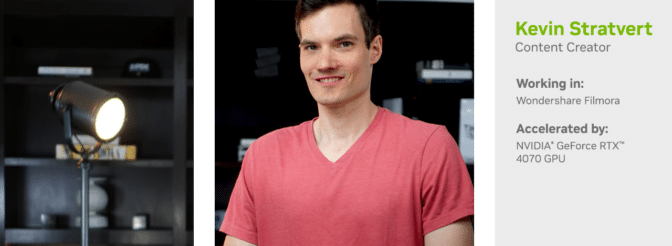
This week's featured In NVIDIA Studio Artist Kevin Stratvert shares more about Wondershare Filmora's AI-powered content creation.
Share the (amazing) beauty of RTX video
RTX Video HDR analyzes standard dynamic range video and converts it into HDR10-quality video, expanding the color gamut to produce crisper, more vibrant frames and enhancing the sense of depth for greater immersion.
RTX Video HDR enables Filmora users to create high-quality content perfect for gaming videos, travel vlogs, and event filmmaking.
Combining RTX Video HDR with RTX Video Super Resolution, another AI-powered tool that uses trained models to sharpen video edges, restore features, and remove artifacts, further improves image quality. RTX Video HDR requires an NVIDIA RTX GPU connected to an HDR10-capable monitor or TV. For more information, see the RTX Video FAQ.
If you have an RTX GPU-equipped PC, you can send your files to the Filmora desktop app and continue editing with local RTX acceleration, which doubles the speed of the export process using dual encoders on GeForce RTX 4070 Ti and above GPUs.
Learn more about Wondershare Filmora's AI-powered features.
Making the most of Filmora’s AI features
Kevin Stratvert has a teacher's heart and has always enjoyed sharing his technical knowledge and tips with others.
One day, he had an idea: “What if I made a YouTube video that explained things directly to users?” His first big hit was a tutorial on how to get Microsoft Office for free from Office.com. The video garnered millions of views and great responses, and he's been making content ever since.
“The more content I created, the more questions and feedback I got from my audience, creating a never-ending cycle of creativity and connection,” Stratobert said.
Explaining the benefits of AI has been a particularly interesting area for Stratvert, especially as it relates to Wondershare Filmora's AI-powered features. One of their YouTube videos, a beginner's tutorial for the Filmora video editor, goes into detail about the AI effects that video editors can use to speed up their workflow.
example:
- Smart Edit: Edit automatically generated, footage-based transcripts, including in multiple languages.
- Smart Cutout: Remove unwanted objects or change backgrounds in seconds.
- Speech-to-text: Automatically generate compelling descriptions, titles, and captions.
“AI has become an important part of my creative toolkit, especially helping me refine the little details that really make a difference,” says Stratobert. “Having AI handle these technical tasks gives me more time to focus on creating content, making the whole process smoother and more efficient.”
Stratvert is also experimenting with NVIDIA ChatRTX, a technology that allows users to interact with local data, install and configure various AI models, and effectively prompt the AI for both text and image output using CLIP and more.
NVIDIA Broadcast played a key role in helping Stratvert create a professional environment for their web conferences and live streams. The app's features, such as background noise removal and virtual backgrounds, help maintain a professional look on screen, especially useful in a home studio environment where it's harder to control variables in the environment.
“NVIDIA Broadcast helps make our web conference and livestream setups professional.” — Kevin Stratvert
Stratvert emphasizes the importance of the GeForce RTX 4070 graphics card in the content creation process.
“With RTX GPUs, we saw dramatic improvements in rendering times and playback smoothness in even the most demanding scenarios,” he said. “What's more, the advanced capabilities of RTX GPUs support more demanding tasks, including real-time ray tracing and AI-driven editing features, opening up new creative possibilities in editing.”
Check out the video tutorial on the Stratvert website.
Follow NVIDIA Studio Instagram, X and FacebookAccess the tutorial Studio YouTube Channel Subscribe to receive updates directly to your email. Studio Newsletter.