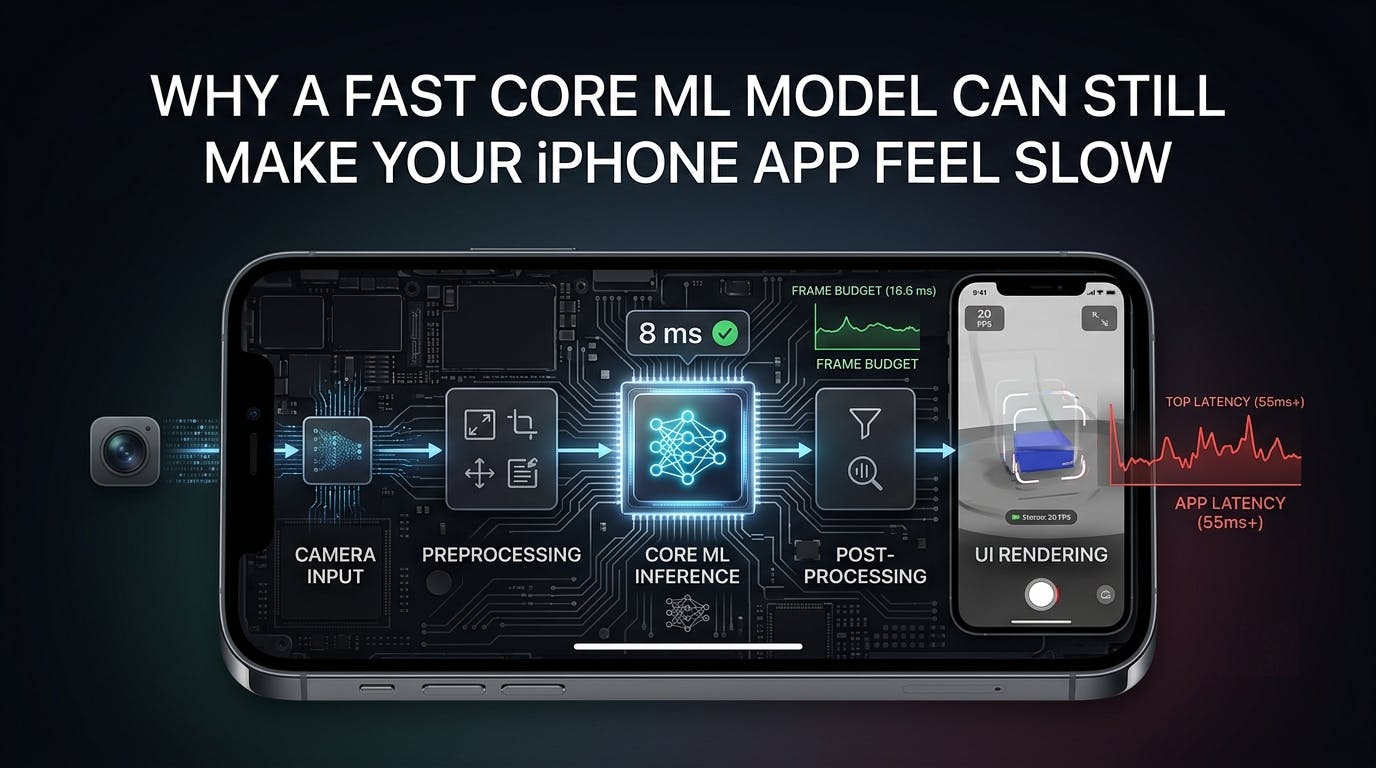
Core ML models run in 8ms. Although the benchmarks look good, the app still feels slow. Camera previews are choppy, scrolling is unresponsive, buttons feel slow, and animations drop frames. After profiling my application, I noticed something unexpected. The model wasn’t the bottleneck. The real problem is everything happening around it: thread scheduling, preprocessing, memory allocation, model initialization, UI updates, etc. Accelerated models are just one part of building responsive on-device AI experiences.
The latest iPhones can run incredibly sophisticated machine learning models directly on the device, but providing a smooth user experience requires more than just optimizing inference speed. The entire application pipeline, from capturing input data to rendering the final result, determines the responsiveness of your app.
This article describes five practical techniques that can significantly improve the performance of on-device machine learning applications.
Why even high-speed models still feel slow
iOS has a user interface main thread.
At 60 FPS, every frame has approximately 16.7ms Complete. With a ProMotion display running at 120Hz, that budget drops to approx. 8.3ms.
Meanwhile, the system must:
- Handling touch events
- Update layout
- rendering animation
- draw next frame
When machine learning inference runs synchronously on the main thread, it quickly consumes some of your limited frame budget.
// ❌ Blocks UI rendering
let prediction = try model.prediction(input: input)
label.text = prediction.label
Even though the prediction itself takes only a few milliseconds, the surrounding work (image preprocessing, memory allocation, model manipulation, UI updates) can cause the execution to exceed the available frame time.
The result is not a slow model.
It slows down due to frame drops.
1. Take inference off the main thread
Swift Concurrency makes it much easier to run machine learning workloads asynchronously.
Rather than blocking UI rendering, it performs inference in the background and returns to the main actor only when updating interface elements.
func classify(_ input: MyModelInput) async throws -> String {
    let output = try await Task.detached(priority: .userInitiated) {
        try self.model.prediction(input: input)
    }.value

    return output.label
}
Next, update the UI.
Task {
    let result = try await classify(input)

    await MainActor.run {
        self.resultLabel.text = result
    }
}
This keeps the rendering pipeline available while the model runs independently.
This separation is especially important for camera-based applications, where continuous frame processing can easily conflict with UI rendering.
2. Load the model once
A common performance mistake is recreating the Core ML model for each prediction.
// ❌ Expensive
func predict(_ input: Input) throws -> Output {
    let model = try MyModel()
    return try model.prediction(input: input)
}
Model initialization is not free. This includes loading weights, allocating resources, and preparing the model for execution.
Instead, initialize the model once at application startup or through dependency injection.
final class Classifier {

    private let model: MyModel

    init() throws {
        let configuration = MLModelConfiguration()
        configuration.computeUnits = .all

        self.model = try MyModel(configuration: configuration)
    }

    func predict(_ input: Input) throws -> Output {
        try model.prediction(input: input)
    }
}
A single model instance can typically process thousands of predictions without repeated initialization overhead.
3. Choose compute units intentionally
Core ML controls where inference is performed.
|
computing unit |
Typical use case |
|---|---|
|
|
Default selection for most applications |
|
|
Useful when GPU resources are used frequently |
|
|
Useful for models that benefit from GPU acceleration |
|
|
Debugging and deterministic testing |
There is no universally optimal setting.
For example, applications that use Metal, ARKit, or continuous camera rendering may improve overall performance by avoiding unnecessary GPU contention.
The best approach is to benchmark different configurations using realistic workloads and target devices.
4. Optimize your entire ML pipeline
Inference is just one step in the workflow.
A typical image-based prediction pipeline looks like this:
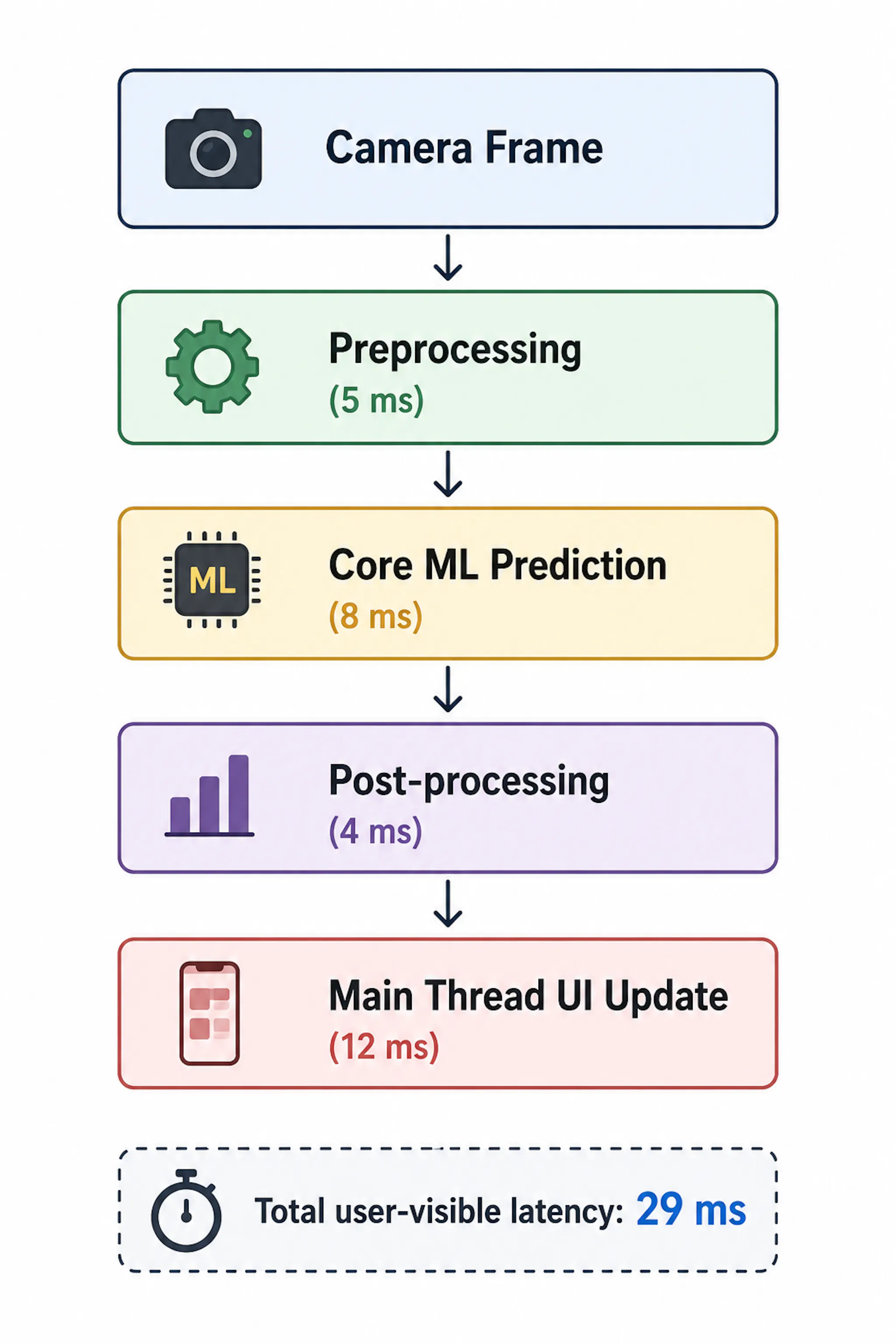
For many applications, preprocessing and data processing takes as much time as the actual model execution.
Several optimizations can reduce unnecessary overhead.
- Reuse image buffers whenever possible.
- Avoid repeated memory allocations.
- Process camera frames in a dedicated serial queue.
- Skip old frames instead of creating a processing backlog.
For real-time applications, it is usually more valuable to process the latest frames than to finish work on older frames.
Simple approach:
guard !isProcessing else { return }

isProcessing = true

Task.detached(priority: .userInitiated) {

    defer {
        Task { @MainActor in
            self.isProcessing = false
        }
    }

    // Preprocess image
    // Run Core ML prediction
    // Process results
}
This prevents multiple expensive predictions from competing for system resources.
5. Measuring more than inference time
Logging only model execution time gives an incomplete picture.
A model that predicts in 8ms may still have a poor experience if preprocessing takes 20ms and UI updates block rendering.
Measure the complete pipeline visible to users.
example:
let start = CFAbsoluteTimeGetCurrent()

let prediction = try model.prediction(input: input)

let elapsed = (CFAbsoluteTimeGetCurrent() - start) * 1000

print("Inference: \(elapsed) ms")
However, application profiling provides much greater insight.
Some useful instrument templates include:
- time profiler — Identify CPU bottlenecks
- core ML — Analyze model execution
- animation hitch — Detect rendering issues
The goal is not just to reduce inference latency.
The goal is to improve the user’s actual viewing experience.
Test across different devices
Machine learning performance varies widely between iPhone generations.
Workflows that feel instant on modern hardware may behave very differently on older supported devices.
When evaluating ML capabilities, test for:
- Latest supported iPhones
- mid-generation devices
- Oldest supported device
Designing only for the fastest hardware often results in unexpected performance issues for real-world users.
Common performance mistakes
|
error |
better approach |
|---|---|
|
Executing predictions on the main thread |
Run inference asynchronously |
|
Re-create the model repeatedly |
Cache a single model instance |
|
Measure inference latency only |
Measure your entire pipeline |
|
Ignore preprocessing costs |
Optimize image conversion and memory usage |
|
Benchmark only one device |
Testing across multiple hardware generations |
Important points
Building responsive on-device AI is more than just creating fast neural networks.
It’s all about creating fast pipelines.
Practical checklist:
✅ Separate inference from the main thread.
✅ Reuse model instances.
✅ Benchmarking compute unit configurations.
✅ Optimize preprocessing and memory usage.
✅ Measure end-to-end latency.
✅ Validate performance across multiple devices.
These improvements often have a greater impact on user experience than reducing inference time by a few more milliseconds.
When users describe your app as “fast,” They rarely talk about benchmark numbers.
They talk about responsiveness.
And responsiveness starts with keeping the UI free to do its job.