
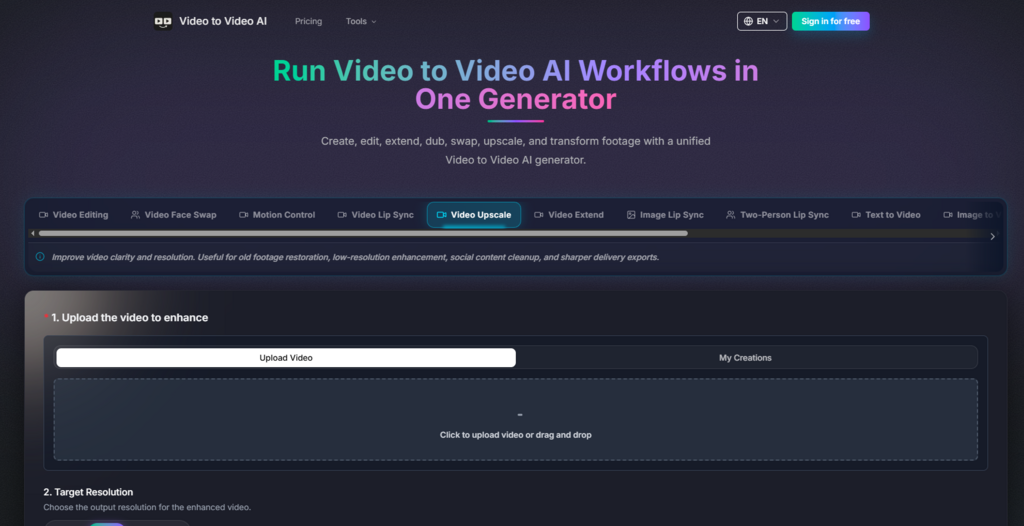
The video AI space has been splitting into two noisy camps: single‑purpose tools that do one trick reasonably well, and bloated suites that promise everything but deliver friction. Over the past few months, I have been looking for a middle ground—a platform where character replacement, face swap, lip sync, upscaling, and duration extension live under one roof without forcing me to learn five different interfaces. That search led me to Video to video ai, a unified generator that approaches video‑to‑video AI as a workflow problem rather than a feature checklist. Instead of stitching together separate apps for each task, the platform lets you upload a clip, attach reference assets, write a prompt, and generate a transformed version—all within the same environment. What follows is not a marketing recap. It is a practical walkthrough based on real test runs, actual interface behaviour, and the kind of small but telling details that separate useful tools from over‑hyped demos.
A Testing Framework Built Around Real Creative Scenarios
To evaluate whether a video AI tool actually works in production, I avoid generic “generate something cool” tests. Instead, I run a small set of repeatable tasks that mirror common professional needs: swapping a character while keeping camera motion intact, changing a wardrobe across a full shot, syncing dialogue to new audio, upscaling old footage, and extending a clip by a controlled number of seconds. Each task exposes different pain points—motion preservation, identity consistency, detail recovery, and temporal control. The platform I tested handles all of these through distinct workflows, but the underlying logic remains consistent: video plus references plus prompt equals transformed result.
Character Replacement: Motion First, Identity Second
The character replacement workflow is where many video‑to‑video tools stumble. They either lock the motion too rigidly, making the new character feel pasted on, or they over‑rotate on the new identity and lose the original performance timing. In my tests, the platform takes a different approach. It asks for a video and reference assets—frontal, side, and even top angles if you have them—and then uses the prompt to guide which elements should change. The output preserved the original camera movement and action rhythm while applying the new visual identity across the full clip. The multi‑angle asset support made a noticeable difference in consistency, especially when the character turned or moved through the frame. This is not a magic bullet; prompt quality matters a great deal, and complex scenes with rapid motion may require a second pass. But for ad variations, virtual production tests, and scene redesign work, the workflow feels deliberate rather than experimental.
Clothing Swap: Wardrobe Changes Without Re‑shooting
Changing what a talent wears in an existing shot typically means either a costly reshoot or hours of rotoscoping. The clothing swap workflow aims to remove that friction. It uses front and back reference images to capture the garment’s silhouette and fabric behaviour, then applies the new look while keeping body motion, framing, and performance intact. I tested this with a walking shot where the original outfit was a dark jacket and the reference was a lighter, patterned coat. The result maintained the walking pace and arm swing, and the new garment wrapped around the body in a way that felt plausible rather than warped. The fidelity is not perfect every time—lighting mismatches between the reference and the video can create subtle tonal shifts—but for fashion previews, concept testing, and rapid iteration, it saves days of production work.
Lip Sync and Face Swap: Precision in Performance Transfer
Lip sync and face swap are often treated as gimmicks, but they have serious applications in dubbing, localization, and character previews. The platform handles both through a similar reference‑based mechanism. For lip sync, you provide the new audio track, and the system aligns mouth movements to the new speech while keeping pacing, expression, and delivery feeling natural. In my tests, the sync accuracy held up well for dialogue‑length clips, though longer monologues with rapid speech required more careful audio preparation. The face swap workflow, meanwhile, uses a face image and a target face image to identify which face in the video should be replaced. The original performance, camera motion, and shot timing remained intact, which is the critical difference between a usable tool and a novelty filter. The result is not always photorealistic in extreme lighting conditions, but for character previews and concept ads, it provides a clear directional view without the cost of a full VFX pipeline.
Motion Control: Beyond Basic Expression Transfer
Most video AI tools handle facial expressions reasonably well but lose coherence when the movement involves full‑body actions or fine finger gestures. The motion control workflow on this platform is designed to address that gap. It synchronizes motion transfer across facial expression details, full‑body movement, and even subtle finger actions, while keeping the generated performance precise and believable. I ran a test with a clip that included a hand gesture—pointing and then waving—and the output preserved the finger articulation better than I expected. The platform does not claim to be a full motion‑capture replacement, and in practice, complex choreography may still show artefacts. But for expressive video generation where fine‑grained control matters, this workflow adds a layer of nuance that many competitors skip.
The Practical Workflow: How the Generator Actually Operates
Understanding what a tool can do is only half the picture. The other half is how you get there—the steps, the friction points, and the moments where the interface either accelerates your work or gets in the way. The platform uses a generator‑based model where you switch between workflows depending on your task. The recommended flow for video editing tasks is consistent across most features, and it follows a clear four‑step pattern.
Step 1: Upload the Video
Starting with the Raw Clip
Every workflow begins with the video—the clip you want to transform while keeping its camera and motion structure. The upload process is straightforward, and the platform accepts standard video formats without requiring pre‑processing. This is where you set the foundation; the quality of the clip directly influences the final result, so starting with clean footage makes a visible difference.
Step 2: Add Reference Assets
Defining the New Visual Target
Once the video is uploaded, you attach supporting images or element packs that define the new visual direction. For character replacement, this might be frontal, side, and top views of the new character. For clothing swap, front and back references of the new garment. The platform does not limit you to a single reference; multiple angles improve consistency, especially when the subject moves through the frame. In practice, I found that two to three well‑lit references gave better results than a single high‑resolution image, which aligns with the platform’s emphasis on multi‑angle asset packs.

Step 3: Write the Edit Prompt
Guiding What Changes and What Stays
The prompt is where you translate your creative intent into text. You reference the uploaded assets and explain what should change or remain. This is the most skill‑dependent part of the workflow. Vague prompts produce vague results; specific prompts that reference the reference images directly yield tighter outputs. The platform does not offer a prompt builder or template library, so you are effectively writing your own instruction set each time. That gives you full control but also means the learning curve is steeper for users new to prompt‑based video editing.
Step 4: Generate the New Version
Rendering and Downloading the Result
After the prompt is set, you trigger the generation and wait for the rendered video. The platform does not display a real‑time progress bar with granular detail, but the turnaround time felt reasonable for clips under 10 seconds. Once the output is ready, you can download the version that best fits your creative brief. The option to regenerate with adjusted prompts is available, which is useful when the first pass misses a subtle detail.
A Side‑by‑Side Comparison: Where This Workflow Stands
To put the platform’s approach in perspective, I compared it against the typical alternatives—single‑purpose AI tools and traditional editing software with AI plugins. The differences are less about raw capability and more about how the workflow feels in practice.
| Aspect | This Platform | Single‑Purpose AI Tools | Traditional Editors + Plugins |
| Entry Barrier | Moderate; prompt writing is the main skill | Low; each tool has a narrow, simple interface | High; requires editing knowledge and plugin management |
| Workflow Clarity | Unified generator with consistent steps | Fragmented; you switch apps for each task | Fragmented; plugins have different UIs and logic |
| Creative Control | High; references and prompts give fine‑grained direction | Medium; limited to the tool’s specific function | Very high; but requires significant manual effort |
| Best‑Fit Scenario | Rapid iteration, concept testing, and multi‑task pipelines | One‑off edits where depth is not critical | Final‑mile polish where quality trumps speed |
| Result Consistency | Depends heavily on prompt and reference quality | Generally consistent within a narrow domain | Consistent but labour‑intensive |
| Learning Investment | Medium; one logic across all workflows | Low per tool, but high cumulative across tools | High; steep learning curve for each plugin |
The table does not declare a winner; it simply maps where each approach fits. For creators who bounce between character swaps, lip sync, and upscaling in a single project, the unified workflow reduces context‑switching overhead. For specialists who only ever need one function, a dedicated tool might feel lighter.
Realistic Limitations: What the Platform Does Not Promise
No video AI tool is flawless, and this one is no exception. The platform is transparent about what it offers, but it does not over‑promise on areas where the technology still has inherent constraints. In my testing, a few limitations stood out.
First, prompt quality is the single biggest variable. A well‑crafted prompt with clear references produces strong results; a vague or contradictory prompt produces outputs that require multiple regenerations. The platform does not provide prompt engineering guidance within the interface, so new users may need to experiment before they find a reliable formula.
Second, complex scenes with rapid motion, occlusions, or extreme lighting may require more than one generation pass. The motion preservation is good, but it is not perfect. Fast‑moving subjects with overlapping elements—like a crowd scene or a performer with flowing fabric—can introduce artefacts that a second pass with adjusted references can mitigate but not always eliminate.
Third, the result may vary across clips. The same prompt and references applied to two different videos can produce different levels of fidelity. This is not a flaw specific to this platform; it is a characteristic of generative models that are sensitive to input conditions. The platform’s consistency is above average for the category, but it does not guarantee identical outcomes across every test.
Fourth, the platform does not offer free tiers or trial credits based on the published pricing structure. The entry point is a paid plan, which means you are committing financially before you can test extensively. For professional users who already have a budget for AI tools, this is less of a barrier; for casual experimenters, it is a consideration.
Who Benefits Most from This Unified Approach
After running through the workflows and living with the interface for several sessions, I have a clearer sense of where this tool fits in a creator’s toolkit. It is not a replacement for high‑end VFX software, nor is it trying to be. Instead, it occupies a practical middle ground for professionals who need to move fast and test ideas without burning production budgets.
For advertising and marketing teams, the character replacement and clothing swap workflows enable rapid A/B testing of different visuals in the same video asset. You can generate multiple versions of a spot with different talent or wardrobe, show them to stakeholders, and decide on a direction without reshooting.
For localization and dubbing studios, the lip sync workflow reduces the manual work of matching dialogue to new languages. The output is not broadcast‑ready without some polish, but it provides a strong starting point that cuts weeks off the traditional pipeline.
For independent creators and small studios, the all‑in‑one nature of the platform means you do not need to subscribe to five different tools for five different tasks. The learning investment is concentrated on one logic, and the time saved on context‑switching adds up over a project.
For VFX and concept artists, the face swap and motion control workflows offer a quick way to preview character designs in motion. Instead of building a full CG render for a pitch, you can use reference assets and a video to generate a proof‑of‑concept that communicates the idea clearly.

A Final Note on Workflow Over Hype
The video AI space is crowded with tools that look impressive in curated demos but fall apart in daily use. What sets this platform apart, in my experience, is not a single killer feature—it is the coherence of the workflow. The logic of uploading a video, adding references, writing a prompt, and generating a result applies across character replacement, clothing swap, face swap, lip sync, upscaling, and extension. That consistency reduces the cognitive load of switching between tasks and lets you focus on the creative direction rather than the interface.
The platform is not perfect, and it does not pretend to be. The quality of your output will depend on the quality of your inputs, and complex scenes may need extra passes. But for creators who value speed, iteration, and a unified environment, ai video to video offers a workflow that feels designed for the way production actually happens—in bursts, with revisions, and across multiple types of edits. It is a tool that respects your time while leaving room for your judgment, and that, in the current landscape of AI video tools, is rarer than it should be.


