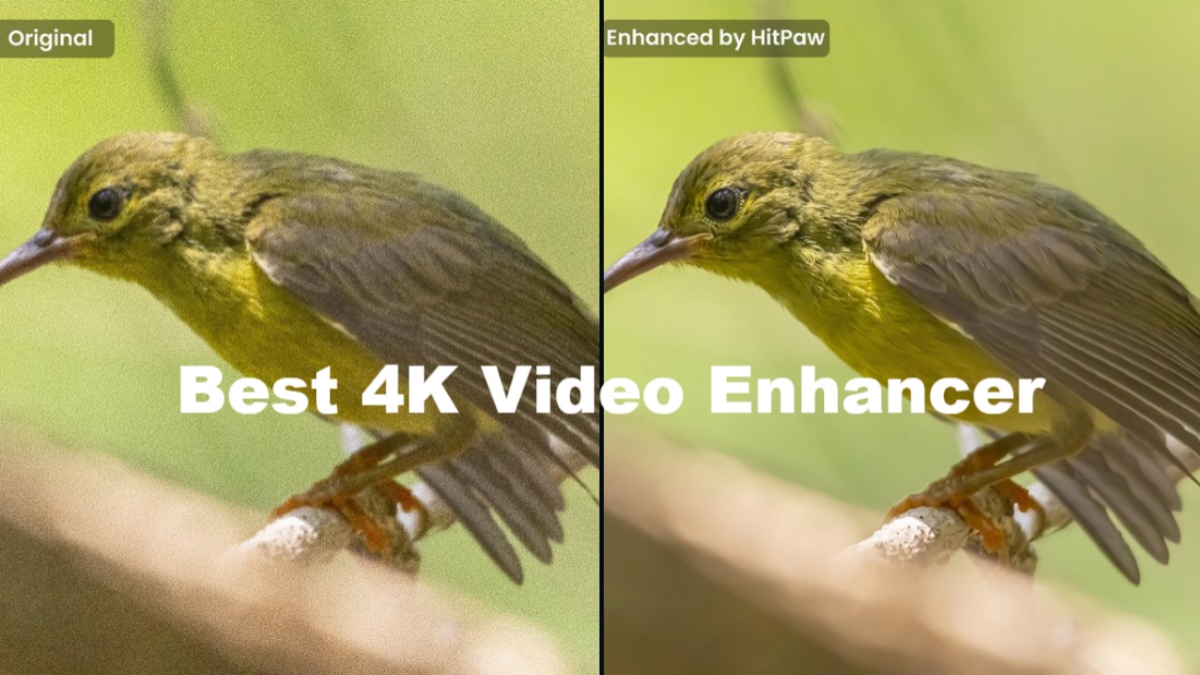
Video quality expectations have changed dramatically over the past few years. What once looked good in 720p looks soft and blurry on modern screens. As a result, older videos do not display very well and this creates the need for AI enhancer tools. There are currently many options to choose from, some of which we have tested previously. But this time I tried HitPaw’s VikPea video enhancer tool. After using it for a while, I think this might be the best AI video enhancer out there.
Which AI video enhancer is best?
To answer which AI video enhancer is best, you need to be able to understand the main characteristics of a good video enhancer tool. You need to increase resolution without over-sharpening images, intelligently reduce noise and artifacts, especially under low-light conditions, and upscale low-light video content to high resolution.
And guess what? HitPaw VikPea does it all. without the need for manual labor From users. HitPaw has made this possible by working with Comfy to integrate AI technology directly into creators’ workflows. This brings professional-grade image and video enhancement tools within creative platforms like VikPea. Click here for more information.
The collaboration also focuses on reducing manual labor and delivering higher quality results, as AI-driven tools are becoming an integral part of content creation these days. Just upload your video, select the improvements you’re looking for, and click. export. AI takes care of the rest. This ease of use and the quality of the results lead me to consider it one of the best AI video enhancer tools. Let’s see how to install it.
HitPaw VikPea: Installation, Setup, UI Overview
Let’s start with the installation process of HitPaw VikPea. It was very easy at first. Simply visit the HitPaw VikPea website and choose one of the following: window or macOS, and click the “Try it for free” button. From there, just unzip the file and follow the setup wizard. Once that is done, the software will launch immediately without any unnecessary steps.
As for the interface, it’s clean and minimal. You don’t need to be a video editing expert To understand the environment. Everything is fully labeled and accessible from the sidebar. Within 10 minutes of using the VikPea tool, I was able to quickly understand the entire tool.
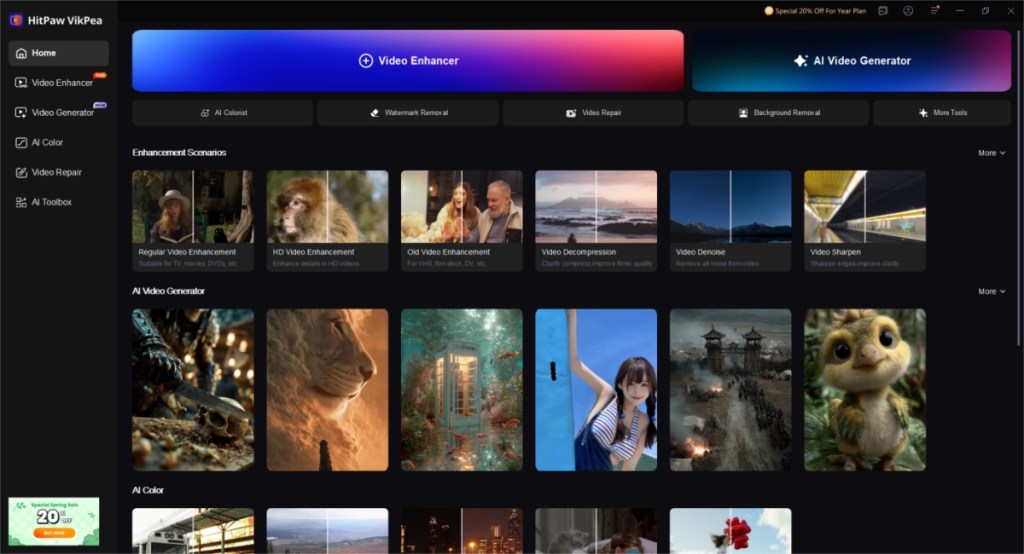
The workflow is equally simple. Select one of the provided AI tools > Import video and select AI model > Select output resolution > Click preview. A short 3-5 second clip will be displayed. To view the full results, export. This workflow follows almost all VikPea tools. Simplicity is Useful for beginnersBut I wish there was a pro mode for advanced players.
Main features of HitPaw VikPea Video Enhancer
Now that we’ve had a quick look at the installation and workflow, let’s talk about some of the great features of HitPaw VikPea Video Enhancer.
- AI upscaling Increase resolution up to 4K while maintaining clarity
- AI video generator Create soothing visuals with the best AI video generation model
- noise removal and Artifact reduction Cleans up grainy compressed footage
- AI frame rate interpolation Smooth out choppy videos and increase FPS
- Adjusting colors and tones Automatically improve video color and contrast
- Batch processing Save time by processing multiple videos at once
- Also has dedicated functions Anime and game recording Functional enhancements too
- system Support for popular platformsincluding Windows, Mac, Android, and iOS.
- Other notable features include video repair, watermark removal, background removal, frame interpolation, and stabilization.
HitPaw VikPea AI Model
What makes HitPaw VikPea’s video extension different is its library of AI models tailored to different types of footage. The reason we get such perfect results is because no model fits all situations. Let’s discuss some of its highlight models.
General model
First, I tried the General model, which is the most versatile of the three. It works wonders to enhance, restore, upscale and improve most videos. Whether it’s an old clip copied from a CD or a low-resolution video from a social media app.
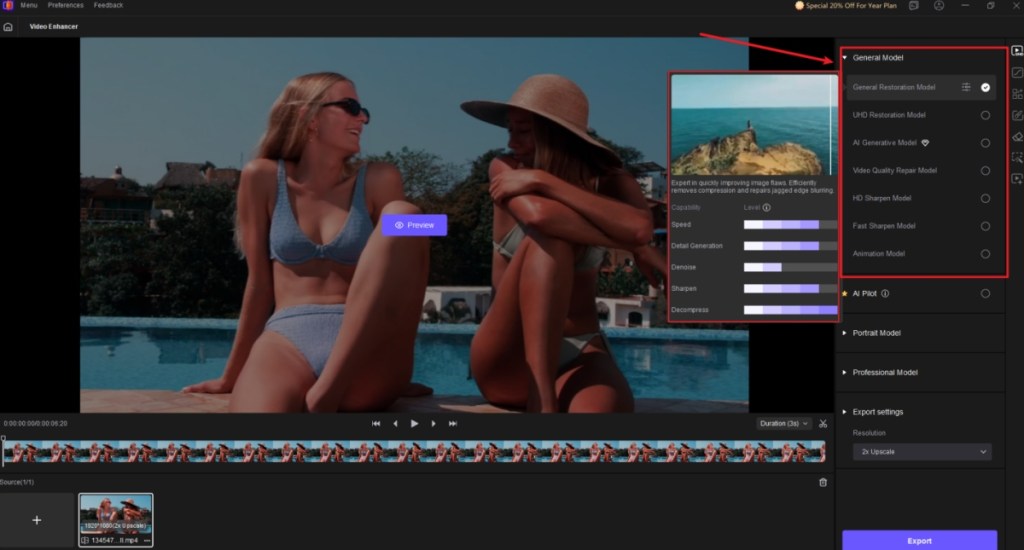
I tried it out on some videos I recorded during my editor’s wedding and the quality really improved. The footage I recorded on my iPhone 13 looked pretty dull, but VikPea’s AI video enhancer improved it considerably. of the difference is quite noticeableespecially when viewed side by side.
portrait model
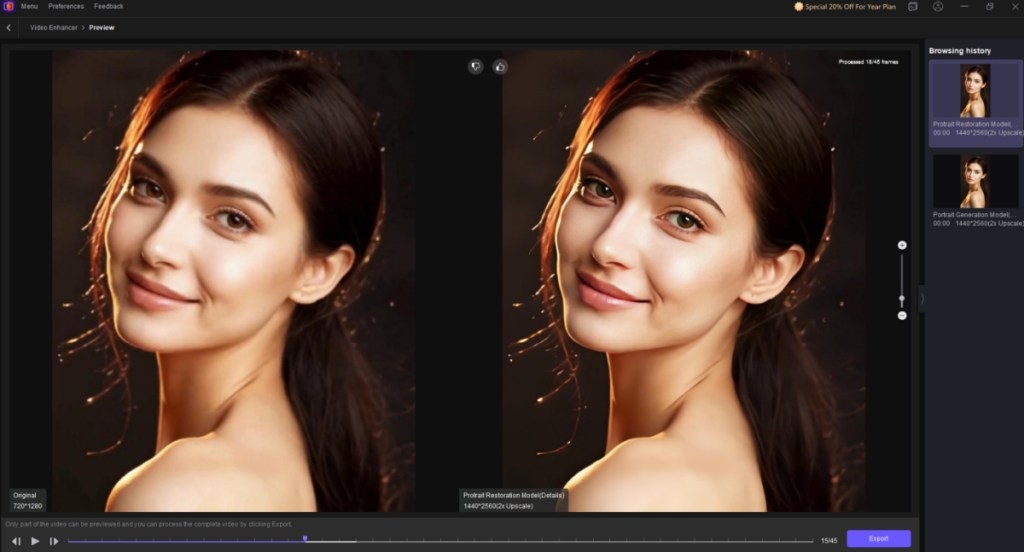
Then I tried portrait model, i.e. Suitable for vlogs, selfie videosor clips containing faces. This model focuses on facial details, skin texture, and edge refinement. So I uploaded another clip and the results lived up to my expectations. The footage looked much better than what I shot. It also avoids the waxy look that some AI enhancers have, which is a big advantage.
professional model
lastly, professional model. This is ideal for highly compressed videos. It was probably recorded by my grandparents. We found it to be the best model to restore such videos as it provides improved videos. Reconstruction of old or corrupted footage With the help of AI. At the same time, it enhances fine details and textures without over-sharpening the video.
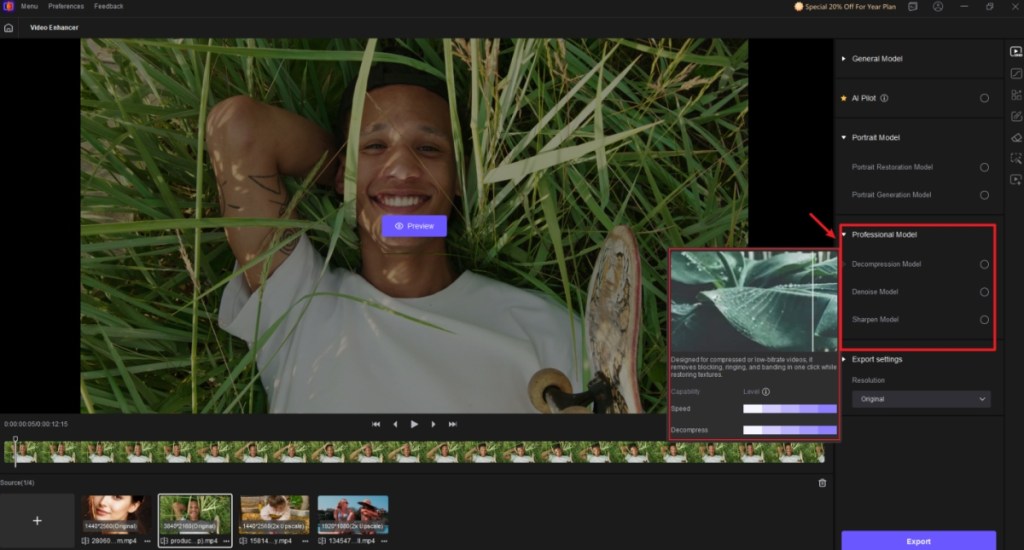
Well, I put it to the test with another video that I first shot with my smartphone almost 12 years ago. It’s no wonder that the results were astonishing. The quality of the video, which was originally 480p, has improved significantly. Now it looks cleaner and more detailed.
Results and practical applications
In real-world testing, HitPaw VikPea consistently performs better compared to heavier AI tools out there. This is all done using the Video Enhancer API and Cloud-accelerated rendering delivers up to 4x faster output Better than other AI video enhancers. And you get almost 90% of the results with much less effort.
| video enhancer tool | Features | output quality |
|---|---|---|
| HitPaw VikPea AI Video Enhancer | AI upscaling to 4K+, smart noise removal, artifact and background removal, detail enhancement, batch processing, purposeful AI models, cloud-accelerated rendering, easy-to-use workflows | Your videos now look much cleaner and more natural, with a more lifelike finish, better quality, almost no visible artifacts, more consistency, and exports are 4x faster. |
| Topaz Video AI | Supports 4K upscaling, artifact reduction, detail and edge fine-tuning, batch editing, and motion smoothing | Good upscaling with texture preservation, keeping authentic details, skin too smoothed and looks artificial and takes a long time to export |
| AVCLabs Video Enhancer | AI upscaling, noise reduction, color and contrast enhancement, batch processing, and popular format support | You get a fair amount of improvement, but the results often feel soft with a halo effect around the edges, and fine details don’t look as good. |
| Aiarty Video Enhancer | 4K upscaling, video denoising, facial detail enhancement, color correction, and user-friendly presets | Provides sharper footage, but results are inconsistent, edges are smoothed too much and details are lost, and the final output looks “processed” rather than natural |
Old, low-resolution clips look sharper, noisy night footage becomes clearer, and compressed video regains lost detail. This allows HitPaw VikPea to Ideal choice for novice users Anyone who wants to fix old videos with AI video enhancer. Content creators can also use this to improve their footage. What impressed me most was the natural finish, with no unrealistic sharpness.
HitPaw VikPea: Price
HitPaw VikPea offers a free trial so you can test its features before committing. Paid plans allow full export, high resolution, and batch processing. Considering the feature set and ease of use, going with a paid plan seems like the best option. Here is a breakdown of HitPaw VikPea’s different plans and their prices:
| HitPaw VikPea Plan | Pricing |
|---|---|
| 7-day free trial | free |
| monthly | $69.99 |
| yearly | $109.99 |
| perpetual license | $349.99 |
If you ask me, try this tool first and if you like it as much as I do, forever license.
Final Verdict: HitPaw VikPea is the best AI video enhancer
Overall, HitPaw VikPea is a comprehensive AI video enhancer that offers simplicity without sacrificing results. It may not replace advanced professional tools, but for most users looking to restore old videos, it provides exactly what they need: cleaner, clearer, and improved video. If you want a minimal video enhancer that works well out of the box and isn’t overwhelming, HitPaw VikPea is an easy recommendation.