

The advent of deepfake AI image-to-video technology has completely changed the way creators create video content. The days of shooting scenes, recruiting actors, and spending hours editing footage are now gone, and artificial intelligence can be used to create dynamic videos from a single photo. Tools like Deepfake Maker allow you to create motivational photos, motion and interesting video clips within minutes.
Fundamentally, deepfake AI image-to-video technology is based on the idea of advanced machine learning models that analyze facial expressions, objects, and composition within an image and generate realistic motion between frames.
What is deepfake AI image-to-video conversion?
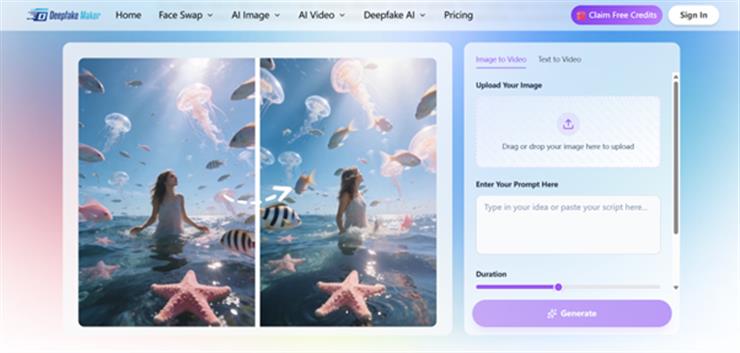
Deepfake AI Image to Video Deepfake-type AI technology is an artificial intelligence (AI) technology that transforms images into videos by creating lifelike movements and expressions. Rather than being based on frame-by-frame animation, such AI models look at the composition of an image and predict how elements will evolve over time.
Common features of deepfake AI image-to-video generators include:
- movement of facial expressions.
- Generation of realistic head movements.
- simulate body movements
- Added cinematic camera effects.
The real problem for creators: turning photos into engaging videos
Suppose you have a small YouTube or Tik Tok account. We have dozens of great photos, portraits, product photos, and character illustrations, but they don’t necessarily work as posters.
Instead of redesigning your content, you can:
- Turn one of your old portraits into a talking video.
- Convert your product images into short ads.
- Bring your character’s image to life as a meme video.
Deepfake Maker allows creators to post a single photo and turn it into a multi-second video with realistic movement and effects in seconds.
How deepfake AI image-to-video technology works
image analysis
First, the system analyzes the uploaded image to determine:
- face
- object
- lighting and textures
- Depth and spatial layout
This step allows the AI to understand the visual structure of the scene.
Prediction of movement
The AI then predicts how the elements in the image will move. for example:
- My eyes are flashing
- head movement
- camera zoom
- body movements
The machine learning model generates intermediate frames to simulate movement between locations.
Frame generation
Finally, the system generates a series of frames that make up a video clip. This is typically done using generative models that iteratively improve the output until it looks natural.
How to: Convert images to videos using a deepfake maker.
Step 1: Upload your image
Choose high quality images.
Deepfake Maker offers multiple AI effects, including:
- talking photo animation
- dance and movement effects
- social media style motion video
- creative meme animation
Step 3: Generate the video
Once you select an effect, AI automatically processes the image and generates the animation.
This usually takes less than a minute.
Step 4: Download and share
Once your video is ready, you can export it and upload it to:
- TikTok
- instagram reel
- YouTube short
- marketing campaign
Key features that make deepfake makers stand out
high speed processing
Most videos are generated within a minute, making it perfect for social media creators who need a quick response.
No editing skills required
The interface is designed for beginners. Just upload your image and choose an effect.
Multiple AI video effects
Beyond simple animations, this platform also includes creative video generators such as:
- AI dance generator
- AI kiss generator
- one shot video generator
These tools allow users to quickly experiment with different styles.
All-in-one AI media platform
Unlike many tools that focus only on videos, Deepfake Maker also offers the following features:
- AI image editing
- video enhancement
- face replacement tool
- Generation between images
Comparison of Deepfake Maker and other AI image conversion tools
Several AI platforms now offer deepfake AI image-to-video capabilities.
Common examples include:
- Hey Gene
- runway
- pika
- mid journey video tools
However, these tools are often focused on advanced workflows or require a subscription.
In contrast, Deepfake Maker prioritizes simplicity and speed. One-click workflows are perfect for:
- beginner
- social media creator
- meme creator
- digital marketer
Deepfake AI image-to-video creative use cases
social media content
Turn your photos into engaging short videos for platforms like TikTok and Instagram.
marketing campaign
Brands can create promotional videos by animating product photos without filming them.
educational content
Teachers can animate historical portraits and illustrations to make their lessons more engaging.
entertainment and memes
Creators often use deepfake AI images in video generators to create humorous or viral clips.
personal project
You can also animate your personal photos, avatars, and artwork to create unique digital memories.
Best practices for realistic results
If you want your deepfake AI images to look realistic in your video clips, follow these tips:
Use high resolution images
Low quality photos will produce weak motion results.
Choose a clear facial angle
Front-facing images usually animate more naturally.
keep the background simple
A busy background can confuse the AI model.
Try out different effects
Sometimes the most unexpected animation style produces the best results.
The future of AI Image-to-Video technology
The rapid growth in the development of deepfake AI image-to-video technology indicates that AI-generated videos will become a traditional creative element in the near future.
In the near future, there may be tools that can:
- Create complete movie scenes from your photos.
- Automatically generates long AI videos.
- Transform AI images into interactive virtual worlds.
conclusion
The advent of deepfake AI image-to-video technology is changing the way people create content on the internet. With a single image, creators can now create interesting videos that once required advanced editing skills and expensive production equipment.
This technology is now available to everyone through platforms such as deepfake makers. With the ability to quickly create AI video effects, user-friendly interface, and the variety of video effects provided by the app, you can transform static images into dynamic content within minutes.


