
It’s easy to praise AI video tools, but difficult to master them. Short clips may look impressive at first glance, but they can miss the point if the camera moves seem random, the subject changes too much, or the format doesn’t suit the location where the video is posted.
That’s why I wanted to see it, sulfur 2 From a real user’s perspective. I wasn’t looking for a tool to just create fancy demos. I wanted to see if it could help turn simple ideas into short visual drafts for social media, product concepts, storyboards, and early campaign testing.
Start with a clear video idea
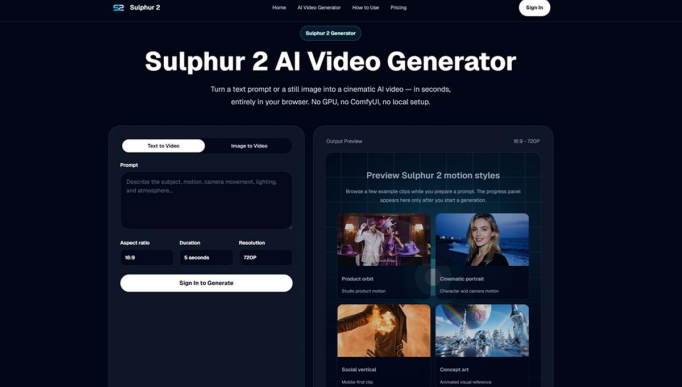
The first thing I noticed is that Sulfur 2 simplifies my workflow. You can start with a written prompt or upload an image, choose your basic settings, generate a short video in your browser, and then adjust the prompt to improve the next version.
This is important because many people who need video content are not professional editors. Marketers may need a simple advertising concept. Creators may need a visual hook from Reels or TikTok. Designers may want to animate static images for presentations. In these cases, the tool needs to be fast enough to test your ideas without complicated setup.
Sulphur 2 is built around online AI video creation, so you don’t need to install local models or configure GPU settings. The first test removes a lot of friction.
Text-to-video conversion works best when you put yourself in the director’s shoes
Text-to-video workflows are convenient, but prompts require instruction. A vague prompt like “Create a cinematic product video” is usually not enough. Better prompts describe subject matter, action, setting, camera movement, lighting, mood, and style.
For example, write something like sleek black wireless speakers on a reflective table, slow dolly-in camera movements, soft studio lighting, shallow depth of field, and a premium product commercial style.
Such instructions give Sulfur 2 a clearer visual target. It also makes it easier to judge the results. If the lighting, camera movement, or product framing isn’t quite right, the following prompts will tell you exactly what to adjust.
Here is Sulfur 2 AI Video Generator I find it more useful than random prompt experiments. This encourages compact shot descriptions that are closer to how a real creative brief works.
Image to video conversion is the most practical use case
For me, the image-to-video option is one of the most useful parts of Sulfur 2. If you already have product images, portraits, concept art, or brand visuals, you can upload them to illustrate how your scene will work.
This is helpful because visual consistency is one of the biggest challenges in AI video. Starting with an image gives the tool a powerful reference point. The product can be made closer to its original shape. Characters and designs can keep more of their identity. Turn still images into short video clips without requiring a full video shoot.
For e-commerce, this could mean turning your product shots into short showcases with slow rotations or smooth camera movements. For social media, that might mean bringing static posters, fashion images, food photos, and concept visuals to life. For creative teams, it helps bring moodboards and storyboards to life.
Why camera language matters
One thing I appreciate is the focus on camera and motion controls. Sulphur 2 supports a simple camera language including close-ups, wide shots, dolly-ins, tracking shots, orbit motion, slow motion, and smooth cinematic pacing.
It’s a small word, but it makes a difference. A product video with a slow dolly-in is different from a product video with orbital motion. Social hooks with close-ups feel different than wide establishing shots. When camera language is missing, your clips may look good, but the direction may feel unclear.
This is especially important for short videos. When you only have seconds, every movement must have a purpose.
Where sulfur is used 2
I primarily use Sulphur 2 for early creative work. Good for product showcase ideas, short social clips, advertising concepts, landing page visuals, testing cinematic scenes, and creative storyboarding.
Small businesses can use this to test product video concepts before planning to shoot. Social media managers can create several vertical clip ideas before choosing one direction. Filmmakers and designers can use it to visualize scenes, atmosphere, and camera movements before building large projects.
It is also suitable for types of work where speed is more important than perfection. In some cases, your goal may not be to create the final video in one step. The goal is to quickly visualize your ideas so you can discuss them with your team, improve them, and decide if they’re worth developing.
Recommended simple workflow
Start with one clear use case. Decide whether your clip is for a TikTok, YouTube Short, product page, ad concept, storyboard, or presentation.
Next, create a prompt as a shortshot instruction. Include subject matter, action, setting, camera movement, lighting, mood, and style.
If you have product images or visual references, use the image-to-video workflow. This gives you a better starting point for your clip and gives you more control over the outcome.
Then choose a format based on your final channel. Vertical frames are usually better for TikTok, Reels, and Shorts. Landscape orientation is suitable for websites, product showcases, and presentations.
Finally, review the results like an editor. Check for motion, framing, thematic consistency, and whether the clip actually supports your idea.
Things to keep in mind
AI video still requires human judgment. Generated clips are useful, but should be carefully considered before being used in marketing or public content.
Make sure it looks accurate, moves naturally, and matches the scene with your brand and message. If the initial results are close but not quite correct, your best bet is usually to refine the prompt with clearer camera, lighting, and action details.
Sulphur 2 also uses a credit-based workflow, with free credits available to new users. Therefore, it’s wise to start with a quick 5-second test before spending more credits on larger experiments.
final thoughts
reason sulfur 2 As useful as it feels, it’s not promised to replace video production. Its value is simpler and more practical. It helps users turn prompts and images into short, cinematic clips directly within the browser.
For creators, marketers, designers, and small teams, this is enough to speed up the early stages of content creation. It gives you a way to test visual ideas, animate still images, explore camera movement, and create short drafts without complex editing software.
If you want to try out AI video without setting up any technical tools, Sulfur 2 is a practical place to start. Start with clear prompts or reference images, keep your first tests simple, and use the results of each to enhance the next version.



