I typed a sentence and 6 seconds later my video was created. It felt free, and that was the whole design, no coincidence. The numbers that actually matter are not easily visible. This is your receipt. Before shutting down in March 2026, OpenAI’s Sora cost about $15 million a day to run, and one 10-second clip cost about $1.30 to compute, according to eWeek and Cybernews reports. Dividing one by the other means that at peak times, a single product will generate approximately 11.5 million 10-second clips per day.
Next, let’s calculate the energy. According to a study by MIT Technology Review, a 5-second AI video clip has an output of about 1,000 watt-hours, which is equivalent to running a microwave for an hour. Even using conservative unscaled estimates for 10-second clips, rather than the steep non-linear jumps actually found in the 2024 HotCarbon study, power generation alone exceeds 23 million kilowatt-hours per day. The average carbon intensity of the U.S. power grid produces approximately 9,200 tons of CO2 per day. A mature tree absorbs approximately 22 kilograms of CO2 per year. Dividing this amount is equivalent to approximately 420,000 tree years’ worth of carbon absorption, which is absorbed in 24 hours. A typical mature forest density is about 500 trees per hectare, which equates to about 800 hectares of forest, and one app day erases the annual carbon ledger, several times more than Hyde Park.
This number is hard to see, and that’s the problem.
You can understand the numbers without waving your hands
Vague claims about AI and the environment have desensitized people to the subject, so here’s what’s actually documented, not implied.
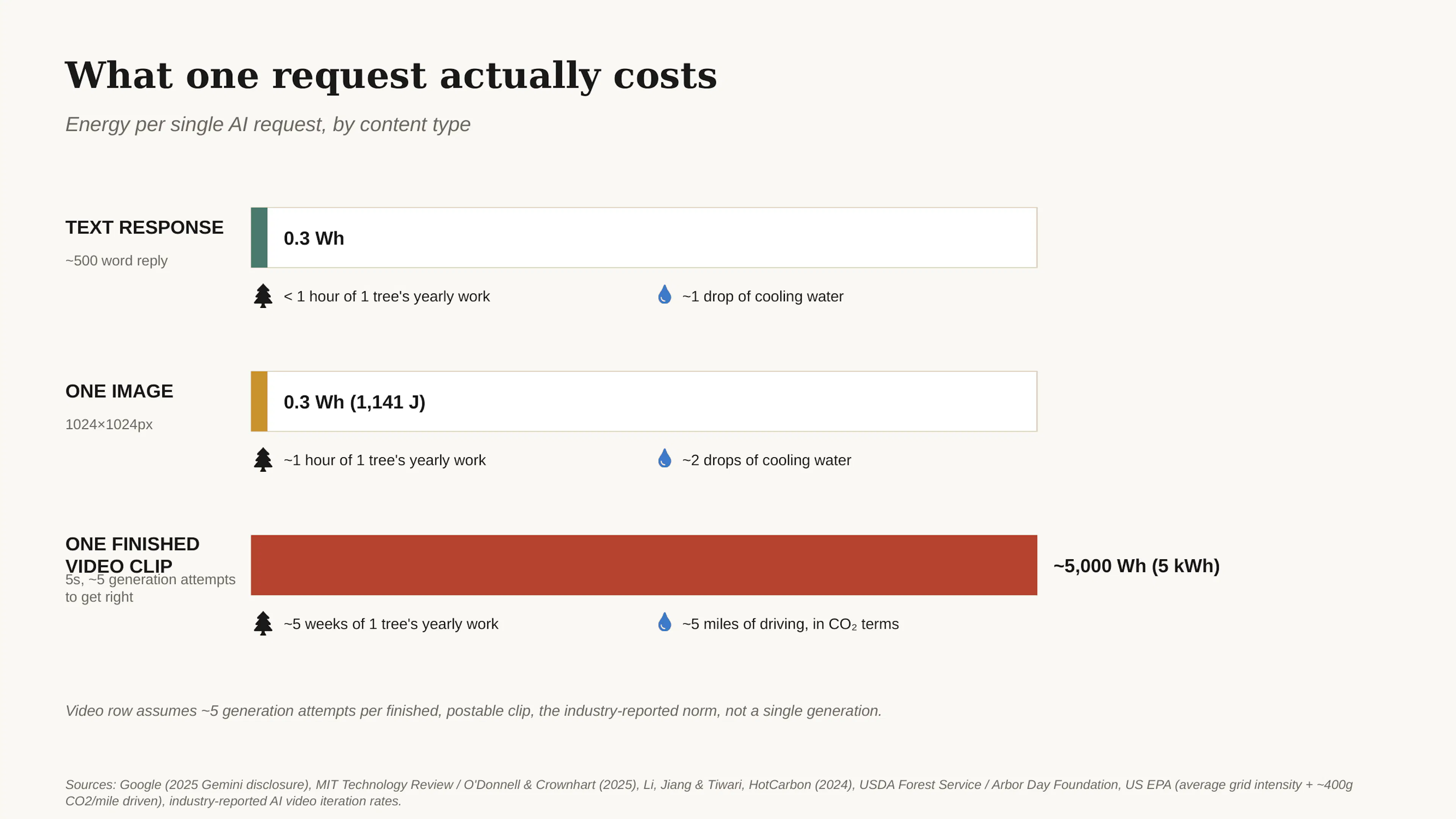
Sentence. In 2025, Google revealed that the median power consumption for Gemini text queries will be approximately 0.24 watt-hours, which the company says is approximately 33 times lower than its own estimates a year ago. This is real progress and worth saying loud and clear. Work is underway to streamline the text model. OpenAI cites similar numbers of around 0.34 watt-hours per query.
image. MIT Technology Review, in collaboration with researchers O’Donnell and Crownhart, found that Stable Diffusion 3 Medium consumes approximately 1,141 joules of GPU energy per 1024×1024 image. This is about the same energy as a microwave for 5 seconds, and about the same order of magnitude as a text query.
There are two reasons why videos cost more. A 2024 HotCarbon study by Li, Jiang, and Tiwari found that 6-second clips consume four times more energy than 3-second clips. This is a non-linear jump, which crucially distinguishes video from image generation rather than just an enlarged version. In addition, it requires repetition. Each available clip requires 3 to 10 attempts. Consistency is an exception because the text-to-video model reinterprets the same prompt differently each time. Numbers per generation and numbers per exit clip are two different statistics, and all marketing copy about “sustainable AI” only cites the smaller of the two.
Lists the actual cost of one request of each type.
 Cost of generative AI
Sources: Google’s 2025 disclosure, MIT Technology Review, Li/Jiang/Tiwari (HotCarbon 2024), USDA Forest Service tree uptake data, EPA average grid carbon intensity.
According to figures from the USDA and the Arbor Day Foundation, a mature tree absorbs about 22 kilograms of CO2 per year. One video clip completed after five trials emitting approximately 2 kilograms of CO2 is equivalent to nearly five weeks of one tree’s total annual production. That’s about the same time it takes someone to drive five miles in the time it takes to get a satisfactory clip, using the U.S. EPA’s own numbers of about 400 grams of CO2 emissions per mile. While video generation isn’t inherently catastrophic, the entire product experience is built to make regeneration smooth, and anything smooth gets defunded and spammed. Multiply that by 11.5 million clips per day and you get the forest at the beginning of this article.
Who is this really about?
It doesn’t really matter who pressed generate. They are not given the information to make a different choice, and blaming individual actions for something that the product itself was designed to produce is precisely the turnaround that the industry benefits from.
The problem is companies. Some companies are able to display cost estimates on screen before production, while others are not. Any version that allows new users to default to the lowest-cost, lowest-resolution option and instead default to the flashiest, most expensive option is because that version will be shared and encourage adoption. Something that allows you to rate limit or nudge after the 3rd playback attempt, and instead make the 11th attempt just as smooth as the 1st. None of this is an oversight. This is a product that works as intended for business models that seek power generation, not curtailment.
Compare this to literally any other field of engineering. A reputable cloud provider won’t ship a product where you don’t see your computing costs until the invoice arrives. This is considered a dark pattern and the team will be paged for runaway spending. AI-generated products simply determine that the same standards do not apply to environmental costs because no one is submitting the bill. Data centers already account for around 180 million tons of indirect carbon emissions worldwide, and the International Energy Agency predicts that data center electricity demand could reach 945 terawatt-hours by 2030, which could exceed the entire annual consumption of Japan today. AI is the fastest growing part of that number, but the products driving growth aren’t interested in showing why.
What should I actually do?
None of this means less use of AI. This means adapting the model to the job rather than defaulting to whatever is open. The biggest, most capable model is rarely an efficient choice, as most tasks don’t require it.
Use the provider’s cheapest tier for brainstorming, drafting, and everyday questions. This is the biggest lever that most people have never touched. Claude Haiku 4.5, GPT-5.4 mini or nano, and Gemini 3.1 Flash-Lite are all built specifically for this purpose. It’s responsive, uses a fraction of the energy and cost of flagship models, and is good enough for outlining emails, summarizing documents, rewriting paragraphs, and answering simple questions. If you’re using a full-price flagship model for such tasks, you’re paying premium-level compute for a job that can be easily handled at a budget level.
Lightweight models are sufficient for wireframes, mockups, and UI drafts. You don’t need front-line reasoning to lay out a login screen or sketch a dashboard. Haiku layer or mini layer models, like more expensive models, can generate functional HTML or Figma-style layouts from their descriptions. This is because layout and boilerplate structure are not where hard reasoning exists. Save larger models for one screen with really tricky interaction logic instead of 12 models with just forms and cards.
If you need actual coding work, debugging, or actual logic to get right, step up to a middle-tier model. This is where Claude Sonnet 5, GPT-5.4, or Gemini 3.1 Pro wins for tasks that involve higher costs, actual inference, multi-step logic, or code that actually needs to work. Again, the efficient method is routing. Let the cheaper model handle 80% of the easy requests (formatting, simple searches, boilerplate) and only escalate to the expensive model for the really difficult 20%. Several routing tools exist to automate this split.
Reserve the largest and most expensive models for what you actually need. Complex multi-step reasoning, high-stakes writing, or problems you’ve already seen cheap models get wrong. This is what a full tier of Claude Opus, GPT-5.5, or Gemini 3.1 Pro is for. Using these as defaults for everyday tasks is like hiring a professional consultant to answer questions that the intern down the hall already knows.
For images, choose the resolution and model layer according to your actual use case. Concept sketches that guide a client’s direction don’t need the same resolution as the final product. Most image tools allow you to choose between draft mode or express mode. Use it for things that may or may not be final.
For videos, don’t set full generation by default at all. Start by storyboarding your shot list using an inexpensive text model to get the framing and pacing exact in words. Then, produce just one or two shots that you simply can’t get any other way, at the lowest resolution you know if the shots work. Full resolution generation is for the version you actually use, not the version you’re using to decide whether you like it or not.
Decide what you need before generation, not after. Most waste comes from first generating and then understanding intent. Specific prompts outweigh five vague prompts and the worst of them all: a coin toss.
Edit rather than regenerate. Please fix if something is close. Completely regenerating one-word tweaks is one of the most common and best-avoided habits, but it will also slow you down.
If you’re building something that sends the same context repeatedly, turn on caching. All major providers now offer prompt caching, which offers discounts of up to 90% on repeating portions of prompts. If system prompts or reference documents do not change between calls, caching alone can significantly reduce your bill for those parts, typically requiring only a single line change.
Writing something like a token costs money, so it’s expensive. Precise prompts are used less on both ends of the exchange than long prompts that force the model to make guesses. Precision is a form of restraint, and restraint is currently the only thing required of any product interface.
This isn’t about guilt. It’s about refusing to make decisions for you through the lack of a spinner or meter. Because technology can truly free up time and energy for greater good. This promise is worth keeping. So it’s worth not spending money on a fourth take of a video that you’ll probably forget tomorrow.
Source: Google’s 2025 Gemini Environmental Disclosure. MIT Technology Review, “We did the math on AI’s energy footprint” (2025). O’Donnell & Crownhart, MIT Technology Review (2025). Li, Jiang, Tiwari, “Carbon in Motion”, HotCarbon (2024); International Energy Agency, Electricity 2025 Report. Tree carbon sequestration data from USDA Forest Service and Arbor Day Foundation. Average tree density in mature forests (~500 trees/ha). US EPA eGRID average grid carbon intensity. U.S. EPA, “Greenhouse Gas Emissions from a Typical Passenger Vehicle” (2023, approximately 400g CO2/mile). Industry-reported AI video repetition rates (3-10 generation attempts per available clip). Sora daily compute cost and cost per clip as reported by eWeek and Cybernews (2026). Model pricing and tier positioning from OpenAI, Anthropic, and Google’s own public API pricing pages as of July 2026.
A methodology note on the headline number: For the “daily” estimate, we estimate the volume of clips per day using Sora’s independently disclosed daily compute cost (approximately $15 million) divided by the reported compute cost per clip (approximately $1.30/10 second clip), then apply the MIT Technology Review’s energy per 5 second number and conservatively and linearly calculate the 10 seconds, which is much lower than the steeper nonlinear scaling actually found in HotCarbon’s research. This reflects Sora’s reported peak usage, not the AI video industry as a whole, and is presented as an order-of-magnitude estimate rather than an audited number.