If you ask teachers if they use YouTube for their lessons, you will find that most of them do. Now, you can use AI to make YouTube videos much more learner-friendly. When I gave a presentation on the subject, many people were interested in the idea, so I decided to spread the word. AI tools are changing rapidly, so how you access them and accurately integrate them into your lessons can provide great benefits. These tools are also useful for administrators.
example:
- YouTube videos can be useful in science lessons, such as showing the process of cell division. By adding an outline tool like the one described below, you can highlight important highlights of the video to your students or point them back to a specific point. This can be useful for test preparation, helping students with learning challenges, or both.
- School leaders who are instructing staff on how to manage difficult conversations with parents can use bullet points of key points from the video with organized links, highlighting the most important parts and making these sections more efficient to find and refer to.
With school leaders presenting early and often ahead of the school year, now is the perfect time to start embarking on these strategies. The potential for strategic use of YouTube content for educational purposes is too valuable to overlook.
Turn YouTube videos into great lesson activities
First, find the video you want with a good old-fashioned Google search. Maybe you already have a video you love? Install this free app now. AI Summarizer Chrome Extension It uses the standard Google single sign-on process. (If you don't have a Google account, get one; most people who use YouTube probably already have one.) Follow the standard prompts to allow access. Once the extension is installed, when you visit a YouTube video, you'll see the following message in the toolbar to the right of the video:
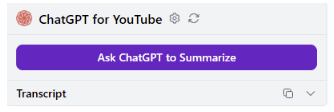
When the popup appears, click on “Ask ChatGPT to summarize.” Within a few seconds, you'll have a content summary with the key parts highlighted. Note, however, that you can only do this for free 7 times per week.
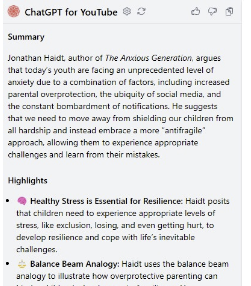
Here's how it actually works: I teach a lot about helping kids work through trauma, and as I was preparing a presentation for principals, I came across this video on YouTube. Anxious GenerationThe author has written a comprehensive book on this topic, but this 16-minute video helped me summarize it for my talk. Click the purple Ask Chat GPT button to This is a great read (Please refer to the following)provided the following:
- Overall Overview
- highlight
- Nifty little icons that match each highlighted subtopic
Another tool to go further
next, Harpa AIToolsHarpa also requires Google Single Sign-On. Like the first tool, this one can be found in the top right corner of any YouTube page. The icon you need to click looks like this:

Just click within the video you want to summarize. The results are amazing – you'll get a nice clickable link. Organize it like this It will appear in the toolbar on the right. (Click the link to enlarge.)
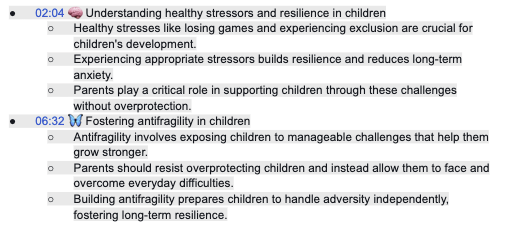
I really love that the Harpa AI gives you a clickable link with a timestamp to take you directly to that location. This is a great way to scan and click there when using this tool to jump to a teaching moment.
YouTube video tool with transcript
You can also try Graspinstall it using Google Single Sign-In and look for it in the toolbar on the right. It will look like this:

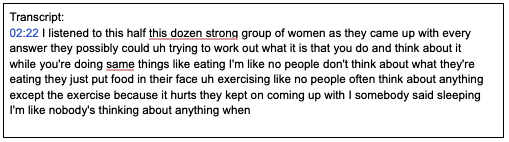
I used the same video clips I described earlier, only capturing a small portion of them because it's more comprehensive and literal rather than a summary or highlights, and I used a computer-generated transcription, which means there are some odd errors.
Like Harpa, this tool indexes by timestamp clips, making it easy to find that frame by clicking on it. Unlike the above two, it gives you details rather than summaries or highlights.
Which is my favorite tool?
It's a kid-or-girl decision, but in the end, I have no choice but to choose Glasp, which combines the best of the other two: summarized highlights and indexed, clickable links. I still use the other two, but Glasp is my go-to for now.
Be sure to check them all out this summer and get a great index that you can integrate into your lesson slides and templates. Enjoy and share!
Integrating AI tools like ChatGPT, Harpa AI, and Glasp with YouTube videos gives educators a powerful tool to enhance their teaching methods. Leveraging them, they create more engaging and efficient learning experiences, helping students and staff understand complex concepts more easily. From summarizing content to highlighting key points to providing detailed transcripts, AI tools can transform the way video content is used in the classroom. Leverage these advancements to make lessons more interactive and accessible, benefiting both educators and students.
Opinions expressed by SmartBrief contributors are their own.
_________________________
Subscribe to SmartBrief's free email newsletter See the latest hot topics About Educational TechnologySmart Brief 250+ industry-specific newsletters.