

Today, we are excited to announce the next big advancement in our journey to faster scaling optimization: Amazon SageMaker AI Inference Container Image Cache. This results in up to 2x faster end-to-end latency for generated AI models during scale-out events.
Over the years, Amazon SageMaker AI has continued to reduce latency across scaling stages: detecting the need to scale out, provisioning instances, downloading container images, retrieving model weights, and starting containers. Amazon SageMaker AI previously introduced sub-minute Amazon CloudWatch metrics and launched an inference component data caching solution that stores container images and model artifacts on already running instances to help detect scale-out needs up to six times faster than traditional mechanisms. This approach reduced cold start latency for scaling inference component operations that reuse existing instances. Together, these features improve autoscaling responsiveness for scenarios where inference components can be placed on already provisioned instances and use existing caches.
Amazon SageMaker AI uses container caching to extend these scaling improvements to scenarios where you need to launch new instances. Container caching eliminates delays in downloading container images when you need to launch a new instance. This is a scenario that previous instance store-based caching could not solve. This post shows how container caching addresses container image download bottlenecks and demonstrates the performance improvements you can expect.
Scaling challenges: When should you launch new instances?
The following diagram shows the steps during instance scaling when a new instance is launched.
- Provisioning an instance: A new Amazon Elastic Compute Cloud (Amazon EC2) instance is launched.
- Pulling a container image: Container images are pulled from Amazon Elastic Container Registry (Amazon ECR).
- Download model artifacts: Model weights are obtained from Amazon Simple Storage Service (Amazon S3).
- Starting the container and checking its health: The inference server initializes, loads the model into memory, and passes readiness checks.
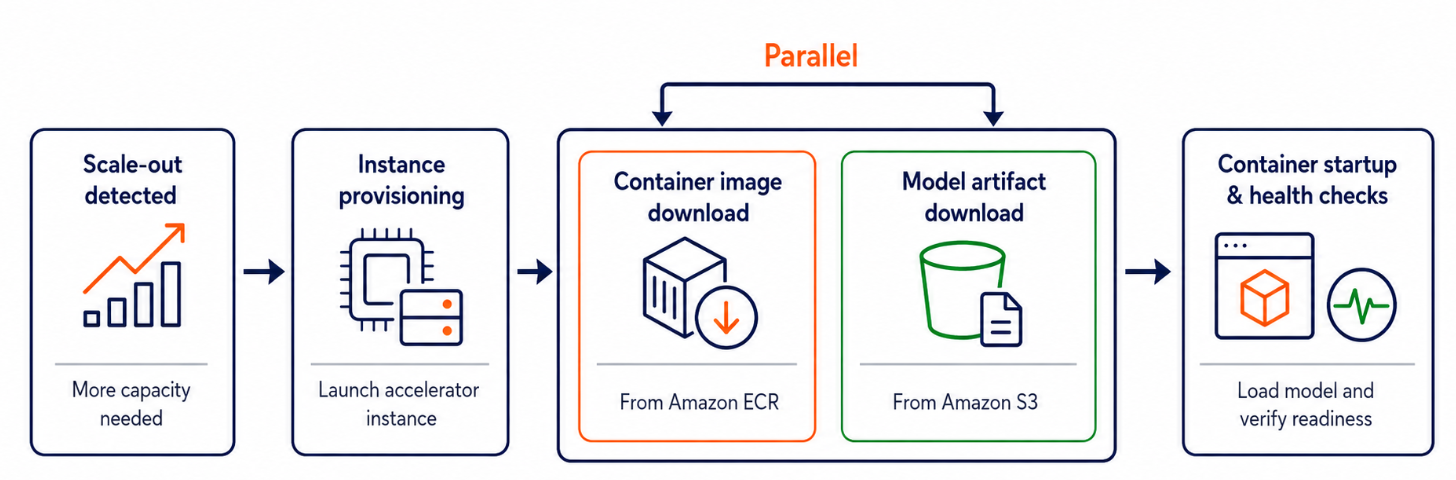
Note: Container image download and model artifact download occur in parallel.
Container image downloads are often the main source of endpoint scale-out latency, especially for generated AI workloads. These workloads use large containers such as SageMaker Large Model Inference (LMI, powered by vLLM), vLLM, and NVIDIA Triton. Caching containers removes the container image pull step during a new instance scale-out event for common endpoint patterns.
- Single model endpoint – Scaling is achieved by launching additional instances, each hosting its own copy of the model.
- Inference component-based endpoints – Scaling adds new instances only when existing instances do not have enough capacity to host additional inference components.
How container caching eliminates image pull bottlenecks
The following diagram shows how the scaling timeline changes for a Qwen3-8B (16 GB) model on a ml.g6.2xlarge instance with LMI containers (17.7 GB compressed).
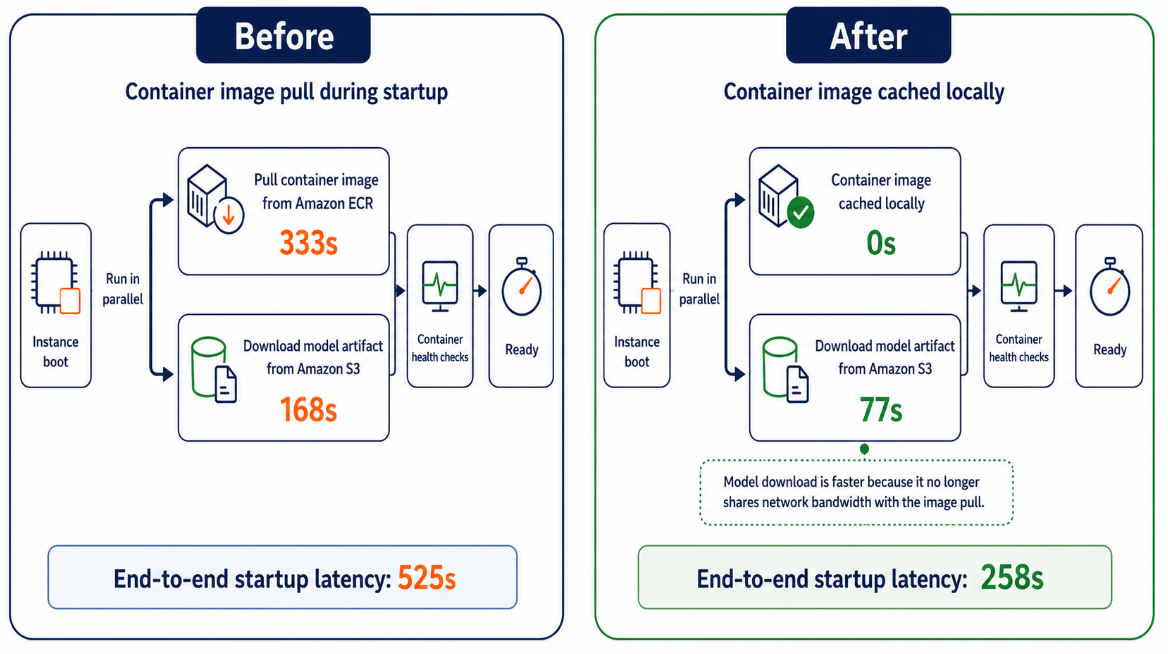
Before container cache:
- pull the container image From Amazon ECR: 333 seconds
- Download model artifacts From Amazon S3: 168 seconds
The image pull and model download were performed in parallel, so the end-to-end startup delay was 525 seconds.
After container caching:
- container image Already locally cached: 0 seconds
- Download model artifacts:77 seconds. When container images are pre-cached, model downloads no longer compete with image pulls for network bandwidth, reducing latency from 168 seconds to 77 seconds.
End-to-end startup delay is reduced to 258 seconds.
result: Container caching removed image pulls from the scale-out path, eliminated network bandwidth contention, and reduced end-to-end startup latency from 525 seconds to 258 seconds, an improvement of approximately 51%. If a cached image is unavailable, SageMaker AI automatically reverts to pulling from Amazon ECR, so scaling is never blocked.
How container caches work with inference components
Container caching works in conjunction with the inference component. When you deploy multiple inference components, the cache stores each unique container image referenced by the inference components.
Security and tenant isolation
Container image caching maintains the same strict tenant isolation guarantees that SageMaker AI currently provides. Each cache is dedicated to a single customer endpoint and is not shared across AWS accounts or endpoints. When a customer deletes a SageMaker AI endpoint, the associated image cache is automatically cleared.
performance results
The following table shows the results observed from early access customers who tested Container Cache.
| customer | example | image size | model size | P50 ago (seconds) | After P50 (seconds) | P50 improvement | |
| 1 | customer 1 | ml.g4dn.xlarge | 15.7GB | 0GB | 381 | 134 | -65% |
| 2 | customer 2 | ml.g5.2xlarge | 17.5GB | 5.8GB | 346 | 164 | -52% |
| 3 | customer 3 | ml.g5.xlarge | 10.6GB | 6.5GB | 346 | 216 | -38% |
The improvement depends on the endpoint instance type, container image size, and model size.
Combine all three autoscaling optimizations
For the fastest scaling response, you can combine all three features introduced throughout the autoscaling optimization series. Each removes a different source of delay from the scale-out path.
| optimization | What could be improved? | How to enable | |
| 1 | Improving metrics in less than 1 minute | Trigger your scale-up needs 6x faster | set ConcurrentRequestsPerModel or ConcurrentRequestsPerCopy Target tracking policy |
| 2 | Data caching for inference component-based endpoints | Reduces image pull time when adding a copy of a model to an existing instance | No opt-in required. Container caching is automatically activated for inference component-based endpoints for supported accelerator instance types. |
| 3 | container image cache | Reduce image pull time when launching new instances. | No opt-in required. Container caching is automatically activated for endpoints that use supported accelerator instance types. |
Together, these optimizations eliminate the main sources of scale-out delay. Detect demand 6x faster with sub-minute metrics and trigger scaling decisions in seconds instead of minutes. The two cache tiers complement each other along different scaling axes. Data caching eliminates image and model download delays when a new inference component copy is placed on an existing instance. When scaling requires launching new instances, container image caching ensures zero image pull time at launch.
Supported configurations
Container caching is supported on the SageMaker inference endpoint accelerator instance type. Works with any container image hosted on Amazon ECR, including custom images. No need to change the container.
Container caching is available in all commercial AWS Regions where SageMaker AI inference is supported. For the latest list of supported instance types and regions, see the Amazon SageMaker AI documentation.
conclusion
With the new container cache, Amazon SageMaker AI provides an autoscaling optimization suite built specifically for generative AI inference.
- Sub-minute metrics allow autoscaling to detect changes in load up to 6x faster than standard 1-minute CloudWatch metrics.
- Faster scaling of existing instances: Instance store container caching eliminates delays in image pulls and model downloads when reusing running instances.
- Faster scaling on new instances (this release): Container caching removes image pulls when launching new instances, reducing end-to-end scaling latency by up to 50%.
Together, these features transform your SageMaker AI scaling experience from minutes of cold start latency to fast, predictable response. Generative AI applications can now confidently handle traffic spikes, maintaining low latency and high availability for end users.
First, deploy your generated AI workload to the SageMaker AI inference endpoint on a supported accelerator instance type. The container’s cache is automatically activated. For more information about supported instance types and regions, see the Amazon SageMaker AI documentation. You can also try the AWS Management Console to create or update endpoints.
Looking ahead, we will continue to invest in further reducing scaling latency. stay tuned.
About the author


