The ability to quickly and efficiently create compelling visuals is standard for any image generator these days, but CGDream AI Image Generator stands out as the one site that brings all of its AI-powered image capabilities together.
CGDream AI Image Generator lets you create compelling images with a wide range of customization options, filters and 3D controls, giving you full control over your visuals. Whether you're working with text, images or 3D models, this powerful tool is designed to make it easy to generate high-quality visuals.
What is CGDream AI?
CGDream AI Image Generator is an advanced tool designed to create high-quality images from a variety of sources, including text descriptions, existing images, and 3D models. By leveraging powerful artificial intelligence algorithms, users can generate, enhance, and transform visuals with minimal effort. This tool is perfect for anyone looking to create professional-grade images without advanced technical knowledge or hours of manual work.
CGDream AI Image Generator is packed with features
CGDream AI Image Generator stands out with its wide range of features designed to serve diverse creative needs.
- Generate images from any source: Users can create images from text, existing images, or 3D models. This versatility makes it suitable for a variety of applications, from social media content to marketing materials.
- 3D Viewer Controls: The integrated 3D viewer allows detailed manipulation of your visuals, allowing precise adjustments to achieve the perfect image from any angle.
- Image to 3D Conversion: Convert 2D images into 3D models, opening up new possibilities for your creative projects.
- Filters, Styles and Effects: Choose from a wide range of filters, styles and effects to enhance your images and add a unique touch and artistic flair.
- Upscaling: Enhance the quality and intricate details of generated or uploaded images with advanced upscaling capabilities.
- repair: Correct specific parts of an image or fix imperfections to create a polished final product.
How to use CGDream AI image generator
Creating your first image with CGDream AI is easy and intuitive. Here's a step-by-step guide to get you started:
- Enter the promptFirst, enter a description of what you want to create. This description acts as a prompt. You can make it as detailed or simple as you want, depending on how specific you want to make it.
- Select Filter: Choose from up to five filters to add effects and enhance your images. These filters allow you to customize the look and feel of your visuals and add your own artistic touch.
- Adjusting the filter strength: Each filter comes with an adjustable slider that allows you to control the strength and intensity of the effect. This feature gives you precise control over the final look of your image.
- Upscale an image: Once you have created an image, you can increase the resolution and detail by clicking the “X2” button. This upscaling feature improves the quality of your image, making it clearer and more refined.
How effective is this tool? Let's see how it performed when we tried it out with the prompts from our Character's Journey Prompts Guide.
prompt:
“Ella stands with a confident posture, her hazel eyes magnified by reading glasses reflecting a flame of eternal curiosity. Her outfit is a blend of scholarship and adventure, complemented by the ancient compass she always carries with her. Her every movement exudes a sense of purpose, as if she is about to discover a secret that will change the world.”
output:
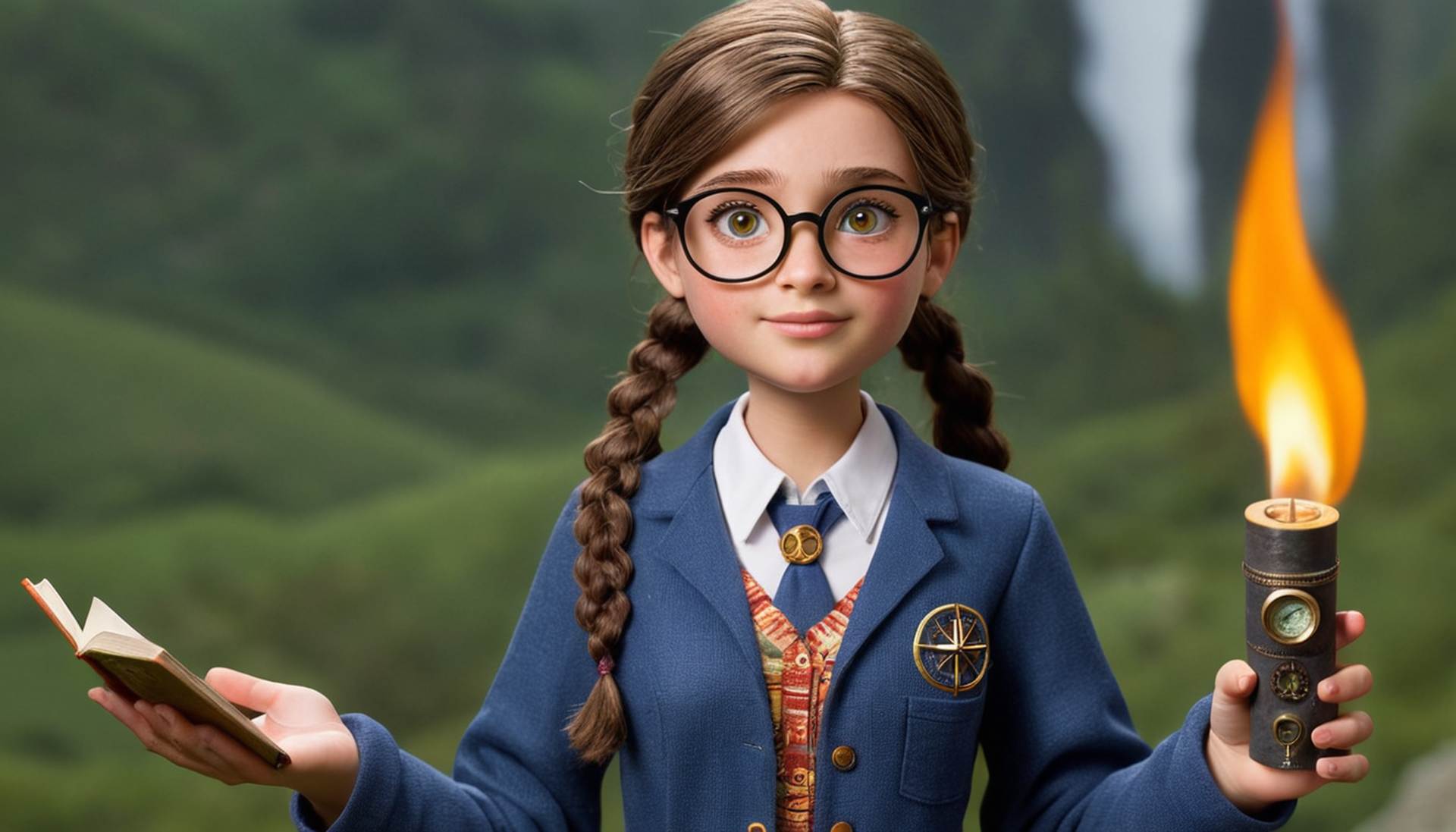
prompt:
“Drenched in rich coffee brown and alluring gold hues, the logo makes you feel like you're traveling the world every time you see it. At the heart of the design is a steaming cup of coffee, which effortlessly transforms into a world map.”
output:

If you I want to compare the output of tools If you use Midjourney, be sure to check out our Midjourney character prompt guide to see how Midjourney worked with the same prompts.
What is the price of CGDream AI image generator?
CGDream AI image generator offers two pricing plans: Free Starter Plan And that Paid Premium Plan.
Here's a breakdown of the plans available:
Starter plan: Free
The Starter Plan is perfect for those who are just getting started with CGDream AI. Users can start generating AI images for free. The main features of the Starter Plan include:
- Monthly generated images: Up to 1,200 sheets.
- Concurrent Jobs: Maximum of 2 simultaneous jobs.
- Browse and Search: Access is restricted.
- Image variations for each job: Two variations.
- Priority Image Generation: not available.
- Private mode: Not included.
- Commercial Use:Not allowed.

Premium Plan: $10.00/month
The Premium plan is ideal for users who require more resources and advanced features. It costs $10 per month, VAT may apply. Key features of the Premium plan include:
- Monthly generated images: Up to 24,000 images.
- Concurrent Jobs: Maximum of 3 simultaneous jobs.
- Browse and Search: Unlimited access.
- Image variations for each job: 4 variations.
- Priority Image Generation: Available and reduces processing time.
- Private mode: Gives you the option to make your project private.
- Commercial Use: Permission is granted and the generated images can be used for commercial purposes.
You can always switch to a premium plan to take advantage of these enhanced features and higher limits.
Don't miss the CGDream AI Art Contest
CGDream AI not only helps users create, but also gives them an opportunity to show off their creativity through art challenges. The current competition focuses on 3D-to-image creations, with attractive prizes and recognition.
🏆 Join the CGDream 3D-to-Image Challenge! 🏆
Compete for a total prize pool of $1,000 and a premium subscription! 🚀
Challenge Details:
▪ Prizes: Up to $300 in cash prizes and premium subscriptions!
▪ Category: Most Liked & Most Shared 3D-To-Image Visuals
▪ Deadline: August… pic.twitter.com/ZEFaefFvpY— CGDream.ai (@CGDream_ai) July 10, 2024
way to participate:
- Generate a new image or select an existing one.
- To submit your image, click on the challenge icon.
- Share your artwork in the challenge gallery and promote your image on social media to increase your chances.
prize:
- Most Liked:
- First place: $300
- The second: $150
- 3rd place: $50
- 4th: 3 months premium subscription
- No.5: 1 month premium subscription
- Most Shared:
- First place: $300
- The second: $150
- 3rd place: $50
- 4th: 3 month premium subscription
- No.5: 1 month premium subscription
Participants must use 3D-image conversion capabilities and anyone can participate in the contest. July 10, 2024 to August 10, 2024The winners are August 16, 2024.
Featured Image Credit: CGDream/YouTube