I repeated the same three-second cape move 11 times and realized how much it really cost me.
It was a rooftop chase scene in my AI animation series “Lost Garden.” On paper, the shot was simple. The figure spun, the cloak fluttered in the wind, and the camera was set. On screen, it kept coming back in the wrong direction, fabric slipping past its shoulders, floating half a beat too long, and snapping in directions the wind didn’t support for the rest of the scene. I continued playing. I never wrote down which model, which prompt version, or the cost of each trial. By the end of the 12th take, he had spent more credits on three seconds of the cape than on the rest of the scene combined. I found out a few weeks later by counting backwards from my monthly bill.
The price of a 10-second AI video clip could range from about $0.75 to $4 by 2026, depending only on which model produced it, and few people keep track of which model produced which shot for how much. This gap is the subject of this article. It’s not about which model is “best”, it’s about building one-line habits that tell you after the fact exactly what you spent on and why. That way, your next decision will be a calculation rather than a guess.
How much will it really cost to produce one AI video clip in 2026?
Prices for leading AI video models are published on a per-second basis and range widely to a significant extent. According to BuildMVPFast’s July 2026 API price comparison, Kling 3.0 costs about $0.075 per second (about $0.75 for a 10-second clip), Sora 2 base tier costs about $0.10 per second (about $1), and Runway Gen-4.5 costs about $0.12 per second (about $1.20). $), Google’s Veo 3.1 Standard runs approximately per second. That’s $0.40 per second, or about $4 for the same 10 seconds. This is actually a spread of more than 5 times the verifiable, editable and functionally exchangeable output.
None of that affects Veo. 4K output and native audio are worth the premium for hero shots. The point is even narrower: For the same 10 seconds, the price can vary greatly depending on the selection you make within about 2 seconds of selecting the drop-down menu.And most people producing AI videos have no record of which dropdowns were selected in which shots.
Why do AI filmmakers lose track of where their budget is going?
That’s because the cost of AI video doesn’t fall like a normal budget line. It’s quietly compounded into three separate locations, and most filmmakers plan only one of them.
- Planning burns. Instant drafts, character outlines, and storyboard iterations. It looks free because it’s mostly text, but by the time a single frame has been rendered, it adds up to an episode of 40 shots, including several revisions of the character outline.
- Generation burn. This is the obvious one and the only one that takes up most budgets. A mid-2026 industry report states that professional AI video productions typically run 3-5 generation passes per hero shot to reach usable quality, and that running an ambiguous prompt four times on a premium model can consume 120-320 credits to get one usable result.
- Continuous combustion. something expensive. If a character or prop runs in the middle of a sequence and you catch it eight shots later, you haven’t fixed a single shot. Re-audit and often regenerate everything downstream from the breakage.
Journalist Joey Mathers, writing for AutoGPT in July 2026, articulated this trap. “Every failed generation is a microtransaction that cannot be recovered.” This line is worth pinning on your desk. A generation not tracked is a cost of not learning from it. Because you no longer know what you paid to find out it didn’t work.
What should I record for each generation trial?
This fix is not a better prompt. This is a habit. Write down one line for each attempt, but not before deciding whether a take is good or not.
The working generation ledger requires at least the following:
- Timestamp and shot ID
- Model and version (Kling 3.0, Veo 3.1 Standard, what I ran)
- The prompt or prompt version, and the seed if the model exposes a seed.
- the cost of that particular attempt
- Verdict: Keep, Reject, Partial, and explain why in one line.
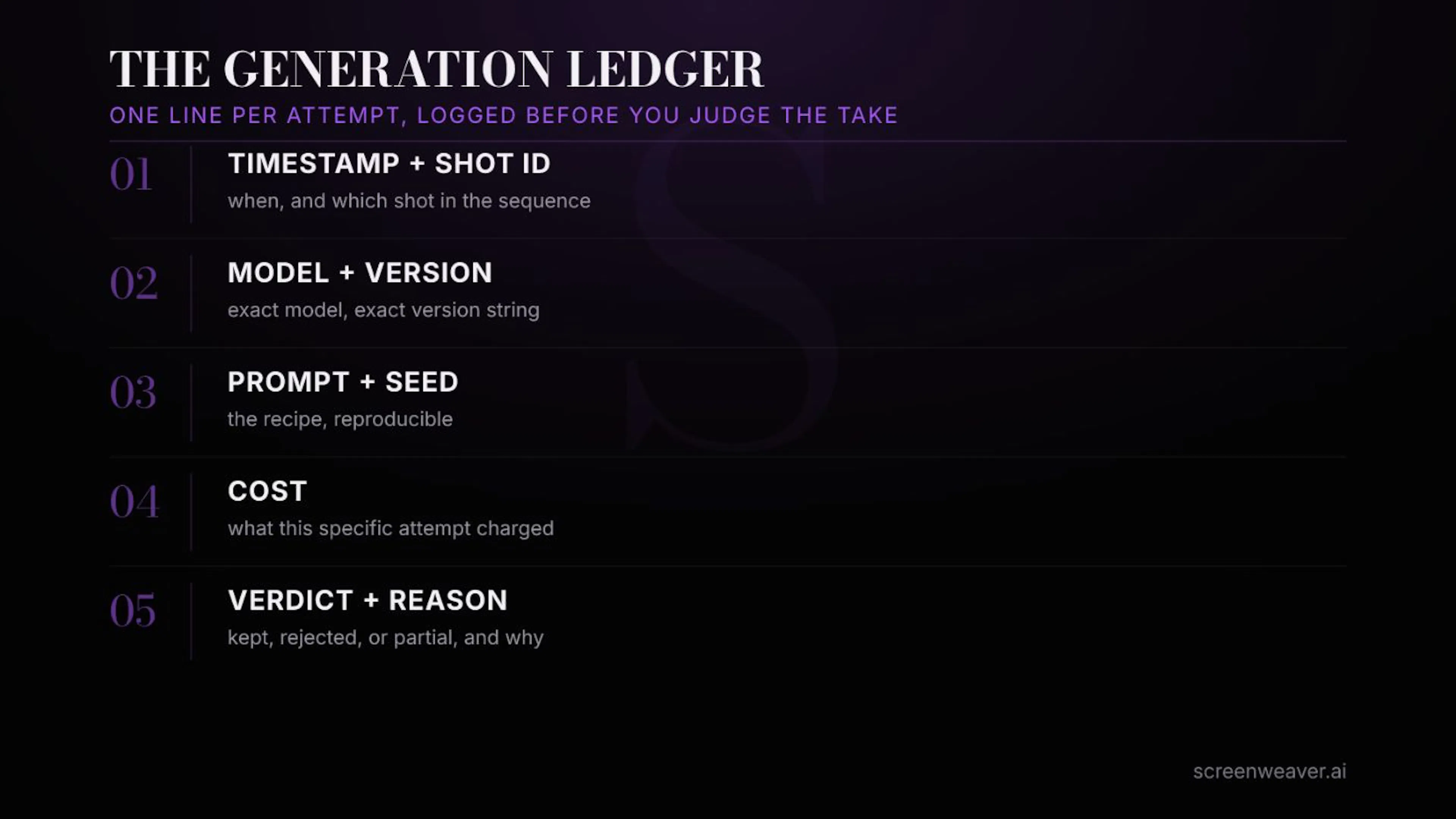 Generation ledger: 5 fields, 1 row per trial.
The last field is the one that people skip and the one that can actually save you money. It will tell you which takes were rejected with a reason. Takes that are rejected without a reason will simply be charged to your account. Record this for a few weeks and a pattern will naturally emerge. This prompt style will definitely take three tries on this model, and this type of fabric and hair movement is definitely not worth trying on cheaper layers. This shot type is cheaper to nail with Kling than with Veo.
The log line takes 10 seconds. If you don’t write it down, you’ll make the same guess again without realizing it, which will require another 20 attempts.
Back to the rooftop shot. Once I started recording costs and verdicts on every take, the pattern was obvious in hindsight. The failed attempts all used the same mid-tier model, the same price, and the same vague instructions for the cloak physics. This amendment could not have been more cleverly written. In the same way that a locked character reference stops facial drift, we were locking in a single reference for how the fabric should move and doing exactly one trial instead of 11 blind trials.
How many plays should I allow before proceeding?
Give yourself a number before you start, not after you’ve already spent that number. The workflow that appears repeatedly in current reporting on this issue is the draft->commit sequence. Generate the first pass at low resolution or short duration. It’s typically a fraction of the cost of a full render, so ensure motion and composition preservation before committing to an expensive full-quality pass. Limit the number of attempts to three, then stop and question the plan instead of prompting.
Just because playback is fast doesn’t mean it’s free. Every attempt is a real transaction against a real balance, and the “one more try” habit is just like how a $200 monthly budget for AI video quietly disappears into the near-misses folder. This is the same story told by Mazars at AutoGPT. A clear budget is thrown in, three usable clips, and a ton of near failures.
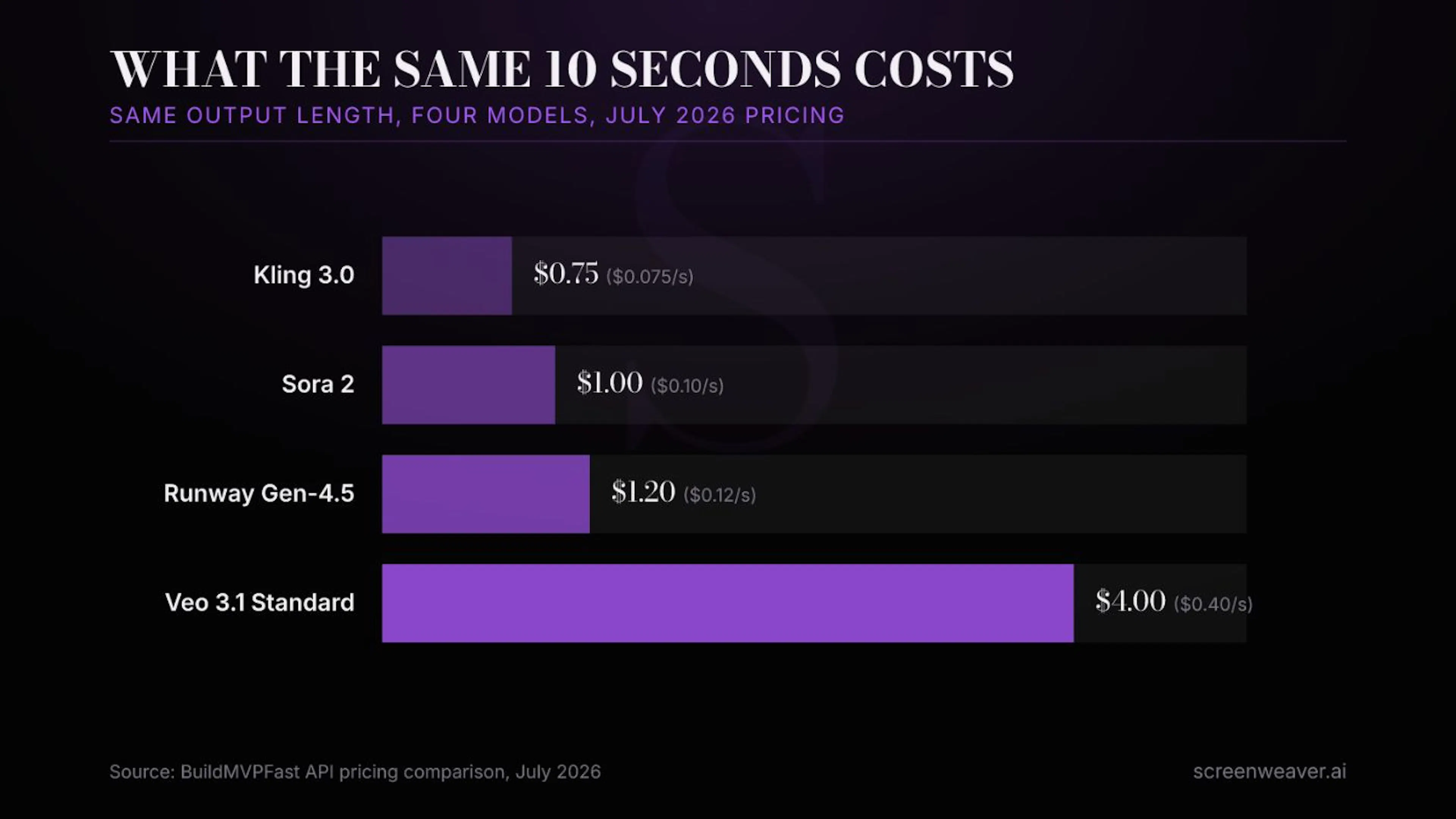 Same 10 seconds, 4 models, 5x+ spread for July 2026 pricing.
Does the generation ledger replace the version log?
No, it’s worth being precise about this. The version log (model, seed, prompt version, settings) shows what this clip was created with, so you can recreate the clip later or notice when a silent model update breaks the seed. Next to it is a generation ledger that answers another question. That is, whether all attempts were kept or rejected, how much did it really cost and was it worth it? One is about reproducibility. The other one is about decision making. Run along and you’ll know what worked and what’s worth finding.
This is exactly why I continue to build ScreenWeaver as a single workspace rather than a separate folder of tools. Scripts, shot lists, reference stills, and in turn costs and verdicts for every attempt should exist next to each other, not scattered in generator history tabs, spreadsheets, and credit card statements that only show post-damage totals.
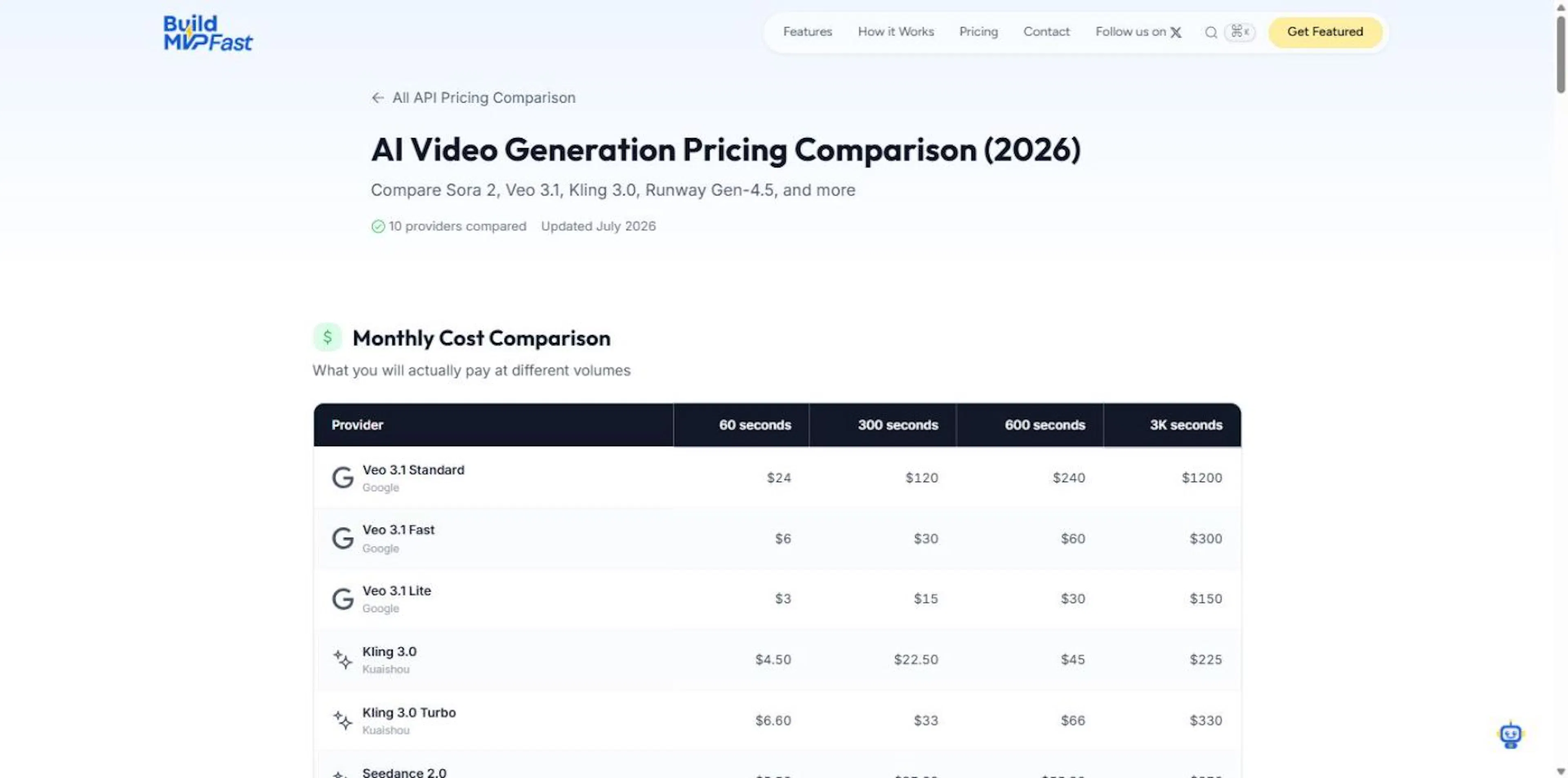 BuildMVPFast’s July 2026 AI Video Price List. This is the source of the numbers in this article.
FAQ
Do I need special software to store generation ledgers, or is a spreadsheet sufficient?
A spreadsheet is enough to get started. The five columns (timestamp, model, prompt version, cost, and verdict) are second to none in any log. Goals are habits, not tools.
How long should rejected takes and their log entries be retained?
Log entries are small pieces of text and are stored indefinitely. It’s actually worth keeping the rejected video file until the scene is locked, as the “failed” take may later become the correct reference for another shot.
Does this matter if I have a fixed monthly subscription rather than pay per second?
Yes, probably more. Subscriptions hide per-attempt costs even better than API bills, so the only way to know if you’re getting value from your plan is to track what each retained shot actually produces.
If you’re currently generating AI video, you might want to start with the next shot you want to perform. Before deciding whether a take is good or not, write down the model, cost, and verdict. It takes 10 seconds and is honestly the only way to know where your budget is actually going.
I write about the practical aspects of AI filmmaking at Lost Garden and ScreenWeaver. For more information, please visit frankhoubre.com.