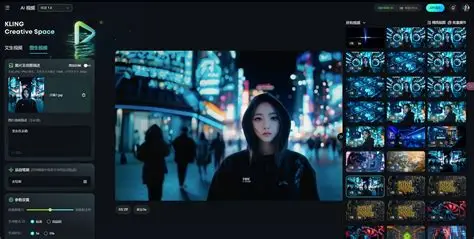
AI video tools will be everywhere in 2026, but looking good in a demo isn’t the same as being usable in a real-world workflow. Most people aren’t trying to produce cinematic masterpieces. You want short clips that are stable, consistent, and easy to iterate across social, product marketing, content experimentation, and more.
In this review, we tested Lanta AI with two practical goals:
- Create a usable image-to-video clip From real-world inputs (portraits, product images, simple visuals).
- Apply video effects This effect feels intentional rather than gimmicky, and is especially popular with content that can be quickly shared.
This is not a sponsored breakdown, nor am I aiming to “rank all tools.” This is a practical evaluation of what works, what doesn’t, and for whom Lanta AI is best suited.
Easy decision (for busy readers)
Perfect for: Perfect for creators and small teams who need a clean, repeatable image-to-video workflow and a growing library of effects without spending hours on editing software.
Not ideal if: Anyone who needs frame-perfect, VFX-heavy control like a professional compositor, or who wants to create complex choreography for multiple characters from a single prompt.
My biggest lesson: Lanta AI is most powerful when treated like a production utility, with small inputs, clear direction, and fast iterations, rather than demanding fast-moving scenes.
What I tested
To keep the test realistic, we used three common content scenarios.
Test A: Portrait image → “Alive” short video
goal: Subtle movements that feel warm and natural rather than creepy
Success criteria: Stable identity, minimal flicker, consistent lighting
Test B: Product images → short ad-style clips
goal: Micromotion to highlight the product without distorting the shape
Success criteria: Stable edges, no “melting” labels, clean backgrounds
Test C: Simple visuals → Effect-based short story (for social)
goal: Add one obvious effect without messing up the underlying clip
Success criteria: Readable, exportable, and not overly noisy
We also kept constraints consistent with how most people publish.
- 4-8 seconds per clip
- Composition suitable for vertical and square shapes
- “Sound Off” readability (video should be understandable even when muted)
Experience #1: Image to video conversion
Image-to-video conversion is where many AI platforms struggle. Common problems are predictable. Drifting faces, shimmering textures, wonky edges (hair, hands), seemingly random camera movements, etc.
Lanta AI improved results the most: reduce movement ambition And make it clear what should not change. Using gentle camera movements (slow pushing) and micro-motion (subtle light/breeze) made the output noticeably more stable.
If you want to try the same pipeline I used, the most direct entry point is the image-to-video workflow for the following platforms: AI image to video
What looked good?
- micro motion clip (subtle movements) were always easier to use than “dramatic” movements.
- Portrait stability Improved when movement is slow and the camera is steady.
- iterative loop It was easy to do. We generated several variations, kept the best one, and then improved it.
Where I struggled (honestly)
- Complex movements (quick movements, large gestures, tight close-ups) increase the risk of warping.
- Fine text in images can be degraded depending on the intensity of effects and motion.
- In some outputs, a crowded background amplifies the shimmer.
The most effective instant style
Instead of long paragraphs, I used “shot + motion + lock.”
- shot: Steady, slow push, moderate framing
- motion: Subtle (changes in wind and light), not dramatic
- rock: Identity, face shape, clothing, and background composition remain unchanged.
- quality: No flickering, jitter, or distortion
This approach is less exciting on paper, but it produces more publishable clips.
Experience #2: Video Effects (Fun, but only when controlled)
 Effects are what can make an AI tool shine or spam. The difference is whether or not it has the following effects:
- Strengthens the clip without destroying it,
- Can be repeated as a reliable template for content output
Lanta AI’s effects library includes: AI video effects
What I liked
- Effects feel more useful when applied to short, steady base clips.
- Some effects are naturally “shareable”, which can be helpful if you’re producing content regularly.
- For marketing-style output, effects can act as hooks without requiring a full editing suite.
Things to be careful about
- Using too many effects can make your content feel formulaic. The best results come from self-control.
- Some effects may introduce more visual noise. Keep the duration short (4-6 seconds) and test multiple variations.
A practical way to use effects is to treat them like this: module: Set and export one effect per clip and one purpose per clip. Don’t stack three effects and expect consistent results.
Ease of use, speed, and “real-world workflow” issues
The real question isn’t “Can I generate video?” the:
Can you quickly create multiple usable variations without making the tool a secondary job?
In my testing, Lanta AI fits into the following workflow:
- Start with one image,
- Generate 6 to 10 variants and
- Select the most stable 1-2,
- Optionally apply one effect module.
- Export and publish.
This is a real loop for creators, growth teams, and indie makers.
Who should consider Lanta AI?
Please consider this in the following cases:
- You want a practical image-to-video workflow with clear instructions
- If you publish short-form content and want repeatable output
- Prefer “shippable quality” over endless manual editing
You may not like it if:
- Requires precise timeline-level control for every frame
- Expect perfect anatomy every time during fast-moving interactions
- When you need a long, complex narrative scene from a single prompt
Tips for better results
- minimize movement For the first draft.
- Use a stable camera (No rotation, no shaking).
- lock what’s important (identity, text, composition).
- generated in batch Modify one variable at a time.
- Use effects like seasonings— one per clip, not the entire buffet.
If you follow these rules, your “usable hit rate” will increase significantly.
final thoughts
Lanta AI is not magic and does not eliminate the need for sense. However, certain workflows will be easier. This means turning still images into short, publishable clips, optionally enhanced with effects if your content requires it.
If you’re evaluating an AI video tool in 2026, we recommend that you judge by the following questions rather than a single impressive output: How quickly can you create three variations that you can actually post? This is where tools like Lanta AI become practical rather than experimental.