
In the healthcare industry, manual processing of paper-based forms continues to be costly. Although advances have been made in data extraction from scanned documents and images, human oversight is usually still required. Input errors by individuals creating forms and unreliable extractions from digitization still need to be corrected.
This post shows you how to build an automated bill processing pipeline using two key Amazon Bedrock features. Amazon Bedrock Data Automation, which intelligently extracts documents from health insurance claim forms, and Amazon Bedrock AgentCore, which hosts an AI agent that validates and transforms the extracted data into Fast Healthcare Interoperable Resources (FHIR) resources in AWS HealthLake. Learn how to combine these services to create end-to-end workflows that reduce manual processing while maintaining accuracy with automated validation checks.
Solution overview
This solution demonstrates an automated workflow for processing medical claim forms using AI-powered services. When a healthcare provider uploads a CMS-1500 claim form (in PDF format) to an Amazon Simple Storage Service (Amazon S3) bucket, it triggers a processing pipeline that starts with AWS Lambda and performs three main functions:
- Amazon Bedrock Data Automation uses intelligent document processing to extract structured data from your forms.
- An AI agent using Strands Agent running on Amazon Bedrock AgentCore validates this data against existing patient and provider records in AWS HealthLake, checking for completeness and consistency.
- If all validations pass, the agent creates a standardized FHIR claims resource in HealthLake. It also generates technical summaries for claims processors and patient-friendly explanations of claim status. Both are sent as Amazon Simple Notice Service (Amazon SNS) notifications.
This automated workflow helps reduce manual processing time while maintaining accuracy through AI-assisted validation.
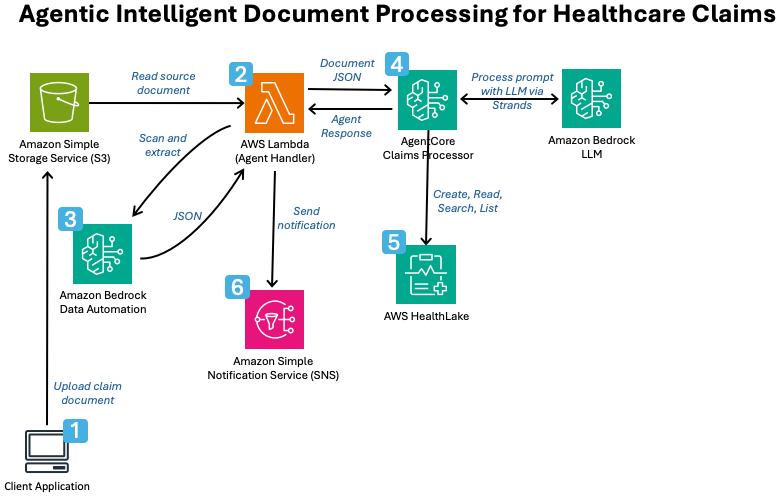
Figure 1: Architecture diagram of the solution.
The image above shows the following steps:
- The sender uploads the billing document to Amazon S3.
- When the file arrives, AWS Lambda is triggered.
- Amazon Bedrock Data Automation extracts information from documents and outputs the results in JSON format.
- AWS Lambda then calls AgentCore and passes the document for processing.
- AgentCore queries AWS HealthLake, makes claims, and creates a summary JSON response.
- AWS Lambda calls Amazon SNS to deliver an error or success response.
Lambda is used as an event trigger when a document is created in S3 and acts as a deterministic supervisor to the agent workflow. Validate whether each document is processed or sent to the dead letter queue for exception handling.
Bedrock Data Automation streamlines generative AI development and automates workflows involving documents, images, audio, and video. For document processing, Bedrock Data Automation combines traditional optical character recognition (OCR), machine learning (ML) models, and generative AI to accurately extract data. Blueprints (artifacts) can be used to specify what data to extract from a document and how to extract it. You can use pre-built templates or build custom configurations for your use case. The output includes confidence scores and bounding box data for extracted fields and tables. The custom output here produces predictable JSON representations of CMS-1500 claim forms in various formats.
AgentCore hosts Strands agents. Agents use two tools to interact with HealthLake. create_fhir_claim and search_fhir_resources.
The agent uses the following workflow:
- Find insured, patient, physician, and coverage information in AWS HealthLake to use as a reference for your claim forms. The first attempt uses a direct method call and default search parameters. Additionally, the agent runs the following prompts to confirm the tool invocation and retry the search if necessary:
First, examine previous tool invocations to determine which resources are under warranty. If no match is found, two more attempts are made to find a match using different search parameters in the claims JSON. We focus on high confidence scoring attributes and report how we found matches.
- If a reference is found, create an FHIR representation of the claim and send it to AWS HealthLake.
- Create a JSON object that captures your completed work. The object includes the claim ID (if created), the response to the human processor, and the response to the patient. The processor’s response serves as a warning or monitor. The patient’s response signals the sender if the error needs to be corrected.
Prerequisites
Before deploying your solution, make sure you have the following:
- An AWS account with administrator privileges.
- Access to Anthropic Claude Sonnet 4.6 on Amazon Bedrock. For more information, see Accessing Amazon Bedrock Foundation Models.
- NodeJS version 24 or later.
- Node Package Manager (npm) version 11.5 or later.
- Python version 3.13 or later.
- AWS Cloud Development Kit (AWS CDK) version 2.1025 or later.
Deploy the solution
The AWS Cloud Development Kit (CDK) and AgentCore command-line interface are used for deployment in the following steps.
- Clone the repository.
- Run the following command from the root of your repository:
Subscribe to SNS topics to receive notifications
- Access the Amazon SNS console.
- choose Topics.
- choose agent notification.
- choose Create a subscription.
- Select as protocol email.
- Please enter your email address.
- choose Create a subscription.
- Confirm your subscription by clicking the link in the confirmation notification within the email.
Use the solution
The next section describes two scenarios: a failure scenario and a success scenario.
1. Failure scenario: Simulate a failure by omitting one of the reference resources that AWS HealthLake requires.
The project code contains sampledata folder. use load_sampledata.py To stage some data, HealthLakeDatastoreArn from cdk deploy output:
upload sample1_cms-1500-P.pdf Copy it to your S3 bucket under a folder named . /input. One of the required resources was intentionally not loaded.
This should generate a message similar to the following through SNS.
We were unable to process your claim because we could not find your insurance coverage information in our system. Contact your insurance company to find policy number G4683A for your AnyHealth Plus Medicare plan or call our office to update your coverage information.
This simulates how agents perceive problems and generate human-friendly responses to failed claims.
2. Successful scenario: Verify that the required HealthLake resources exist to simulate a successful operation. In this scenario, we inject data discrepancies for the agent to overcome. In the sample data below, the insured ID number has been changed.
Create missing references in HealthLake.
Reprocess the PDF using the steps above. You will receive the following message through SNS.
The CMS 1500 claim form for patient John Doe diagnosed with low back pain M54.9 was successfully processed. The patient was identified by DOB (10-10-1960). Insured Jane Doe was identified through a name search after an ID search failed due to a mismatch between the billing ID (11-2234-10190) and the database ID (11-2234-1019O) (different last characters). Dr. Jane Smith was identified as the referring physician by ID 123456. Coverage was verified based on Medicare Policy G4683A published by AnyHealth Plus. This claim includes four proceedings: CPT 97810 ($170) of October 15, 2005, CPT 73521 ($120) of October 20, 2005, CPT 98940 ($250) of October 30, 2005, and CPT of October 30, 2005. 97124 ($120). Total $660.
This message provides human reviewers with an at-a-glance summary of successful submissions and other observations made by the agent.
best practices
Design-time AI is better than run-time AI. In this solution, the orchestration logic is known in advance. The document processing steps are predictable and the initial query to HealthLake follows a consistent pattern. Because these requirements are clearly defined at design time, we explicitly encoded the logic rather than relying on the Model Context Protocol (MCP) server to infer the order of operations at runtime. The result is a solution that is more reliable and easier to maintain. To build this, we used Kiro, an agent IDE that converts natural language specifications into working code. Kiro generated API calls to Bedrock Data Automation within Lambda and built tools within the agent. Kiro reduces the number of calls to Bedrock by generating precise, targeted code at design time, rather than issuing broad exploratory prompts at runtime. This reduced operational costs and shortened the development lifecycle.
Definitively supervise agents. The use of S3 and Lambda in this architecture was intentional. Agents do two basic things. Observe explicit tool calls and generate FHIR resources to load into HealthLake. It then returns the report to your Lambda function. The Lambda function acts as the final arbiter of the success or failure of a claim.
cleaning
You can delete the solution by calling the following command:
cost
Below are cost considerations for each service you use.
Note: The cost considerations below are based on AWS prices at the time of publication and are for informational purposes only. Actual costs may vary. Please refer to each service’s pricing page for the latest pricing.
- AgentCore runtime pricing is $0.0895 per vCPU hour, memory pricing is $0.00945 per GB hour, and nominal cost per document.
- Amazon Bedrock Data Automation costs $0.04 per page for blueprints with 30 fields or less, and $0.0005 for each additional field beyond 30 fields.
- The model charges agents using Anthropic Claude Sonnet 3.7 V1. In our test document, the tokens are approximately 76,000 inputs and 6,000 outputs. On-demand pricing is $0.23 per sheet and $0.09 out, or $0.32 per document.
- AWS HealthLake charges per hour of storage at $0.27 per hour for the first 10 GB.
- With this architecture, Lambda, S3, and SNS charges are negligible per document.
conclusion
Although production medical claims processing often requires additional steps beyond this solution, this pattern illustrates the power of integrating AI agents into document workflows. By giving AI agents direct access to processing tools, they can provide valuable insights in a variety of ways, including identifying potential billing issues, highlighting areas that require human review, and generating easy-to-understand status messages for patients. This AI-assisted approach helps claims processors work more efficiently and reduce processing times while maintaining accuracy. The previous example illustrates a possible scenario: data discrepancies between letters. ah And the number zero. In this situation, the agent will resolve the discrepancy and process the claim accurately.
To learn more about building intelligent document processing solutions, see the Amazon Bedrock documentation or check out other healthcare solutions in the AWS Architecture Center.
About the author


