Last updated: November 20, 2022
It can be hard to control your party in the middle of a big battle, but luckily, Pillars of Eternity 2 Deadfire We've created a complex AI creator that can determine how your companions should react in different situations.
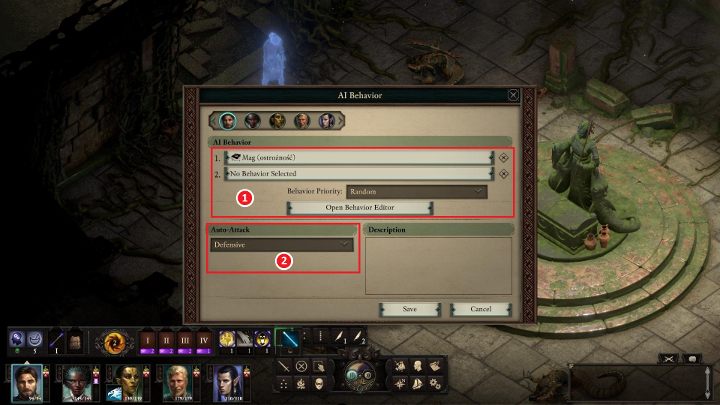
Click on your character's portrait, then right-click on the gear icon to open the window shown above.
[1] This area allows you to adjust the behavior of a particular character. The default modes available are “Aggressive” and “Cautious”. By clicking “Open Behavior Editor”, you can see how these modes work and create your own behaviors (explained below).
[2] Here you can choose the auto-attack option, with the developers providing four different variations (you can't create your own).
- passive – Characters will not attack automatically, regardless of the situation.
- Self defence – Characters will not participate in combat unless attacked by an enemy.
- Defensive – Characters will automatically attack nearby enemies regardless of whether they are attacked or not.
- Aggressive – Characters attack all enemies regardless of whether they have been attacked or not.
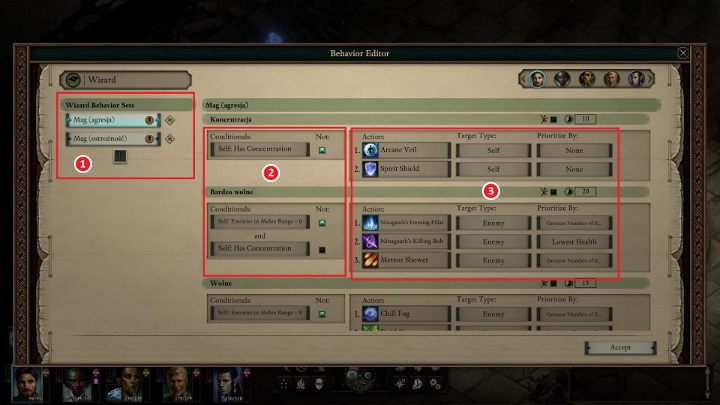
When you click “Open Behavior Editor”, the window shown above will appear.
- [1] This list contains the actions your character can perform (click the plus to add a new action).
- [2] Here you can determine various conditions such as low health, use of a particular weapon, situations where a ranged attack character is attacked, etc. There are a lot of options here.
- [3] The last table lets you choose an action, here you can set the ability you want to use, set the target (yourself or an enemy) and the priority of this action (e.g. enemies with low resistance to freeze damage).