
Adobe Lightroom now lets you turn photos into videos using generative AI. This feature comes as part of a long list of June 2026 updates, giving photographers who forget to record video the option to produce B-roll-like footage. However, this tool is the second Lightroom tool to require generated credits, and the first Lightroom-native Adobe tool to use the credit system.
This update is part of a long list of June 2026 updates for Creative Cloud across Lightroom and Photoshop, and video tools Premiere and After Effects. Among photo features, Lightroom’s assisted culling leaves beta, and Photoshop gets a reflection removal tool from Adobe Camera RAW.
Lightroom desktop: Generate video from photos
Within Lightroom on your desktop device, a new video generation option uses either Adobe Firefly or Google Veo to generate AI videos using your photos as a starting point. This option can be found by going to the top menu and[写真],[ビデオの生成]It will be displayed when you select .

This will display a pop-up suggesting prompts such as “Add subtle movement” or “Slow pan”, as well as a text field to enter your custom prompt. A drop-down menu allows users to choose between 4, 6, or 8 second videos.
Generate Video is not the first generation AI tool introduced in Lightroom, but this update is the second feature in Lightroom to use generation credits, and the first for a native Adobe tool. Previously, only Topaz Gigapixel Generative Upscale used generative credits within Lightroom. Adobe tools such as Generative Remove currently do not consume credits in Lightroom.
Some generated credits are included with certain subscriptions, but additional credits must be purchased after that. Creative Cloud Photography Plan 20GB includes 100 credits per month, Lightroom Plan 250, and 1TB Photography Plan includes 1,000 credits per month.
A pop-up generate video box will show the creator how many credits will be consumed in the process and the remaining balance. Adjusting various options will change that amount of credits. For example, shorter videos consume fewer credits.
Lightroom Classic and Lightroom: Assisted culling
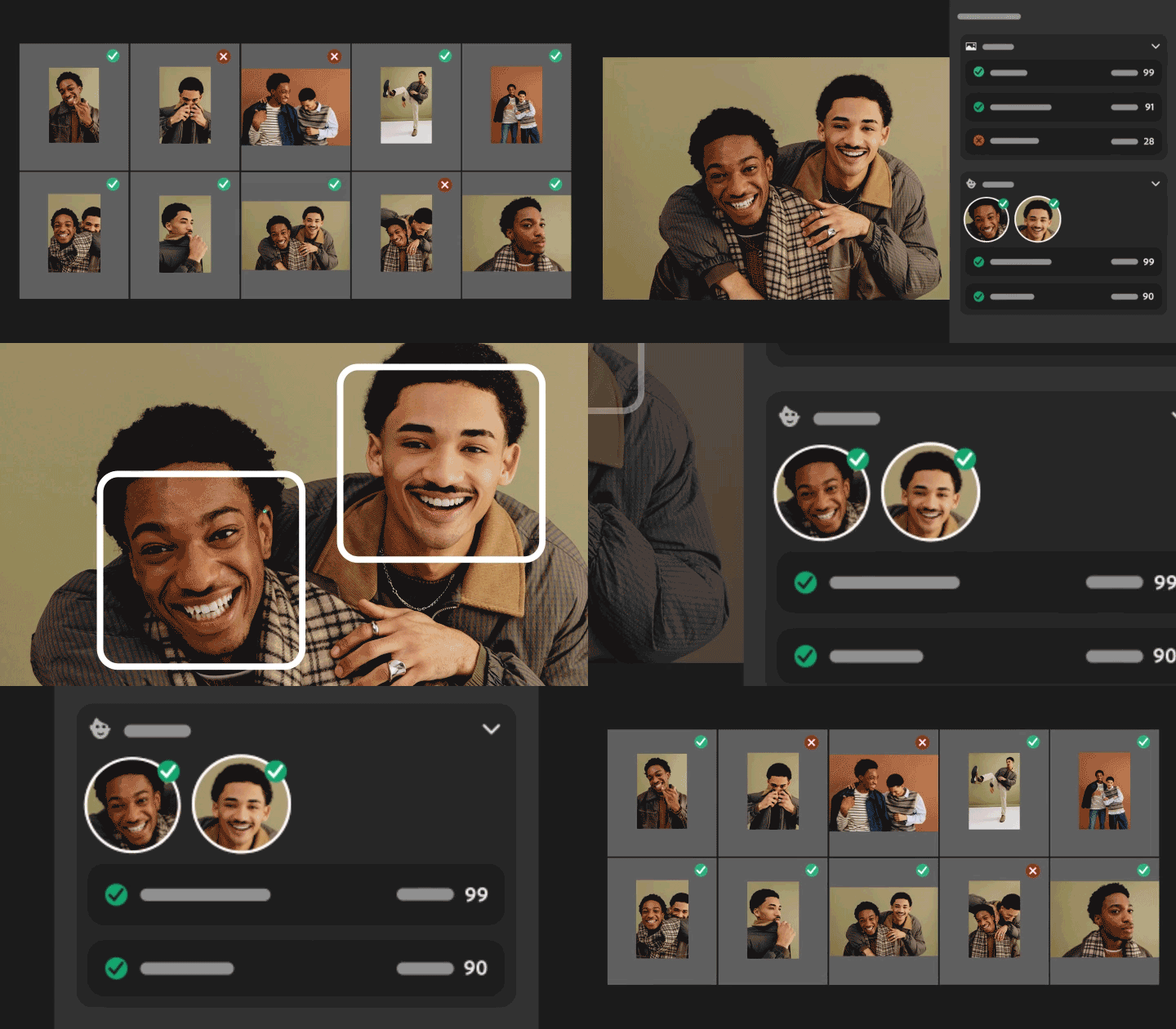
Lightroom previously got Assisted Culling, a beta tool that helps photographers weed out bad shots with tools like checking focus and making sure both eyes are open. This feature is currently being moved out of early access (a beta feature in Adobe terminology). This feature is rolling out to both Lightroom and Lightroom Classic.
Additionally, the assisted culling tool now recognizes faces and gives each face a score for whether its eyes are open and in focus. This tool is designed to help you examine photos that contain multiple people.
The update also added filters that give photographers more control over how their photos are sorted and how strict the screening process is.
Lightroom Classic’s Library module also lets you filter out photos that use generative AI or need an update to their AI settings, as well as the program’s ability to sort photos by things like shutter speed or which camera took the photo.
[被写体の選択]has been improved with a detail slider that allows authors to adjust the edges of the mask to improve accuracy in small details such as hair.
The Lightroom update also includes AI sharpening with Noise Aware from Topaz Labs and support for RAW files from the Sony A7R VI.
Adobe Photoshop: Remove reflections

Adobe Camera RAW’s reflection removal tool has moved into the realm of Photoshop. Similar to ACR’s capabilities, the AI-based tool detects and removes reflections in photos taken through glass.
Unlike ACR, the anti-reflection version of Photoshop makes adjustments as layers, allowing creators to go back and tweak them later, allowing for non-destructive editing.

Photoshop’s removal tool can now use on-device generation AI, allowing the tool to work without an internet connection.
This update rolled out across Adobe’s photography tools on June 15, along with updates to Premiere, After Effects, and Illustrator.
You might also like…
Check out the best photo editing apps. Or check out the best Photoshop alternatives and Lightroom alternatives.