Artificial intelligence is becoming a part of the daily work of creators, startups, agencies, and business teams. Some tools help people write faster. Some organize research, automate support, and improve analysis. Video generation has joined that list, but this brings another challenge.
Video is more difficult to produce than text because it combines story, motion, timing, audio, images, and visual coherence. Helpful videos do more than just look impressive. It needs to match your message, platform, and audience. That’s why the future of AI video may rely on better creative workflows rather than a single prompt.
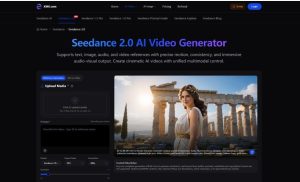
For technology teams and content producers, this is an important distinction. Models can generate clips, but workflows help turn ideas, references, and feedback into something usable. Tools like Seedance 2.0 are part of this change because they support text, image, audio, and video references in one generation process.
AI video is becoming a practical tool
AI video previously felt experimental. Many of the early works were interesting to look at, but difficult to control. Now the discussion is becoming more pragmatic. Teams want to know if AI video can help them create product demos, social media clips, campaign drafts, training videos, explainers, and visual prototypes.
This is important for startups, digital agencies, small businesses, and media teams who need to publish more visual content without always having a large production budget. Short videos can help explain your product, introduce new features, tell customer stories, and make your campaigns easier to understand.
The problem is that video production can slow down your team. Even a simple clip may require footage, editing, music, captions, and multiple versions for different platforms. AI video can alleviate some of that friction by allowing teams to create early drafts from existing material.
From static assets to moving drafts
Most organizations already have useful content assets. It may include product screenshots, campaign images, brand visuals, short clips, audio notes, or previous videos. The challenge is to turn these assets into a coherent video concept.
Seedance 2.0 is built around that type of workflow. Rather than just starting with an empty text prompt, users can upload references and explain how to use each asset. The image serves as the first frame or visual reference. Video can guide movement. Audio can affect rhythm. Prompts can describe lighting, camera movement, scene changes, and atmosphere.
This is useful because many teams don’t start with a sophisticated creative brief. They start with scattered materials and deadlines. A visual draft helps the team determine whether the idea is clear enough before spending more time on production.
Why reference control is important
One of the biggest weaknesses of AI video is its unpredictability. Prompts may produce visually strong results, but your team may miss the exact product, character, scene, or pacing you need.
Reference control helps reduce that gap. AI video generation by Seedance allows users to guide output through multiple inputs instead of relying solely on text. This makes the process more convenient for real-world content where brand equity, product details, and campaign tone are important.
For example, startups can turn product screenshots into short feature teasers. Training companies can create a visual draft of the course introduction. Social media teams can test different versions of campaign clips before choosing the strongest direction.
Improved workflow reduces AI project failures
Many AI projects fail because teams treat the tool as a whole solution. In reality, AI works better when connected to clear processes.
For AI video, the process is simple.
- Define your video goals.
- Collect images, clips, audio, or brand references.
- Create prompts that describe movement, mood, pace, and format.
- Create a short draft.
- Check for clarity, consistency, and audience suitability.
- Refine your strongest version or send it to an editor for finishing.
This type of workflow helps teams avoid random output. It also makes feedback easier. Instead of saying the video should be “more engaging,” your team can show you a draft and discuss starting frames, camera movement, pacing, and product visibility.
Use cases for creators and businesses
The most practical use case is not necessarily the most dramatic. AI video often provides value for small, repetitive tasks that are time consuming.
Creators can turn podcast quotes into more visual vignettes. Retailers can test product teasers from static images. Fintech startups can create short descriptions of new features. Digital agencies can prepare several campaign concepts before presenting options to clients.
For these teams, using Seedance to create videos can speed up iterations. The platform’s multimodal controls make it easy to work from existing assets and refine results without having to rebuild all your ideas from scratch.
That doesn’t eliminate the need for editors, designers, and creative directors. This will give you a quicker starting point. Human judgment is still required to decide what is trustworthy, what fits your brand, and what should be published.
What this means for AI adoption
The value of AI video is measured by more than just the visual impression of the generated clip. It is measured by how well the tool fits into your daily work.
The practical question for businesses and creators is whether AI video can reduce latency, improve idea testing, and help teams publish better content. Seedance 2.0 aims in that direction by combining references, prompts, and editable video directions into one workflow.
As AI adoption increases, the teams that will benefit the most will be those that build clear processes around the tools they use. You can create a clip with the appropriate prompts. A good workflow will help you turn that clip into useful communication.
That’s where AI video becomes more than just a novelty. It becomes part of the production process, helping teams move from assets to drafts, drafts to decisions, and decisions to content delivered to viewers.