Building high-performance generative AI agents requires an architecture that can deliver fast inference, coordinate multiple agents, and operate reliably under production workloads. If you’re building generative AI agents to automate reviews, power digital assistants, and support complex decision-making workflows, you need those agents to work well. You need to reduce manual effort, respond in near real-time, and scale to thousands of interactions without additional infrastructure management. In this post, learn how to build these high-performance agents on AWS using a combination of GPU-accelerated inference, serverless orchestration, shared memory, and built-in observability. These capabilities are essential when moving from experimental prototypes to systems that deliver consistent business value.
As agent workload increases in production, concurrent requests can significantly increase inference latency, leading to delayed responses and poor user experience. In stateless execution environments, agents often lose conversation or task context between interactions. This results in repetitive work and inconsistent output. Limited visibility into agent execution makes it difficult to diagnose faults, understand inference paths, and control operational costs. These challenges become more pronounced in multi-agent systems, where multiple agents need to run in parallel, share context, and aggregate results.
Build a multi-agent campaign review system that demonstrates parallel inference, context persistence, and traceable execution paths using a unified architecture combined with NVIDIA NIM for GPU-accelerated inference. Amazon Bedrock AgentCore provides managed runtime, shared memory, and built-in observability, and Strands Agent provides serverless multi-agent orchestration. This approach supports performance, scalability, and operational insight in production environments. Although this example focuses on marketing content reviews, the same pattern applies to digital assistants, review automation, and search enhancement generation pipelines.
To bring these concepts to life, the next section describes a reference architecture and implementation that shows how these components work together in practice.
Solution overview
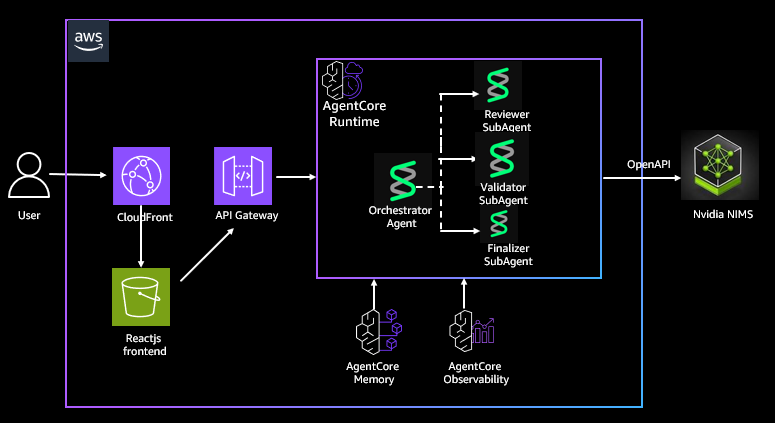
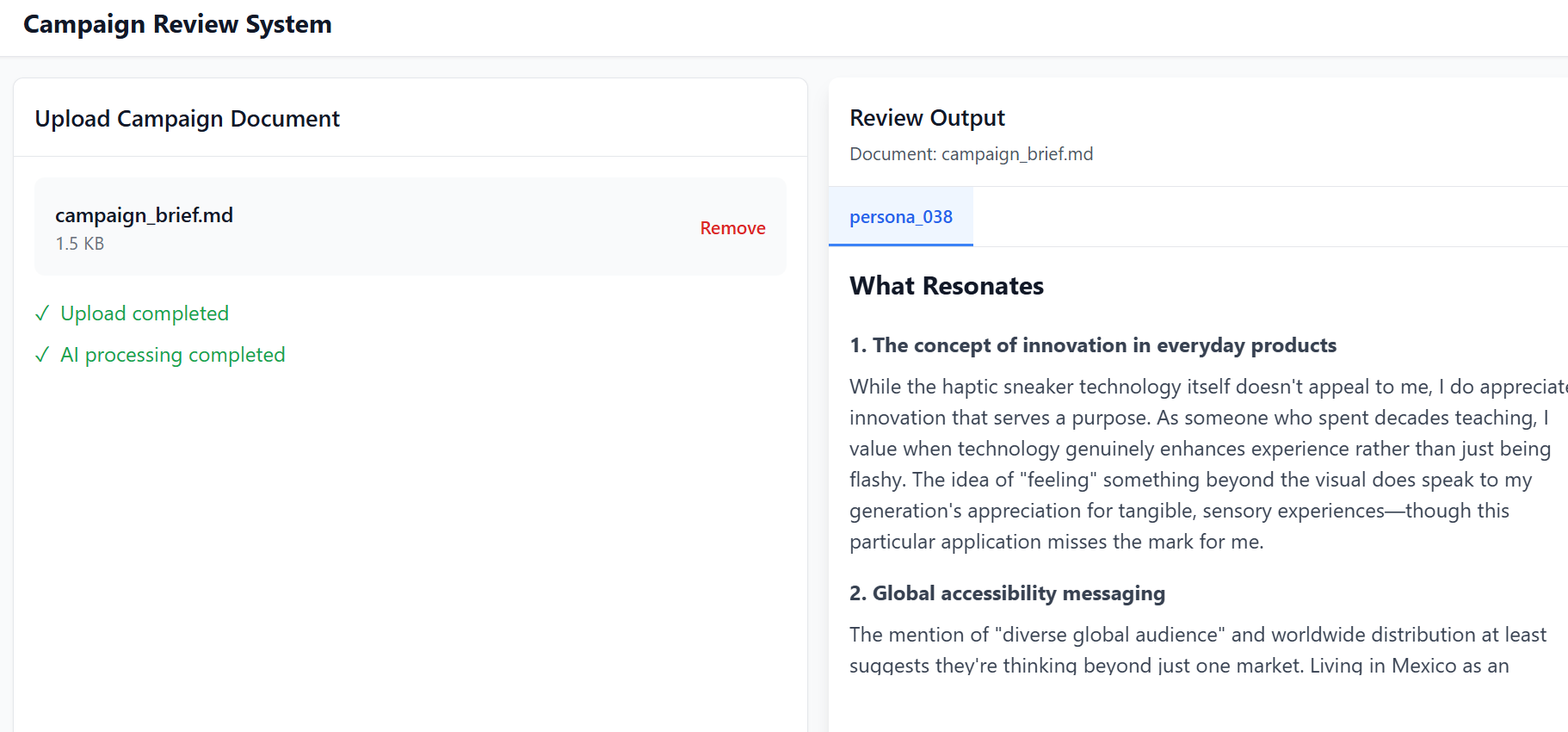
We build a system consisting of three specialized agents working in parallel. Persona review agents evaluate campaign content from multiple audience perspectives and generate resonance scores. Validator agents check content against legal and brand guidelines. The finalizer agent aggregates the output and produces a unified set of recommendations. When you submit documents through a React-based frontend, results are polled asynchronously and agent feedback is displayed as it becomes available.
Our solution uses the hosted NVIDIA NIM API, available at build.nvidia.com, to deliver high-performance GPU-accelerated inference as a fully managed service. These endpoints run optimized large-scale language models on a GPU backend managed by NVIDIA. These backends use technologies such as Compute Unified Device Architecture (CUDA) and TensorRT-LLM to provide low-latency, high-throughput responses to agent workflows. By exposing an OpenAI-compatible Chat Completion API, NIM integrates with Strands-based multi-agent orchestration layers without the need for model-specific adaptation.
Implement agent orchestration using Strands Agents, AWS’s multi-agent framework for orchestrating tool-based inference workflows. Strands allows you to explicitly model agent interactions, making it easier to manage parallel execution, control flow, and aggregation of results across multiple agents. Package the Strands orchestrator and specialized agents as Docker containers and deploy them to Amazon Bedrock AgentCore Runtime. AgentCore Runtime provides a managed execution environment with checkpoint and recovery capabilities. These features help agents successfully recover from interruptions and scale to thousands of concurrent calls without manual infrastructure management.
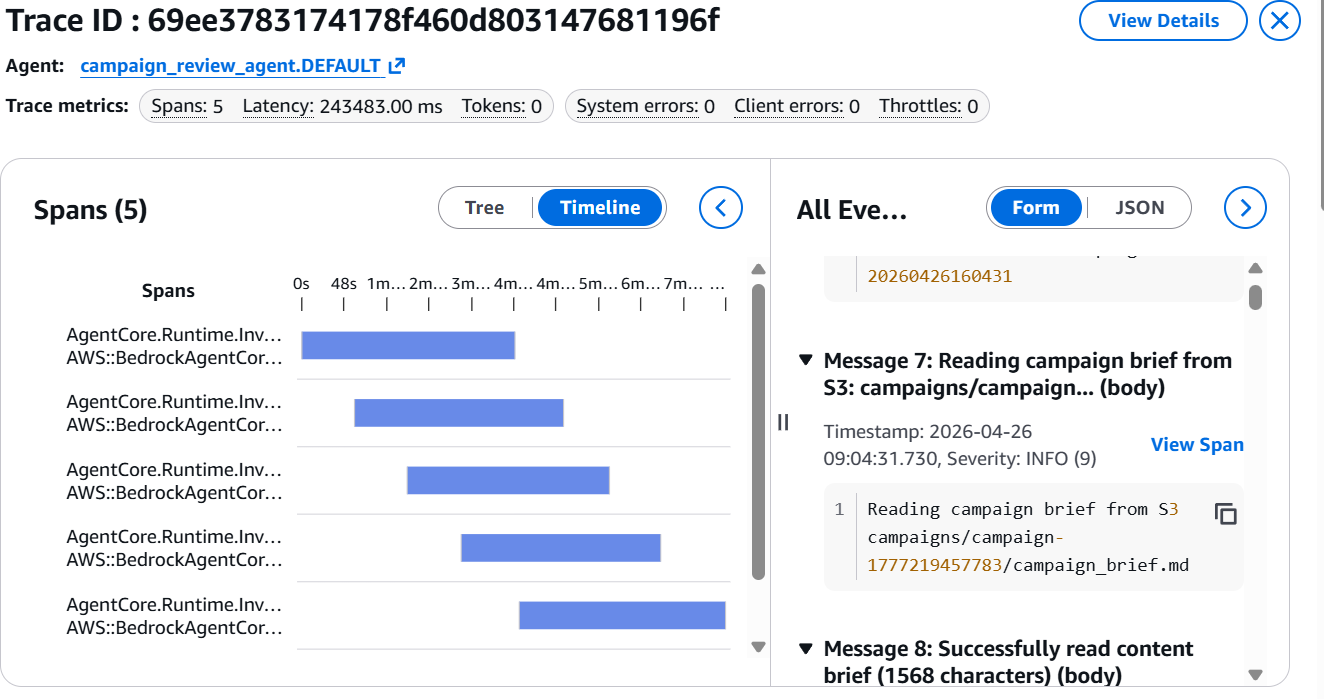
Amazon Bedrock AgentCore Observability provides detailed visualization of each step of an agent’s workflow, allowing developers to inspect execution paths, audit intermediate outputs, and debug performance bottlenecks. You can monitor operational metrics such as latency, token usage, and error rates through Amazon CloudWatch. This visibility helps you understand agent behavior and identify performance bottlenecks in production.
It also uses Amazon Bedrock AgentCore Memory to share context across agent invocations and provide support for multi-turn conversations. AgentCore Memory has built-in support for storing conversation state and history, so you can extend this implementation to provide a natural language interface for your AI assistant.
One of the core aspects of this solution is ease of deployment to the Bedrock AgentCore runtime using AWS Serverless Application Model (AWS SAM) templates. Call the Amazon API Gateway interface provisioned by the template. This packages and deploys the Strands agent and all its dependencies, and enables AgentCore Observability and AgentCore Memory.
The following architecture diagram shows how NVIDIA NIM, Strands Agents, and Amazon Bedrock AgentCore work together to support inference, orchestration, memory, and observability in your deployment.
Prerequisites
Before deploying this solution, you need to set up your development environment using the following tools as a prerequisite:
- Install the AWS Command Line Interface (AWS CLI).
- Install AWS SAM CLI v1.100.0+
- Install Docker v20.x+.
- Install Node.js v18.x+
- Install Python v3.11 or later
dependencies
Implementing the Strands Agent also requires the following dependencies, which are packaged in a DockerFile:
- AWS Strands Multi-Agent Framework: Strand Agent
- Strand Agent Tools and Utilities: Strand-Agent-Tools
- HTTP library for API calls: requests
- Amazon Bedrock agent core functionality: bedrock-agentcore
- AWS SDK for Python: boto3
Deploy the solution
Now that you understand the architecture, the next step is to deploy the solution in your AWS environment. Please note that to use NVIDIA NIM, you must accept the NVIDIA AI Enterprise EULA (available at time of AWS Marketplace subscription or NGC registration).
Our solution can be downloaded from our GitHub repository. Deploy and access your solution in your AWS environment using the following step-by-step guidance, which is also provided in the Deployment section of the GitHub repository.
Step 1: Clone the repository
Step 2: Configure AWS credentials
Configure the AWS CLI.
Verify your credentials.
Step 3: Configure Amazon DynamoDB persona tables
Make the script executable.
Run the setup script.
Step 4: Build the AWS SAM application
Step 5: Deploy the infrastructure
Use guided deployment and follow the prompts to enter the stack name, agent name, AWS Region, and accept default values for other areas.
Step 6: Get the deployment output
Get an API endpoint.
Save these values.
- ApiEndpoint – HTTP API URL
- CampaignOrchestratorApi – Agent API URL
- CloudFrontURL – Frontend URL
- FrontendBucket – S3 bucket for frontends
Step 7: Deploy the agent to AgentCore runtime
This deploys the Strands agent to Bedrock AgentCore and writes the agent ARN to Systems Manager.
This will take approximately 5 minutes. API Gateway times out (29 seconds), but the AWS Lambda function continues to run.
Monitor progress:
Wait until you see the following content: The agent core runtime is now ready. Written agent ARN to SSM.
confirm:
Step 8: Configure the front-end environment
Create .env file
Step 9: Build and deploy the front end
Install dependencies.
Build the frontend:
Get the frontend bucket name.
Deploy to S3.
Disable CloudFront cache (optional, for updates).
Step 10: Access the application
Get the CloudFront URL.
Access the application by opening the URL in your browser. Use this campaign_brief.md file as a sample campaign document and upload it to the left panel. You can now view campaign review output from multi-agent orchestration in the right panel, as shown below.
Navigate to the Bedrock AgentCore Observability console and select an agent to get detailed visualization of each step of the agent workflow, as shown below.
cleaning
To avoid recurring charges, clean up your AWS account after trying the solution.
- Delete an AWS CloudFormation stack.
- Drop a DynamoDB table.
conclusion
In this post, you learned how to build a production-ready generative AI agent system by combining NVIDIA NIM for GPU-accelerated inference with Amazon Bedrock AgentCore and Strands Agents on AWS for serverless orchestration. By separating inference from agent coordination, this architecture supports independent scaling, sharing of context between agent interactions, and deep visibility into execution and performance.
The approach in this post provides a practical foundation for multi-agent systems that require parallel reasoning, context persistence, and operational insight. Whether you’re building review automation, digital assistants, or other agent-driven applications, these patterns will help you move from experimental prototypes to systems that you can reliably deploy, observe, and scale on AWS.
About the author
 Kanishk Mahajan I am a principal in AI/ML for AWS Professional Services. In this role, he leads GenAI and agent transformations for some of AWS’ largest customers in the telecommunications and media and entertainment sectors.
 Akshay Parkhi He is a Machine Learning Engineer at Amazon Web Services with over 16 years of experience leading enterprise transformation across SAP, cloud, DevOps, and AI/ML. He designs and scales production-grade AI and agent systems that drive important business outcomes in complex real-world environments.