
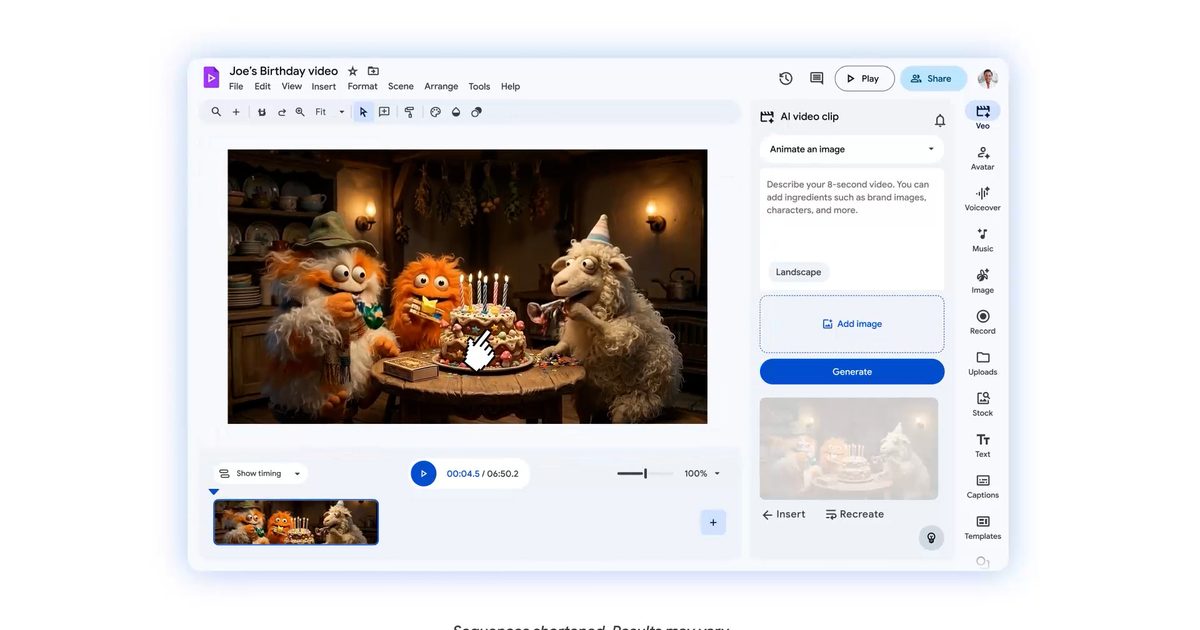
It’s clear that Google Workspace’s AI-powered video tool Vids has gotten a pretty big upgrade and is trending toward doing more work for you. With smarter editing tools, cleaner automation, and a sharper eye for polish, putting together professional-looking videos now feels deceptively easy.
What’s new about Vids?
- Directable avatars: You can now drop your avatar into the scene and actually please tell them what to do. Want a presenter to pick up your phone, point to a sales graph, or walk you through a product demo? Just type it in. The best part is that their faces and voices are consistent throughout, so the video doesn’t look like a chaotic collage of mismatched clips. It feels slick, purposeful, and, dare I say it, a little too easy.
- Custom avatar: If you find the built-in avatars a little boring, you can create your own from scratch. Play around with your appearance, change your clothes, change your background, and basically set the overall mood. For example, you can have the same avatar explain quarterly results in a formal office environment, and then subtly switch to a bright, fun background for product explanations. All this can be done without losing your identity.

- Veo 3.1 integration: This is really fun. Generate short video clips within your Vid by simply typing prompts or uploading images. “Cinematic drone footage of a beach at sunset” turns into a real clip in seconds. You get 10 8-second generations for free each month, which seems like enough until you start experimenting and suddenly find yourself wanting more.
- Export directly to YouTube: Once your video is ready, you can send it to YouTube directly from within Vids. It’s quick and seamless, and removes one small but very real annoyance in the process.

- Screen recording with Chrome extension: There’s also a built-in screen recorder that works via a Chrome extension. It’s perfect for quick tutorials, demos, and walkthroughs because you can capture the screen along with audio and camera. For example, if you’re explaining how a feature works or walking someone through a tool, you can record it on the fly without the hassle of additional software. It’s simple and, more importantly, it only works when you need it.
What I actually think about these new tricks
Google has some experience with AI. We rarely develop anything half-heartedly. With Vids, the same approach is pretty obvious. These features reduce the burden of video creation. What would normally require multiple tools, several retries, and a lot of patience now seems much more streamlined. On paper, everything looks very promising. From generating clips to directing avatars to finalizing the final output, many heavy and repetitive tasks seem to be handled automatically.

That being said, I want to spend a reasonable amount of time with this product to see where it shines and where it might stumble. Because that’s where the real story lies. But for now, it feels like Google is pushing Vids in the right direction. If this takes off, we’ll likely be looking at more capable and useful video tools, rather than just another AI feature that looks impressive but fades in everyday use.


