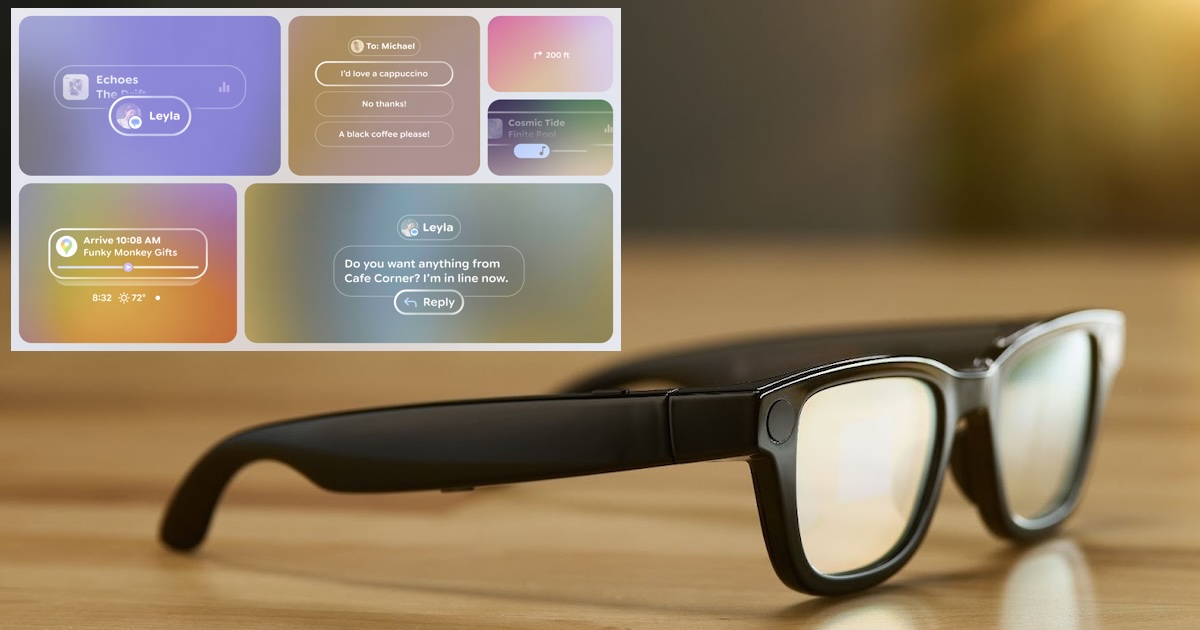
With the release of Android XR SDK Developer Preview 3, Google introduced two new libraries that enable developers to create AI glasses experiences: Jetpack Projected and Jetpack Compose Glimmer. Jetpack XR's ARCore has also been expanded to work with AI glasses, adding motion tracking and geospatial capabilities.
New libraries introduced in Android XR SDK Developer Preview 3 allow developers to extend existing mobile apps to interact with the AI glasses by leveraging the built-in speakers, camera, and microphone, and display information through the glasses' display when available.
There are many scenarios where your app might need to use AI Glass hardware. For example, you can add UI controls to your video conferencing app that allow users to switch the video stream from their phone's camera to the AI glasses' camera to provide a first-person perspective.
The first library, Jetpack Projected, enables host devices such as Android phones to: project Deliver your app's XR experience to AI glasses using audio and video. This library allows your app to check if the target device has a display and wait until it is available. To allow your app to access device hardware, it must request permission at runtime, following the standard Android permissions model.
valid projected context. Audio support is easy because the AI Glasses audio device operates as a standard Bluetooth audio device.
If you want to capture photos and videos with the camera on your glasses, it gets a little more complicated because you need to instantiate and set up some classes to check for hardware availability, and bind the activity lifecycle to the camera so that it can open and close depending on the activity's state.
Jetpack Compose Glimmer, on the other hand, is a set of UI components and visual language for creating augmented experiences on display-equipped AI glasses. The new visual language uses optical see-through to blend visuals with the environment, focusing on clarity, readability, and minimizing distractions. Supported components include text, icons, title chips, cards, lists, and buttons. All components are built on basic concepts. surfaceallows developers to create non-standard components.

Glimmer components can be customized using modifiers to adjust their layout, appearance, and behavior, and can be stacked along the Z axis to use shadows to create a sense of depth. Google also introduced an AI Glasses emulator in Android Studio to simulate UI previews and user interactions such as touchpad and voice input.
As a final note regarding the latest Android XR SDK version, Google has extended ARCore for Jetpack XR, a set of APIs for creating augmented experiences that includes the possibility of retrieving planar data, pinning content to a fixed position in space, and more. The latest version adds support for motion tracking, allowing the glasses to react to your movements and geospatial posture and anchor content to locations covered by Google Street View.
Android XR SDK Preview 3 is available in Android Studio Canary when you upgrade to the latest emulator version (36.4.3 Canary or later).