Today, we are announcing Amazon SageMaker AI powered by MLflow. It includes serverless capabilities to dynamically manage infrastructure provisioning, scaling, and operations for artificial intelligence and machine learning (AI/ML) development tasks. Reduce operational overhead by scaling up resources during intensive experiments and scaling them down to zero when not in use. Introducing enterprise-scale features such as seamless access management with cross-account sharing, automatic version upgrades, and integration with SageMaker AI features such as model customization and pipelines. With no administrator configuration or additional costs, data scientists can quickly start tracking experiments, implementing observability, and evaluating model performance without infrastructure delays, making it easy to scale MLflow workloads across your organization while maintaining security and governance.
In this post, we explain how these new features can help you use SageMaker AI in MLflow to run large-scale MLflow workloads, from generative AI agents to large-scale language model (LLM) experiments, with improved performance, automation, and security.
Enterprise-scale capabilities of SageMaker AI with MLflow
SageMaker AI's new MLflow serverless capabilities deliver enterprise-grade management with automatic scaling, default provisioning, seamless version upgrades, simplified AWS Identity and Access Management (IAM) authentication, resource sharing with AWS Resource Access Manager (AWS RAM), and integration with both Amazon SageMaker Pipelines and model customization. term MLflow app replace the previous one MLflow tracking server This is a term that reflects a simplified, application-centric approach. You can access the new MLflow app page in Amazon SageMaker Studio, as shown in the following screenshot.
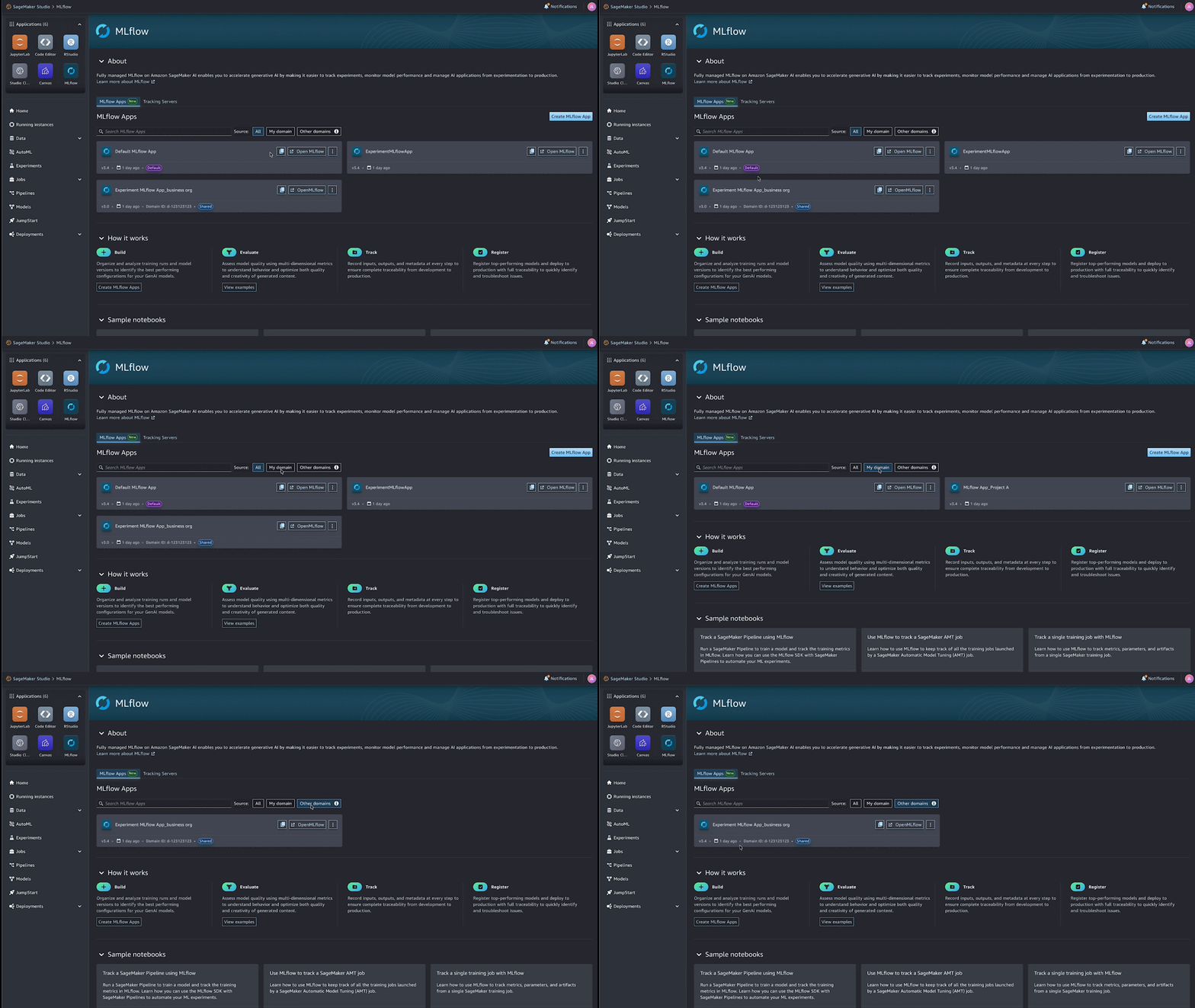
When you create a SageMaker Studio domain, a default MLflow app is automatically provisioned to streamline the setup process. Enterprise-ready out-of-the-box with no additional provisioning or configuration required. MLflow apps scale elastically based on usage, reducing the need for manual capacity planning. Training, tracking, and experimentation workloads can automatically get the resources they need, simplifying operations while maintaining performance.
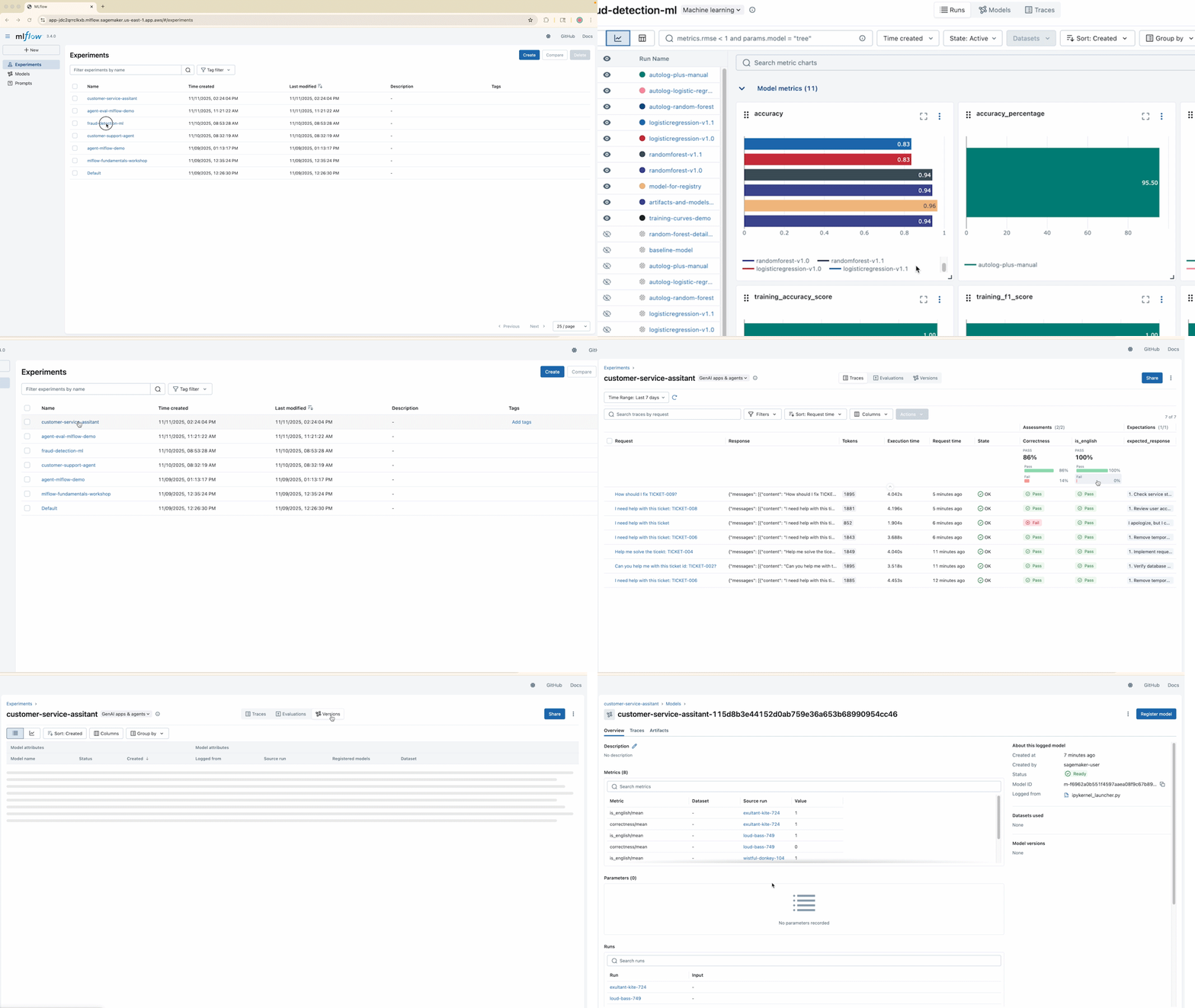
Administrators can define maintenance windows during the creation of MLflow apps during which in-place version upgrades of MLflow apps occur. This makes your MLflow apps standardized, secure, and continuously up to date, with minimal manual maintenance overhead. MLflow version 3.4 is supported in this release and extends MLflow to ML, generative AI applications, and agent workloads, as shown in the following screenshot.
Simplified identity management with MLflow apps
Simplified access control and IAM permissions for your ML team with the new MLflow app. Streamlined permission set: sagemaker:CallMlflowAppApinow covers common MLflow operations, from creating and searching experiments to updating trace information, making it easier to apply access controls.
By enabling simplified IAM permission boundaries, users and platform administrators can standardize IAM roles across teams, personas, and projects, facilitating consistent and auditable access to MLflow experiments and metadata. For complete IAM permissions and policy configuration, see Set up IAM permissions for MLflow apps.
Cross-account sharing of MLflow apps using AWS RAM
Administrators want to centrally manage their MLflow infrastructure while provisioning access across different AWS accounts. MLflow apps support AWS cross-account sharing for enterprise AI collaborative development. As shown in the following diagram, this feature uses AWS RAM to help AI platform administrators seamlessly share MLflow apps between data scientists with consumer AWS accounts.
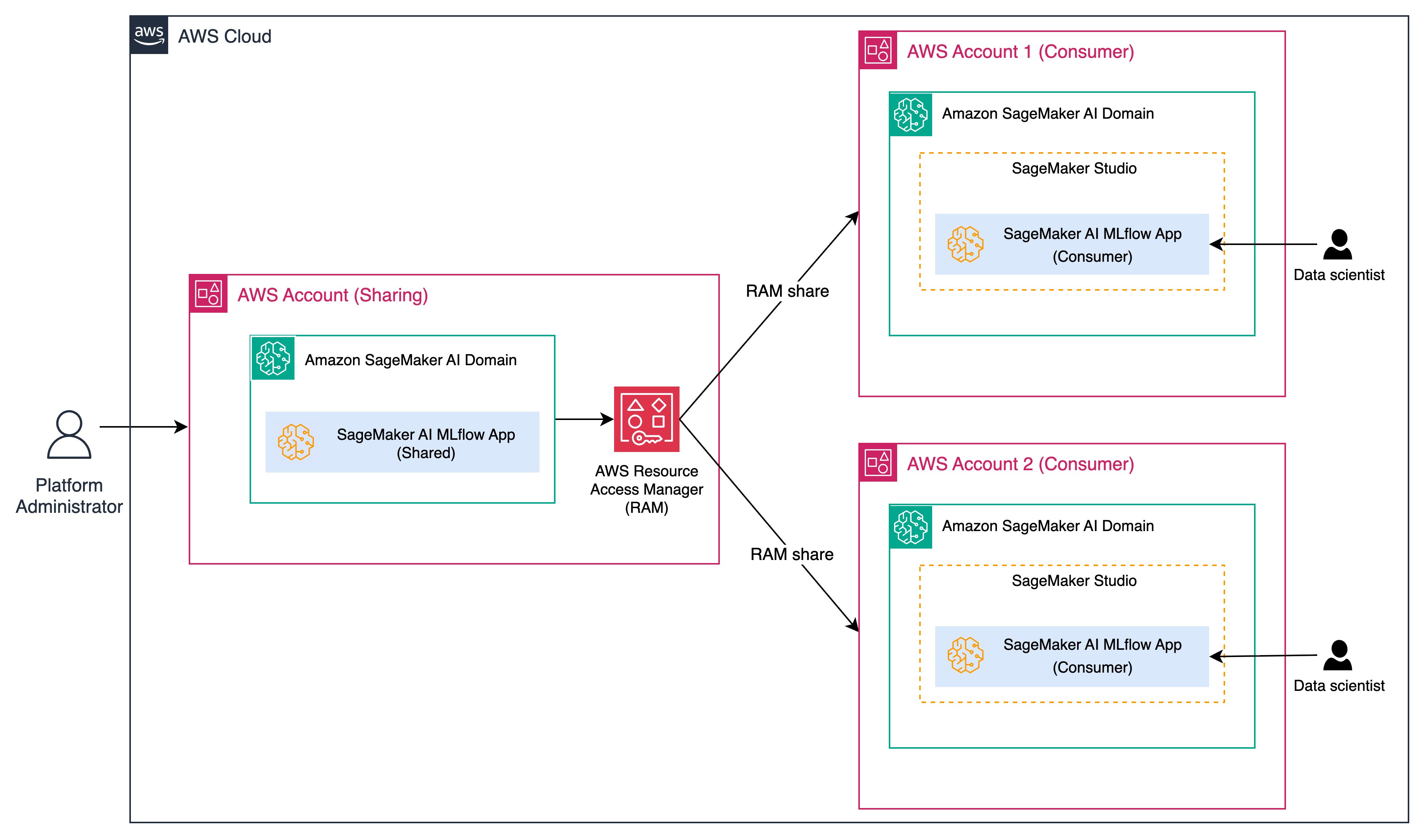
Platform administrators can maintain a centrally managed SageMaker domain to provision and manage MLflow apps, and data scientists in separate usage accounts can securely launch and interact with MLflow apps. Combined with new simplified IAM permissions, enterprises can launch and manage MLflow apps from a central management AWS account. A shared MLflow app allows downstream data scientist consumers to record MLflow experiments and generated AI workloads while maintaining governance, auditability, and compliance from a single platform admin control plane. For more information about cross-account sharing, see Getting Started with AWS RAM.
Integrating SageMaker Pipelines with MLflow
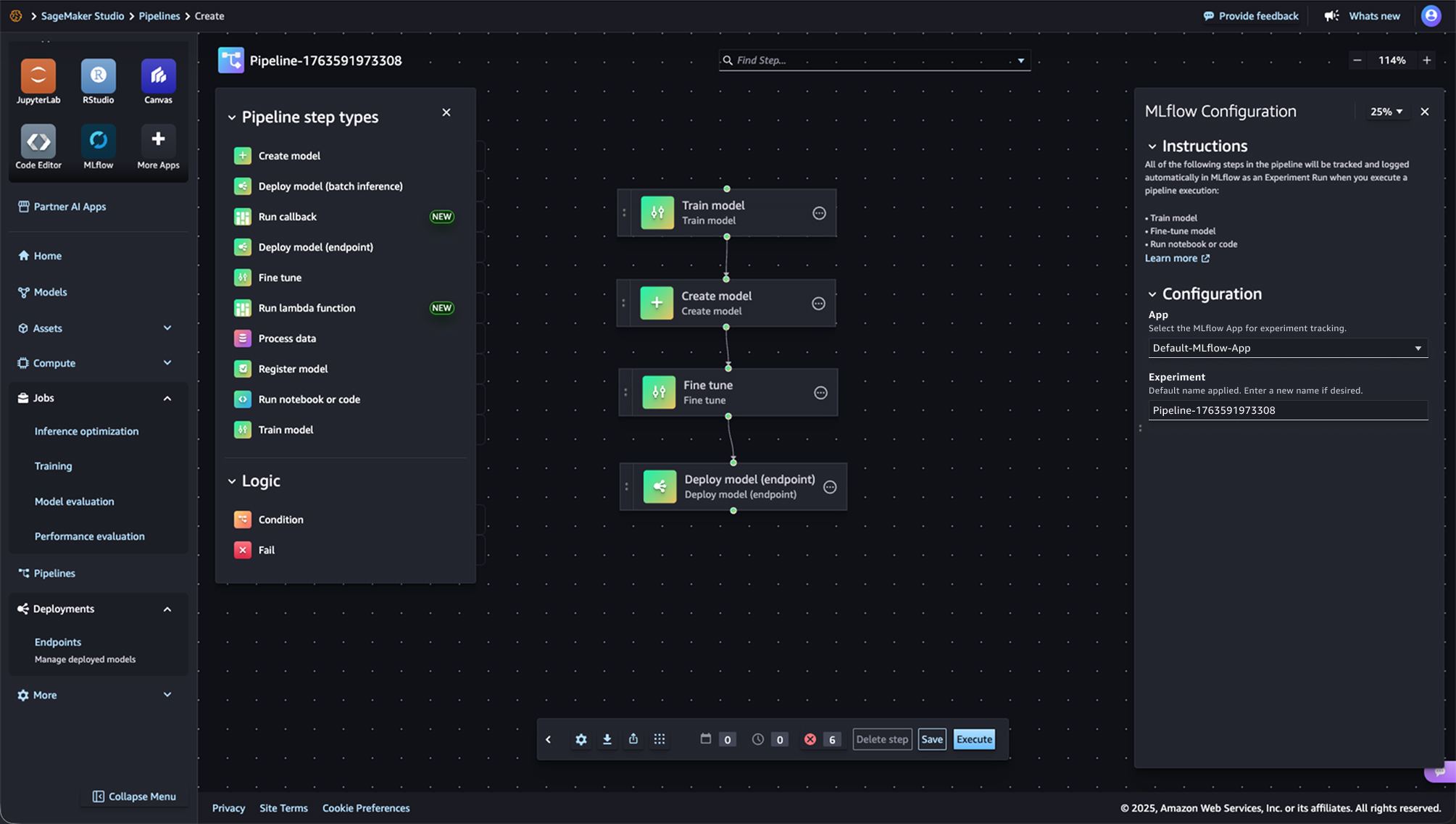
SageMaker Pipelines is integrated with MLflow. SageMaker Pipelines is a serverless workflow orchestration service purpose-built for MLOps and LLMOps automation. Seamlessly build, run, and monitor repeatable end-to-end ML workflows using an intuitive drag-and-drop UI or the Python SDK. From a SageMaker pipeline, a default MLflow app is created if it doesn't already exist, you can define an MLflow experiment name, and metrics, parameters, and artifacts are logged to the MLflow app as defined in the SageMaker pipeline code. The following screenshot shows an example ML pipeline using MLflow.
Customizing SageMaker models and integrating MLflow
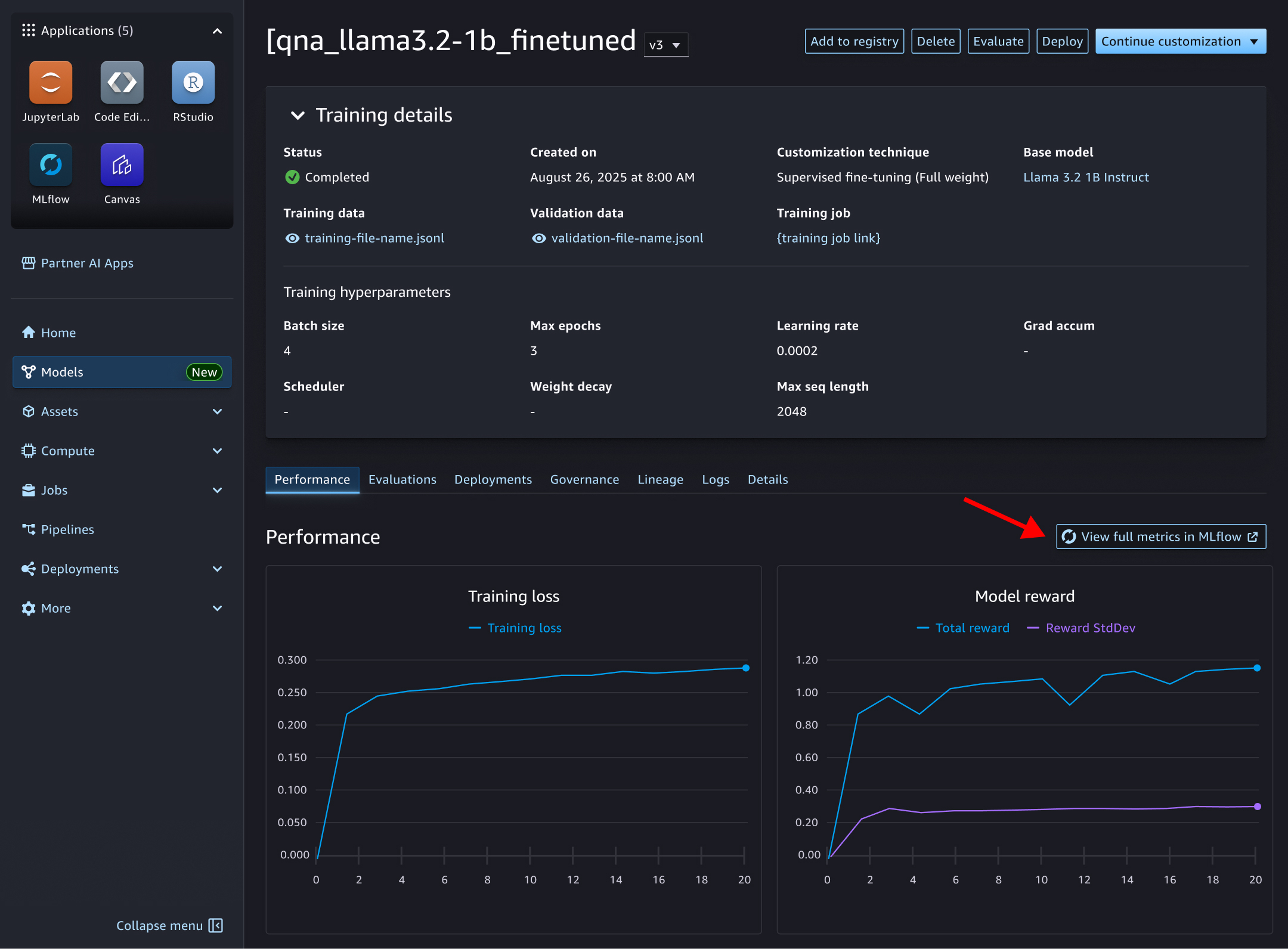
By default, SageMaker model customization is integrated with MLflow, providing automatic linking between model customization jobs and MLflow experiments. When you run a model customization fine-tune job, the default MLflow app is used to select experiments and automatically record metrics, parameters, and artifacts. The SageMaker model customization job page allows you to view metrics retrieved from MLflow and drill down to additional metrics within the MLflow UI, as shown in the following screenshot.
conclusion
These features enable SageMaker AI's new MLflow app to support enterprise-scale ML and generative AI workloads with minimal management effort. You can get started with the examples provided in the GitHub samples repository and AWS Workshop.
The MLflow app is generally available in AWS Regions where SageMaker Studio is available, except GovCloud Regions in China and the US. We invite you to explore new features and experience the increased efficiency and control it brings to your ML projects. Visit the product details page for SageMaker AI with MLflow and get started today by accelerating your generative AI development with managed MLflow on Amazon SageMaker AI. Please submit your feedback to AWS re:Post for SageMaker or through your regular AWS Support contact.
About the author
 Sandeep Ravish I am a GenAI Specialist Solutions Architect at AWS. He works with customers through AIOps efforts across model training, generative AI applications such as agents, and scaling generative AI use cases. We also focus on go-to-market strategies that help AWS build and tailor products to solve industry challenges in the generated AI space. You can connect with Sandeep on LinkedIn to learn more about generative AI solutions.
 Rahul Eashwar iHe is a senior product manager at AWS and leads managed MLflow and partner AI apps within the Amazon SageMaker AIOps team. With over 20 years of experience from startups to enterprise technology, he leverages his entrepreneurial background and MBA from Chicago Booth to build scalable ML platforms that simplify AI adoption for organizations around the world. Connect with Rahul on LinkedIn to learn more about his work in ML platforms and enterprise AI solutions.
 Jessica Liao He is a senior UX designer at AWS and leads the design of MLflow, model governance, and inference within Amazon SageMaker AI, shaping how data scientists evaluate, manage, and deploy models. Her experience designing DNA life science systems brings expertise in handling complex problems and driving human-centered innovation, which she now applies to make machine learning tools more accessible and intuitive through cross-functional collaboration.