AI video generation tools have exploded in recent months, and most of them start with text. Enter the prompt, wait anywhere from 30 seconds to a few minutes, and hope the model renders something that matches what you have in mind. A different workflow is quietly gaining traction among creators who already have the visual assets they need, whether it’s product photography, travel photography, real estate listings, or portfolio work, and simply want to bring them to life. The workflow is Image-to-video AIThis solves a problem that text-to-video models often struggle with: maintaining the exact composition, subject matter, and mood of an existing image while adding natural and intentional movement.
A 3-step workflow that actually respects your time
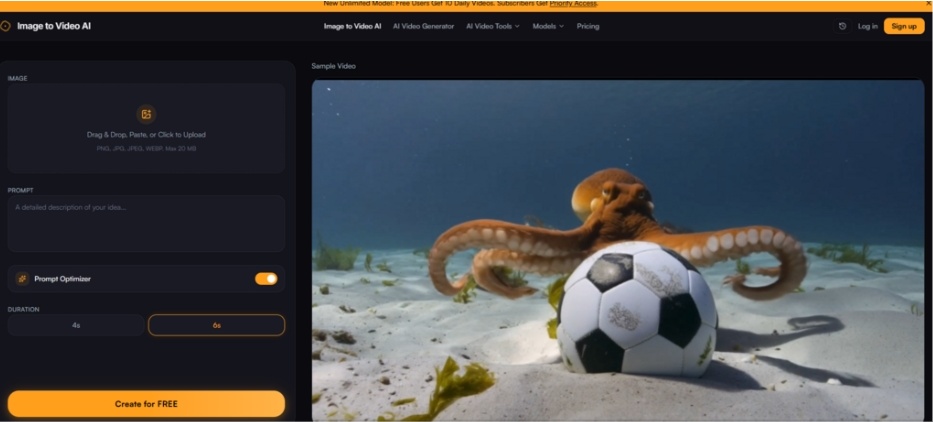
Most AI video tools bury their functionality behind complex parameter panels, model selection dropdowns, and rendering settings that require a computer vision degree to interpret. This platform takes a different approach. The entire process is distilled into three distinct steps, each of which feels intentional rather than stripped down.
Upload an image
The first step is very easy. You can upload JPG, PNG, or WEBP files up to 20 MB. This includes almost any photo taken from a DSLR, smartphone, or e-commerce product shoot. Before the AI does anything, you have the option to crop and frame the image to your desired aspect ratio. This is a small but important point. Many competing tools force you to accept the crop you decide on, potentially ruining your carefully composed shot. Here you can control the configuration of the image before it appears on the model. The interface supports drag and drop, so the upload step takes about the same amount of time as it takes to find the file on your computer.
Add prompts to describe motion
This is where this tool differs from basic animation generators that just apply random pans and zooms. Enter a text prompt that describes exactly how you want the scene to behave. The platform lists specific examples such as “slow camera zoom,” “wind blowing through trees,” “gentle water ripples,” “slow zoom in,” “gentle shaking,” and “flowing water.” The more specific the prompt, the better the results. The engine uses both the photo and the description to generate context-aware animations. In practice, this means you don’t have to guess which motion style to select from the dropdown. It’s describing what you actually want to see.
Generate and download videos in seconds
Click Generate and our AI will turn your photos into dynamic videos. You can preview the results, make adjustments as needed, and download the finished clip. The entire workflow is fast enough that a single image can be repeated multiple times within minutes. This is essential when trying to orchestrate the perfect camera movements and atmospheric effects for client presentations or social media posts.
What the platform actually offers: A practical look
Rather than relying on marketing copy, it’s worth considering what the tool does well, where it falls short, and who benefits most from the trade-offs.
Quality and realism of movement
The platform touts “cinema-quality” output with smooth, realistic motion that rivals paid alternatives. In testing, the results are somewhere between impressive and really useful. For landscape photography, prompts like “gentle water ripples” create subtle, believable surface movement that doesn’t look like a cheap filter. For portraits or product shots, “Slow Camera Zoom” creates a professional, drawn-in effect that feels more like a documentary camera operation than a digital effect. The model seems to understand the spatial relationships within the image. The person standing in the foreground and the mountain in the background move at different perceived speeds during the zoom, adding to the sense of realism.
However, results vary depending on the complexity of the image and the specificity of the prompt. In busy scenes with lots of overlapping elements, the movement can look a little unnatural on second or third viewing. From a real user’s perspective, this tool works best when you treat prompts as directional guides rather than precise specifications. The engine interprets the description along with the visual content of the image, and the interaction between the two determines the final output.
Fast interpretation and creative control
One of the platform’s main claims is that it combines image and text prompts for accurate, context-aware animations. This is not an exaggeration. This model does more than just apply common motion effects to the entire frame. Try to understand what the image contains and how the prompt interacts with those elements. A prompt like “Wind blowing through the trees” produces different results for a forest image and a single potted plant image, with the motion applied locally to the relevant subject rather than uniformly across the frame.
However, the level of control is not infinite. It is not possible to specify exactly which parts of the image will move and which parts will remain stationary. You cannot define keyframes or adjust motion curves. This is not a traditional animation tool. This is an AI generator that independently decides how to interpret instructions. This can be limiting for creators who need pixel-perfect control over every element. For creators who need great results quickly, this tradeoff is more than acceptable.
Output quality and resolution
This platform offers HD output at up to 1080p resolution. In practice, this means your videos will look sharp on social media feeds, websites, and presentation screens. The free tier includes a small watermark on the generated videos, while the paid plans remove it completely. The watermark is unobtrusive, so it won’t obscure the main subject matter or ruin the composition, but it’s noticeable enough that you’ll want to upgrade if you publish professionally.
There is one detail worth noting. Although the platform claims in the hero text on the homepage that the free tier is watermark-free, the FAQ clarifies that the free tier output includes a small watermark. This is a small discrepancy that can cause confusion, but the prices of paid plans are affordable enough that upgrading should not be a big barrier for serious users.
Who will actually benefit from this workflow?
The platform’s use cases span several different creative and commercial scenarios, each with different trade-offs.
real estate and real estate marketing
One user testimonial states that the tool can be used to turn real estate listing photos into cinematic property walkthroughs, and that buyers spend more time viewing property listings with video previews. This is an attractive use case because real estate photography already exists. Agents work with the photos they have, rather than taking new photos for each property. Adding subtle movement to living room shots or backyard views can make a property feel more alive, even without videography. The limitation is that the AI is limited to the motion it can infer from a single image. It cannot simulate walking around the house or looking around a room. It works well as a quick social media teaser or as a supplement to your listing. For a fully virtual tour, you’ll need something more comprehensive.
E-commerce and product photography
Another testimonial claims that adding video previews to product pages increased conversion rates by nearly 40%. This is a tangible, measurable result that aligns with broader e-commerce trends: videos convert at higher rates than static images. This platform makes it very easy to animate your entire catalog without any editing skills. From a practical point of view, this is where this tool shines. Product photos are typically clean, bright, and feature a single subject against a simple background. These are exactly the kinds of images that AI motion models can handle well. Slow zooms and gentle rotations can give your product a tangible feel that can’t be expressed in still photos.
Social media content and brand storytelling
Content creators, marketing managers, and influencers are the platform’s core audience. The ability to turn travel photos, lifestyle shots, or brand visuals into short, cinematic clips in less than a minute is invaluable to anyone managing a content calendar. The free daily credits (10 generations per day for free users) are enough to try out different prompts and styles before subscribing to a paid plan. Paid plans give you priority access, faster generation, and higher resolution models. This is important when producing content at scale.
Platform comparison: quick reference
| side | this platform | Typical alternatives |
| starting point | Upload your image and describe your motion | Please enter the text prompt. I hope it goes well |
| learning curve | Low – 3 steps, no settings to configure | Moderate to Steep – Model Selection, Parameters, and Style Controls |
| creative control | Prompted guided motions based on your images | You have full control if you know what you’re doing but it takes time to learn |
| Consistency of output | Higher for clean and simple images. Changes depending on the complex scene | Varies greatly depending on model and prompt quality |
| Best use case | Enhance existing visual assets | Generate completely new visuals from scratch |
| time per generation | seconds | seconds to minutes |
Practical limitations to be aware of
No tool is perfect. This tool has clear boundaries that are important depending on your use case.
Rapid quality is the biggest factor in output quality. The platform makes it clear that the more specific the prompt, the better the results. In other words, you can’t just upload an image, click generate, and expect magic. You need to think about what movement makes sense for your image and clearly explain it. Ambiguous prompts produce ambiguous results.
Complex scenes may require multiple generations. Images with many overlapping objects, complex textures, or unusual compositions can cause strange motion. The platform encourages you to preview the results and adjust as necessary. This means that the iteration is part of the workflow. From a practical standpoint, add a few more generations to your budget for unwieldy images.
The results may not be the same every time. As with most generative AI models, there is an element of variability. The same image and the same prompt can produce slightly different motions in different runs. This is not a bug, it’s inherent to the behavior of these models, but it’s worth knowing if you want complete frame consistency across a batch of videos.
The free tier includes a watermark. The home page suggests otherwise, but the FAQ makes it clear that the free output includes a small watermark. If you’re publishing professionally, we recommend upgrading to one of our paid plans. Paid plans start at $9.9 per month for 2,000 credits (approximately 200 generations without watermark) or a one-time pack of 200 credits for $9.99.
Conclusion: Practical tools for specific tasks
This is not a replacement for professional video editing software, nor is it intended to be. It’s a concentrated thing AI image to video Generators that solve specific problems. Make existing visual assets more appealing with minimal effort. For real estate agents, e-commerce store owners, social media managers, and content creators who need to create videos from images at scale, the workflow is fast, the learning curve is shallow, and the results are publishable. For filmmakers, animators, or anyone who needs frame-by-frame control, this is the wrong tool for the job. But that’s okay. Because this tool is not made for them.
This platform does one thing and does it pretty well. Respect your time, provide clear feedback, and allow for rapid iteration. In a world full of AI tools that promise everything and cause confusion, that clarity is valuable.