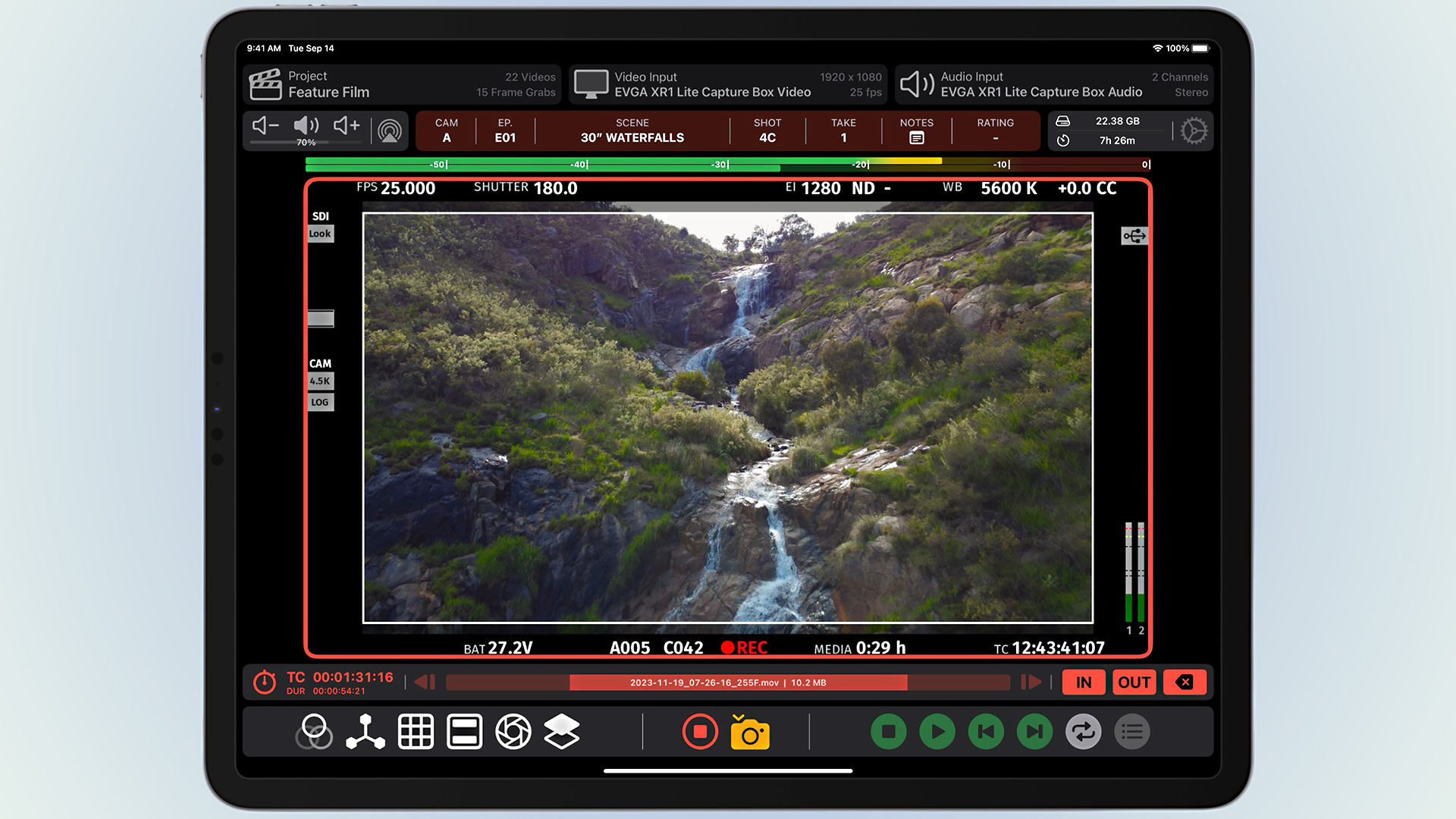

The Video Assist iPad app received a major update at NAB 2026, introducing advanced masks, record trigger support for Canon C50 and C400 cameras, enhanced metadata extraction for all RED cameras and Sony Venice, as well as new VTR reporting functionality for generating end-of-day PDF reports directly on set.
The Video Assist app was built by independent developer and former VCR operator Bradley Andrew, and has gained a reputation as a strong contender since we first covered it in 2023. The app connects to your camera or wireless video system via a UVC capture card (HDMI cards typically cost $20 to $100, SDI cards cost $200 to $650) and captures LUTs, live compositing, focus peaking, false color, zebra, anamorphic desqueeze and audio metering. It also supports clean video output via a USB-C to HDMI/DisplayPort adapter or AirPlay to drive another director or client monitor. This latest update, timed for NAB 2026, pushes the app even further into the realm of professional production.

Metadata extraction expands to RED and Sony Venice
Video Assist’s metadata extraction system uses computer vision to read status information displayed in a camera’s video feed. Rather than relying on proprietary data protocols, the app “reads” the overlay that the camera outputs with the image. Previously limited to ARRI cameras, this feature now supports all RED cameras and Sony Venice.
Extracted metadata fields include clip name, frame rate, lens, iris, ND filter, exposure index, shutter, white balance, color correction, and start/end timecode. Camera filenames are also detected and automatically applied to clips recorded within Video Assist, ensuring naming consistency between the original camera media and the app recording. For VTR operators and DITs managing footage across multiple cameras, this type of automatic metadata synchronization can save significant time.

Canon C50 and C400 support record triggers
Another computer vision-powered feature, Record Trigger, allows the app to automatically start and stop recording when it detects that a connected camera is rotating. The system already supported ARRI, RED, Sony Venice, Sony Burano, Blackmagic, and DJI cameras. This update adds Canon C50 and Canon C400 with support for all video output display modes. According to the developer, other Canon cameras that use the same output system should also be compatible.

VTR report and multiple masks
The new VTR Report feature allows you to generate a PDF document containing clip thumbnails, metadata, clip information, camera information, and notes for each recorded clip. It’s designed for sharing selected takes in post-production or creating technical reports at the end of a shooting day, without the need for a dedicated DIT to handle this separately.
Mask effects have also been expanded to support three separate masks simultaneously with independent controls for shading, color, and line weight. This means you can overlay multiple frame line guides on a set at once. For example, you can display both a 2.39:1 theatrical crop and a 16:9 delivery format in the same feed.

Price and availability
Video Assist is available for free download from the App Store. The free version runs in demo mode (with watermarks) for hardware compatibility testing. The basic subscription costs $129.99 per year, while the Pro subscription adds LUT, focus peaking, false color, zebra, compositing, ProRes recording, and metadata extraction for $199.99 per year. If you’re at NAB 2026, check out Video Assist at the Accsoon booth (#C7338).
Have you used Video Assist in your productions? Or are you considering it as a lightweight alternative to a traditional Video Assist setup? Feel free to let us know in the comments section below.