Modern browsers are so powerful that in many cases you don’t need to install another application on your computer to fix the problem. Simply launching Chrome or Firefox is sufficient. There will always be a service that completes the task online.
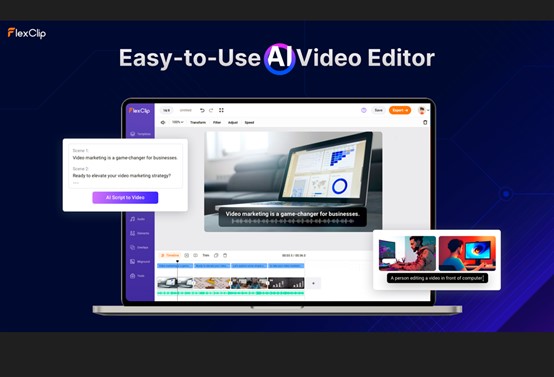
What I want to cover in this article is flex clip It is a service that helps you edit videos online. Of course, you should expect non-Adobe or DaVinci quality from such a solution. But it can solve basic and many specialized tasks. So what can FlexClip do?
start of work
After authenticating with the service, you can start creating videos from scratch or choose one of hundreds of templates on various topics. This option is great if you have an idea for a video but want some experience creating quality effects and transitions.
Selecting a template takes you to its preview. You can also see his other FlexClip templates with similar themes here. If all is well, customization Click the button to proceed to video editing.
video editor
The editor itself does not interfere with your work. Even beginners will find it easy to understand. However, professionals may need more than just a few basic features.
Like any other video editor, you can add videos here and perform various operations such as cropping, splitting, changing speed and aspect ratio, adding watermarks, filters, color correction, etc. You can also add audio and voice actors.
Unfortunately FlexClip cannot handle multiple tracks. It doesn’t even have a separate audio track. Everything is placed on a single timeline.
Otherwise, you can do simple edits, swap clips, add various effects, and more. I would like to talk about some of them below.
What you can add to your project
template
Whether you started your project from scratch or already applied a ready-made template, you can always add templates to your videos with FlexClip.
Templates are ready-made video projects with transitions, special effects, music, and other features. Replace the text, adjust the slides yourself, and your video is ready.
text and overlay
You can add various text inserts to your project. These are both titles and text elements that you add to your clip.
video, photo, music
Here, unlike the media section, you can add stock videos, photos, and audio. These are free additions to your FlexClip subscription. Each section features category navigation and a handy search function to find exactly what you need.
element
If you’re familiar with the word ‘clip art’, you’ll find it right here. This section contains various decorative things like buttons, shapes, arrows, masks, frames and other shape shapes.
background
Background – Background for any application. What I like about FlexClip is that it offers a video as a background. This is the usual background color addition. There are also categorizations.
AI video work
Like all self-respecting modern tools, FlexClip supports artificial intelligence. There are three types of generators.
AI text to video
To do this, go to: tool select a section From text to video.input The prompt will be displayed in any language and a video track will be added to your project based on it.
Don’t expect anything supernatural from this tool. Unlike fully artificial intelligence video generation, FlexClip selects the best video from your library and adds it to your project.
If you have no ideas, click Example of use; This service provides a stash.
AI video script
In the same section, you should go to the AI Video Script Tool, briefly describe your video idea, and choose the length short, medium, or long.
And clicking the Generate button will create a script for the upcoming video, split into scenes showing the announcer’s location and words.
Scripts can be easily added to previous tools to generate videos.
AI image generator
FlexClip allows you to generate images based on stable diffusion. To do this, you need to write a request to the generator with the corresponding tool and select the style and size of the image.
The result is two images that you can add to your project or generate new images.
video export
Once your masterpiece is ready, you can watch it online or instantly export it to video or GIF format. Here are my thoughts while writing this review. I made no effort at all.
I enjoyed working with FlexClip, but there are also more robust online video editors. However, you can add lots of cool templates and stock clips to your projects.
Overall, this is a great option for making quick videos that aren’t too complicated. This service is suitable for beginners and home users.