

Chatbots continue to dominate day-to-day AI-based tasks. General-purpose models with various pricing tiers are in the spotlight, but many specialized models also exist, making chatbot options in 2026 more diverse than ever.
Chatbots simulate human interaction through text or voice communication, using AI and natural language processing to converse with users. They provide cost-effective automation for businesses, scalability during periods of fluctuating demand and improved user experiences.
These tools are staples in customer-facing environments characterized by repetitive, relatively simple exchanges, such as user support, customer service and sales. Because today’s AI chatbots offer a range of features and integrations, choosing the right platform is more critical and nuanced than ever.
How I evaluated leading AI chatbots
This article tests multiple AI chatbots using a single prompt, evaluating their performance across the following criteria:
- Quality and relevance of responses.
- Reliability.
- Rate limits.
- Overall UI.
- Support options.
- Pricing.
- Unique or noteworthy features.
I needed a broad prompt that would showcase the chatbots’ strengths and idiosyncrasies. To this end, I selected the open-ended query “How has rock-and-roll music changed in the last 40 years?” Chatbots can respond differently to slightly reworded phrases, so I used this exact phrasing for each evaluation to ensure a fair, consistent assessment of each model’s performance.
When evaluating the chatbot outputs, I considered various possibilities that they could discuss in their responses, such as the following:
- Subgenres, such as punk, post-punk, hard rock, yacht rock, grunge and pop rock.
- Styles, such as guitar-driven vs. vocals-driven approaches.
- Technological considerations, such as innovations in music production and sound engineering.
- Listening methods, such as the evolution from vinyl to CDs to streaming.
- Business elements, such as indie labels vs. major record companies.
6 general-use AI chatbots to consider in 2026
The following are my evaluations of six leading AI chatbot options: ChatGPT, Claude, DeepSeek, Google Gemini, Microsoft Copilot and Perplexity. Because the scope and types of user queries vary extensively, and each system has its own strengths, this list is unranked.
ChatGPT
ChatGPT, developed by OpenAI, is one of the best-known AI chatbots on the market. Its specialized features, including problem-solving, flexibility and language understanding, make it an attractive option for many businesses.
ChatGPT’s pricing varies by access, speed and features, with a good balance between individual-use plans and enterprise-level management. They include the following:
- Free tier. Limited use and basic access.
- Go. $8 a month, aimed at individuals seeking cheaper access to certain expanded features.
- Plus. $20 a month, aimed at individuals who need more access to features and faster responses.
- Pro. $100 a month, aimed at heavy or professional use with higher limits and more advanced features.
- Business. $20 per user a month when billed annually, aimed at teams. It includes ChatGPT and Codex. OpenAI also offers a Business Codex-only option with use-based pricing.
- Enterprise. Custom pricing for larger organizations that need administrative, security and compliance controls.
Like other chatbots, each tier unlocks access to faster models and additional features. Note that API access is priced differently. Pricing varies by region.
ChatGPT’s response to my query was comprehensive and broader than any other chatbot’s. It analyzed rock and roll’s changes in multiple contexts, including technological advancements, genres, cultural shifts, the decline of older rock styles and the subsequent rise of nostalgia for certain rock influences. It even examined changes in perceptions and images of rock musicians.
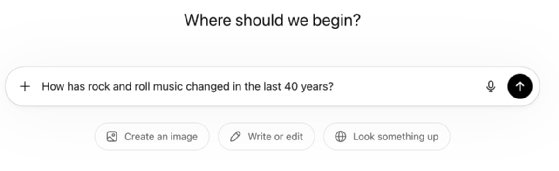
ChatGPT Plus opens with the simple prompt starter, “Ask anything,” and offers buttons for more focused queries, such as “Create an image,” “Write or edit” and “Look something up.” The interface is plain and distraction-free — a refreshing contrast to applications with overloaded toolbars and multiple windows.
However, ChatGPT does not cite sources, and it provides no indication of a response’s accuracy. It also offers no immediate access to help or FAQs, features common in many other chatbots. The OpenAI Discord community can serve as a resource for troubleshooting and support.
Claude
Claude AI is a general-purpose chatbot with a conversational tone. Its parent company, Anthropic, focuses heavily on ethical and safe practices, making the tool attractive to businesses. The assistant and model family are built for natural conversation, reasoning, summarization, analysis and coding. It’s particularly known for handling long context, structured outputs and productivity workflows. It offers API integrations with enterprise tools.
Claude has three longstanding model tiers, each with different levels of performance and capability:
- Claude Haiku 4.5 is a fast, capable model suitable for user-facing applications and interacting with large data sources, with sufficient coding capabilities.
- Claude Sonnet 4.6 is a more advanced model that can handle reasoning challenges and more complex coding.
- Claude Opus 4.8 is Anthropic’s top-tier model; it excels at language comprehension, content creation and coding, offering the same speed as Sonnet but with greater depth.
Claude Sonnet touts a “computer use” capability that enables the AI model to interact with a computer like a human user: moving the cursor, filling out forms and navigating to webpages. This is a common but relatively new feature of AI models.
And in June 2026, Claude introduced Fable 5, a Mythos-class model designed with safeguards for longer and more complex projects. Fable 5 was available to the public (before it became subject to dispute with the U.S. government) through Anthropic’s consumption-based Enterprise plan — one of three pricing tiers, along with individual and team tiers. There’s also a separate API pricing model.
Individual plans include the following:
-
- Free. $0, limited use.
- Pro. $20 a month, standard use and access.
- Max 5x. $100 a month, with five times the Pro capacity per session.
- Max 20x. $200 a month, with 20 times the Pro capacity per session.
The Team tier adds collaboration, administrative controls and shared workspace features. Team plans require at least five users and include the following two options that organizations can mix and match seats between:
-
- Team Standard. $25 per seat a month.
- Team Premium. $100 per seat a month, with more use and extended capacities designed for power users.
The enterprise tier has custom pricing for larger organizations that need additional security, compliance and governance controls. It includes all features found in the Team tier.
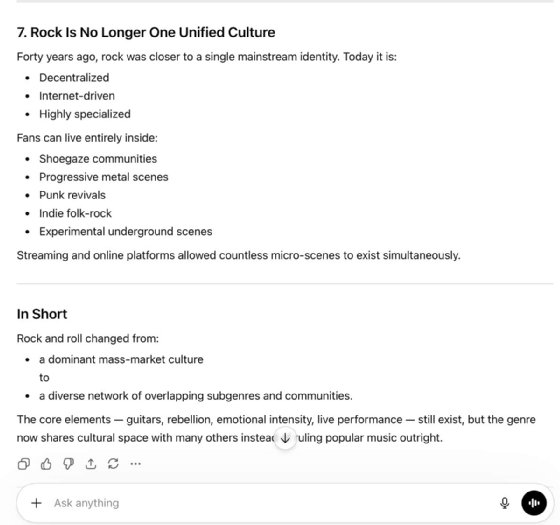
Claude Haiku, available through a Claude Pro subscription, quickly handled my rock music query, organizing its response by theme, taking different decades into account. However, while Claude offered many examples of bands and musical styles, its response was far more limited than Perplexity’s, and it lacked citations or sources. Claude’s response also didn’t address major changes such as digital recording, digital distribution and the advent of social media.
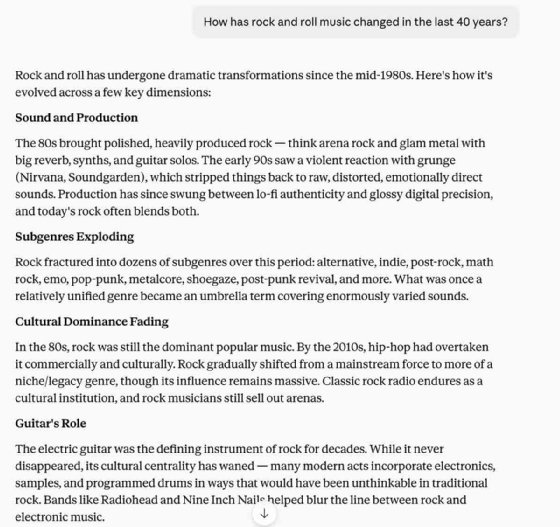
Claude’s UI is simple, letting users quickly enter queries and evaluate responses without unnecessary screen clutter. The Help link directs users to a series of clear, concise articles covering different aspects of using the chatbot. Claude AI’s active Reddit group offers additional opportunities for community support and discussions.
Similar to ChatGPT, Claude also keeps a record of past conversations, making it easy to revisit previously researched topics. This feature is handy for users who frequently reference company data in repeated queries, for example, in sales trend analysis and customer service contexts.
DeepSeek
DeepSeek, a China-based AI company backed by High-Flyer, offers a problem-solving AI tool that breaks issues down into steps, making it especially good for math, logic, coding and other sequential tasks. DeepSeek’s AI models are known for their high performance and low cost, reportedly costing far less to train than rival products.
DeepSeek’s consumer chat experience is a free web- or app-based service with access to flagship models DeepSeek-R1 and DeepSeek-V3. It also offers a developer platform for custom workflows and experimentation, including specialized model variants for coding and math that improve its capabilities for specific tasks. Technical researchers, builders and model tinkerers can compare behaviors, run local experiments and build derivatives on top of the released models. It uses the OpenAI-compatible API structure.
DeepSeek offers a different approach to model and data management. Its models, weights and technical reports are available to the public and published under the permissive MIT license. This lets developers inspect, run and modify the models rather than having to work with them as black boxes. Furthermore, organizations can deploy DeepSeek on their own infrastructure for additional control and privacy.
DeepSeek’s monetization model is based on the API and enterprise or developer use. The vendor makes money through token-based API use rather than monthly seat licenses. One pricing example shows the DeepSeek-V3 chat model at $0.14 per 1 million input tokens and $0.28 per 1 million output tokens. DeepSeek-V3 is the low-cost, general-purpose model.
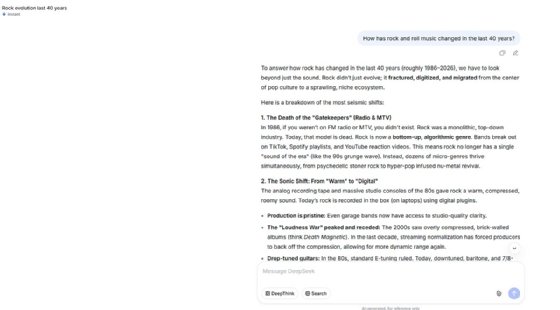
You must create an account with DeepSeek chat to use its features. Unfortunately, DeepSeek’s web interface wouldn’t let me create an account, even though I use a standard OS on my Mac and a Chrome browser. It kept returning a “Current device environment error.”
Google Gemini
Google Gemini operates using two levels of model capability: Flash and Pro. The Flash level handles quick answers and high-volume tasks at a lower price, while Pro provides deeper reasoning and more complex prompts.
Gemini is designed to handle information queries and document analysis, and its video, image and music generation capabilities expand its use beyond text. Another standout feature is the ability to write and run Python code directly within the UI, making it an excellent choice for developers.
Google Gemini offers a consumer tier and an API integration tier. The consumer tier has four levels:
- Free. Basic access to Gemini with limited use and storage.
- AI Plus. $4.99 a month, with times the use limits of the free plan and access to more features.
- AI Pro. $19.99 a month, with four times higher use limits than with the free plan and access to more features.
- AI Ultra. $99.99 a month, with 20 times higher use limits and advanced features compared to the pro plan.
The API tier varies by model and token use, depending on enterprise integration requirements.
Gemini handled my query differently from chatbots like Claude and Perplexity. Rather than organizing the response chronologically, it offered a genre-focused analysis. For example, it noted the decline of classic rock while acknowledging its continuing influence and examined the emergence of alt-rock, indie and grunge. Unlike other chatbots, it also mentioned the popularity of electronic music and K-pop.

Gemini’s UI is simple, with easy access to help resources. Like other Google products, Gemini’s interface is polished and straightforward. Multiple disclaimers note that Gemini can make mistakes and encourage users to double-check its responses — a refreshing level of transparency.
Gemini’s primary access is using a chat-like interface alongside a standard web page. You can also “pop out” the chat window to create more workspace. If you access Gemini on a loaded page, it assumes you’re asking about the topic found on that page, which streamlines the interface and reduces your effort.
Gemini’s query responses are framed as drafts for content generation, with the interface offering multiple variations to choose from. This is particularly useful for users who want to compare output options side by side.
Gemini is integrated into standard Google tools, including Chrome. It’s also available using the Google Apps palette in Gmail, Google Calendar and other applications. Once a user signs in to any Google app, they’re also signed in to Gemini, making it well-suited to organizations that already use the Google ecosystem.
Microsoft Copilot
One of Microsoft’s biggest advantages is its massive and comprehensive ecosystem. Microsoft creates a range of services and applications, from Azure Cloud and Office to server OSes. Microsoft also does an excellent job integrating these capabilities across its entire product line, and its AI offering Copilot is a prime example.
Copilot integrates with Microsoft Office products, giving the chatbot unique functionalities and enterprise-grade capabilities to streamline workflows. You can turn Copilot on and off for use in Microsoft tools, such as Word and Excel.
Microsoft Copilot offers several pricing tiers, ranging from consumer to enterprise. Consumer plans include the following:
-
- Copilot Free. Basic access in Windows and web experiences.
- Copilot Pro. $20 per user a month for premium features and Microsoft 365 integration.
Business plans include the following:
-
- Copilot Chat. Comes with many Microsoft 365 business plans and provides basic AI chat and agents.
- Microsoft 365 Copilot Business. $18 per user a month for some business plans.
- Microsoft 365 Copilot. $30 per user a month with some enterprise plans.
Licensing varies extensively depending on other product subscriptions. Note that GitHub Copilot is licensed separately.
Copilot’s response to my query differed from other chatbots. First, it analyzed changes in rock music through the 2020s, whereas other chatbots broke off their analysis around 2010. Like other responses, Copilot acknowledged subgenres and gave band examples through the decades. However, its overall response was less complete, lacking any mention of key topics, such as streaming, digitization and the business side of rock music.
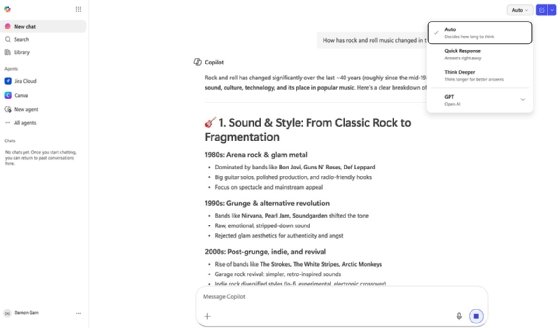
Copilot’s help features were concise and effective. An FAQ section in the login info bar, offers advice on interacting with Copilot, responsible AI, chat history and more.
Like many Microsoft products, Copilot includes an extensive user community. The Microsoft 365 Copilot community is a great starting point, and you’ll also find plenty of active Reddit groups.
Perplexity
Perplexity focuses on personalized information searches and retrieval, making it a strong alternative to traditional search engines. Unlike typical search engines, which return a list of links for users to investigate on their own, Perplexity summarizes search results and cites sources.
Like other services, the more you pay for Perplexity, the better your access and the more features you get. This approach offers flexibility. Beginning with Perplexity’s free tier is an easy win, although enterprises will quickly lean into the governance and control aspects of the paid Business tiers.
Individual plan options include the following:
-
- Free. No subscription, but it includes limited access.
- Pro. $17 a month when billed annually.
- Max. $167 a month when billed annually.
Business plan options include the following:
-
- Enterprise Pro. $34 per seat a month when billed annually.
- Enterprise Max. $271 per seat a month when billed annually.
Pro-level plans include access to Perplexity Computer, an orchestrator for handling complex tasks, as well as the latest AI models and premium data sources. Max-level access adds higher usage limits, more Perplexity Computer credits, massive file handling and priority access to new features. Enterprise-level plans add identity and access management controls and configurable settings. Discounted government pricing is also available.
Perplexity Pro organized its response to my music prompt chronologically. It discussed subgenres in the 1980s, the grunge movement in the 1990s, and the expansion of alt-rock and indie rock in the 1990s and early 2000s. It then discussed shifts in music consumption, such as digital distribution methods and the role of social media in sharing music. It concluded with a discussion of the resurgence of classic rock and the renewed interest in traditional listening formats, especially vinyl.
Perplexity’s response said rock and roll continues to be both experimental and rebellious, while taking advantage of opportunities in digital creation and consumption.
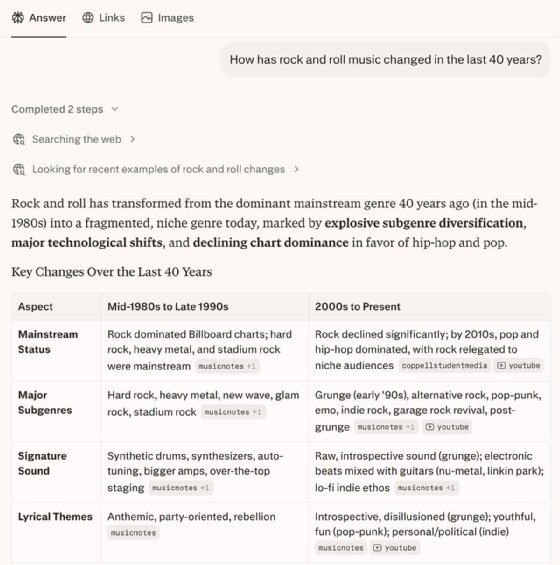
Perplexity has a straightforward interface, resulting in a smooth, user-friendly experience. The response was relevant and directly answered the query, and I appreciated that Perplexity’s summarizations included citations. In my day-to-day use of Perplexity, I often follow the links in its citations to delve deeper into topics. I also regularly use the Spaces feature to organize queries, especially those that I work with long-term or intermittently.
The interface offers easy access to help, including FAQs and keyboard shortcuts. The UI also allows file exports, with the results provided in DOCX, Markdown and PDF formats. Perplexity maintains an active Discord channel and and service uptime is reliable.
Perplexity remains one of my most-used tools on my business MacBook Pro.
AI chatbot specialization
Many AI tools include chatbot interfaces but are specialized for particular tasks, such as writing, analysis, automation, communication and coding, rather than general use. Specializing in certain tasks helps decision-makers understand the best use of that tool. Furthermore, some general-use chatbots perform better at certain tasks than others. The following are some categories and example tools:
- Sales and marketing. Jasper and Salesforce Einstein.
- Data analysis. ChatGPT, Microsoft Copilot and Tableau AI.
- Writing and editing. Grammarly, ChatGPT and Claude.
- Research. Perplexity and Elicit.
- Coding. GitHub Copilot, Codeium, Cursor and Claude.
- Imaging. DALL-E and Adobe Firefly.
- Productivity. Microsoft Copilot, Notion AI and Google Gemini.
General-purpose chatbots aim to do many things well, while specialized AI tools often go deeper into a single workflow. Coding remains one of the best examples of AI tool specialization. While virtually any AI tool can deliver code, services like GitHub Copilot will typically deliver far better results than an AI tool like Perplexity or Jasper. Most organizations select multiple specialized tools for specific teams, such as developers or marketing departments.
Choosing the best AI chatbot for your needs
AI chatbot providers sometimes struggle to establish a unique market identity or niche. To ensure you choose the right product for your organization, consider your needs and match them to the chatbot’s strengths. Many specialized AI chatbots deliver optimized results for specific workflows and audiences. For example, while not reviewed in this article, Jasper AI specifically focuses on writing marketing content. Others, such as DeepSeek, offer functionality around privacy, customizability and experimentation.
Start by identifying which features matter most for your use case. For example, Gemini offers integration with other Google products and extensive Python support, which might be of interest for technical workflows and companies already using the Google ecosystem. Likewise, if citations are essential, Perplexity AI is an attractive option thanks to its sourced responses.
Conducting a test like the one in this article — testing the same queries across multiple platforms — can help you assess which best fits your needs. Pay attention to the depth and breadth of responses, and run the same query multiple times, perhaps on different days, to check for consistency and relevance.
Note that selecting different models within each chatbot service can drastically affect performance and the quality of results. Free services will provide generic capabilities, but it might be worth paying for upgraded capabilities for important queries or tasks.
While pricing is remarkably similar across many vendors, tiered systems with access restrictions and performance benefits can affect cost effectiveness. Evaluate each vendor’s tiers to ensure you can get the features you need at a reasonable price.
Finally, remember to consider the chatbot from the user’s perspective. The best chatbot isn’t just technically capable — it also needs to feel approachable and intuitive. A good interface, effective APIs and a conversational demeanor go a long way toward getting employees and customers comfortable using AI chatbots.
Damon Garn owns Cogspinner Coaction and provides freelance IT writing and editing services. He has written multiple CompTIA study guides, including the Linux+, Cloud Essentials+ and Server+ guides, and contributes extensively to Informa TechTarget and CompTIA Blogs.

