

If you want to convert your script to video, AI Story Video Generator can save you a lot of time. It helps you build a sequence of scenes with a better flow instead of creating one short clip at a time. Videoinu’s AI story video generator is built for such story-first workflows.
What is AI Story Video Generator?
Therefore, it is useful for purposes other than entertainment. It can also be used for educational videos, explanatory stories, lesson content, and brand storytelling. Videoinu’s page says it specifically supports short stories, educational scripts, and creative stories.
Why use Videoinu for story videos?
Videoinu’s AI story video generator is designed around written stories and multi-scene output. The official page explains that the example begins with a written story or script, which turns into a series of scenes with visual continuity. This is an important difference from standard text-to-video conversion tools, which often focus on a single clip.
Another useful part of the workflow is that Videoinu says it uses multiple AI video models for different parts of the storytelling process, such as scene creation and transitions. The page also says that this multi-model approach allows story videos to feel more structured and intentional than the output of a single model.
video dog It also provides access to many AI video models, including Sora, allowing users to explore different styles and results in one place. Its main appeal is not just one model name, but a simpler workflow for converting ideas into videos and improving them over time.
How to use AI story video generator with Videoinu
Step 1: Write the story or script
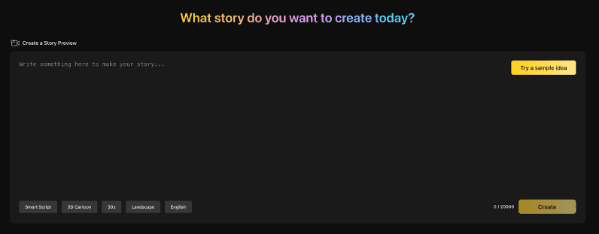
Let’s start with the story itself. Videoinu’s official workflow begins by entering a story idea, plot outline, or structured screenplay. This could be a short story, a lesson script, a branded story, or a rough outline of a scene.
Keep it simple at first. You don’t need a perfect script. A short scene-by-scene synopsis is often enough to get started.
for example:
- A child finds a lost robot in the forest
- they become friends and go home together
- A storm begins and they hide in an old hut
- Robot reveals message from another world
This is a good enough structure for a first test.
Step 2: Define story flow and visual style
Once your script is ready, it’s time to shape the flow of your video. According to Videoinu, this step includes defining pacing, tone, and scene transitions. Now decide whether you want your story to be gentle, dramatic, playful, cinematic, or educational.
This step is important because your story video needs more than great visuals. They need rhythm. A fast product video feels different than a warm storybook or classroom explanation.
You can think about questions such as:
- Should the scene move quickly or slowly?
- Is it better to be upbeat or emotional?
- Should transitions feel smooth, sharp, or dramatic?
- Should the visuals be realistic, animated, or stylized?
Videoinu says that at this stage it chooses the AI model that best fits the continuity of the story and supports more consistent results.
Step 3: Generate the story video
Then generate the video. Videoinu’s page describes this step as generating a story video, previewing each scene, and downloading the final result.
This is where the story starts to become visual. Instead of reading the script as text, you can now observe how the scenes connect.
Don’t expect your first version to be perfect. With story-based AI tools, the first pass is often best used as a draft. The value is that you can immediately see if the pacing, scene order, and visual direction are appropriate.
Step 4: Check the scene flow
This is the most important step for your story’s content. Watch the video carefully and ask questions like:
- Do the scenes feel connected?
- Does the tempo match the story?
- Is the tone consistent from beginning to end?
- Does the result feel like a real story and not a random clip?
Videoinu repeatedly emphasizes continuity and story flow on its pages and user reviews. Some reviews specifically mention that the output feels structured rather than random, and that videos feel like stories rather than disconnected clips.
That’s exactly what you need to check here.
Step 5: Refine and build the final version
After review, improve the script, pacing, or visual presentation and generate again. Videoinu also states that the generator works best with scene-based segments, which can be combined into longer videos on the platform.
This means that the best workflows are usually iterative. Build one version, review, improve, and extend it. For long content, we recommend breaking your story into sections instead of forcing everything into one long generation.
Tips to improve your story video results
A few simple habits can improve your Story videos.
Start with a clear structure. It’s easier for AI to turn even a basic three- or five-part story into a coherent video than loose paragraphs with no sequence.
I will write about each scene. Story generation works better when each part has a purpose.
Keep your tone consistent. The result can feel like a mess, with the first half feeling like a fairy tale and the second half feeling like a dark thriller.
Let’s think about migration. This is not a minor detail since Videoinu specifically includes scene transitions as part of its setup. Smooth transitions make the entire video look more intentional.
Use the first output as a draft. The first version will help you check the pace and flow. The best results are often achieved after one or two touch-ups.
What can you create with AI Story Video Generator?
Story-based AI video tools are useful for many formats.
Create short narrative videos for social media. You can turn your lesson scripts into educational videos. Instead of direct sales, you can build a brand story that explains your ideas through storytelling. Videoinu reviews mention use cases such as pre-visualizing story ideas, creating lesson videos, narrative-style brand videos, and helping writers convert stories into visual format without using editing software.
This scope is one of the reasons why the Story Video tool is different from regular text-to-video tools. It’s not just about looking good. These are meant to help the viewer follow the idea.
final thoughts
The AI Story Video Generator works best when you treat it as a storytelling tool, not just a clip creation tool. Start with a script, shape the pace and style, generate drafts, and adjust scenes until your video feels consistent. Videoinu is built around that process, making it a practical option for story-driven video creation.
FAQ
What is AI Story Video Generator?
This is a tool that converts written stories and scripts into structured videos. Videoinu defines it as a way to create story-driven videos with scene order and narrative flow.
How is it different from regular text to video conversion?
Regular text to video conversion usually focuses on a single clip. Videoinu says its AI story video generator focuses instead on scene order and story flow.
Can I use long scripts?
yes. Videoinu’s FAQ states that you can input longer scripts to produce multi-scene story videos.
Is it suitable for educational videos?
yes. Videoinu says the tool is suitable for education, training, and explainer-style story videos.
Do I need video editing experience?
no. According to Videoinu, the platform is built to work even for users with no editing experience, as it automatically manages the visual storytelling process.



