
Many companies have large volumes of paper or electronic documents that contain untapped business intelligence. With the advancement of generative AI, various large language models can be used to accurately extract relevant data from these documents. This post demonstrates an intelligent document processing pipeline that consists of both on-demand inference and batch inference options on Amazon Bedrock to enable the flexibility on the document processing time and cost. For time-sensitive requests, one can use the on-demand inference option, while the batch inference option is most cost optimized. It also explains how to dynamically specify the large language model and prompts at the document level, enabling you to extract data from multiple types of documents using the same pipelines.
Solution overview
If you, like one of our customers, have hundreds of millions land lease documents in scanned PDF format (PDF that contains only images without editable text, e.g. in this case, scanned land lease saved as PDF) in the backlog, and new documents are still piling up every day, this is a solution you can use to effectively extract data from these documents. As shown in the following diagram, this solution builds two inference pipelines, on-demand and batch, with a mechanism to invoke them dynamically. By using effectively designed prompts managed in Amazon Bedrock Prompt Management, the data can be extracted and standardized from scan PDFs, which often have varying formats and conventions, or from text files.
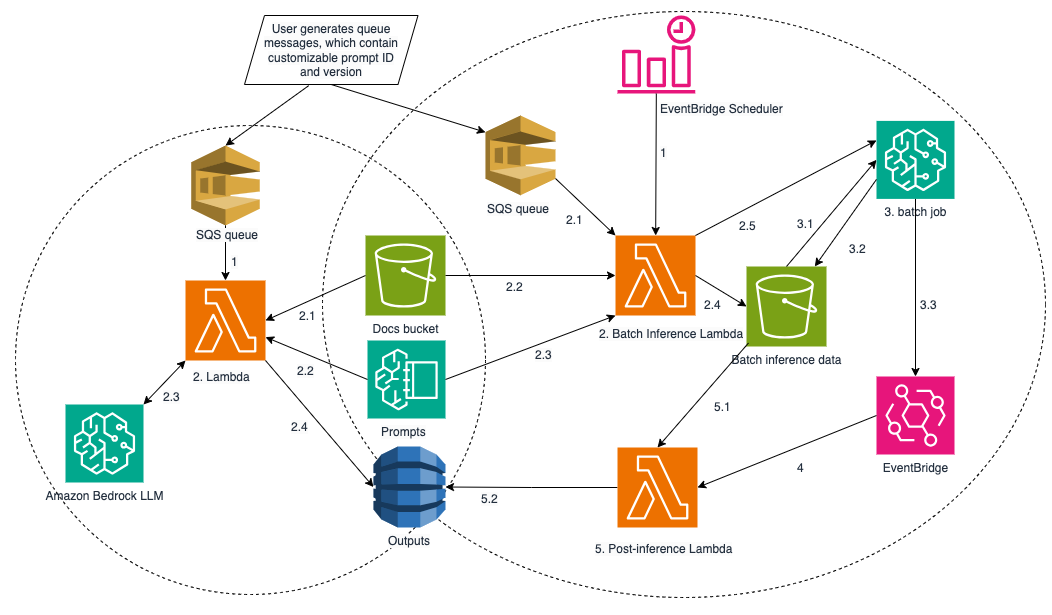
The pipeline on the left is the on-demand pipeline that extracts data from documents one-by-one, returning results within seconds. This makes it suitable for time-sensitive requests.
The pipeline on the right is the batch inference pipeline that processes multiple document requests in a single Amazon Bedrock batch inference job, where your model invocation will be processed asynchronously. Users can specify the prompt ID and version in the request in both pipelines, and the corresponding prompt text will be retrieved from Amazon Bedrock Prompt Management.
The following sections provide detailed descriptions of both pipelines.
1. On-demand inference pipeline
An AWS SQS First-In, First-Out (FIFO) queue is created in the on-demand inference pipeline. When a queue message containing the document ID, LLM model ID, prompt ID/version, and system prompt ID/version arrives, it triggers an AWS Lambda function. This function retrieves the PDF document from the specified Amazon S3 bucket, converts the PDF pages to PNG images, retrieves the relevant prompts from Amazon Bedrock Prompt Management, composes the message to call the LLM, and saves the result into an Amazon DynamoDB table.
1.1. AWS SQS FIFO queue
An AWS SQS FIFO queue is used to trigger Amazon Bedrock inference when a single document arrives. The key reasons for using a FIFO queue are:
- Reliable Message Delivery – Makes sure that each message is delivered exactly once.
- First-In, First-Out (FIFO) Processing – Maintains a strict ordering, providing better predictability for processing.
- Message Grouping – The Message Group ID attribute makes sure the messages are processed in order within each group. Each producer can use a unique Message Group ID to maintain order for related messages.
How is a queue message created?
The queue messages can be created externally with AWS CLI or AWS SDK API. The following is an AWS CLI command example:
The file message_txt.txt in this example is a JSON file containing the message attributes needed for the application. See details in the Testing the pipelines section below.
The Lambda function will delete the queue message after Amazon Bedrock has returned the extracted data.
1.2. Lambda function – queue message processing and inferencing
1.2.1 Retrieving the documents, converting to images, and splitting large files
The Lambda function downloads the document using the s3_location attribute in the queue message. If the document is scanned PDF, it is then converted to images for the multimodal model to understand.
As of this writing, the Claude 4 Sonnet model only allows a maximum of 20 images per multimodal invocation. Therefore, if a document contains more than 20 pages of images, it must be split into chunks of 20 pages. The doc_id, chunk_count and chunk_id are stored in an Amazon DynamoDB table, along with the extracted results and the model performance metrics.
doc_id: the identifier of the documentchunk_count: the total number of chunks for that documentchunk_id: the identifier of each chunk of the document
1.2.2. Retrieving prompts from Amazon Bedrock Prompt Management
Land lease documents vary in format – some present land tract attributes in numbered list, others in tables, and some even in land drawings. Hence, using different prompts tailored to each document format enhances extraction accuracy.
The prompts used in the LLM call are stored in Amazon Bedrock Prompt Management. Each prompt has a unique ID and is versioned. The SQS messages must specify the relevant prompt ID and version, which are then used to retrieve the prompt body during Lambda execution.
Note: There is a service limit of 50 prompts per region and 10 versions per prompt.
1.2.3 Composing message for LLM calls and processing the response
The Lambda function continues with the following steps:
- Compose the messages for LLM by concatenating the prompt body and images.
- Send request(s) to Amazon Bedrock using the Converse API.
The LLM will return the extract data in a JSON string, you can examine the result in your DynamoDB table as illustrated in the following testing the pipelines section.
1.2.4 Saving the results
Finally, the Lambda function completes the process by:
- Parsing the JSON and storing the land tract attributes to the DynamoDB table.
- If the document has been successfully processed and the results are stored, the SQS message is deleted from the queue.
2. Batch inference pipeline
A standard AWS SQS queue is used for the batch inference pipeline because of its high throughput. The queue messages are created in the similar way as in the on-demand pipeline, except the message-group-id attribute is not required.
The main components in the batch inference pipeline includes:
- Amazon EventBridge Scheduler.
- Batch Inference AWS Lambda function to pre-process the scanned PDFs, create JSONL files and submit the batch inference job.
- Amazon EventBridge rule.
- Post-processing AWS Lambda function.
The following sections describe the details of the batch inference pipeline.
2.1. Amazon EventBridge scheduler
An Amazon EventBridge Scheduler starts the batch inference Lambda function on a schedule.
2.2. Batch inference Lambda function
The function first checks if there are enough messages in the queue before proceeding. At the time of writing, there is a minimum number of records of 100 for Amazon Bedrock batch inference job.
2.2.1 Receiving queue messages
The Lambda function loops through the messages in the queue and extracts the document ID, LLM model ID, prompt ID/version, and system promptID/version.
2.2.2 Retrieving the documents without duplicates, converting to image, and splitting large files
The Lambda function then retrieves the documents, converts them to images if they are scanned PDF, and splits the large files if necessary – just as in the on-demand pipeline. Because the standard SQS queues do not guarantee exactly-once message delivery, the function also makes sure that duplicate messages are ignored.
2.2.3 Allowing different prompts in a batch inference job
Similar to the on-demand pipeline, different document formats require different user prompts for more effective data extraction.
The intended prompt ID and version for each document are specified in the SQS messages. During Lambda execution, the function retrieves the prompt body from Amazon Bedrock Prompt Management.
2.2.4 Creating JSONL artifacts for batch inference job
The Lambda function then handles the following tasks:
- Creating a
metadata.jsonin the Batch Inference Data S3 bucket to store the message attributes, including the SQS message ID,doc_id, prompt ID/version, system prompt ID/version, and other project-related attributes. This file is later used by the Post-Processing Lambda to populate the DynamoDB table. - Processing the documents to create the JSONL files required for the Amazon Bedrock batch inference job. This process is parallelized using Python’s multiprocessing module for efficiency. The JSONL files are uploaded to the Batch Inference Data S3 bucket.
- Deleting the SQS messages after the documents have been prepared and uploaded to the S3 bucket. This requires setting a large Visibility Timeout for the queue.
2.2.5 Composing messages and submits batch inference job
Finally, the batch inference Lambda function creates the Amazon Bedrock batch inference job using the JSONL artifacts from the previous step. Note that each batch job can only process documents using one model, meaning the SQS messages within the same batch job must specify the same model ID. If there are more than one model ID specified in the incoming messages, the Lambda function uses a polling mechanism that selects the most frequently specified model ID to use.
2.3. The Amazon Bedrock batch inference job
When Amazon Bedrock receives the batch inference job, it places it in a queue. Once the job starts, it proceeds with the following steps.
2.3.1 Retrieving JSONL artifacts for batch inference job
Amazon Bedrock retrieves the JSONL artifacts specified during job creation.
2.3.2 Storing batch inference outputs
Upon completion, Amazon Bedrock stores the outputs to the Batch Inference Data S3 bucket, which is also specified in the job creation.
2.3.3 Notifying Amazon EventBridge
After job completion, Amazon Bedrock sends a job status change event to Amazon EventBridge, which is captured by an EventBridge rule.
2.4. Amazon EventBridge rule triggers the post-inference Lambda function
The EventBridge rule triggers the post-processing Lambda function to handle further model output processing.
2.5. Post-processing Lambda function
2.5.1 Retrieving the output JSONL
The Lambda function fetches the inference output JSONL from the batch inference data S3 bucket.
2.5.2 Saving the inference output
The function parses the JSONL files and saves the extracted land tract attributes to a DynamoDB table.
Prerequisites
If you want to try this example yourself, make sure you meet these prerequisites:
- An AWS account with access to the AWS Management Console
- Appropriate IAM permissions to create and manage CloudFormation stacks, which typically include:
- cloudformation:CreateStack
- cloudformation:DescribeStacks
- cloudformation:UpdateStack
- cloudformation:DeleteStack
Deploying the CloudFormation stacks
Deploy the on-demand pipeline:

When you choose the Launch Stack link, you will be taken to AWS CloudFormation to launch the CloudFormation stack:
- On the Create stack page, choose Next
- On the Specify stack details page, choose Next
- On the Configure stack options page, choose Next
- On the Review and create page, select I acknowledge that AWS CloudFormation might create IAM resources
- Choose Submit
After it’s submitted, you can observe some details about the stack such as Stack info, Events, Resource, and more. The following screenshot is the Events for your reference:
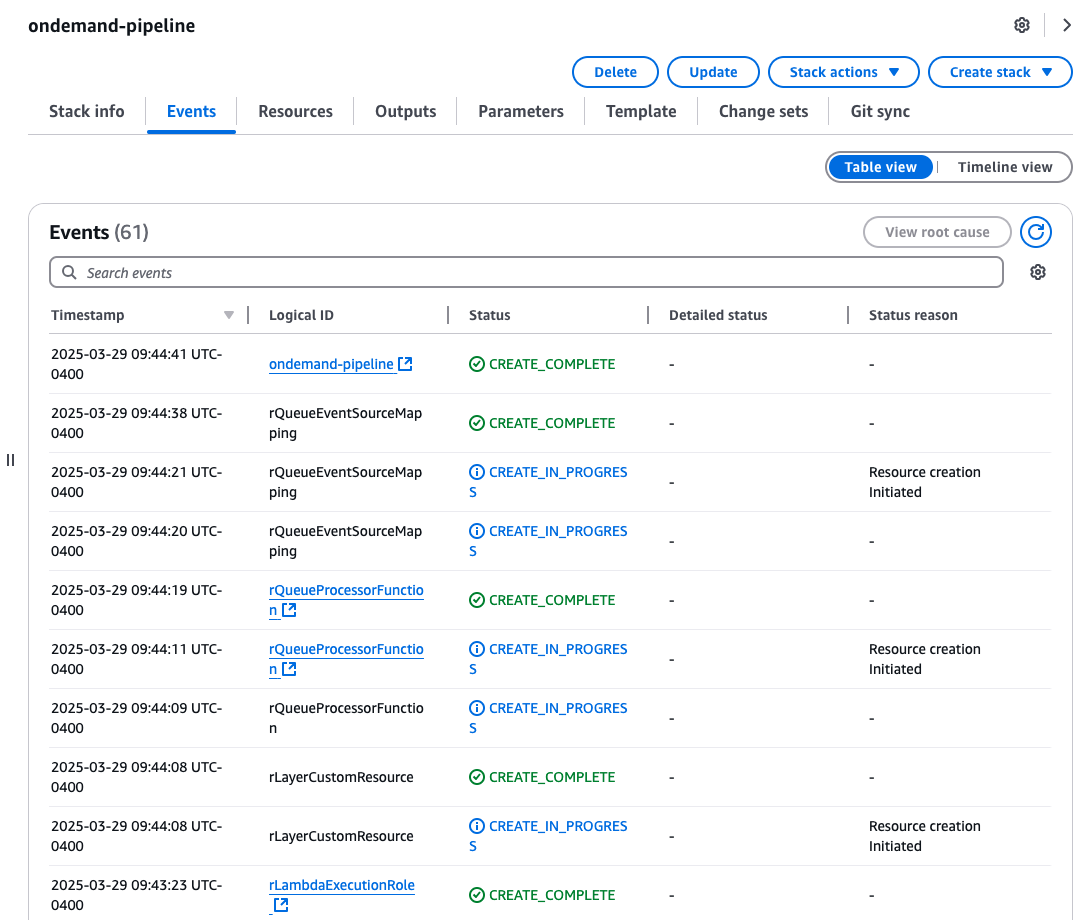
You can also deploy the batch pipeline following the same steps.
Testing the pipelines
The following steps guide you to test the on-demand pipeline. The batch pipeline can also be tested in the similar steps if you have at lease 100 documents.
- Download the data to your local environment. There are three land documents from Winkler County, Andrews County, and Sutton County that are purchased from the Texas Land Records and County Records website.
- Upload downloaded PDF file(s) to the S3 artifact bucket ondemand-data-pipeline-bucket-${account_id} that is created in CloudFormation stack.
- Create a text file message_txt.json using the following example by replacing the prompt ID, system prompt ID and S3 bucket that are created from your CloudFormation stack.
- Create a shell script send2queue.sh by using the above AWS CLI example by replacing the queue name in and execute it. You will see a message to your SQS queue ondemand-data-pipeline-queue.fifo.
- The queue message will trigger the Lambda function ondemand-data-pipeline-queue-processor.
- Examine the Lambda log in Amazon CloudWatch, the log group is /aws/lambda/ondemand-data-pipeline-queue-processor.
- Examine the Amazon Bedrock inference output in the DynamoDB ondemand-data-pipeline-table table. The JSON result in the
model_responsecolumn for the Winkler County example should look like the following:
Cleanup
To clean up the resources:
- Sign in to the AWS Management Console
- Navigate to the CloudFormation service
- In the CloudFormation dashboard, find and select the stack you want to delete
- Choose the “Delete” button at the top of the page
- Confirm the deletion when prompted
CloudFormation will automatically delete the resources that were created as part of the stack in the correct order, handling dependencies appropriately.
Deleting the CloudFormation stacks does not delete the S3 buckets and the DynamoDB because their deletion policy is set to retain to help prevent data loss. To delete these resources, go to each service’s page in the AWS Management Console and delete them.
Conclusion
The on-demand and batch Amazon Bedrock inference pipelines presented in this post explain how you can dynamically process documents based on the time sensitivity and data volume. You should also consider the cost facts when deciding which pipeline to use. With the batch pipeline, as found in our tests, the cost of Amazon Bedrock is 50% lower compared to on-demand pipeline.
Another key feature in this solution is the ability to specify the large language model (for on-demand pipeline) and prompt at the individual document level, enabling these pipelines to support various types of intelligent document processing.
With parallelism enabled using the Python’s multiprocessing module, both Lambda functions of the batch inference pipeline can process 1,000 documents within 15 minutes.
Call to action
Amazon Bedrock can enable you to build many generative AI applications. We recommend following the quick start in the following GitHub repo and familiarizing yourself with building generative AI applications. For advanced readers, you can look into how to scale the solution further. One idea is to run the Lambda code in AWS Batch instead, allowing tens of thousands of documents to be processed in a single Amazon Bedrock batch inference job.
About the authors


