


We’ve all been there. After an hour-long meeting full of ideas, action items, and deadlines, I realized that no one was clearly taking notes. Someone volunteers to “summarize the recording later.” This usually means spending hours playing the entire session.
It’s frustrating, inefficient, and completely unnecessary in 2025.
This is exactly the problem Video Transcriber AI was built to solve. Eliminate meeting chaos by automatically converting recorded discussions into structured, searchable text in minutes instead of hours.
Whether you’re a manager trying to keep track of your team, a researcher documenting interviews, or a freelancer juggling multiple clients, Video Transcriber AI helps you easily transcribe, organize, and reuse meeting recordings.
The pain of manual meeting notes
If you’ve ever tried to take detailed notes during a meeting, you know how difficult it can be to keep up. Someone always speaks too fast, overlaps ideas, and finds themselves missing important decisions.
Recording the meeting seems like an obvious solution. But then comes the real challenge.
- Play the video multiple times to hear every sentence
- have trouble recognizing who said what
- Don’t waste time formatting and editing messy transcripts
result? Time is wasted and deadlines are delayed.
Video Transcriber AI eliminates that entire process. With just one upload, you can automatically convert your video to text and get clean, time-stamped notes that you can instantly share or edit.
What is Video Transcriber AI?
Video Transcriber AI is an intelligent web-based platform that converts any video recording into accurate, editable text in minutes. It uses advanced speech recognition technology to identify multiple speakers and preserve context, making it ideal for complex team meetings and brainstorming sessions.
Regardless of the file format (MP4, MOV, AVI, etc.), you can upload your file directly from your computer and receive a clear, well-structured transcript within minutes.
Unlike other transcription tools that struggle to handle long or large files, VideoTranscriber supports uploads of up to 1 GB per file and also allows batch processing. This means you can transcribe multiple meetings at once.
How Video Transcriber AI simplifies meeting management
Meetings are where most decisions are made, but they are also where information is most likely to be lost. Here’s how Video Transcriber AI changes that dynamic.
1. Instant transcripts from recorded calls
No more waiting for hours or assigning someone to manually enter your notes. With Video Transcriber AI, you just need to upload your recorded meeting and the AI will do the rest.
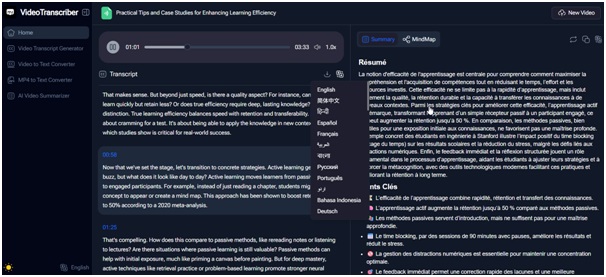
Automatically identify speakers, insert timestamps, and organize text into easy-to-read paragraphs. Whether your discussions take place on Zoom, Teams, or Google Meet, you can now share structured recordings with your team.
result? Meeting summaries are now fast, accurate, and stress-free.
2. Timestamps to keep context clear
Meetings often include a follow-up, such as, “Let’s think again about what Sarah said earlier.” Usually it takes forever to find that moment in a video.
With VideoTranscriber, each line of text includes a timestamp, so you can jump directly to that part of the recording if you want. This is a simple but powerful way to make long meetings more manageable.
3. High accuracy across different voices
One of the biggest frustrations with transcription tools is their inconsistency. This especially occurs when multiple people are speaking at the same time or have different accents.
Video Transcriber AI was built with this challenge in mind. It uses advanced speech models that can handle diverse voices and overlapping dialogue, while maintaining accuracy close to human transcription.
That means less time editing and more time acting on meeting insights.
4. Works in over 100 languages
For international teams and global businesses, Video Transcriber AI supports over 100 languages including English, Spanish, Japanese, Portuguese, French, and more.
When collaborating across geographies, you can automatically generate multilingual transcripts or use them as the basis for translation and subtitling.
This makes Video Transcriber AI a powerful tool for cross-border communication, ensuring no ideas are lost during translation.
5. Browser-based and easy
There’s no need to install any software or create an account. Everything is done directly within your browser.
Simply visit Video Transcriber AI, upload your meeting video, and wait a few minutes for the AI to complete the transcription. You can then copy, edit, or export the text as needed.
This is the easiest way to stay organized without adding tools or complexity to your workflow.
Real-world example: From chaos to clarity
Suppose you want to record a 60-minute project meeting with six participants. Upload your MP4 file to Video Transcriber AI.
Within 10 minutes, you will receive a transcript containing:
- Automatically separate each speaker
- Contains a timestamp for easy reference
- Format conversations neatly
Then, you can summarize key decisions, identify action items, and share them with your team without having to watch the video again.
For teams that do daily stand-ups or weekly check-ins, this saves time each week and makes post-meeting reporting nearly painless.
When audio recording is sufficient: Audio Converter AI
In some cases, it is not necessary to video record the entire meeting; an audio recording is sufficient. In this situation, Audio Converter AI is the perfect complement.
Just like video, you can convert audio to text quickly and accurately. Upload an audio recording from your phone, a Zoom audio file, or a podcast interview and get a polished transcription in minutes.
Video Transcriber AI and Audio Converter AI work together to create a complete system for capturing, processing, and organizing all your audio content, regardless of format.
Why professionals choose Video Transcriber AI
Thousands of professionals have turned to Video Transcriber AI because it combines accuracy, speed, and simplicity in one platform. Here’s why this is the recommended solution for meeting transcription:
- Handle large files easily: Up to 1 GB per video, plus batch uploads.
- Achieves near-perfect accuracy. Even with multiple speakers and accents.
- Save time and money: No manual transcription or outsourcing required.
- Preserves structure: Instantly share timecoded and organized transcripts.
- Works instantly: No download, signup, or setup required.
Built for efficiency-minded teams – teams that want results, not extra steps.
How to use Video Transcriber AI in your next meeting
Getting started is easy and takes less than a minute.
- Jump to video Transcriber AI
- Upload your recorded meeting (MP4, MOV, or other supported format)
- Wait a few minutes for automatic transcription to complete
- Download or edit your transcript instantly
that’s it. No training or onboarding required. Just a way to quickly capture and share important conversations.
Smarter workflows for modern teams
Meetings aren’t going away anytime soon. But the way we document and share them could be smarter.
With Video Transcriber AI, you can:
- Convert long recordings into actionable notes
- Create a searchable archive of discussions
- Generate highlights and summaries for follow-up emails
- Support multilingual communication between global teams
It’s more than just a transcription tool, it’s a workflow enhancer. VideoTranscriber automates tasks that used to take hours, allowing you to focus on higher-value tasks.
conclusion
Manually taking notes and playing recordings are a thing of the past. Today’s teams need immediate access to clear, organized, and actionable information.
Video Transcriber AI makes it possible. Convert complex meeting notes into clean, accurate text that can be reviewed, searched, and shared effortlessly. Transform the way you work with audio content, whether you’re managing remote teams, handling client calls, or documenting investigations.
And if your recording is audio-only, Audio Converter AI (https://audioconverter.ai/) extends the same functionality to audio files, ensuring all dialogue is captured and understood.
If you’re tired of wasting hours watching meetings over and over just to find a sentence, try Video Trancriber AI (https://videotranscriber.ai/). Experience how transcription can make your job easier.
(CSR in India)

advertisement

advertisement

advertisement

advertisement




