
With Amazon Bedrock Knowledge Bases, you can give foundation models (FMs) and agents contextual information from your organization’s private data sources to deliver more relevant, accurate, and customized responses. As the data grows, maintaining real-time synchronization between Amazon Simple Storage Service (Amazon S3) and your knowledge bases becomes critical for accurate, up-to-date responses.In this post, we explore how Deloitte used Amazon EKS and vCluster to transform their testing infrastructure.
In this post, we explore an automated solution that detects S3 events and triggers ingestion jobs while respecting service quotas and providing comprehensive monitoring. This serverless solution uses an event-driven architecture to keep your knowledge base current without overwhelming the Amazon Bedrock APIs.
The challenge
Knowledge bases in Amazon Bedrock require manual synchronization whenever documents are added, modified, or deleted in S3 (including metadata files). Organizations need automated synchronization for frequent content updates, multiuser environments where teams upload documents throughout the day, real-time applications such as customer support systems that require immediate access to current information, and to improve operational efficiency by removing manual sync processes that are prone to delays or being forgotten. To achieve reliable automation, organizations must carefully orchestrate sync operations while respecting the Amazon service quotas and rate limits.
Service design considerations
When implementing automated synchronization, customers must account for the protective constraints of Amazon Bedrock. Amazon Bedrock service quotas limit concurrent ingestion jobs to:
- Five jobs per AWS account (helps prevent resource exhaustion)
- One job per knowledge base (facilitates focused processing)
- One job per data source (maintains data consistency)
For more information about Amazon Bedrock service quotas, refer to Amazon Bedrock service quotas in the Amazon Bedrock Reference guide. These limits are specific to each AWS Region and might change in the future, so consult the documentation for the most current quota information.
The StartIngestionJob API for knowledge bases has a rate limit of 0.1 requests per second (one request every 10 seconds) in each supported Region.
Consider having a content team updating multiple files during a release. Without coordination, sync requests queue up due to service limits, requiring manual oversight. An orchestrated approach handles this seamlessly, making sure the changes are processed efficiently while respecting service constraints.
Solution overview
This event-driven solution automatically synchronizes your Amazon S3 documents with Amazon Bedrock Knowledge Bases. When documents are added, modified, or deleted in your S3 bucket (including metadata files), the solution automatically triggers synchronization jobs while respecting service quotas and rate limits. The solution uses the streamlined AWS Serverless Application Model (AWS SAM) deployment and operates as a fully serverless architecture without requiring infrastructure management.
This solution implements an event-driven architecture that combines key AWS services to process Amazon S3 changes in real time while intelligently managing ingestion jobs. The following components work together to facilitate reliable synchronization while respecting service quotas:
- Amazon EventBridge captures real-time changes from Amazon S3
- AWS Lambda functions process events and manage synchronization
- Amazon Simple Queue Service (Amazon SQS) queues buffer requests to respect service quotas
- AWS Step Functions orchestrate the synchronization workflow
- Amazon DynamoDB tracks document changes and job metadata
The following diagram shows how the solution uses AWS services to create an event-driven synchronization system.
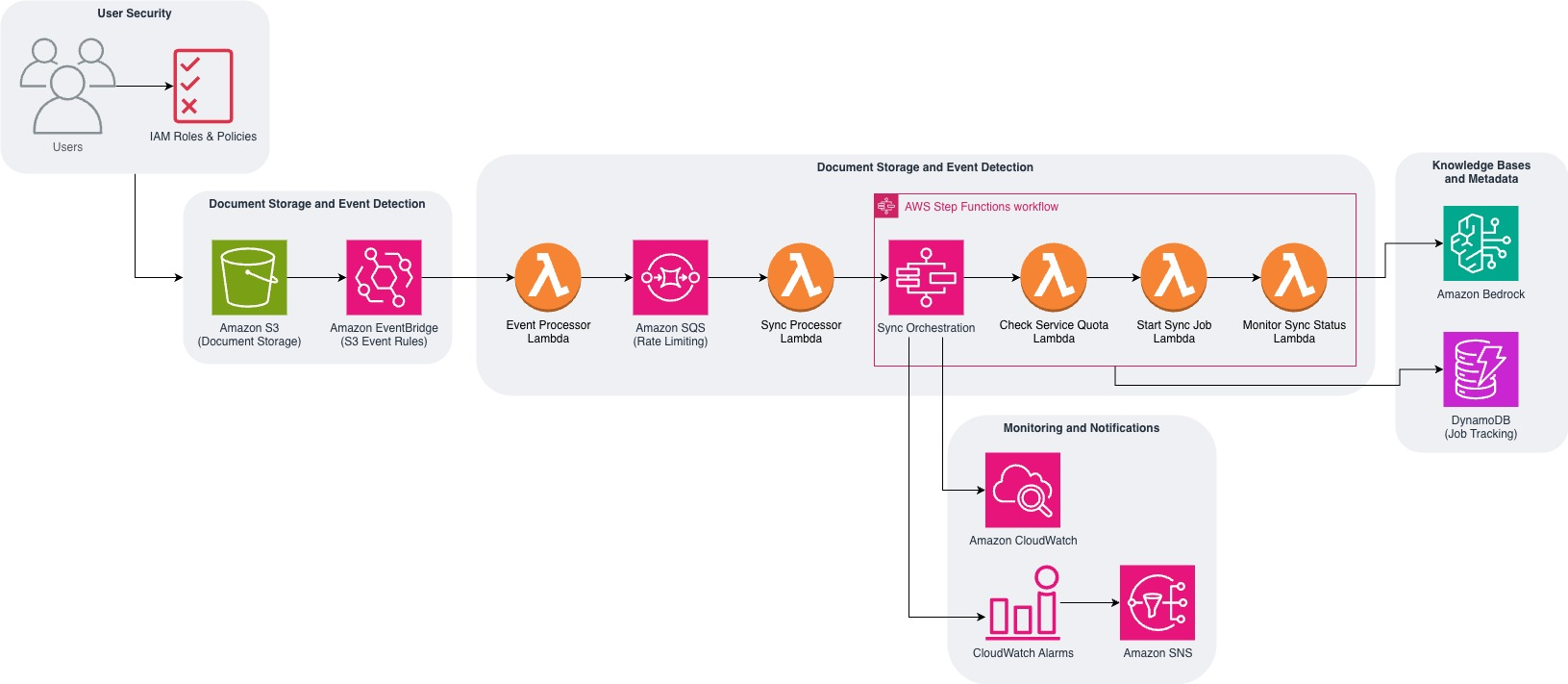
The solution architecture consists of five interconnected components that work together to manage the complete synchronization workflow. Let’s explore how each component functions within the system, with code examples to illustrate the technical implementation behind this ready-to-deploy solution.
Phase 1: Document change detection
The initial phase establishes automated detection and processing of document changes in your S3 bucket. Here are the main actions performed during this phase:
- EventBridge captures S3 events – When documents are uploaded, modified, or deleted, S3 automatically sends events to EventBridge
- Lambda processes events sequentially – EventBridge triggers the event processor Lambda function, which extracts document metadata (file path, change type, and timestamp) and creates tracking entries in DynamoDB for audit purposes
- SQS queues sync requests – The same Lambda function immediately sends a sync request message to Amazon SQS, which buffers the requests to manage rate limits and facilitate reliable processing
The following code shows how the event processor Lambda function handles incoming S3 events and coordinates the tracking and queuing process:
Phase 2: Queue management
To maintain consistent processing and respect service quotas, the solution implements a queuing mechanism that manages document change requests. The queue management phase involves these critical steps:
- Amazon SQS buffers requests – Messages from phase 1 are queued to enforce the rate limit between sync job requests are met
- Lambda processes messages – The sync processor Lambda function consumes one message at a time from the SQS queue
- Workflow initiation – Each message triggers a new Step Functions execution with the document change details and knowledge base configuration
This code demonstrates how the sync processor Lambda function consumes SQS messages and launches the orchestration workflow:
Phase 3: Orchestrated synchronization
The orchestration phase uses AWS Step Functions to coordinate the synchronization process while managing service quotas and handling failures. This workflow includes:
- Quota validation – Checks the active ingestion jobs in the current Region across the knowledge bases to confirm service limits aren’t exceeded
- Conditional execution – If quotas allow, starts the sync job immediately; otherwise waits 5 minutes before checking again
- Job monitoring – Tracks sync job progress and handles both successful completion and failure scenarios
- Error handling – Implements retry logic and dead letter processing for failed synchronization attempts
The following Step Functions state machine definition shows the decision logic for quota management and job execution:
Phase 4: Knowledge base processing
During this phase, the knowledge base processes the synchronized content and makes it available for use. The following steps occur:
- Document processing – Amazon Bedrock scans the changed documents identified during the sync job
- Vector conversion – Documents are chunked and converted to vector embeddings using the configured embedding model
- Index updates – New embeddings are stored in the vector database while outdated embeddings are removed
- Content availability – Updated content becomes immediately available for semantic search and retrieval
Phase 5: Monitoring and alerts
The final phase implements comprehensive monitoring and alerting to make sure the solution operates reliably. This includes:
- Status tracking – Updates document change status in DynamoDB as jobs are completed successfully or fail
- Notification delivery – Sends success or failure alerts through Amazon SNS to configured email addresses or endpoints
- Performance monitoring – Amazon CloudWatch metrics track sync job duration, success rates, and quota utilization
- Automated alerting – CloudWatch alarms trigger when error rates exceed thresholds or jobs remain stuck
Key features
This solution provides several essential capabilities that facilitate efficient and reliable synchronization between Amazon S3 and your knowledge bases. Let’s explore each key feature and its benefits.
Real-time event processing
The solution immediately responds to S3 changes. EventBridge integration captures S3 events in real time. The system processes Amazon S3 object changes as they occur by using S3 event notifications to automatically trigger ingestion jobs. Response is prompt and there is no waiting for scheduled processes.
Comprehensive quota management
The solution respects the Amazon Bedrock service quotas:
Intelligent rate limiting
SQS queue configuration facilitates proper rate limiting:
Robust error handling
The solution implements comprehensive error handling with dead letter queues for failed messages, automatic retry logic for transient failures, and detailed logging through CloudWatch to facilitate reliable operation and straightforward troubleshooting.
Prerequisites
Before you deploy this solution, make sure you have the following:
- An AWS account with permissions to create and manage the following services:
- A preconfigured Amazon Bedrock knowledge base with:
- At least one data source connected to Amazon S3
- Appropriate permissions to manage Amazon Bedrock Knowledge Bases
- The following tools installed on your development machine:
Estimated time for the infrastructure deployment: 5–10 minutes
Solution walkthrough
This section walks you through the step-by-step process of deploying the automatic sync solution in your AWS environment. To deploy this solution, follow these steps:
- Clone the GitHub repository:
- Build and deploy the solution:
During deployment, you’ll be prompted to provide these parameters:
- Stack Name [
kb-auto-sync] – Name for your CloudFormation stack - AWS Region [
us-west-2] – Region where your Amazon Bedrock knowledge base exists - KnowledgeBaseId – Your Amazon Bedrock knowledge base identifier
- S3BucketName – Name of the S3 bucket containing your documents
- S3KeyPrefix (Optional) – Specific folder prefix to sync (for example,
documents/) - NotificationsEmail (Optional) – Email address for sync job notifications
- MaxConcurrentJobs [5] – Maximum number of concurrent sync jobs
- Allow AWS SAM CLI IAM role creation [Y/n] – Permission to create IAM roles
- Save arguments to configuration file [Y/n] – Save settings for future deployments
The following code shows an example input:
Setting default arguments for sam deploy
===============================
Stack Name [kb-auto-sync]: my-kb-sync


AWS Region [us-west-2]: us-east-1


Parameter KnowledgeBaseId: kb-1234567890


Parameter S3BucketName: my-document-bucket


Parameter S3KeyPrefix: documents/


Parameter NotificationsEmail: user@example.com


Allow SAM CLI IAM role creation [Y/n]: Y


Save arguments to configuration file [Y/n]: Y
The deployment will create the necessary resources and output the stack details upon completion.
Cost considerations
The solution uses several AWS services, each with its own pricing model:
These are the estimated monthly costs for typical usage per 10,000 documents:
- Lambda invocations: ~$0.20
- EventBridge events: ~$1.00
- Other services: Minimal costs
This solution is ideal for organizations that need real-time document synchronization, process frequent document updates, and require automated knowledge base maintenance with minimal manual intervention. The process follows these actions in a real-world example where a user uploads a document:
- The user uploads the document to Amazon S3 at 2:00 PM
- EventBridge captures the S3 event immediately
- The event processor Lambda function creates a tracking entry and sends an SQS message
- The sync processor Lambda function receives the message and starts a Step Functions workflow
- The quota check verifies there are no active jobs for the knowledge base
- The ingestion job starts immediately
- The monitor function tracks progress until completion at 2:05 PM
- The change is marked as processed in DynamoDB
Troubleshooting
Sync job failures and rate limiting are common issues that can be resolved as follows:
- Sync job failure – This can occur when permissions are misconfigured or document sizes exceed limits. To resolve:
- Review ingestion job warnings in the Amazon Bedrock console under your Knowledge Base data source sync history.
- Verify that IAM permissions are correctly configured
- Confirm that document sizes are within the allowed limits
- Rate limiting – This happens when too many sync requests are processed simultaneously or service quotas are reached. To resolve this, take these steps:
- Monitor CloudWatch metrics to identify bottlenecks
- Adjust concurrency settings as needed to stay within limits
Cleanup
To avoid incurring ongoing charges, it’s important to properly clean up the resources created by this solution. Follow these steps to facilitate the removal of the components.
To delete the stack using AWS SAM, enter the following code:
To delete the stack using CloudFormation, follow these steps:
- Open the AWS CloudFormation console
- Select your stack:
kb-auto-sync(or the custom name you chose during deployment) - Choose Delete and confirm the deletion
- Wait for stack deletion to complete without errors
The following resources will remain after stack deletion:
- Original S3 documents
- Amazon Bedrock knowledge base
- CloudWatch logs (until retention period expires)
- Manually created resources outside the stack
Conclusion
This event-driven automated sync solution provides a solution to keep Amazon Bedrock Knowledge Bases synchronized with S3 documents in real time. By combining immediate event processing with intelligent quota management and comprehensive monitoring, the solution facilitates reliable operation while optimizing performance. The real-time approach is ideal for applications requiring immediate document availability, such as customer support systems, documentation systems, and knowledge management solutions.
Next steps and additional resources
Want to learn more? Here are some helpful resources to continue your journey. Deeper dive:
Related solutions:
Documentation:
Support and community:
About the authors


