AI is impacting many industries by improving the way data is collected, interpreted, and used. For example, AI-powered search engines use algorithms that mimic aspects of human intelligence to help users find the information they need.
Many of today's AI tools use large-scale language models for language generation. These LLMs can use deep learning algorithms and large datasets to synthesize information and generate new content. AI systems can integrate LLM with other types of generative AI models to generate text, images, music, and other types of data. LLM functionality determines how AI systems, including LLM, respond to queries and is a key component in the architecture of an AI-powered search engine.
Perplexity AI differs from other search engines by leveraging multiple LLMs to generate responses. Unlike other search engine options, Perplexity provides information synthesized into an easily consumable natural language format, with citations and detailed follow-up.
Explore Perplexity AI's features, strengths, and weaknesses, then follow the tutorial below to start using the tool.
What is perplexity AI?
Perplexity is designed to help users search for information naturally. Take a conversational approach that uses natural language to interpret queries based on context. Additionally, Perplexity provides follow-up suggestions for more refined searches to help users find exactly what they need.
Perplexity is positioned as an alternative to traditional search engines like Google and DuckDuckGo. The company suggests users think of it as a knowledgeable assistant to help them with their searches. Unlike standard search engines, which provide users with a list of links to follow, Perplexity provides information directly in response to a user's query.
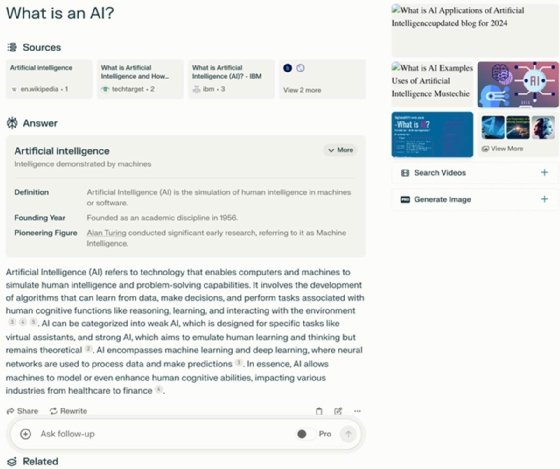
In addition to search engine queries, Perplexity can also generate content similar to AI chatbots such as OpenAI's ChatGPT and Anthropic's Claude. Perplexity Pro allows users to switch between multiple his LLMs created by other organizations, including image generation models such as Dall-E 3 and Stable Diffusion XL, which provide multimodal capabilities to the models . Among other generation features, Perplexity can generate written text, images, and simple code.
Perplexity AI features and costs
Perplexity takes a conversational approach when responding to queries and has the ability to recognize and manipulate context. Users can also access multiple LLMs from different vendors using Perplexity, which distinguishes this tool from competitors such as ChatGPT and Claude, which primarily rely on their in-house LLM products. can. Perplexity is available worldwide, except in the European Union, where regulatory restrictions and data protection laws restrict its availability.
Perplexity offers three subscription formats.
- free.
- Pro costs $20 per month or $200 per year.
- Enterprise Pro offers flexible pricing based on team size.
Perplexity's free version does not require an account and supports basic search, including citations and follow-up queries. Usage is simple. Just enter your question and see the results. This version uses OpenAI's GPT-3.5 model, which allows users to upload and use images, text, and PDF files, but uploads are limited to three per day. The free version doesn't require an account, but creating an account is useful as it gives you perks like profile customization.
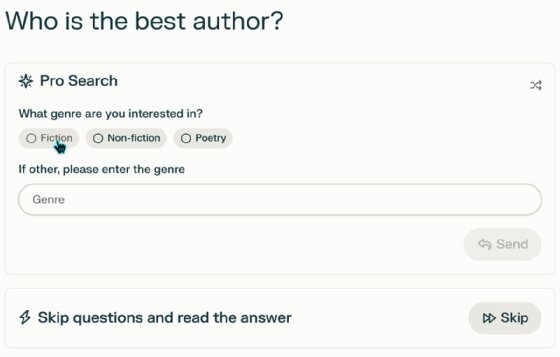
Perplexity Pro integrates more AI models and asks detailed, clear questions. Users can also upload their own PDFs, CSV files, images, text documents, etc. for analysis. A selection of AI models such as OpenAI's GPT-4 Turbo, Anthropic's Claude 3, and Perplexity Experimental give users more options for discovering information.
Perplexity Pro limits queries to 600 per day and offers various benefits such as referral credits and API access for developers. In the Pro version, you can also switch between LLMs to narrow down your search results. Building on the capabilities of Perplexity Pro, Perplexity Enterprise Pro comes with additional administrator features such as user management, single sign-on integration, enhanced security alerts, and data retention.
How to use Perplexity AI
To start using Perplexity AI, follow these steps:
1. Create a free Perplexity account
Although Perplexity can be effectively used without an account, it is helpful to create one. The ability to share collections, customizations, and enhanced settings are useful features.
Create a free Perplexity account using email and set up your account settings and profile. The process is simple, but a paid Perplexity Pro version is advertised.
Add Perplexity to your iPhone or Android device or integrate with your browser using the download link in the bottom left corner.
2. Create a search query
Start in the top left corner of Perplexity. Here you'll find options for new query threads, search links, and a library of recent searches.
Click on the “Discover” link to see AI and technology-oriented news headlines. Libraries consist of threads and collections for creating, managing, and organizing queries.
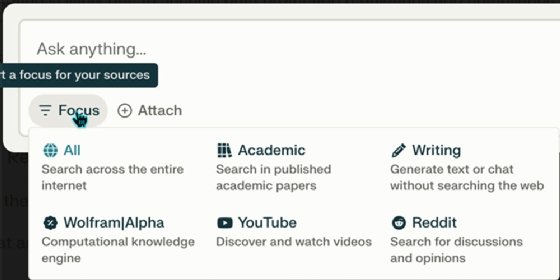
For a more direct search, use the focus feature. Categories include YouTube, Reddit, academic writing, Wolfram Alpha for computational knowledge, writing generators, and “everything.” Considering the vast amount of information available online, the Focus feature makes Perplexity even more useful.
3. Test Perplexity's write mode
Perplexity AI not only responds to search queries, but also provides generative language capabilities. To unleash the creativity of this tool, I asked it to write a song for me.
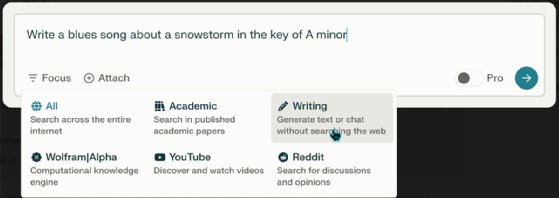
The results are as follows.

The rhymes are decent, but notice that it literally took my request for a blizzard in A minor. No matter where it is.
What do you think about Perplexity?
I admit that. I've been in technology for a long time, and I'm a skeptic about almost everything, including AI. But incorporating Perplexity into my daily writing routine has saved me time and effort and made a huge difference. I especially like the citations because they allow me to double-check the information and dig deeper if needed. I also appreciate natural language responses and have yet to run into any query or token limit issues.
Advantages and disadvantages of Perplexity AI
Perplexity AI offers the following benefits:
- easy to use.
- Powerful free version.
- Conversation style with questions and answers in natural language.
- Unlike many other generative AI tools, citation of sources.
- Flexibility with multiple LLM options.
- Ability to create collections to store and organize queries.
The disadvantages of Perplexity AI are:
- AI tools still return questionable information.
- Some responses will be repetitive.
- Perplexity is vulnerable to hallucinations and other issues affecting third-party LLMs that it accesses.
I’m still learning how to get the most out of Perplexity. We recommend creating a free account and using Perplexity to replace your standard search engine queries. After a few days, check out our comprehensive FAQ for tips and tricks, or check out our technical FAQ if you're a developer or advanced user. You may also find it helpful to download the smartphone version and incorporate it into your activities.
Damon Garn owns Cogspinner Coaction, providing freelance IT writing and editing services. He has written multiple of his CompTIA study guides, including Linux+, Cloud Essentials+, and Server+ guides, and contributes widely to the TechTarget editorial and his CompTIA blog.