When you analyze documents that span millions of characters, you hit the context window barrier and even the largest context windows fall short. Your model either rejects the input or produces answers based on incomplete information. How do you reason over documents that don’t fit?
In this post, you will learn how to implement Recursive Language Models (RLM) using Amazon Bedrock AgentCore Code Interpreter and the Strands Agents SDK. By the end, you will know how to:
- Process documents of varying lengths, with no upper bound on context size.
- Use Bedrock AgentCore Code Interpreter as persistent working memory for iterative document analysis.
- Orchestrate sub-large language model (sub-LLM) calls from within a sandboxed Python environment to analyze specific document sections.
Why context windows aren’t enough
Consider a typical financial analysis task of comparing metrics across two years of annual reports from a single company. Each report runs 300–500 pages. Add analyst reports, SEC filings, and supplementary materials, and the total reaches millions of characters.
When you send these documents directly to a model, either the input exceeds the model’s context window limit and the request fails, or the input fits but the model has difficulty attending to information in the middle of long inputs, often referred to as the “lost in the middle” problem.
Both failure modes exist because context window size is a hard limit that prompt engineering alone can’t solve. You need an approach that decouples document size from the model’s context window.
RLMs: Treating context as an environment
RLMs, introduced by Zhang et al. in arXiv:2512.24601, reframe the problem. Instead of feeding an entire document into the model’s context window, an RLM treats the input as an external environment that the model interacts with programmatically.
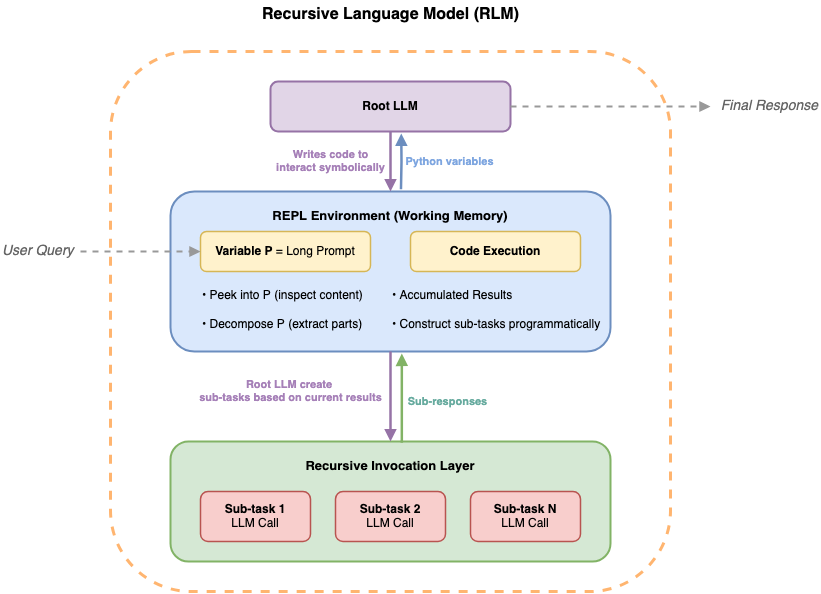
Figure 1. Recursive language models operate as an iterative loop: the root LLM generates code to explore the document environment, delegates semantic analysis to sub-LLMs on selected chunks, and accumulates results in working memory before refining the next step.
The model receives only the query and a description of the available environment. It then writes code to search, slice, and analyze the document iteratively. When the model needs semantic understanding of a specific section, it delegates that analysis to a sub-LLM call, keeping the results in working memory as Python variables rather than consuming context window space.
This creates a recursive structure: the root LLM orchestrates the analysis through code, calling sub-LLMs as needed for semantic tasks, while the full document never enters the model’s context window.
Architecture
Here, we show how to implement RLM using Amazon Bedrock AgentCore Code Interpreter as the execution environment. Amazon Bedrock AgentCore Code Interpreter provides a sandboxed Python runtime with persistent state across executions. The architecture has three components working together.
A root LLM agent, built with the Strands Agents SDK, receives the user’s query and decides what code to execute. An Amazon Bedrock AgentCore Code Interpreter session runs in PUBLIC network mode, with the full document loaded as a Python variable. A llm_query() function injected into the sandbox calls Amazon Bedrock directly from within the Code Interpreter, so sub-LLM results stay in Python variables and don’t flow back into the root LLM’s context window.

Figure 2. RLM architecture using Amazon Bedrock AgentCore Code Interpreter. The root LLM agent iteratively writes and executes Python code in a sandboxed environment where the full input data is pre-loaded. From within the sandbox, the agent can call sub-LLMs via Amazon Bedrock for semantic analysis of specific sections. Intermediate results remain as Python variables in the sandbox, keeping the root LLM’s context window focused on orchestration.
Amazon Bedrock AgentCore Code Interpreter’s PUBLIC network mode supports this by allowing the sandbox to make outbound API calls to Amazon Bedrock. The persistent session state means variables, intermediate results, and extracted data accumulate across multiple code executions, giving the model working memory that persists throughout the analysis.
Implementation
Follow these steps to set up and run RLM with Amazon Bedrock AgentCore Code Interpreter.
Prerequisites
To follow along with this post, you need:
- An AWS account with access to Amazon Bedrock foundation models (FMs).
- Python 3.10 or later.
- The AWS Command Line Interface (AWS CLI) configured with appropriate credentials.
- Familiarity with Python and basic AWS SDK (Boto3) usage.
- An Amazon Bedrock AgentCore Code Interpreter configured with PUBLIC network mode.
- IAM permissions for
bedrock:InvokeModel,bedrock-agentcore:StartCodeInterpreterSession,bedrock-agentcore:InvokeCodeInterpreter, andbedrock-agentcore:StopCodeInterpreterSession.
1: Start a Code Interpreter session and load the document
Create an Amazon Bedrock AgentCore Code Interpreter session and write the document into the sandbox:
2: Initialize the document and define the llm_query() helper inside the sandbox
Inside the sandbox, load the document and define the llm_query() function that sub-LLM calls will use:
3: Create the Strands Agent and run your query
Create a Strands Agent with a single execute_python tool that runs code in the session, then submit your question:
The agent iteratively writes and executes Python code to explore the document, extract relevant sections, and call llm_query() when it needs semantic analysis of specific chunks.
Evaluation
In our evaluation, we compare RLM against two baselines, namely Base and Long Context. In the Base approach, the full document is sent directly to the model in a single API call with 200K token context window. This is the most straightforward strategy but fails when documents exceed the model’s context window. In the Long Context approach, we use Claude’s extended 1 million token context window, which handles larger inputs but still has an upper bound and can suffer from problems like “lost in the middle”.
We evaluated this approach on the Financial Multi-Document QA subset of LongBench v2, a benchmark designed to test LLM performance on tasks requiring reasoning across long contexts. This subset contains 15 multiple-choice questions, each requiring analysis across multiple financial reports with context lengths up to approximately 2 million characters.
We report two metrics: success rate, the percentage of questions that the model can process without exceeding input limits or encountering errors, and accuracy, the percentage of correct answers out of the total questions asked (unanswered questions count as incorrect).
We compared three approaches as described earlier: Base, Long Context, and RLM. We evaluated RLM across four Claude models serving as the root LLM, where the sub-LLM was configured as either the same model or Haiku 4.5 to balance performance and efficiency. We use Claude Haiku 4.5 as the sub-LLM because it offers significantly lower latency and cost for localized chunk-level analysis, while the root model retains responsibility for global reasoning and orchestration.
Table 1. LongBench v2 Financial Multi-Document QA (15 questions). Human expert accuracy from the LongBench v2 paper. Base results for Claude Sonnet 4.6 and Opus 4.6 are omitted because these models have a default 1 million token context window, making the Base and Long Context approaches equivalent.
| Model | Approach | Success rate | Accuracy |
| Claude Haiku 4.5 | Base | 46.7% | 33.3% |
| Claude Haiku 4.5 + Haiku 4.5 | RLM | 100.0% | 66.7% |
| Claude Sonnet 4.5 | Base | 46.7% | 26.7% |
| Claude Sonnet 4.5 | Long Context | 93.3% | 66.7% |
| Claude Sonnet 4.5 + Haiku 4.5 | RLM | 100.0% | 66.7% |
| Claude Sonnet 4.6 | Long Context | 93.3% | 60.0% |
| Claude Sonnet 4.6 + Haiku 4.5 | RLM | 100.0% | 73.3% |
| Claude Opus 4.6 | Long Context | 93.3% | 66.7% |
| Claude Opus 4.6 + Haiku 4.5 | RLM | 100.0% | 80.0% |
| Human Expert | – | – | 40% |
The results reveal three key findings:
- RLM alleviates context length failures. Base and Long Context approaches fail to process some inputs due to context limitations. The Base approach achieves a success rate of 46.7 percent (7/15 questions), while Long Context achieves 93.3 percent (14/15 questions). In contrast, RLM achieves a 100 percent success rate across all evaluated configurations by decoupling document size from context window size entirely. As document scale increases, this reliability advantage becomes increasingly important for practical deployment.
- RLM improves accuracy across most models. RLM increases accuracy for Claude Sonnet 4.6 and Opus 4.6 from 60.0 percent and 66.7 percent (Long Context) to 73.3 percent and 80.0 percent, respectively, and for Claude Haiku 4.5 from 33.3 percent (Base) to 66.7 percent. The largest improvement is observed for Claude Haiku 4.5, while stronger models (Sonnet 4.6, Opus 4.6) show consistent but smaller gains. Claude Sonnet 4.5 exhibits no improvement over the Long Context baseline, achieving 66.7 percent in both settings. This suggests that RLM gains depend on how effectively the root model decomposes the task into sub-queries, which might limit improvements for Sonnet 4.5 in this setting.
- Sub-LLM choice has limited impact in this setting. In additional experiments, we compare using Claude Haiku 4.5 as the sub-LLM compared to using the same model for both root and sub-LLM, and observe no significant difference in accuracy across configurations. This suggests that, for this task, performance is primarily driven by the root model’s ability to generate effective sub-queries rather than the capability of the sub-LLM executing them.
Scaling to code repository understanding: LongBench v2 CodeQA
The Financial QA evaluation focuses on long-form document reasoning. We next examine generalization to a different domain: code repository understanding, which requires navigating large codebases, resolving function dependencies, and tracing logic across files. This setting is particularly well suited to programmatic exploration through code execution.
To test this, we evaluated on the Code Repository Understanding subset of LongBench v2, which contains 50 multiple-choice questions. Each question provides an entire code repository as context (ranging from ~ around 100K to over 16M characters) and asks about implementation details, API behavior, or architectural decisions that require navigating and understanding the codebase.
The architecture is the same as for Financial QA where the full repository is loaded into the Code Interpreter sandbox as a single context variable. The model writes Python code to search for relevant files, extract function definitions, trace call chains, and use llm_query() to analyze specific code sections.
We evaluated all 50 questions using four Claude models with the same approaches. Based on the Financial QA finding that sub-LLM choice has limited impact for stronger models, we fix the sub-LLM to Claude Haiku 4.5 across RLM runs.
Table 2. LongBench v2 Code Repository Understanding (50 questions).
| Model | Approach | Success Rate | Accuracy |
| Claude Haiku 4.5 | Base | 30.0% | 20.0% |
| Claude Haiku 4.5 + Haiku 4.5 | RLM | 100.0% | 64.0% |
| Claude Sonnet 4.5 | Base | 30.0% | 20.0% |
| Claude Sonnet 4.5 | Long Context | 60.0% | 46.0% |
| Claude Sonnet 4.5 + Haiku 4.5 | RLM | 100.0% | 76.0% |
| Claude Sonnet 4.6 | Long Context | 60.0% | 42.0% |
| Claude Sonnet 4.6 + Haiku 4.5 | RLM | 100.0% | 66.0% |
| Claude Opus 4.6 | Long Context | 60.0% | 44.0% |
| Claude Opus 4.6 + Haiku 4.5 | RLM | 100.0% | 74.0% |
The results mirror the Financial QA findings: RLM achieves 100 percent success rate across all models, compared to 30–60 percent for Base and Long Context. Accuracy improves substantially across models under RLM, with every model achieving between 64 percent and 76 percent—up from 20–46 percent under Base and Long Context.
How the model works through a problem
To illustrate how RLM operates in practice, the following is a representative sequence from one of the evaluation questions. The model is asked to compare financial metrics across two annual reports totaling approximately 1.5 million characters.
First, the model searches the context for structural markers to understand the document layout:
Next, it slices into specific sections to find revenue tables:
For semantic analysis, it delegates to the sub-LLM:
Finally, it aggregates findings across multiple sections and arrives at a final answer.
Considerations
When adopting RLM for your document analysis workloads, keep the following practical tradeoffs in mind.
- Latency. RLM trades latency for capability. Based on our evaluation of the two LongBench v2 datasets, individual RLM runs range from about 10 seconds for straightforward questions to several minutes for complex questions with large contexts, with most completing within a few minutes. For batch processing or offline analysis, this tradeoff is well justified. For real-time applications, consider whether the task truly requires processing documents beyond the model’s context window.
- Cost. Each RLM run involves multiple model invocations, both the root LLM’s iterative reasoning and the sub-LLM calls from within the sandbox. For cost-sensitive workloads, you can use a smaller model (such as Haiku 4.5) as the sub-model while keeping a larger model as the root to reduce costs while maintaining accuracy.
- Prompt engineering. The system prompt affects how efficiently the model uses its tools. Without guidance, models tend to make unnecessary sub-LLM calls to validate their own reasoning or print verbose intermediate summaries through code execution. Clear instructions about when to use code execution compared to when to reason directly reduce wasted tool calls and improve end-to-end latency.
Cleaning up
To avoid ongoing charges, stop the Amazon Bedrock AgentCore Code Interpreter session when the analysis is complete:
If you created a dedicated Code Interpreter resource for this walkthrough and no longer need it, you can delete it through the Amazon Bedrock AgentCore console or the AWS CLI.
Conclusion
Recursive language models offer a practical path to processing documents that exceed model context windows. By combining Amazon Bedrock AgentCore Code Interpreter with the Strands Agents SDK, you can implement RLM to reason over arbitrarily long input data through iterative code execution and sub-LLM calls.
Across our evaluations, the results are significant: Claude Opus 4.6 with RLM achieves 80.0 percent accuracy on LongBench v2 Financial QA (compared to 66.7 percent for Long Context with 1 million token context window and 40 percent for human experts), and Claude Sonnet 4.5 with RLM achieves 76.0 percent on LongBench v2 Code Repository QA (compared to 20.0 percent for Base prompting with 200K token context window, 46.0 percent for Long Context).
Tasks that require reasoning over long contexts or large reference libraries can benefit from this pattern, whether it’s financial analysis, code repository understanding, healthcare and life sciences research, legal review, or compliance auditing. If you try this approach on your own document analysis workloads, we want to hear what you build. Share your experience in the comments.
To get started with the approach described in this post, explore the following resources:
References
- Zhang, A. L., Kraska, T., & Khattab, O. (2025). Recursive Language Models. arXiv:2512.24601
- Bai, Y., Tu, S., Zhang, J., Peng, H., Wang, X., Lv, X., Cao, S., Xu, J., Hou, L., Dong, Y., Tang, J., & Li, J. (2024). LongBench v2: Towards Deeper Understanding and Reasoning on Realistic Long-context Multitasks. arXiv:2412.15204
About the authors