Voice agents, live captioning, contact center analytics, and accessibility tools all depend on real-time speech-to-text, where your application streams audio in and receives transcription back simultaneously over a single persistent connection. Traditional request-response inference falls short here because transcription cannot begin until the entire audio recording has been received, adding latency that breaks the real-time experience these workloads require.
Starting November 2025, you can stream data continuously in both directions between your clients and model containers using Amazon SageMaker AI bidirectional streaming for real-time inference. vLLM now lets you transcribe audio in real time through its Realtime API, where you use WebSockets for bidirectional streaming between client and server.
In this post, we bring these two capabilities together. We show how to deploy Voxtral-Mini-4B-Realtime-2602, Mistral AI’s compact real-time speech model, to a SageMaker AI endpoint using a vLLM container with bidirectional streaming. The result is a fully managed, speech-to-text service where audio flows in and transcription flows back in real time. You can follow along with the full example in the GitHub repository.
Key features required to run voice AI applications
Building a production voice AI application whether it’s a voice agent, live captioning service, or contact center analytics pipeline requires several infrastructure components working together with tight latency budgets. Amazon SageMaker AI and vLLM each address distinct parts of this stack, and together they provide an end-to-end solution that eliminates the undifferentiated heavy lifting. Here is what these applications demand and how each component delivers:
- A real-time speech model with efficient GPU serving. At the core of any voice AI application is a speech-to-text (ASR) model that processes audio incrementally, producing transcription tokens as audio arrives rather than waiting for the complete recording. vLLM serves these models through its Realtime API, a native WebSocket endpoint at
/v1/realtimethat supports multiple speech models, and applies piecewise CUDA graph execution to reduce GPU kernel launch overhead that directly translating to lower per-token latency during streaming transcription. Because vLLM is open source, you retain full control over model configuration, quantization, and compilation settings with no vendor lock-in on the serving layer. - Bidirectional streaming infrastructure. Traditional request-response APIs force the client to upload the entire audio file before the server begins processing. Voice AI applications require a persistent, full-duplex connection where the client streams audio in and the server streams transcription back simultaneously. SageMaker AI solves this with native HTTP/2 bidirectional streaming on port 8443, automatically bridging between the HTTP/2 event stream protocol on the client side and WebSocket on the container side. You do not need to build or manage this protocol translation layer. SageMaker AI handles it transparently.
- Audio processing and encoding. Raw audio from microphones or telephony systems arrives in various formats and sample rates. Before it reaches the model, it must be resampled (typically to 16 kHz mono PCM16), chunked into appropriately sized segments, and base64-encoded for transmission. The client-side pipeline handles this conversion, while vLLM’s Realtime API defines the protocol: base64 PCM16 chunks flow in via WebSocket, and transcription tokens stream back, with the SageMaker AI bidirectional stream carrying both directions simultaneously.
- Connection management and resilience. SageMaker AI maintains WebSocket connections with ping/pong keepalive frames, health-checks your container, and provides endpoint-level monitoring through Amazon CloudWatch. This gives you production observability and connection resilience without custom instrumentation.
In short, vLLM gives you high-performance, open-source model serving with native WebSocket streaming, while SageMaker AI wraps it in managed infrastructure with protocol bridging, health monitoring, and operational tooling. Together, they let you go from a speech model on Hugging Face to a production-ready, real-time transcription service without building custom streaming infrastructure or managing GPU servers.
Solution overview
By the end of this walkthrough, you will have:
- A custom Docker container built on the SageMaker AI vLLM Deep Learning Container with bidirectional streaming enabled.
- A SageMaker AI endpoint running Voxtral-Mini-4B-Realtime-2602.
- A Python client that streams audio files to the endpoint and receives transcription in real time using the SageMaker AI bidirectional streaming SDK.
- A Gradio-based live microphone demo that transcribes speech as you talk.
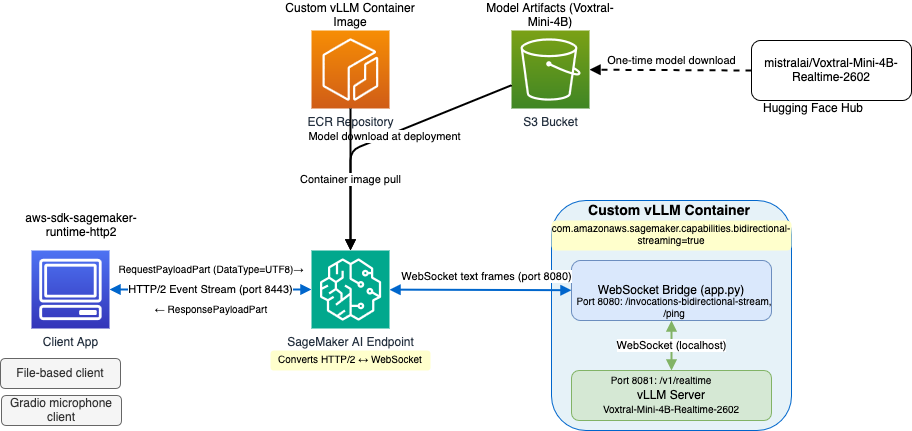
The solution connects three layers:

Client to SageMaker AI: Your application connects to the SageMaker AI runtime endpoint on port 8443 using HTTP/2, which supports multiplexed, bidirectional streaming. Each JSON message in the vLLM Realtime protocol (such as input_audio_buffer.append or transcription.delta) is sent inside a RequestPayloadPart with DataType set to “UTF8”. This tells SageMaker AI to forward the data as a WebSocket text frame. Response messages arrive as ResponsePayloadPart events.
SageMaker AI to Docker Container: SageMaker AI automatically bridges the HTTP/2 event stream and WebSocket protocols. It establishes a WebSocket connection to the container at ws://localhost:8080/invocations-bidirectional-stream, the path SageMaker AI expects bidirectional streaming and forwards data frames in both directions. When you set DataType="UTF8" in your client, the bridge sends WebSocket text frames to the container.
Docker Container: Inside the container, a lightweight FastAPI bridge (app.py) listens on port 8080 at /invocations-bidirectional-stream. When it receives a WebSocket connection from SageMaker AI, it opens a second WebSocket connection to vLLM’s Realtime API at ws://localhost:8081/v1/realtime and forwards messages bidirectionally. The bridge handles the route translation between SageMaker AI expected path and vLLM’s native endpoint, while text frames pass through unchanged. The vLLM server runs on port 8081 and serves its Realtime API at the default /v1/realtime WebSocket endpoint, without requiring you to patch source code. The bridge also proxies /ping health checks to vLLM’s health endpoint, satisfying the SageMaker AI hosting contract.
The Realtime API protocol
The Realtime API provides WebSocket-based streaming audio transcription, allowing real-time speech-to-text as audio is being recorded. You must encode your audio as base64 PCM16 at 16 kHz sample rate, mono channel, before sending it. The message flow in the protocol is as follows:
- Client connects to
ws://host/v1/realtime. - Server sends
session.createdevent. - Client optionally sends
session.updatewith model/params. - Client sends
input_audio_buffer.commitwhen ready to send audio. - Client sends
input_audio_buffer.appendevents with base64 PCM16 chunks. - Server sends
transcription.deltaevents with incremental text. - Server sends
transcription.donewith final transcription and usage stats. - Repeat from step 5 for next utterance.
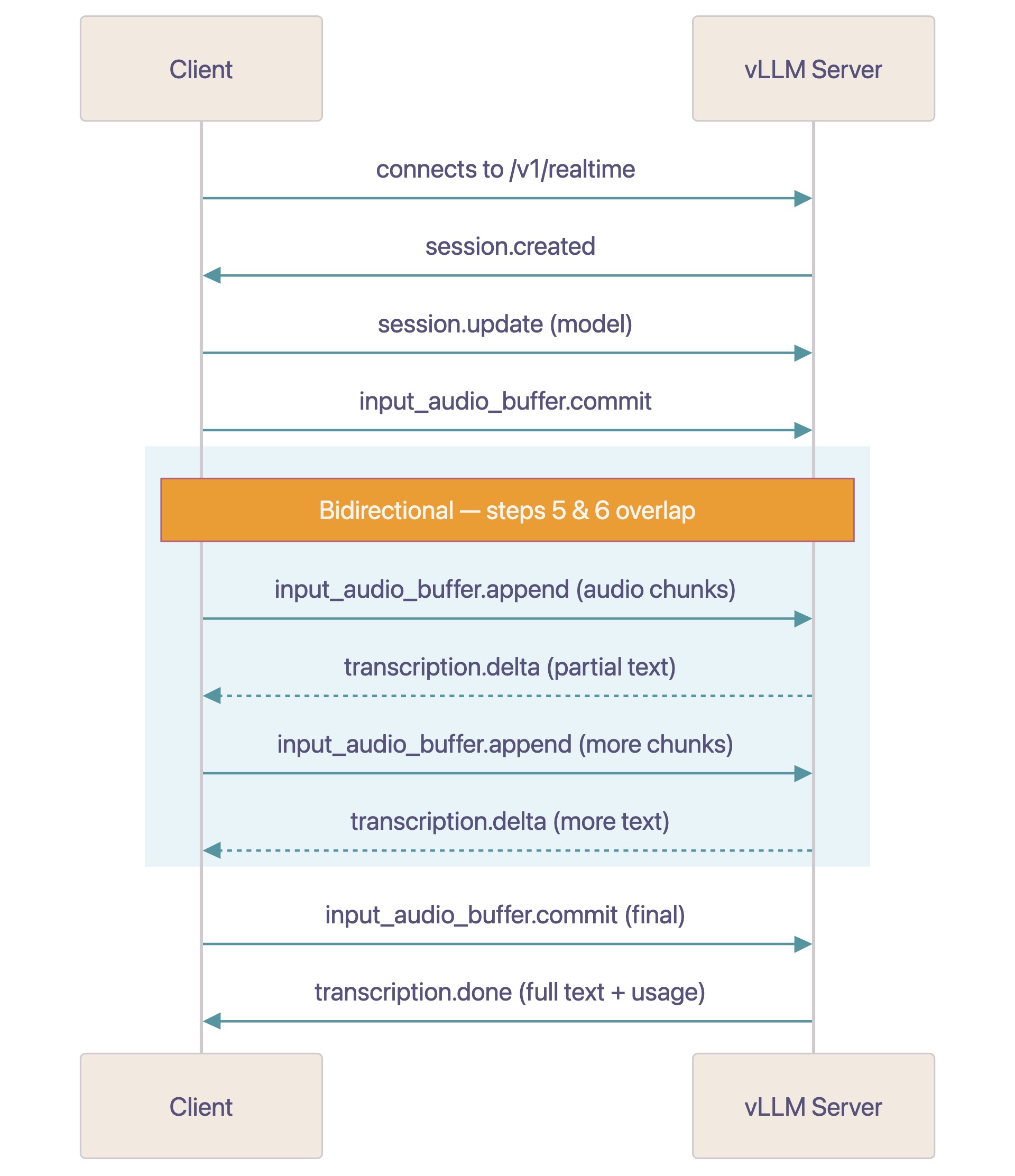
The model begins transcribing as soon as it has enough audio context, streaming transcription.delta tokens back to the client while the client continues sending audio chunks. You do not need to wait until you’ve sent the entire audio before receiving results. Optionally, client can send input_audio_buffer.commit with final=True to signal audio input is finished, which is useful when streaming audio files.
Prerequisites
Build the custom vLLM container
We start with the SageMaker AI vLLM Deep Learning Container and add three things: the bidirectional streaming Docker label, a WebSocket bridge that translates between SageMaker AI expected routes and vLLM’s native API paths, and an entrypoint that runs both processes.
Dockerfile
The Docker label com.amazonaws.sagemaker.capabilities.bidirectional-streaming=true signals to SageMaker AI that this container supports bidirectional streaming. Without this label, SageMaker AI will not establish WebSocket connections to the container.
The bridge (app.py) is a small FastAPI application that listens on port 8080, the SageMaker AI-facing port and forwards WebSocket connections to vLLM’s /v1/realtime endpoint on internal port 8081. It also proxies /ping health checks to vLLM’s /health.
Because the client sets DataType="UTF8", SageMaker AI delivers text frames to the bridge, which forwards them directly to vLLM at /v1/realtime, no frame-type conversion is needed. The binary-to-text decoding in sm_to_vllm is a fallback for clients that do not set DataType.
Deploy to a SageMaker AI endpoint
We deploy to a SageMaker AI real-time endpoint, which will serve our requests.
Configure the model environment and deploy the model
The SM_VLLM_* environment variables configure vLLM’s server parameters:
Voxtral-Mini-4B supports up to 262,144 tokens of context. We set MAX_MODEL_LEN=45000 here, which is sufficient to live-record approximately one hour of audio (3600 seconds / 0.08 seconds per token). Adjust this value based on your expected audio duration. The COMPILATION_CONFIG with cudagraph_mode: PIECEWISE provides CUDA graph optimization for improved inference throughput.
The following code snippet creates the SageMaker AI endpoint:
Test with bidirectional streaming
With the endpoint running, we invoke it using the aws-sdk-sagemaker-runtime-http2 Python SDK. This SDK communicates over HTTP/2 event streams on port 8443 of the SageMaker AI runtime endpoint.
Stream audio and receive transcription
The repository includes a complete client sagemaker_bidi_client.py that wraps the bidirectional streaming SDK in a SageMakerRealtimeClient class. When transcribe_audio() runs, it first sends a session.update event to select the model, then streams the audio file in 4 KB PCM16 chunks. The receive loop runs as a background asyncio.Task, while the main coroutine sends audio chunks so that both directions of the HTTP/2 stream are active simultaneously.
The key detail that makes this overlap observable is the await asyncio.sleep(chunk_duration) after each send. It paces transmission to match real-time playback (~128 ms per 4 KB chunk at 16 kHz) and yields control to the event loop, giving the receive task a chance to process transcription.delta events while more audio is still on the way. Without that yield, chunks would transmit faster than the model can produce output and the interaction would look sequential even though the underlying stream is bidirectional. On the receive side, the loop dispatches on event type: normal ResponseStreamEventPayloadPart events carry JSON messages (session.created, transcription.delta, transcription.done), while ResponseStreamEventModelStreamError and ResponseStreamEventInternalStreamFailure are handled separately so that model-level and platform-level failures surface with clear diagnostics instead of getting lost in the payload path.
Running the client
The output streams transcription text in real time as the audio is sent. Delta tokens appear character by character while audio chunks continue streaming in the background.
Live microphone demo with Gradio
The file-based client is useful for testing, but bidirectional streaming delivers its lowest latency with live audio. The repository includes a Gradio-based microphone client (sagemaker_bidi_microphone_client.py) that captures audio from your microphone and streams it to SageMaker AI in real time:
The microphone client uses the same DataType="UTF8" setting and vLLM Realtime API protocol as the file-based client. It captures audio from the browser via the streaming audio input from Gradio, resamples to 16 kHz PCM16, encodes each chunk into base64, and sends it through the SageMaker AI bidirectional stream. Transcription text updates in the UI as the speaker talks without waiting for the end of their utterance.
Considerations
The vLLM Realtime API expects audio as base64-encoded PCM16 at 16 kHz mono. If your source audio uses a different format or sample rate, convert it before streaming. Voxtral-Mini-4B-Realtime-2602 is a 4B parameter model and fits on a single GPU, so an ml.g6.4xlarge (1x NVIDIA L4) instance is sufficient to host it.
SageMaker AI maintains the WebSocket connection with ping/pong frames every 60 seconds, and the connection is closed if 5 consecutive pings go unanswered. For long-running sessions, make sure your client handles reconnection rather than assuming the stream will remain open indefinitely. Chunk size and pacing are also worth tuning for your use case. This example uses 4 KB audio chunks, which corresponds to approximately 128 ms of audio at 16 kHz PCM16. Smaller chunks reduce latency but increase per-message overhead, while larger chunks improve throughput at the cost of added latency. The appropriate value depends on the latency requirements of your application.
Clean up
To avoid ongoing charges, delete the resources created during this walkthrough once you are finished testing. The SageMaker AI endpoint bills for the underlying instance for as long as it is in service, so removing it is the most important step. The accompanying notebook includes a cleanup cell that deletes the endpoint, endpoint configuration, and model. If you no longer need the custom container image in Amazon Elastic Container Registry (Amazon ECR) or the model artifacts uploaded to Amazon Simple Storage Service (Amazon S3), delete those resources separately to stop incurring storage charges.
Conclusion
In this post, we demonstrated how to deploy Mistral AI’s Voxtral-Mini-4B-Realtime-2602 for real-time speech transcription on Amazon SageMaker AI, combining vLLM’s Realtime WebSocket API with SageMaker AI bidirectional streaming capability.
SageMaker AI bidirectional streaming infrastructure acts as a transparent bridge between HTTP/2 event streams (client-facing) and WebSocket (container-facing). With this bridge, model servers that support a WebSocket-based text-frame API, like vLLM’s Realtime API, can be deployed behind SageMaker AI managed infrastructure with minimal adaptation. All you need is a Docker label, a route remap, and the standard SageMaker AI hosting contract.
This pattern extends beyond speech-to-text. Use cases that require continuous, bidirectional communication, voice agents, real-time translation, interactive audio generation, or multi-turn streaming dialogue can use the same architecture. We demonstrated this with both a file-based client for testing and a Gradio-based live microphone client for interactive use.
Next steps
Deploy your own Realtime API-compatible model on a SageMaker AI bidirectional streaming endpoint with vLLM. The complete notebook, file-based client, and live microphone demo are available on GitHub to help you get started. From there, consider the following directions to build on what you deployed in this post:
Extend the Gradio demo into a full application. Use the live microphone client as a starting point and add features such as transcript export or downstream summarization by chaining the transcription output into a text LLM.
Tune the endpoint for your latency and cost targets. Experiment with instance types, chunk sizes, and vLLM compilation settings to find the right balance for your workload.
Deploy a different real-time model. Swap Voxtral-Mini-4B-Realtime-2602 for another model supported by vLLM’s Realtime API by updating the model artifact and the model identifier passed in the sagemaker_bidi_client.py and sagemaker_bidi_microphone_client.py clients.
Learn more about SageMaker AI bidirectional streaming. Review the documentation to understand the full HTTP/2 event stream contract and apply it to use cases such as voice agents or interactive audio generation.
About the authors