Your logo intro is the first handshake with every viewer—polished motion builds instant trust, while a jerky clip or watermark erodes it. A new wave of AI tools lets you animate that handshake without After Effects or a freelancer; just drop a PNG or type a prompt and watch the reveal render. But “free” isn’t uniform. We tested 10 popular generators against seven pro-level criteria to show what you get at $0, when the paywall matters, and which upgrades stretch a startup’s 2026 budget the farthest.
Why logo intro videos matter for startups
First impressions & branding.
Your intro lands before any copy or dialogue. In the first three seconds, viewers decide whether your brand feels polished or patched together.
Psychologists call this snap verdict “thin-slice” judgment: the brain forms lasting opinions from minimal cues. A crisp logo animation tilts that decision in your favor and frames your pitch as credible.
Branding research from Grovers AI shows that pairing motion with signature color can lift recognition by about 80 percent. That’s a strong return for a clip shorter than a coffee sip.
Motion also taps the eye’s bias for movement over static images. Your logo doesn’t simply appear; it arrives with a flicker, spin, or burst that grabs attention inside noisy feeds and crowded pitch decks.
Animation shapes tone too. A smooth fade signals calm authority. A neon glitch shouts edge and energy. When the style matches your product’s personality, prospects understand who you are before you speak.
Invest a few seconds up front and every video, pitch, or reel starts on the right foot: confident, consistent, memorable.
How we tested and scored every tool
Choosing a logo-intro generator is tough because “free” can mean anything from usable to a branded demo. We built a scorecard that values production-ready results, not marketing hype.
First, we joined each platform’s free tier, uploaded a 1200-pixel PNG logo, and produced an eight-second reveal. We timed the render, downloaded the file, and logged every limit we hit. Then we repeated the test on the first paid tier to note exactly what the upgrade unlocks.
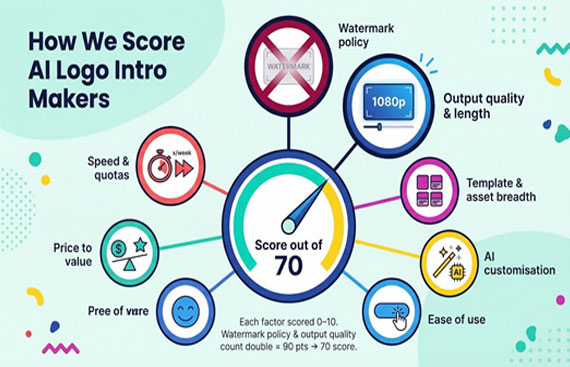
We rated each tool on seven factors, weighted by real-world importance. Watermark policy and output quality count double because a clever idea falls flat if a watermark shouts over it or the resolution tops out at 360p.
-
Watermark policy – Does the free export arrive clean or branded? InVideo, for example, adds its logo to every free video, a deal-breaker for client work according to an OreateAI blog post. -
Output quality & length – Maximum resolution and clip duration without paying. -
Template & asset breadth – Depth of ready-to-use styles, music, and stock clips. -
AI customisation – From text-prompt motion to color matching, how smart is the engine? -
Ease of use – Can a busy founder master it in minutes? -
Price to value – Cash cost of ditching limits versus features gained. -
Speed & quotas – Render time plus any weekly export caps.
Each criterion scores 0–10. The double-weighted items yield a 90-point ceiling, which we convert to a simple “out of 70” headline score in the comparison table. Ties break by lower monthly price, then by AI depth.
The outcome is a ranking that rewards practical freedom: clean exports, HD quality, and fair pricing. Use it to spot platforms that ship a production-ready intro at $0 and those that ask for a card swipe first.
Free vs paid at a glance
Most platforms shout “free forever,” yet the moment you download, the catch appears. To spare you a hunt through terms of service, we stacked every contender side by side and highlighted the two questions founders ask first:
-
Does the free plan stamp a watermark on my logo? -
Can I export in crisp HD or am I stuck with blurry previews?
Answer those and you know whether the tool works today or only after you reach for a card.
|
|
|
|
|
|
|
|
|
|
|
|
|
|
|
|
|
|
|
|
|
|
|
|
|
|
|
|
|
|
|
|
|
|
|
|
|
|
|
|
|
|
|
|
|
|
|
|
|
|
|
|
|
|
|
|
|
|
|
|
|
|
|
|
|
|
|
|
|
|
|
|
|
|
|
|
|
Only five services—Leonardo AI, Canva, FlexClip, Clipfly, and Adobe Express—deliver watermark-free videos on day one. Leonardo AI’s pricing page lists 150 free fast tokens per day and support for four-second 1080p clips, giving startups enough runway to iterate a launch-ready intro before paying.
The rest treat the free tier as a showroom: fine for testing, weak for public launch.
Resolution tells its own story. If your intro will live on YouTube, 1080p is the baseline. Canva and Adobe provide it free. FlexClip stops at 720p until you upgrade, and Renderforest hides Full HD behind its paywall.
Bottom line: decide whether your immediate need is polish at zero cost or template variety and advanced AI. The table shows where the paywall shifts from luxury to necessity so you can budget with confidence.
The ranked top 10 AI logo intro makers
1. Leonardo AI: best for prompt-driven motion
Leonardo feels less like choosing a template and more like briefing a motion artist. Type “explode into neon particles,” add your PNG, and the engine produces a four-second reveal in about 15 seconds.
Behind that speed, Leonardo’s creative suite lets you stitch multiple prompts into a longer sequence, refine motion and pacing, and hold lighting steady across every frame.
Free users get 150 daily tokens and watermark-free downloads. The clip length caps at four seconds, which suits most intros; stitch two clips in any editor if you need extra beats.
The $12-per-month plan extends clip length, grants private projects, and places you in a faster queue. For founders who want distinctive motion without keyframes, that fee replaces hours of design time.
2. Canva: best all-in-one design workhorse
Open a logo-intro template, drop in your PNG, click Animate, and you can download a 1080p video with no watermark. That simplicity explains Canva’s popularity in classrooms and marketing teams. A single dashboard also holds your decks, banners, and LinkedIn posts, so brand consistency comes naturally.
Canva Pro (about ₹499 a month) adds Brand Kits, Magic Resize, and access to a 100-million-item stock library. The catch: animations stay mostly 2D. If you want dramatic 3D spins, you may outgrow it, but for nine startups in ten, Canva handles the job today.
3. InVideo: best for feature-rich editing
InVideo offers a full timeline editor plus an AI layer that writes scripts, selects scenes, and drops an avatar host. On the free tier you can test every feature, but the exported file carries a prominent watermark.
The Plus plan costs $28 a month. Pay once and the watermark disappears, export limits lift, and you receive 50 minutes of text-to-video AI per month. If your team produces frequent content, that bundle can replace several separate tools.
4. Renderforest: best for instant polish through templates
Renderforest provides more than 1,000 logo-reveal templates sorted by style and industry. Free users can edit and preview at 720p, but every download carries a watermark.
A single-export purchase or the Lite subscription (both $10) clears the watermark and grants 1080p quality. Pro (about ₹820 a month, billed yearly) gives 20 unbranded HD downloads each month—useful for teams with regular video output.
5. FlexClip: best no-cost option for quick HD-ready intros
FlexClip delivers watermark-free videos without a card on file. Create a 720p clip in roughly two minutes: drop your logo, pick a motion preset, and export. The Plus plan (₹830 a month) raises resolution to 1080p and widens stock quotas.
6. Placeit: best for one-click variety when speed matters
Scroll, pick an animation, upload your logo, and Placeit shows a ready preview. Downloads, however, cost $9 per video or $14.95 a month for unlimited assets. Agencies that need many variations often find the subscription worthwhile. Customisation stays limited to the fields each template exposes.
7. Adobe Express: best for teams already in Creative Cloud
Adobe Express syncs fonts, colors, and logos from your Creative Cloud library, keeping every asset on brand. The free tier offers watermark-free 1080p exports plus a slice of Adobe Stock. A $9.99 subscription—or an existing Photoshop plan—opens the full stock vault and multiple Brand Kits. Animation remains template-centric and 2D, but upcoming Firefly updates may expand options.
8. Animaker: best for playful, character-driven intros
Animaker turns your browser into a cartoon studio. The free plan limits you to five 720p exports per month, each branded. Pay $10 monthly to remove the badge and bump resolution to 1080p with ten downloads. Building scenes takes more time than template-only tools, yet the end result feels personal and fun.
9. Clipfly: best new AI animator in open beta
Clipfly generates unique logo animations from text prompts with no watermark and no fee—for now. Expect about ten 1080p generations per day before a cooldown message appears. Pricing tiers are “coming soon,” so treat current access as a trial period. Editing controls are minimal; most users finish the clip in another editor.
10. Pixelcut: best mobile-first solution for social creators
Pixelcut lives on iOS and Android. Import a PNG, write a brief prompt such as “retro VHS glitch,” pick duration, and the app renders a 720p watermark-free video. Pro (about ₹820 a month) raises output to 1080p and removes daily caps. Limited controls keep workflows fast, ideal for creators who post from a phone.
Key takeaways: when free is enough and when to pay up
Most “free” intro makers act as showrooms. They tease you with slick previews, then stamp a watermark on the download that screams amateur. InVideo’s own help docs call that badge a deal breaker for professional work. Only five services—Canva, FlexClip, Clipfly, Adobe Express, and Leonardo—let you export a clean HD clip without spending a rupee. Canva even offers full-HD 1080p at no cost, so if the budget is zero, start there.
Once brand reputation is on the line, the upgrade math changes. Renderforest’s $10 pay-per-export removes its watermark and jumps from 720p to 1080p, sparing you a blurry first impression that can cut brand recall by up to 80 percent according to motion-branding research. InVideo’s $28 Plus plan looks steep until you weigh unlimited clean exports, AI minutes, and stock footage that would cost more if bought separately.
Rule of thumb: pay when a watermark appears or resolution stops below 1080p. Otherwise, use the truly free platforms today and put the saved cash toward ad spend—or an extra latte for your next product sprint.