
In this post, you learn how to use Amazon Nova models and Amazon OpenSearch Service to build a scalable, multimodal video search system that enables natural language search across large video datasets. Learn how to go beyond manual tagging and keyword-based search to enable semantic search to unlock the full richness of your video content.
We demonstrate this at scale by processing 792,270 videos from two AWS Open Data Registry datasets: Multimedia Commons (787,479 videos, average 37 seconds) and MEVA (4,791 videos, average 5 minutes). 8,480 hours of video content (30.5 million seconds) took 41 hours to process. Total first year cost: $27,328 (for OpenSearch On-Demand) or $23,632 (for OpenSearch Service Reserved Instances). Pricing consists of one-time ingest ($18,088) and annual Amazon OpenSearch service ($9,240 on-demand or $5,544 by reservation).
The breakdown of intake is as follows.
- Amazon Elastic Compute Cloud (Amazon EC2) Compute (4x c7i.48xlarge Spot, $2.57/hour x 41 hours): $421
- Amazon Bedrock Nova Multimodal Embed (30.5 million seconds x $0.00056/second batch price): $17,096
- Nova Pro Tagging (792K videos x 600 tokens (average)): $571
This solution generates audiovisual embeddings using: AUDIO_VIDEO_COMBINED mode (see the Nova Multimodal Embeddings API schema) to the OpenSearch service to support text-to-video, video-to-video, and hybrid searches.
Solution overview
This architecture consists of two major workflows, ingestion and search, that work together to enable multimodal video search at scale.
Video ingestion pipeline:
The ingestion pipeline processes 19,400 videos per hour using four Amazon EC2 c7i.48xlarge instances with 600 parallel workers. Because the asynchronous API has a concurrency limit of 30 concurrent jobs per account (see Amazon Bedrock quotas), the pipeline uses polling to implement the job queue. Workers submit jobs up to the concurrency limit, poll for completion, and submit new jobs when slots become available. Amazon Nova Multimodal Embeddings handles video processing asynchronously, splitting the video into 15-second chunks (optimized to capture scene changes while keeping the number of embeddings manageable) and producing 1024-dimensional embeddings. These embeddings are chosen over 3072 dimensions to reduce costs by a factor of 3 in terms of storage with minimal impact on accuracy. The cost of generating an embedding does not depend on the dimensionality of the embedding. Amazon Nova Pro adds 10 to 15 descriptive tags per video from a predefined taxonomy.
Note: Amazon Nova 2 Lite improves the accuracy of tagging tasks at a low cost. We recommend that you consider this for new installations. The system stores embeddings in an OpenSearch k-NN index for semantic search and metadata tags in a separate text index for keyword matching. Search allows you to query for videos in three ways. You can convert natural language into embeddings for text-to-video search, directly compare video embeddings for video-to-video search, or combine both approaches in a hybrid search.
Types of searches enabled with this solution:
- Text to video search – Convert natural language queries to embeddings for semantic similarity matching
- Search between videos – Compare video embeds directly to find similar content
- hybrid search – Combines vector similarity (70% weight) and keyword matching (30% weight) to maximize accuracy
Video ingestion pipeline
The following diagram shows the video ingestion and processing pipeline.
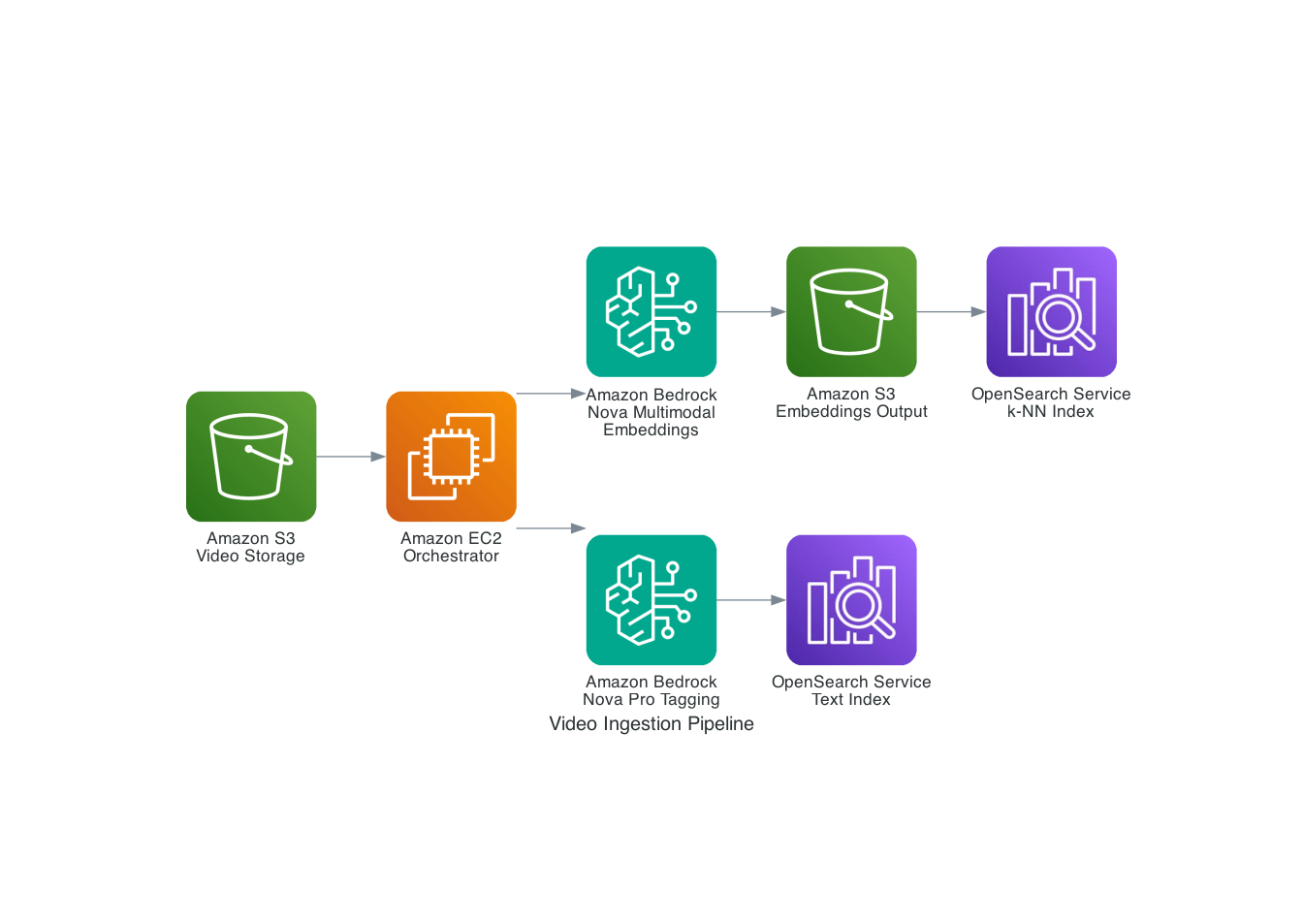
Figure 1: Video ingestion pipeline showing the flow from S3 video storage through Nova Multimodal Embeddings and Nova Pro to dual OpenSearch indexes
The video processing workflow is as follows:
- Upload the video to Amazon Simple Storage Service (Amazon S3).
- Process the video using the Nova Multimodal Embeddings asynchronous API. This will automatically segment your video and generate the embed. The orchestrator polls for job completion (the asynchronous API has a limit of 30 concurrent jobs per account; see Amazon Bedrock quotas) and retrieves the results from Amazon S3.
- Use Nova Pro (or Nova Lite for lower cost and greater accuracy) to generate descriptive tags from predefined taxonomies to enhance your search capabilities.
- OpenSearch k-NN index embedding and text index tags.
video search architecture
The following diagram shows the complete search architecture.
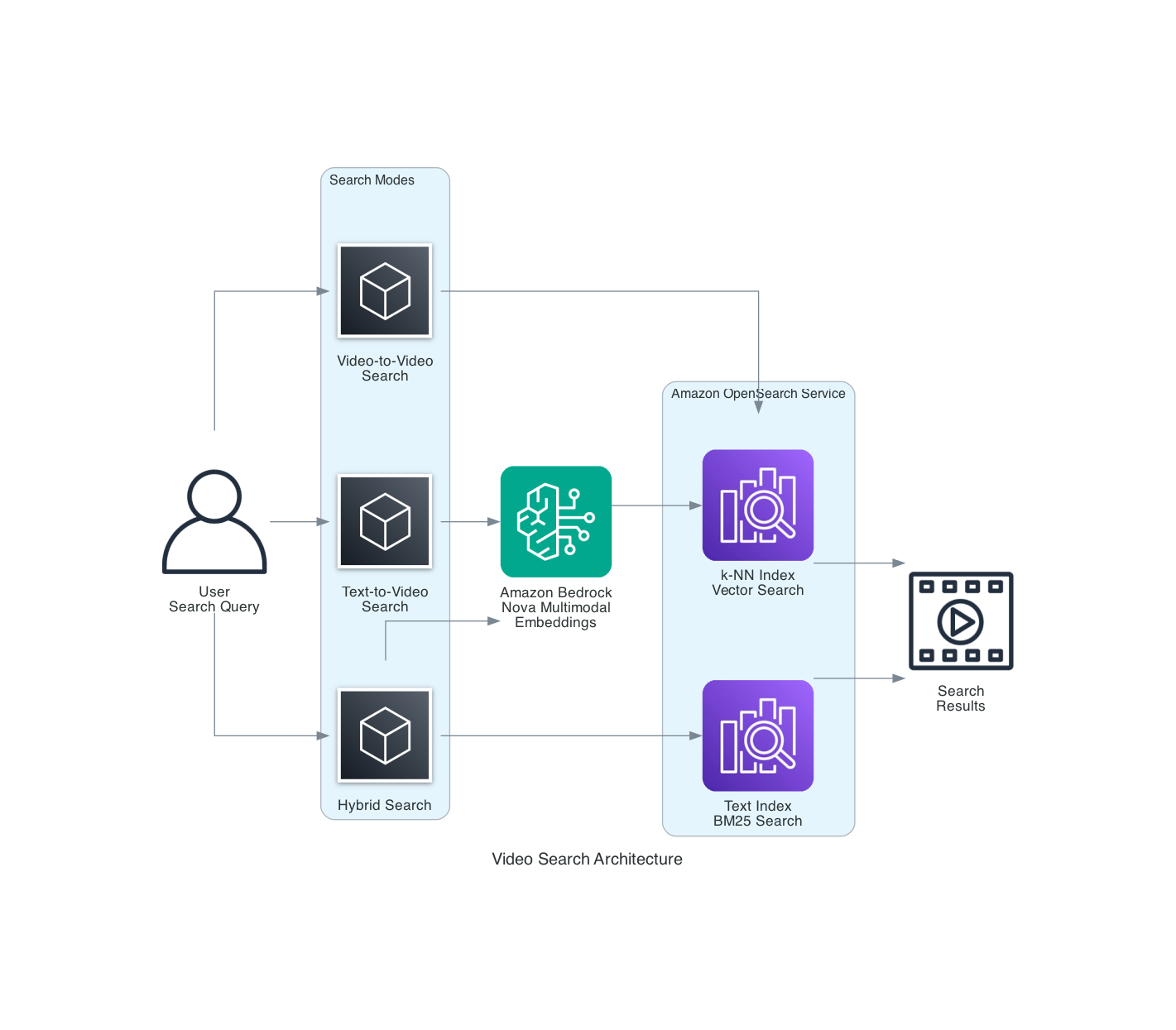
Figure 2: Video search architecture showing three search modes: text-to-video, video-to-video, and hybrid search combining k-NN and BM25.
The search architecture enables three modes:
- Text to video – natural language queries
- video to video – Discover similar content
- hybrid – Combination of semantic matching and keyword matching
Prerequisites
Before you begin, you’ll need the following:
- AWS account with access to Amazon Bedrock
us-east-1(Nova models are enabled by default with appropriate IAM permissions) - Python 3.9 or later installed
- AWS Command Line Interface (AWS CLI) configured with appropriate credentials
- Amazon OpenSearch Service domain (r6g.large or higher recommended)
- Amazon S3 bucket for video storage and embedded output
- AWS Identity and Access Management (IAM) for Amazon Bedrock, OpenSearch Service, and Amazon S3
This solution uses:
- Amazon Bedrock using Nova multimodal embeddings (amazon.nova-2-multimodal-embeddings-v1:0)
- Amazon Bedrock with Nova Pro (us.amazon.nova-pro-v1:0) or Nova Lite (us.amazon.nova-2-lite-v1:0) for tagging
- Amazon OpenSearch Service 2.11 or later and k-NN plugin
- Amazon S3 for video and embedded storage
walkthrough
Step 1: Create an IAM role and policy
Create an IAM role with permissions to call Amazon Bedrock models, write to OpenSearch indexes, and read/write S3 objects.
{
  "Version": "2012-10-17",
  "Statement": [
    {
      "Effect": "Allow",
      "Action": [
        "bedrock:InvokeModel",
        "bedrock:StartAsyncInvoke",
        "bedrock:GetAsyncInvoke",
        "bedrock:ListAsyncInvoke"
      ],
      "Resource": [
        "arn:aws:bedrock:us-east-1::foundation-model/amazon.nova-2-multimodal-embeddings-v1:0",
        "arn:aws:bedrock:us-east-1::foundation-model/us.amazon.nova-pro-v1:0"
      ]
    },
    {
      "Effect": "Allow",
      "Action": [
        "es:ESHttpPost",
        "es:ESHttpPut",
        "es:ESHttpGet"
      ],
      "Resource": "arn:aws:es:us-east-1:ACCOUNT_ID:domain/DOMAIN_NAME/*"
    },
    {
      "Effect": "Allow",
      "Action": [
        "s3:GetObject",
        "s3:PutObject"
      ],
      "Resource": [
        "arn:aws:s3:::amzn-s3-demo-video-bucket/*",
        "arn:aws:s3:::amzn-s3-demo-embedding-bucket/*"
      ]
    }
  ]
}
Step 2: Configure the OpenSearch service index
Create two OpenSearch Service indexes. One for vector embeddings (k-NN) and one for text metadata. This architecture supports semantic search and hybrid queries.
from opensearchpy import OpenSearch, RequestsHttpConnection
from requests_aws4auth import AWS4Auth
import boto3

session = boto3.Session()
credentials = session.get_credentials()
awsauth = AWS4Auth(
    credentials.access_key,
    credentials.secret_key,
    session.region_name,
    'es',
    session_token=credentials.token
)

opensearch_client = OpenSearch(
    hosts=[{'host': 'YOUR_OPENSEARCH_ENDPOINT', 'port': 443}],
    http_auth=awsauth,
    use_ssl=True,
    verify_certs=True,
    connection_class=RequestsHttpConnection
)

# Create k-Nearest Neighbors (k-NN) index for embeddings
knn_index_body = {
    "settings": {
        "index.knn": True,
        "number_of_shards": 2,
        "number_of_replicas": 1
    },
    "mappings": {
        "properties": {
            "video_id": {"type": "keyword"},
            "segment_index": {"type": "integer"},
            "timestamp": {"type": "float"},
            "embedding": {
                "type": "knn_vector",
                "dimension": 1024,
                "method": {
                    "name": "hnsw",
                    "space_type": "cosinesimilarity",
                    "engine": "faiss"
                }
            },
            "s3_uri": {"type": "keyword"}
        }
    }
}

opensearch_client.indices.create(
    index="video-embeddings-knn",
    body=knn_index_body
)

# Create text index for metadata
text_index_body = {
    "settings": {
        "number_of_shards": 2,
        "number_of_replicas": 1
    },
    "mappings": {
        "properties": {
            "video_id": {"type": "keyword"},
            "segment_index": {"type": "integer"},
            "tags": {"type": "text", "analyzer": "standard"}
        }
    }
}

opensearch_client.indices.create(
    index="video-embeddings-text",
    body=text_index_body
)
Step 3: Process the video using Nova multimodal embedding
The Amazon Bedrock asynchronous API processes the video and generates the embed. Divide your video into 15-second chunks and combine audio and visual information.
import boto3
import json
import time

bedrock = boto3.client('bedrock-runtime', region_name="us-east-1")

def generate_video_embeddings(video_s3_uri, output_s3_uri):
    """Generate embeddings for a video using Nova MME async API."""

    # Start async job
    response = bedrock.start_async_invoke(
        modelId="amazon.nova-2-multimodal-embeddings-v1:0",
        modelInput={
            "taskType": "SEGMENTED_EMBEDDING",
            "segmentedEmbeddingParams": {
                "embeddingPurpose": "GENERIC_INDEX",
                "embeddingDimension": 1024,
                "video": {
                    "format": "mp4",
                    "embeddingMode": "AUDIO_VIDEO_COMBINED",
                    "source": {"s3Location": {"uri": video_s3_uri}},
                    "segmentationConfig": {"durationSeconds": 15}
                }
            }
        },
        outputDataConfig={"s3OutputDataConfig": {"s3Uri": output_s3_uri}}
    )

    # Poll for completion
    invocation_arn = response["invocationArn"]
    while True:
        job = bedrock.get_async_invoke(invocationArn=invocation_arn)
        if job["status"] == "Completed":
            return read_embeddings_from_s3(job["outputDataConfig"]["s3OutputDataConfig"]["s3Uri"])
        elif job["status"] in ["Failed", "Expired"]:
            raise RuntimeError(f"Job failed: {job.get('failureMessage')}")
        time.sleep(10)

def manage_concurrent_jobs(bedrock_client, video_queue, max_concurrent=30):
    """Manage 30 concurrent async jobs within quota limits."""
    active_jobs = {}

    while video_queue or active_jobs:
        # Submit new jobs up to limit (uses same start_async_invoke call as above)
        while len(active_jobs) < max_concurrent and video_queue:
            video_info = video_queue.pop(0)
            response = bedrock_client.start_async_invoke(
                modelId="amazon.nova-2-multimodal-embeddings-v1:0",
                modelInput={...},  # Same model_input structure as generate_video_embeddings()
                outputDataConfig={"s3OutputDataConfig": {"s3Uri": video_info['output_uri']}}
            )
            active_jobs[response["invocationArn"]] = video_info

        # Poll all active jobs
        for arn in list(active_jobs.keys()):
            job = bedrock_client.get_async_invoke(invocationArn=arn)
            if job["status"] == "Completed":
                video_info = active_jobs.pop(arn)
                embeddings = read_embeddings_from_s3(job["outputDataConfig"]["s3OutputDataConfig"]["s3Uri"])
                # Process embeddings...
            elif job["status"] in ["Failed", "Expired"]:
                active_jobs.pop(arn)

        if active_jobs:
            time.sleep(10)

def read_embeddings_from_s3(s3_uri):
    """Read JSONL embeddings from S3. Returns list of {startTime, endTime, embedding} dicts."""
    # Download and parse JSONL from s3_uri (standard S3 GetObject + json.loads per line)
Step 4: Generate metadata tags using Nova Pro or Nova Lite
Generate descriptive tags for your videos using Nova Pro (or Nova Lite, which improves accuracy at a lower cost) and enables hybrid searches that combine semantic and keyword matching.
VALID_TAGS = [
    "person", "vehicle", "animal", "building", "nature", "indoor", "outdoor",
    "walking", "running", "sitting", "standing", "talking", "driving",
    "day", "night", "sunny", "cloudy", "urban", "rural", "beach", "forest",
    "sports", "music", "food", "technology", "crowd", "solo"
]

def generate_tags(video_s3_uri, sample_frame_count=3):
    """Generate descriptive tags using Nova Pro or Nova Lite."""

    prompt = f"""Analyze this video and select 10-15 tags from this predefined list that best describe the content:
{', '.join(VALID_TAGS)}

Only return tags from this list as a comma-separated list. Do not invent new tags."""

    response = bedrock.converse(
        modelId="us.amazon.nova-pro-v1:0",  # Or use us.amazon.nova-2-lite-v1:0
        messages=[{
            "role": "user",
            "content": [{
                "video": {
                    "format": "mp4",
                    "source": {"s3Location": {"uri": video_s3_uri}}
                }
            }, {
                "text": prompt
            }]
        }]
    )

    # Parse tags from response and validate against taxonomy
    tags_text = response['output']['message']['content'][0]['text']
    tags = [tag.strip().lower() for tag in tags_text.split(',')]

    # Filter to only valid tags from our taxonomy
    valid_tags = [tag for tag in tags if tag in VALID_TAGS]

    return valid_tags
Step 5: Index OpenSearch Service embeds and tags
For efficiency, use bulk indexing to store generated embeddings and tags in OpenSearch Service.
from opensearchpy import helpers

def index_video_data(video_id, s3_uri, embeddings, tags):
    """Index embeddings and tags in OpenSearch."""

    # Prepare bulk actions for k-NN index
    knn_actions = []
    for idx, emb in enumerate(embeddings):
        doc_id = f"{video_id}_{idx}"
        knn_actions.append({
            "_index": "video-embeddings-knn",
            "_id": doc_id,
            "_source": {
                "video_id": video_id,
                "segment_index": idx,
                "timestamp": emb['start_time'],
                "embedding": emb['embedding'],
                "s3_uri": s3_uri
            }
        })

    # Bulk index embeddings
    helpers.bulk(opensearch_client, knn_actions)

    # Prepare bulk actions for text index
    text_actions = []
    for idx in range(len(embeddings)):
        doc_id = f"{video_id}_{idx}"
        text_actions.append({
            "_index": "video-embeddings-text",
            "_id": doc_id,
            "_source": {
                "video_id": video_id,
                "segment_index": idx,
                "tags": " ".join(tags)
            }
        })

    # Bulk index tags
    helpers.bulk(opensearch_client, text_actions)

    print(f"Indexed {len(embeddings)} segments for video {video_id}")
Step 6: Implement search functionality
Once the ingest is complete, search the indexed videos in three ways: This implementation targets low-latency queries.
Initialize the OpenSearch Service client for search
First, create an OpenSearch Service client for search operations.
from opensearchpy import OpenSearch, RequestsHttpConnection
from requests_aws4auth import AWS4Auth
import boto3

def create_opensearch_client():
    """Create OpenSearch client with AWS authentication."""
    session = boto3.Session(region_name="us-east-1")
    credentials = session.get_credentials()
    awsauth = AWS4Auth(
        credentials.access_key,
        credentials.secret_key,
        'us-east-1',
        'es',
        session_token=credentials.token
    )

    return OpenSearch(
        hosts=[{'host': 'YOUR_OPENSEARCH_ENDPOINT', 'port': 443}],
        http_auth=awsauth,
        use_ssl=True,
        verify_certs=True,
        connection_class=RequestsHttpConnection,
        timeout=30
    )

# Create client
opensearch_client = create_opensearch_client()
Semantic search from text to video
Use the synchronous API to convert natural language queries into embeddings and perform k-NN similarity searches.
def search_text_to_video(query_text, opensearch_client, k=10):
    """Search videos using natural language query converted to embedding."""

    bedrock_client = boto3.client('bedrock-runtime', region_name="us-east-1")

    # Use SINGLE_EMBEDDING task type for text-to-embedding conversion
    # VIDEO_RETRIEVAL purpose optimizes embeddings for searching video content
    request_body = {
        "taskType": "SINGLE_EMBEDDING",
        "singleEmbeddingParams": {
            "embeddingPurpose": "VIDEO_RETRIEVAL",
            "embeddingDimension": 1024,
            "text": {
                "truncationMode": "END",
                "value": query_text
            }
        }
    }

    response = bedrock_client.invoke_model(
        modelId='amazon.nova-2-multimodal-embeddings-v1:0',
        body=json.dumps(request_body),
        accept="application/json",
        contentType="application/json"
    )

    response_body = json.loads(response['body'].read())
    # Response structure: {"embeddings": [{"embeddingType": "TEXT", "embedding": [...]}]}
    query_embedding = response_body['embeddings'][0]['embedding']

    # Perform k-NN search against video embeddings
    search_body = {
        "query": {
            "knn": {
                "embedding": {
                    "vector": query_embedding,
                    "k": k
                }
            }
        },
        "size": k,
        "_source": ["video_id", "segment_index", "timestamp", "s3_uri"]
    }

    response = opensearch_client.search(
        index="video-embeddings-knn",
        body=search_body
    )

    # Extract results
    return [{'score': hit['_score'],
             'video_id': hit['_source']['video_id'],
             'segment_index': hit['_source']['segment_index'],
             'timestamp': hit['_source'].get('timestamp', 0)}
            for hit in response['hits']['hits']]
Text search (keyword matching) with BM25
Uses OpenSearch BM25 scores for tag keyword matching without generating embeddings.
def search_text_bm25(search_term, opensearch_client, k=10):
    """Search videos using BM25 keyword matching on tags field."""

    # Search text index using match query on tags
    search_body = {
        "query": {
            "match": {
                "tags": search_term
            }
        },
        "size": k,
        "_source": ["video_id", "segment_index", "tags"]
    }

    response = opensearch_client.search(
        index="video-embeddings-text",
        body=search_body
    )

    return response['hits']['hits']  # Extract results (same pattern as above)
Search between videos
Get existing video embeds from OpenSearch Service and search for similar content. No Amazon Bedrock API calls are required.
def search_video_to_video(query_video_id, query_segment_index, opensearch_client, k=10):
    """Find similar videos using a reference video segment."""

    # Get the embedding from the reference video segment
    sample_query = {
        "query": {
            "bool": {
                "must": [
                    {"term": {"video_id": query_video_id}},
                    {"term": {"segment_index": query_segment_index}}
                ]
            }
        },
        "_source": ["video_id", "segment_index", "embedding"]
    }

    sample_response = opensearch_client.search(
        index="video-embeddings-knn",
        body=sample_query
    )

    if not sample_response['hits']['hits']:
        return []

    sample_doc = sample_response['hits']['hits'][0]['_source']
    query_embedding = sample_doc.get('embedding')

    # Perform k-NN search with the embedding
    search_body = {
        "query": {
            "knn": {
                "embedding": {
                    "vector": query_embedding,
                    "k": k
                }
            }
        },
        "size": k,
        "_source": ["video_id", "segment_index", "timestamp"]
    }

    response = opensearch_client.search(
        index="video-embeddings-knn",
        body=search_body
    )

    return response['hits']['hits']  # Extract results as needed
hybrid search
We combine semantic k-NN and BM25 keyword matching by taking results from both indexes and combining them with weighted scoring.
def search_hybrid(query_text, opensearch_client, k=10, vector_weight=0.7, text_weight=0.3):
    """Hybrid search combining k-NN semantic search and BM25 text matching."""

    # Generate query embedding (use same code as search_text_to_video above)
    query_embedding = generate_query_embedding(query_text)  # See text-to-video example

    # Get k-NN results (same query as search_text_to_video)
    knn_response = opensearch_client.search(
        index="video-embeddings-knn",
        body={"query": {"knn": {"embedding": {"vector": query_embedding, "k": 20}}}, "size": 20}
    )

    # Get BM25 text results (same query as search_text_bm25)
    text_response = opensearch_client.search(
        index="video-embeddings-text",
        body={"query": {"match": {"tags": query_text}}, "size": 20}
    )

    # Combine results with weighted scoring
    knn_hits = knn_response['hits']['hits']
    text_hits = text_response['hits']['hits']

    combined = {}

    for hit in knn_hits:
        vid = hit['_source']['video_id']
        seg = hit['_source']['segment_index']
        key = f"{vid}_{seg}"
        combined[key] = {
            'video_id': vid,
            'segment_index': seg,
            'tags': hit['_source'].get('tags', ''),
            'vector_score': hit['_score'],
            'text_score': 0,
            'combined_score': hit['_score'] * vector_weight
        }

    for hit in text_hits:
        vid = hit['_source']['video_id']
        seg = hit['_source']['segment_index']
        key = f"{vid}_{seg}"
        if key in combined:
            combined[key]['text_score'] = hit['_score']
            combined[key]['combined_score'] += hit['_score'] * text_weight
        else:
            combined[key] = {
                'video_id': vid,
                'segment_index': seg,
                'tags': hit['_source'].get('tags', ''),
                'vector_score': 0,
                'text_score': hit['_score'],
                'combined_score': hit['_score'] * text_weight
            }

    # Sort by combined score and return top k
    sorted_results = sorted(combined.values(), key=lambda x: x['combined_score'], reverse=True)[:k]

    return sorted_results

# Usage example - search with natural language query
query = "person walking on beach at sunset"
hybrid_results = search_hybrid(query, opensearch_client, k=10)

for r in hybrid_results:
    print(f"Combined: {r['combined_score']:.4f} (Vector: {r['vector_score']:.4f}, Text: {r['text_score']:.4f})")
    print(f"  Video: {r['video_id']}, Segment: {r['segment_index']}")
    print(f"  Tags: {r['tags']}\n")
Search performance at scale
After indexing all 792,218 videos, we measured search performance using all three methods.
The query latencies measured on 792,218 videos are:
- Semantic k-NN search: ~76ms (using HNSW logarithmic scaling)
- BM25 Text Search: ~30ms
- Hybrid search: ~106ms
After indexing and storing all 792,218 videos and generating embeddings, the storage requirements are:
- k-NN index: 28.8 GB for 792K video
- Text index: 1.0 GB for 792K video
- Total: 29.8 GB (manageable with a modern OpenSearch cluster)
The Hierarchical Navigable Small World (HNSW) algorithm used for k-NN search provides logarithmic time complexity. This means that search time increases slowly as the dataset grows. All three search methods maintain response times of less than 200 ms even at 792K video scale, meeting the production requirements of interactive search applications.
What you need to know
Performance and cost considerations
Video processing time varies depending on video length. In our testing, it took about 70 seconds to process a 45 second video using the asynchronous API. Processing includes automatic segmentation, embedding generation for each segment, and output to Amazon S3. Efficiently scale your search operations. Our tests show that semantic searches complete in less than 80 ms, text searches in less than 30 ms, and hybrid searches in less than 110 ms, even on 792K videos. To reduce storage costs while maintaining accuracy, use 1024-dimensional embedding instead of 3072-dimensional. Nova Multimodal Embeddings is priced per second of video input ($0.00056 per batch), so processing costs are determined by video playback time, not embedding dimensions or segmentation. Asynchronous APIs are more cost effective than processing frames individually. For OpenSearch Service, r6g instances are more cost-effective than previous instance types, and you can implement tiering to move cold data to Amazon S3 for further savings.
Scaling to production
For production deployments with large video libraries, consider using AWS Batch to process videos in parallel across multiple compute instances. You can partition your video dataset and assign subsets to different workers. Monitor the health of your OpenSearch Service cluster and scale your data nodes as your index grows. The two-index architecture scales well because k-NN search and text search can be optimized separately.
Tuning search accuracy
Adjust the hybrid search weights based on your use case. The default 0.7/0.3 split (vector/text) favors semantic similarity in most scenarios. If you have high-quality metadata tags, increasing the text weight to 0.5 may improve results. We recommend testing different configurations with your specific content to find a balance.
cleaning
To avoid ongoing charges, delete the resources you created.
- Delete an OpenSearch Service domain from the Amazon OpenSearch Service console
- Empty and delete the S3 bucket used for videos and embeds
- Delete the IAM role created specifically for this solution
Note that Amazon Bedrock pricing is based on usage, so you don’t need to clean up the Amazon Bedrock model itself.
conclusion
This tutorial described building a multimodal video search system for natural language queries across video content. This solution uses the Amazon Bedrock Nova model to generate embeddings. These embeddings capture both audio and visual information and efficiently store it in the OpenSearch Service using a two-index architecture, providing three search modes for different use cases. The asynchronous processing approach is extended to handle large video libraries, and the hybrid search feature combines semantic and keyword-based matching to maximize accuracy. You can extend this foundation by adding features like similarity search between videos, implementing caching for frequently searched queries, and integrating with AWS Batch for parallel processing of large datasets.
For more information about the technologies used in this solution, see Hybrid Search with Amazon Nova Multimodal Embeds and Amazon OpenSearch Service.
About the author