

Organizations may face two significant challenges with conversational AI. First, users need answers where they’re working, whether it’s a CRM, support console, or analytics portal, rather than in a separate tool. Second, implementing secure embedded chat in your application can require weeks of development to build out authentication, token validation, domain security, and global delivery infrastructure.
Embedded chat in Amazon Quick Suite solves the first challenge by bringing conversational AI directly into your applications, allowing users to query structured data, find documents, and trigger actions without switching tools.
This post shows how to solve the second challenge with a one-click deployment solution that embeds chat agents in enterprise portals using the Quick Suite Embedding SDK.
Solution overview
This solution deploys a secure web portal for embedded chat using Amazon CloudFront for global content delivery, Amazon Cognito for OAuth 2.0 authentication, Amazon API Gateway for REST API endpoints, AWS Lambda for serverless API processing, and OpenID Connect (OIDC) federation for identity integration with Quick Suite.
This solution implements defense-in-depth security with multiple layers of protection. DDoS protection in CloudFront, a private Amazon Simple Storage Service (Amazon S3) bucket with origin access controls that prevent direct access to front-end assets, AWS WAF rate-limiting protection in API Gateway, and JSON web token (JWT) signature validation using Amazon Cognito public keys before generating time-limited user-specific embedded URLs in least-privilege AWS Identity and Access Management (IAM). authority.
The following diagram shows the solution architecture.
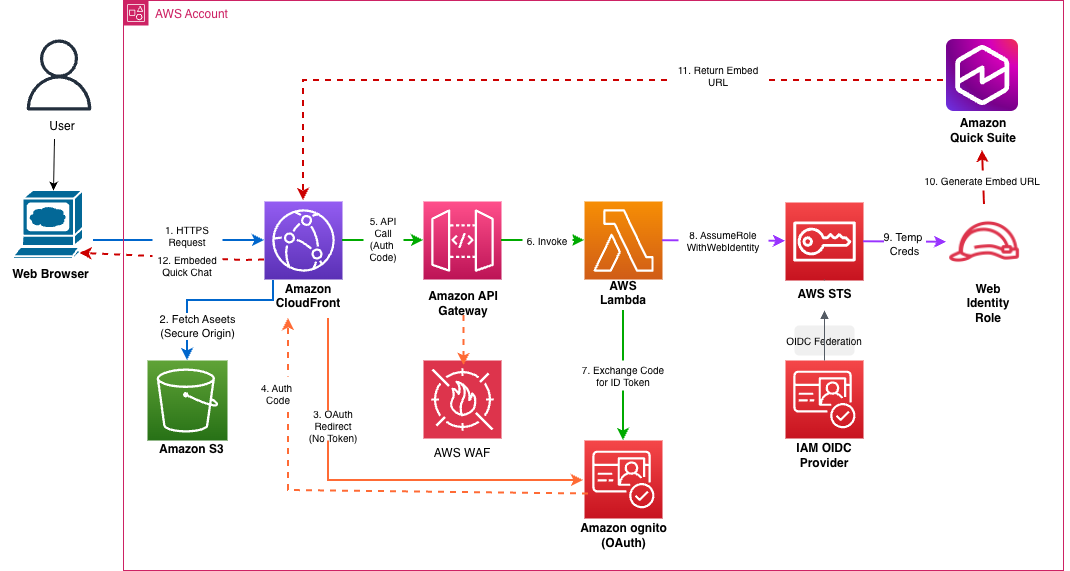
The workflow consists of the following steps:
- Users access the web portal URL and route to CloudFront.
- CloudFront uses origin access controls to fetch HTML, CSS, and JavaScript files from your private S3 bucket.
- The web application checks for a valid authentication token and redirects the unauthenticated user to an OAuth 2.0 login UI hosted in Amazon Cognito.
- When users enter their credentials on the Amazon Cognito login page, their credentials are validated and they are redirected to a CloudFront URL using a one-time authorization code.
- The application extracts the authorization code, makes an HTTPS API call to API Gateway, and passes AWS WAF rate limits.
- API Gateway uses the authorization code to invoke your Lambda function.
- The Lambda function makes a server-to-server HTTPS call to the Amazon Cognito OAuth token endpoint and exchanges authorization codes for JWT tokens (ID token, access token, refresh token).
- This function uses the Amazon Cognito public key JSON Web Key Set (JWKS) with thread-safe caching to verify the cryptographic signature of the ID token.
Here is an example of a decoded JWT:
- The Lambda function uses the verified ID token to call the AWS Security Token Service (AWS STS) AssumeRoleWithWebIdentity API to assume the IAM web identity role and receive temporary AWS credentials.
- This function calls the Quick Suite ListUsers API with temporary credentials to verify that the user exists, and then calls the GenerateEmbedUrlForRegisteredUser API to generate a secure embed URL with domain restrictions.
- This function returns an embedded URL in a JSON response that includes cross-origin resource sharing (CORS) headers to CloudFront through API Gateway. Below is an example of an embedded URL.
- CloudFront applications use the Quick Suite Embedding SDK to create an embedding context using secure cross-origin communication and to render the chat interface in an HTML iframe.
You can deploy your solution using the following high-level steps:
- Deploy serverless infrastructure using the AWS Cloud Development Kit (AWS CDK).
- Provision users with Amazon Cognito and Quick Suite.
- Share Quick Suite assets (chat agents and related connections, knowledge base).
- To use the Quick Suite Chat Agent, visit the web portal.
Prerequisites
The following prerequisites are required to deploy the solution described in this post:
Deploy serverless infrastructure using AWS CDK
To deploy serverless infrastructure using AWS CDK, follow these steps.
- Clone a GitHub repository.
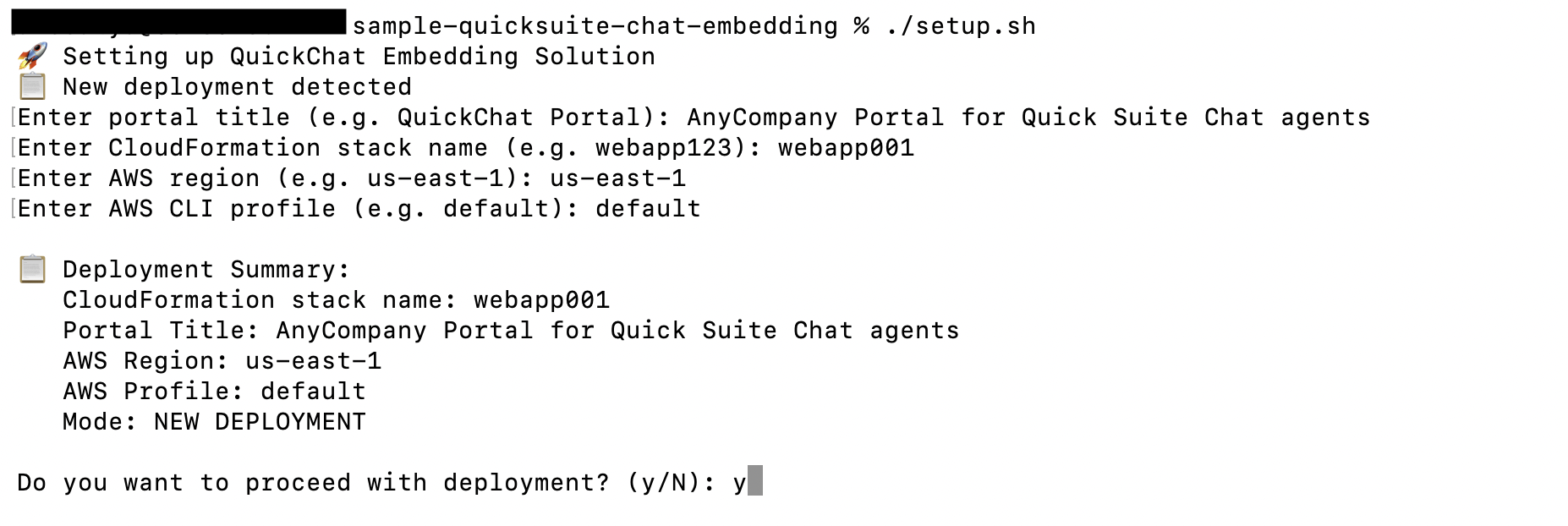
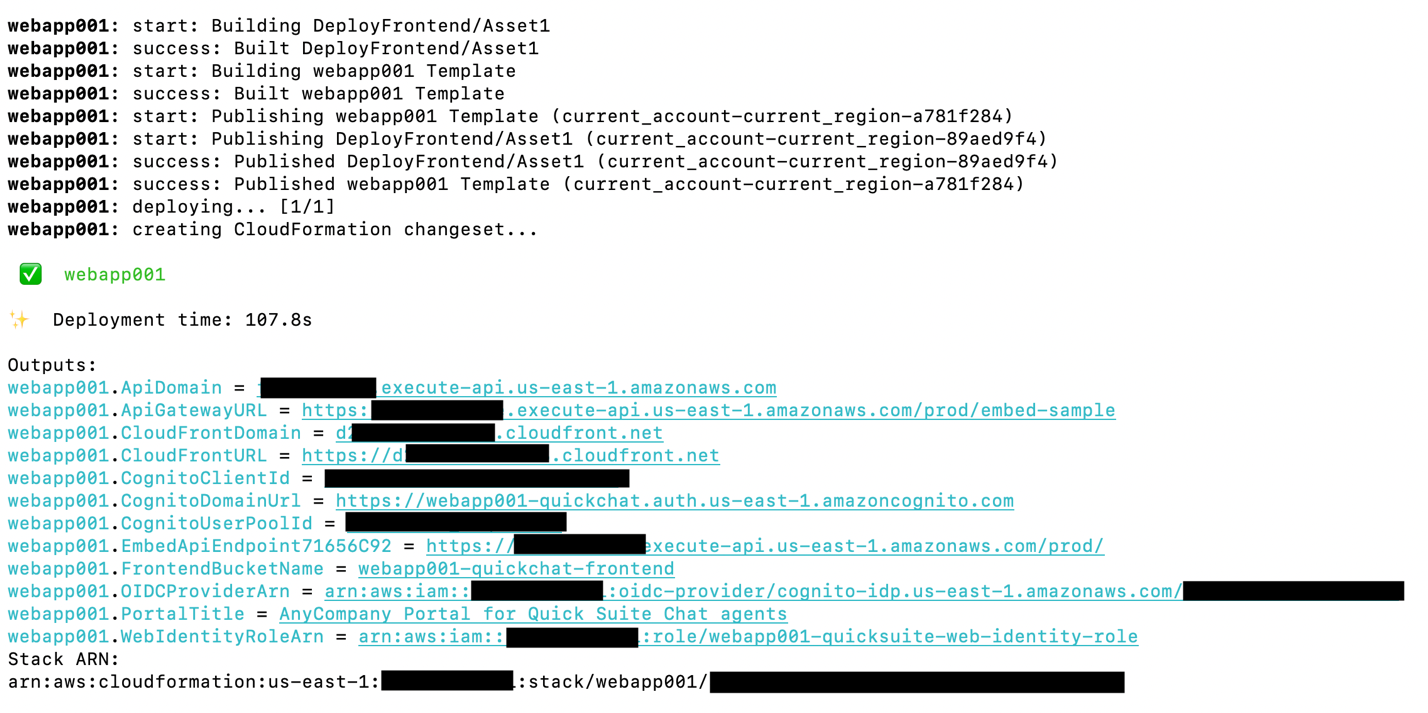
- Deploy your infrastructure.
You are prompted to enter your AWS Region code, AWS CloudFormation stack ID and portal title, and AWS CLI profile.

Provision users with Amazon Cognito and Quick Suite
To provision users with Amazon Cognito and Quick Suite, follow these steps:
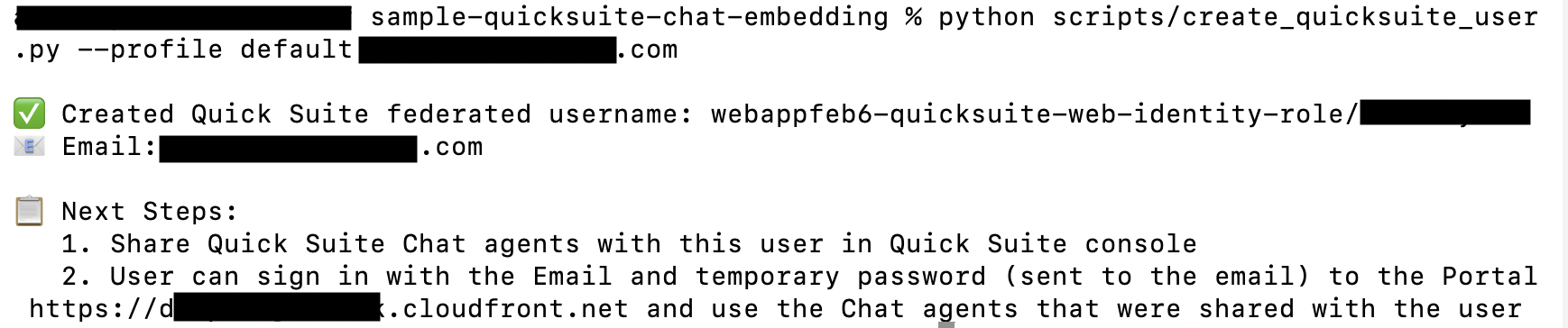
- Create an Amazon Cognito user in your Amazon Cognito user pool.

- Create a federated user in Quick Suite.
Share Quick Suite Chat Agent
To share your Quick Suite Chat Agent, follow these steps:
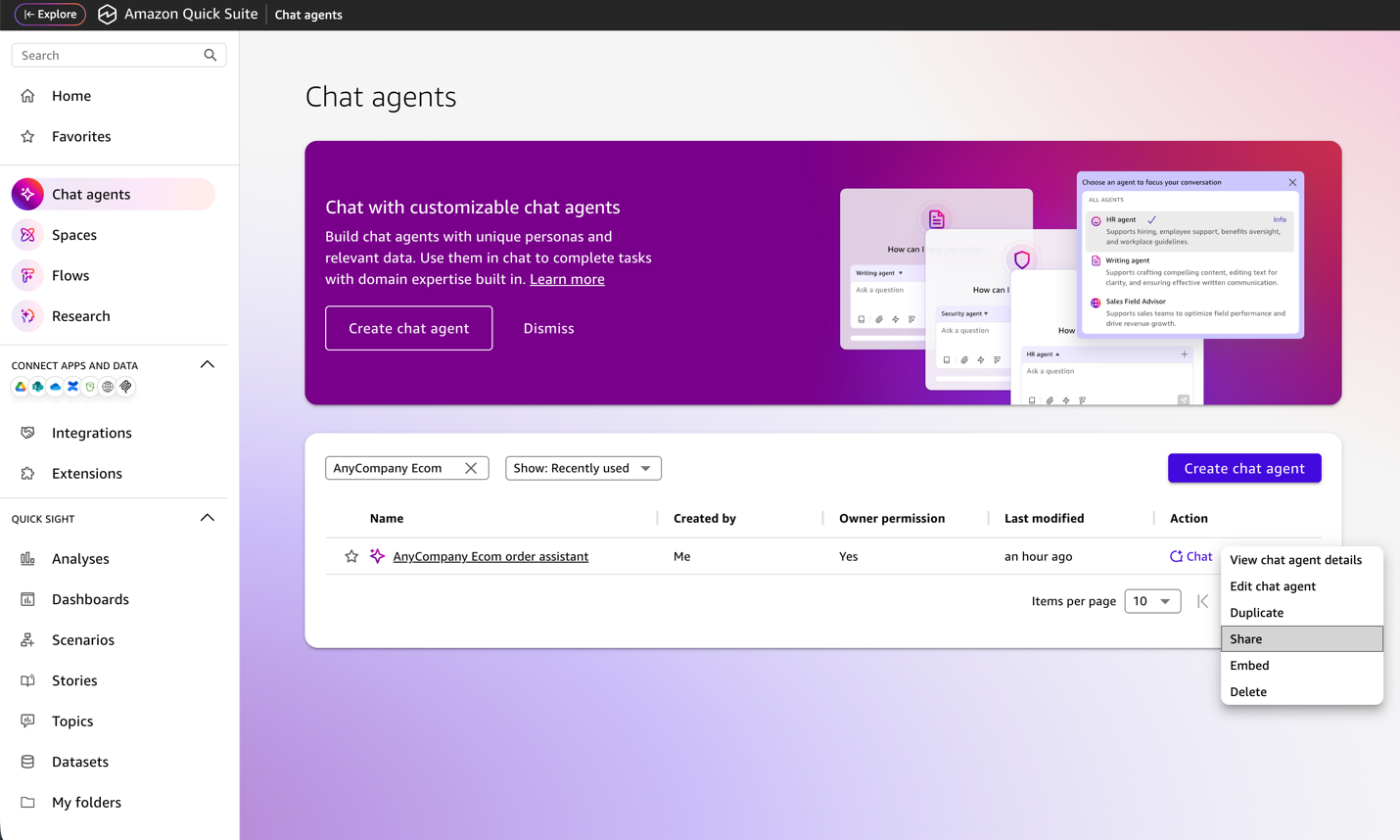
- Sign in to the Quick Suite console using credentials that have the Quick Suite Author Pro role.
- choose chat agent in the navigation pane.
- Select the agent you want to share (such as AnyCompany Ecom order Assistant) and share.
- Search for the username you created earlier (for example: user123@example.com).
- choose share.
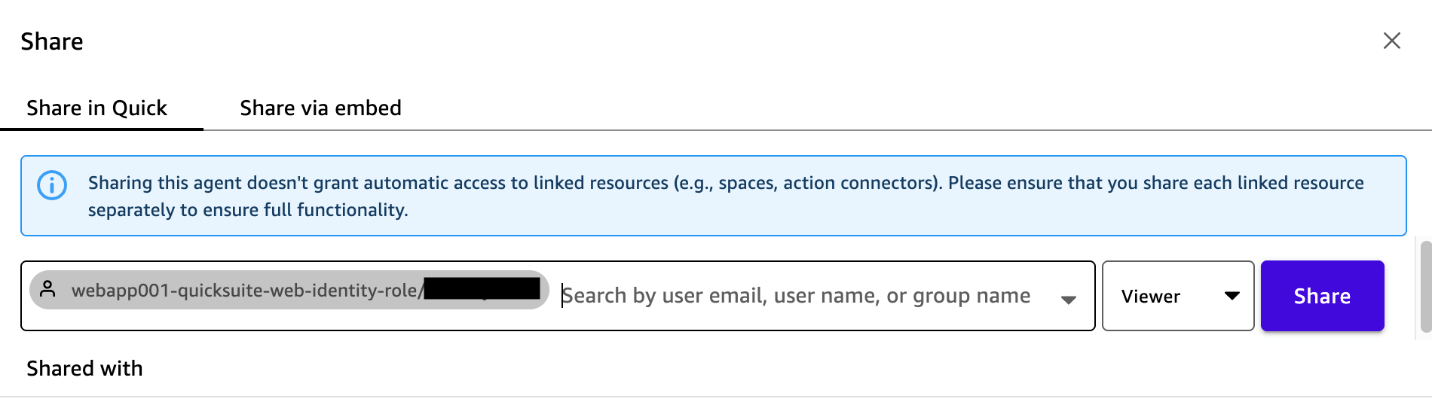

After sharing this agent, you must also share each of the agent’s linked resources individually to see full functionality.
Access the web portal and use the Quick Suite chat agent
To access the web portal and start using Chat Agent, follow these steps:
- Find your temporary password in your Amazon Cognito confirmation email.
- Access the CloudFront URL from a web browser using your user ID and temporary password.
- You will be asked to change your password when you log in for the first time.
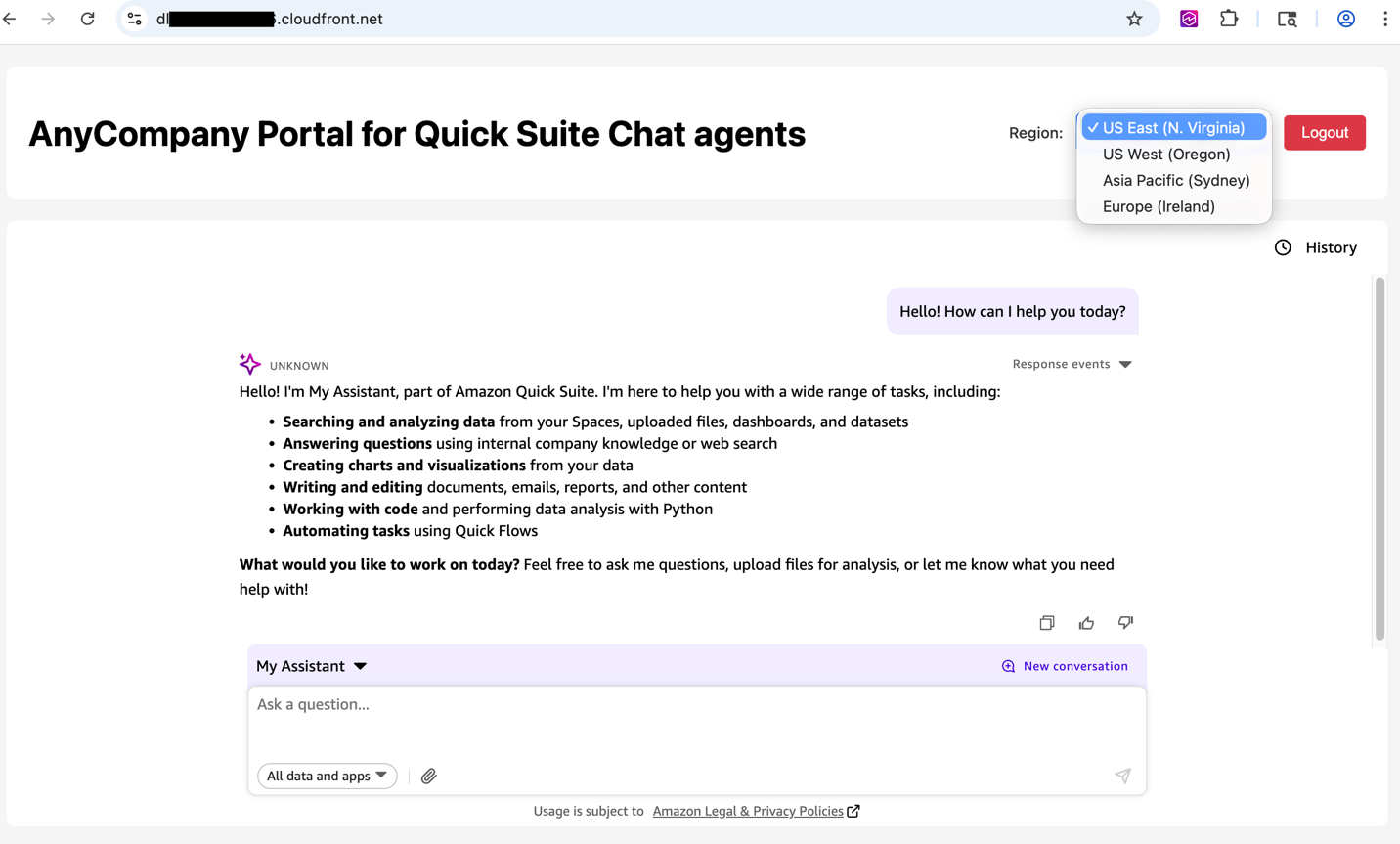
After successful login, you will see the following my assistant in the chat interface.
- Select the region you want to connect to your custom Quick Suite chat agent.
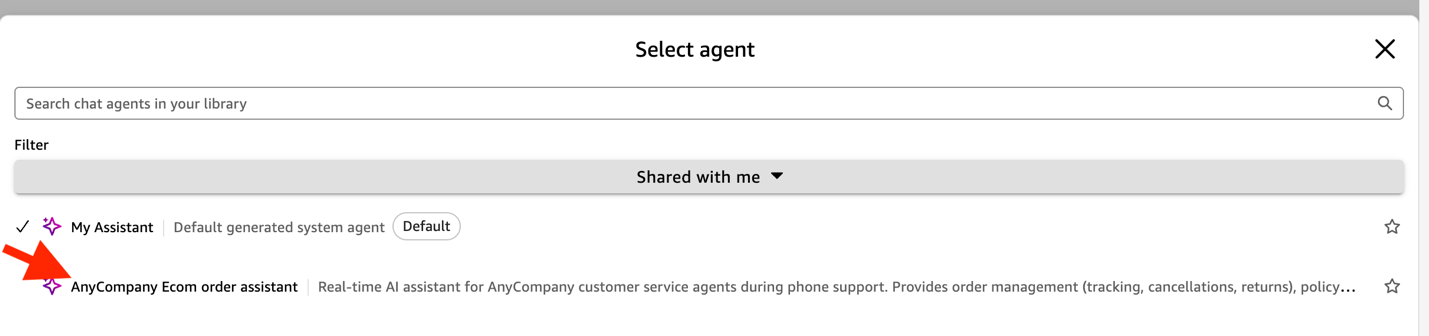
- To view chat agents that have been shared with you, shared with me under filter.
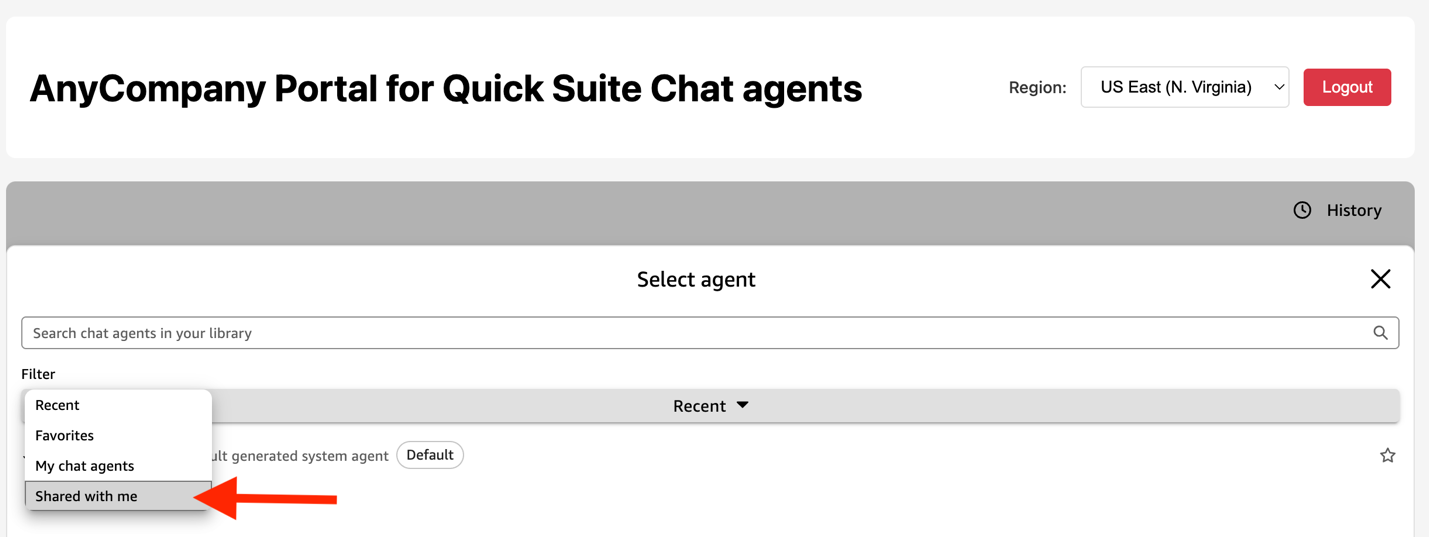
- Select your preferred agent and start chatting.
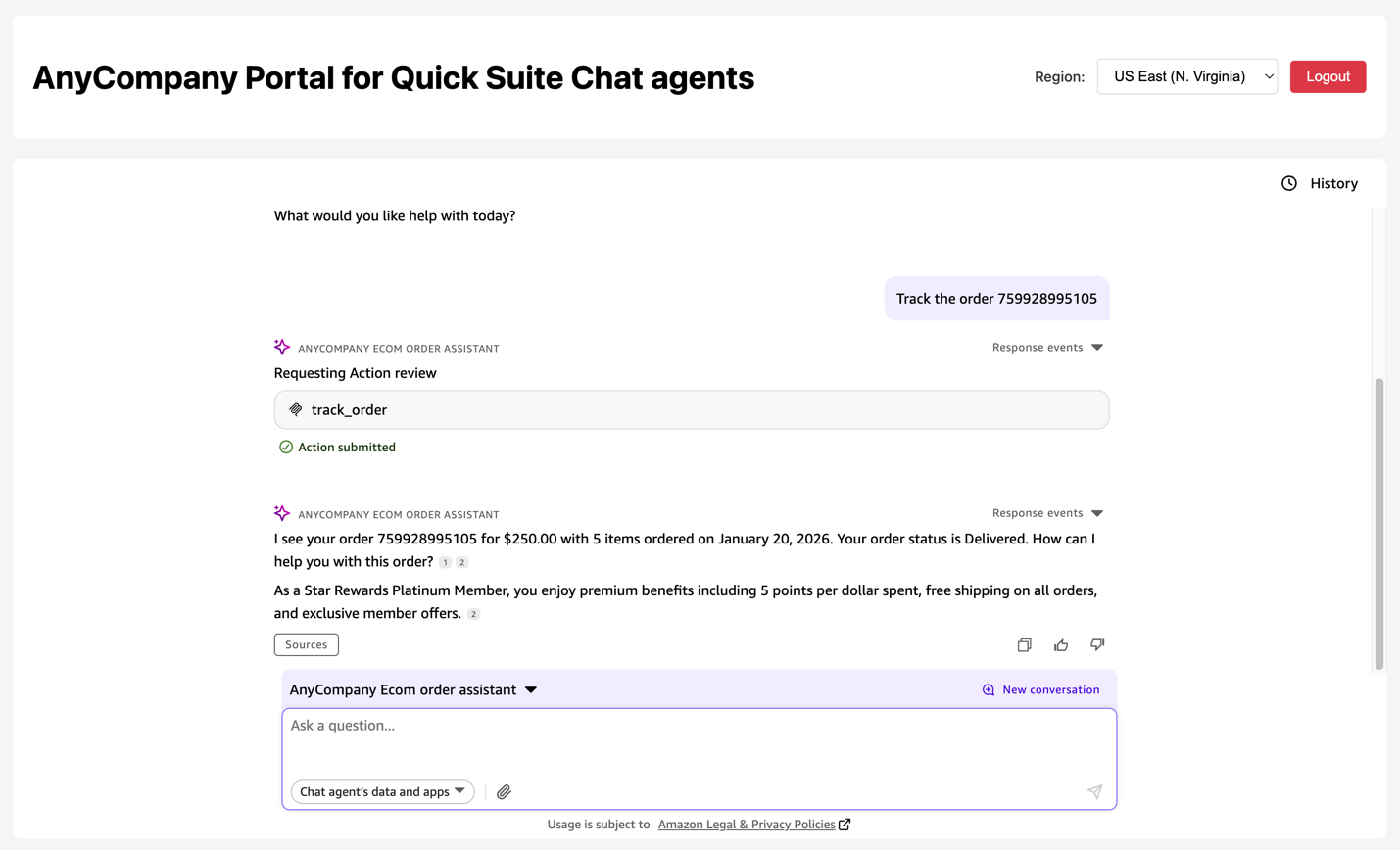
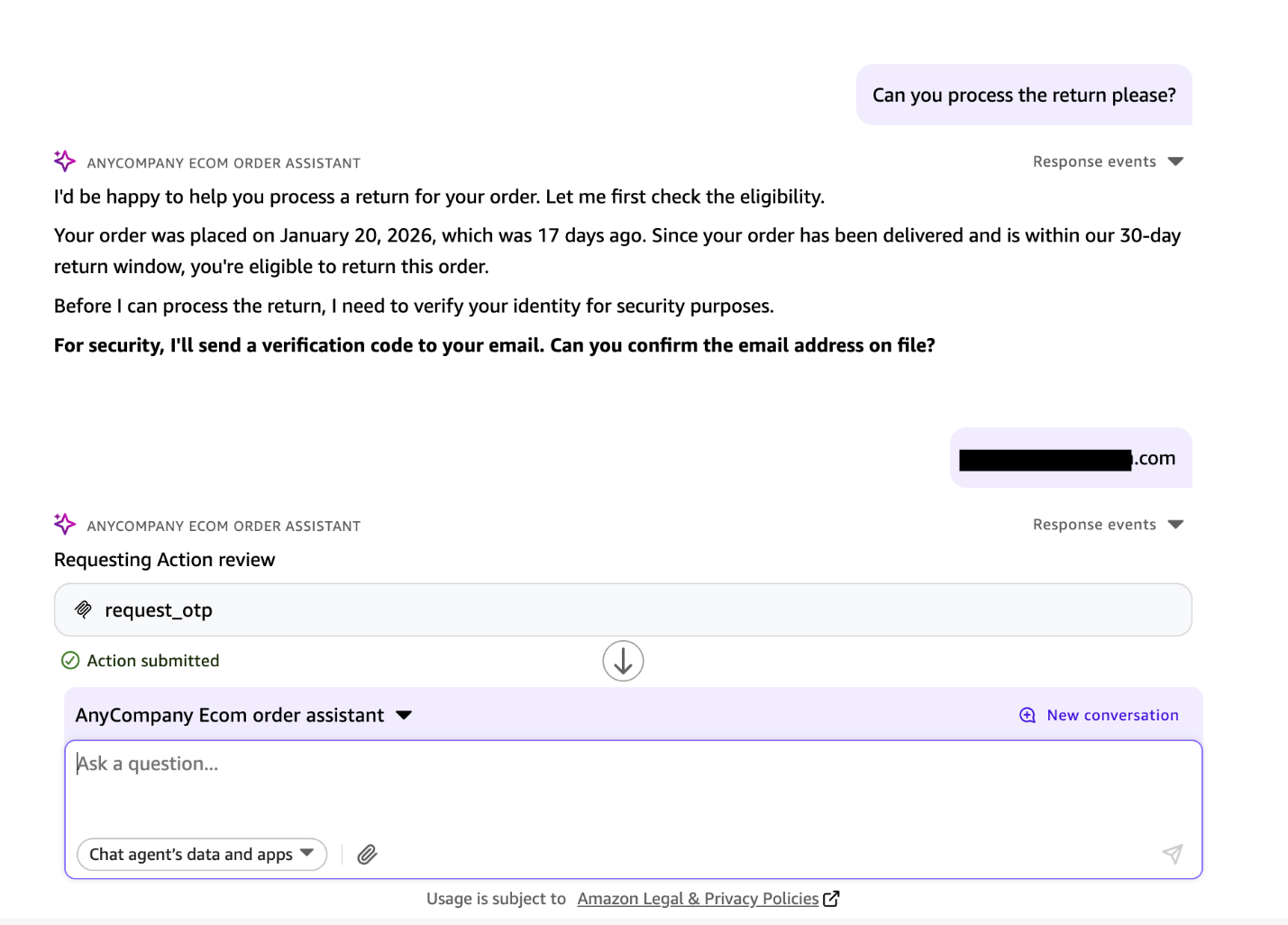
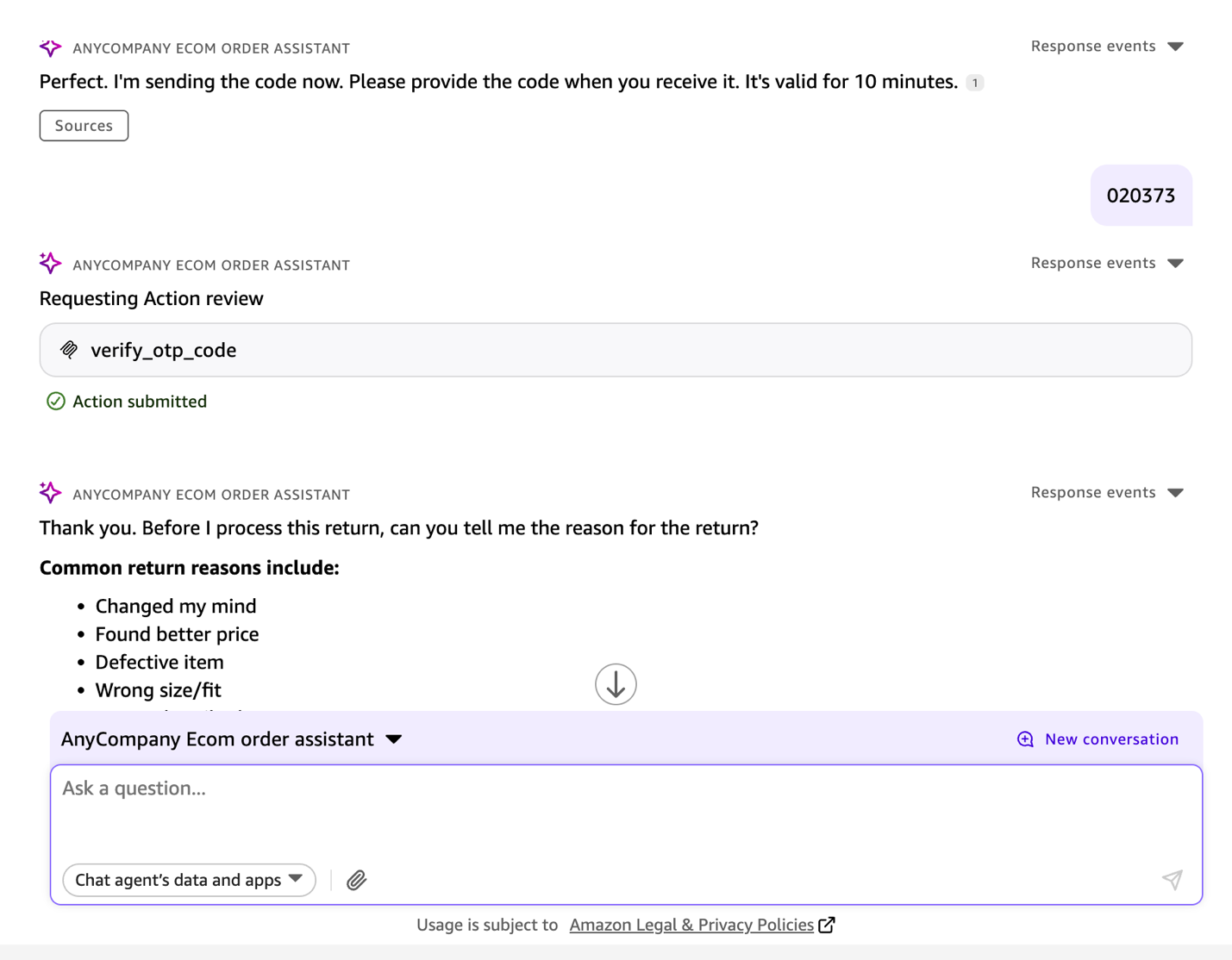
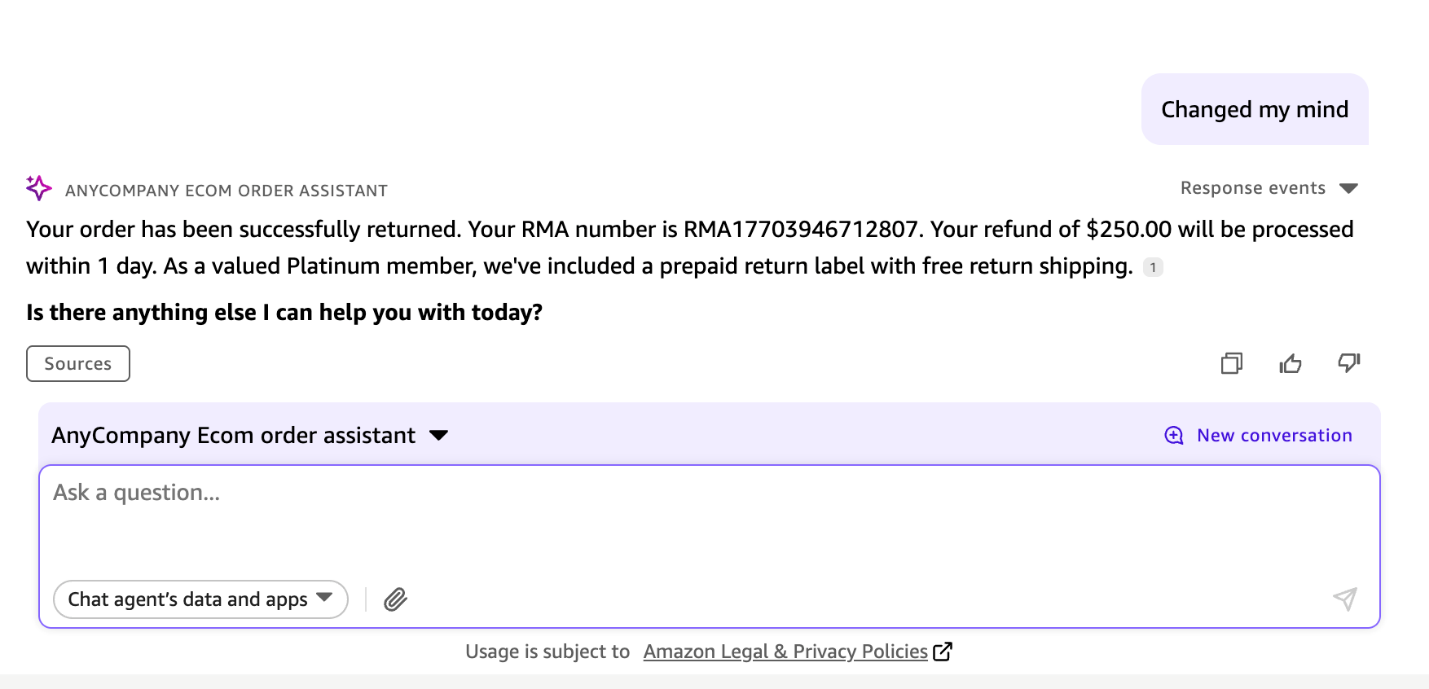
The following screenshot shows a chat interaction between a customer service representative tracking an example online order and processing a return in response to a phone request from a verified customer.
cleaning
To clean up your resources, delete your deployed AWS resources.
conclusion
This solution addresses the core challenges of embedding conversational AI at scale: securing authentication for thousands of concurrent users across locations around the world, maintaining enterprise-grade security with comprehensive audit trails, and simplifying deployment with automated infrastructure provisioning. You can customize your portal’s branding, adjust security policies, and integrate with your existing identity provider. Automatically scale to thousands of concurrent users while maintaining pay-as-you-go pricing.
To try this solution, clone the GitHub repository and deploy the complete infrastructure with one click to embed the Quick Suite chat agent.
About the author
 Satyanarayana Adimula is a senior builder of innovation and delivery for AWS Generative AI. Leveraging over 20 years of data and analytics expertise, we specialize in building agent AI systems that enable large enterprises to automate complex workflows, accelerate decision-making, and achieve measurable business outcomes.


