

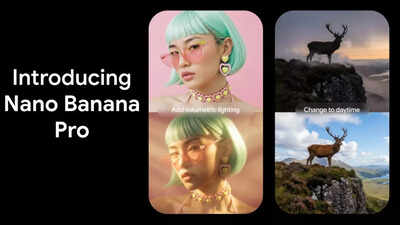
Google has officially announced Nano Banana Pro, a major upgrade to its popular AI image generator. Powered by the newly introduced Gemini 3 model, this latest version provides enhanced inference, improved world knowledge, and more accurate text rendering. This update reflects significant advancements in Google’s AI ecosystem, building on the success of its initial Nano Banana tool, which became a social media sensation. Users can now generate high-resolution images, adjust lighting, focus, and camera angle, and integrate real-time information from Google searches. Nano Banana Pro also supports multilingual text and consistent character visualization, making it ideal for professional creators. This rollout coincides with rapid momentum across Google’s AI products and significant user growth on its Gemini-powered platform.
Google launches Nano Banana Pro with advanced AI features
Nano Banana Pro is based on the Gemini 3 Pro architecture, offering more powerful inference capabilities, improved world knowledge, and more accurate text rendering. The Gemini 3 announcement earlier this week also led to a notable rally in Alphabet stock, reflecting the market’s growing interest in Google’s expanding AI technology.
Josh Woodward, vice president of Google Labs and Gemini, told CNBC that the new version is far superior to the original Nano Banana, which was released in August. Internal testers leverage this tool for tasks like turning code snippets and resumes into polished infographics. Woodward added that users are discovering innovative ways to visualize information that has traditionally been resistant to visual representation.The first Nano Banana tool, built on Gemini 2.5 Flash, became a social media sensation by allowing users to create hyper-realistic mini figures. This original version saw millions of new sign-ups to the Gemini app within days, highlighting the public demand for creative AI tools.
Main features and improvements of Nano Banana Pro
- Improved text processing and multilingual support
One of the notable upgrades in Nano Banana Pro is its enhanced text generation capabilities. This tool can keep the original text within the image, create new text in different styles, and translate your content into multiple languages. These improvements are especially useful for graphic designers, marketers, and content creators, who can now use AI to create posters, mockups, and other marketing visuals with high-fidelity text.
- High quality images with advanced controls
Nano Banana Pro supports image generation at 2K and 4K resolutions, a significant increase from the original model’s 1024×1024 output. Users can now adjust camera angle, lighting, depth of field, focus, and color grading, giving professionals creative control similar to tools like MidJourney. These upgrades enable you to produce images that meet professional standards for clarity, composition, and artistic effect.
- Integration with real-time web search
The new feature allows Nano Banana Pro to connect with Google Search and generate images from live information. For example, users can generate visuals for recipes, create educational flashcards, and create graphics based on current data. This integration extends the tool’s versatility beyond static prompts, making it ideal for dynamic content creation.
- Blending multiple images and text consistency
The Pro version lets you blend up to 14 objects or use 6 high-fidelity photos in one composition. It also allows you to maintain a consistent appearance for up to five people, making it especially useful for creating storyboards, presentations, or character sequences. This feature ensures visual continuity across projects and improves workflow efficiency for professional creators.
Where can I access Nano Banana Pro?
Google is rolling out Nano Banana Pro through multiple channels.
- Gemini App – Default model for image generation with free tier restrictions
- NotebookLM – available to paid users
- Google Workspace – Slides and Vids integration coming
- Search AI Mode – Available to Pro and Ultra subscribers in the US
- Flow (AI video tool) – accessible only to Ultra subscribers
- Gemini API, Google AI Studio, Antigravity IDE – for developer access
Although Nano Banana Pro produces high-quality images, Google notes that it is more resource-intensive and slower than the original Nano Banana.
AI image safety and watermarking
To ensure responsible use, Google is extending SynthID, an AI watermarking system, throughout Nano Banana Pro. All images generated or edited include an invisible identifier, so users can see if a visual was created using Google AI, helping fight misinformation and abuse. Free and pro-level users will also see a visible glowing watermark on the generated images. Ultra subscribers have the option to remove visible watermarks, allowing you to maintain accountability while providing a clean canvas for professional projects, creative presentations, and other commercial or personal uses.
How to use Nano Banana Pro
Using Nano Banana Pro is easy.
- Open the Gemini app
- Choose Gemini Thinking
- Select Banana / Nano Banana Pro for image generation
- Upload an image or enter a text prompt
- Adjust settings such as resolution, lighting, focus, camera angle, etc.
- Download the final image or continue editing within the workspace tools
Free users have a limited number of generations before the app reverts to the original Nano Banana model.
Differences with Google’s Nano Banana Pro Nanobanana AI trends
The original Nano Banana runs on Gemini 2.5 Flash, while Nano Banana Pro is powered by Gemini 3. This gives the Pro version stronger inference, better world knowledge, more accurate text rendering, and enables more complex and accurate image generation.
- Image quality and control
The original Nano Banana supports lower resolutions (approximately 1024×1024), but the Pro can generate images in 2K and 4K. The Pro version also allows for advanced adjustments to lighting, depth of field, focus, color grading, camera angle, and more, giving creators near-professional control.
- Text and multilingual support
Pro has enhanced text handling, can preserve or generate text within images, and supports multiple language features that were limited or absent in the original.Nano Banana Pro can pull real-time information from Google searches to create dynamic visuals, while the original only works with static prompts.
- Consistency of multiple images and text
Pro can blend up to 14 objects or 6 high-fidelity photos and maintain a consistent look for up to 5 characters, making it perfect for storyboards and presentations. The original lacks this level of configuration control.
- Professional safety features
Pro includes SynthID AI watermark for responsible use, visible shine for free/pro users, and optional removal for Ultra subscribers. The original had a simpler watermark or no watermark.Pro is available via the Gemini app, NotebookLM, Google Workspace, Search AI mode, Flow, and the Gemini API, while the original was primarily limited to the Gemini app.Google’s Nano Banana Pro represents a major leap forward in AI image generation, combining Gemini 3’s advanced reasoning with professional visual tools. From high-resolution images and multilingual text features to real-time search integration and multi-image blending, the Pro version offers creators unprecedented flexibility. As this tool is rolled out globally, it is poised to redefine how professionals and enthusiasts alike generate and visualize content.


