

2025 will be a breakthrough year for AI development on PCs.
PC-class Small Language Models (SLMs) have nearly doubled in accuracy compared to 2024, dramatically closing the gap with Frontier's cloud-based Large Language Models (LLMs). AI PC developer tools such as Ollama, ComfyUI, llama.cpp, and Unsloth have matured and their popularity has doubled year over year, with the number of users downloading PC-class models increasing 10x from 2024.
These developments are paving the way for generative AI to become widely adopted among everyday PC creators, gamers, and productivity users this year.
This week at CES, NVIDIA is announcing a series of AI upgrades for GeForce RTX, NVIDIA RTX PRO, and NVIDIA DGX Spark devices that free up the performance and memory developers need to deploy generative AI on PCs.
- PyTorch-CUDA optimizations and native NVFP4/FP8 precision support in ComfyUI deliver up to 3x performance and 60% VRAM savings for video and image generation AI.
- Integrate RTX video super resolution into ComfyUI to accelerate 4K video generation.
- NVIDIA NVFP8 optimizations for the open weight release of Lightricks' state-of-the-art LTX-2 audio-video generation model.
- A new video generation pipeline to generate 4K AI videos using 3D scenes in Blender and precisely control the output.
- SLM inference performance through Ollama and llama.cpp is up to 35% faster.
- RTX acceleration of Hyperlink's new video search feature on Nexa.ai.
These advances enable users to seamlessly run advanced video, image, and language AI workflows with the privacy, security, and low latency that a local RTX AI PC provides.
Generate videos at 4K 3x faster on RTX PCs
Generative AI can create great videos, but online tools can be difficult to control with just prompts. Also, most models are too large to fit into your PC's VRAM, making it nearly impossible to try to produce 4K video.
Today, NVIDIA is introducing an RTX-powered video generation pipeline. This allows artists to generate videos 3x faster and upscale to 4K while using only a portion of VRAM, with precise generation control.
This video pipeline allows budding artists to create storyboards, convert them into photorealistic keyframes, and convert those keyframes into high-quality 4K video. The pipeline is divided into three Blueprints that artists can combine and modify to suit their needs.
- A 3D object generator to create assets for your scene.
- A 3D guided image generator that allows users to set up a scene in Blender and generate photorealistic keyframes from it.
- A video generator that animates videos according to user start and end keyframes and upscales videos to 4K using NVIDIA RTX video technology
This pipeline is made possible by the groundbreaking release of Lightricks' new LTX-2 model, available for download today.
A major milestone in local AI video creation, LTX-2 produces up to 20 seconds of 4K video with superior visual fidelity while delivering results on par with leading cloud-based models. This model features advanced adjustability powered by built-in audio, multi-keyframe support, and low-rank adaptation for controllability, giving creators cinematic-level quality and control without relying on cloud dependencies.
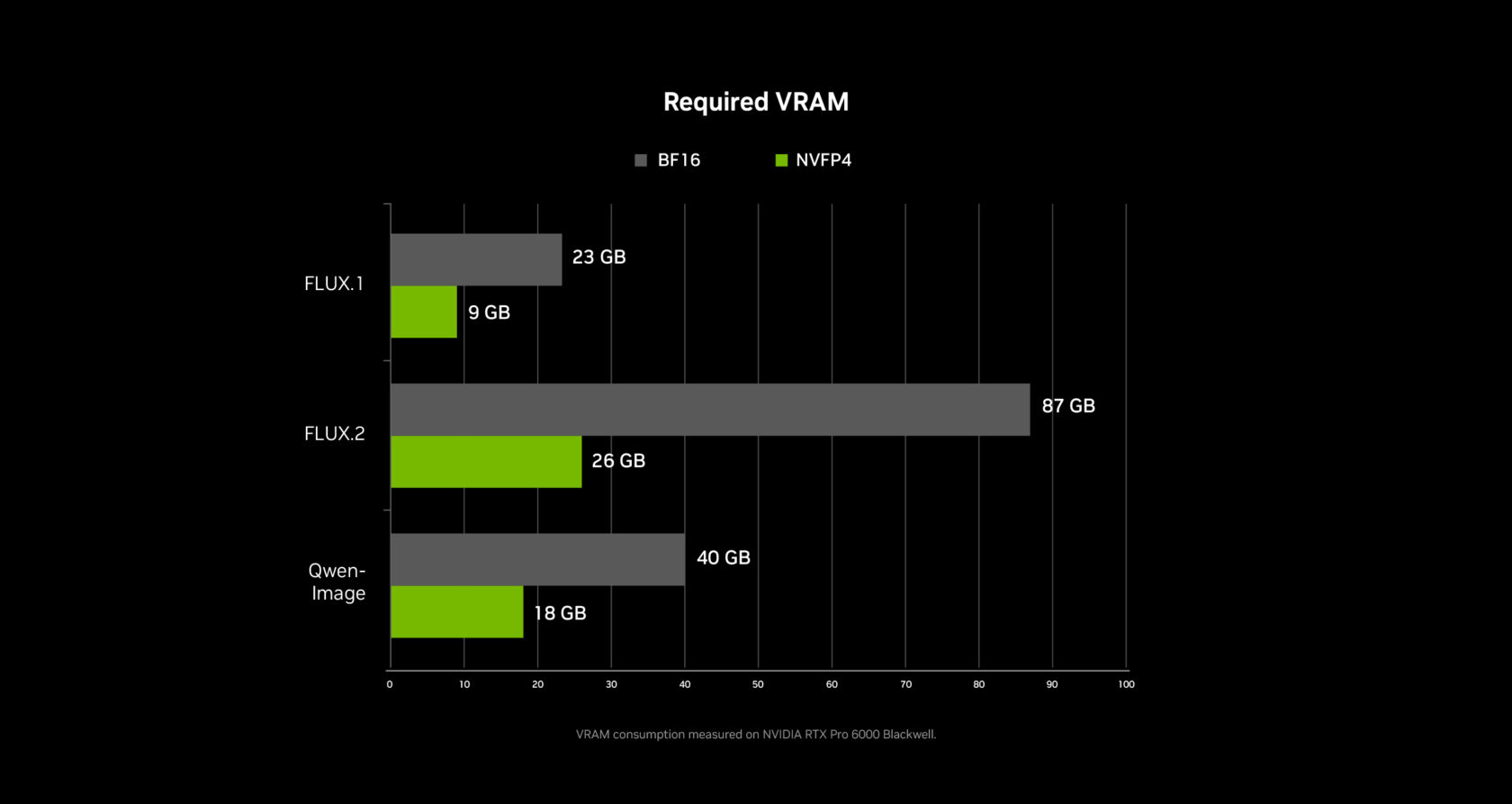
Under the hood, the pipeline is powered by ComfyUI. Over the past few months, NVIDIA has been working closely with ComfyUI to optimize the performance of NVIDIA GPUs by 40%. The latest update added support for NVFP4 and NVFP8 data formats. All combined, the RTX 50 Series' NVFP4 format delivers 3x faster performance and 60% less VRAM, while NVFP8 delivers 2x faster performance and 40% less VRAM.
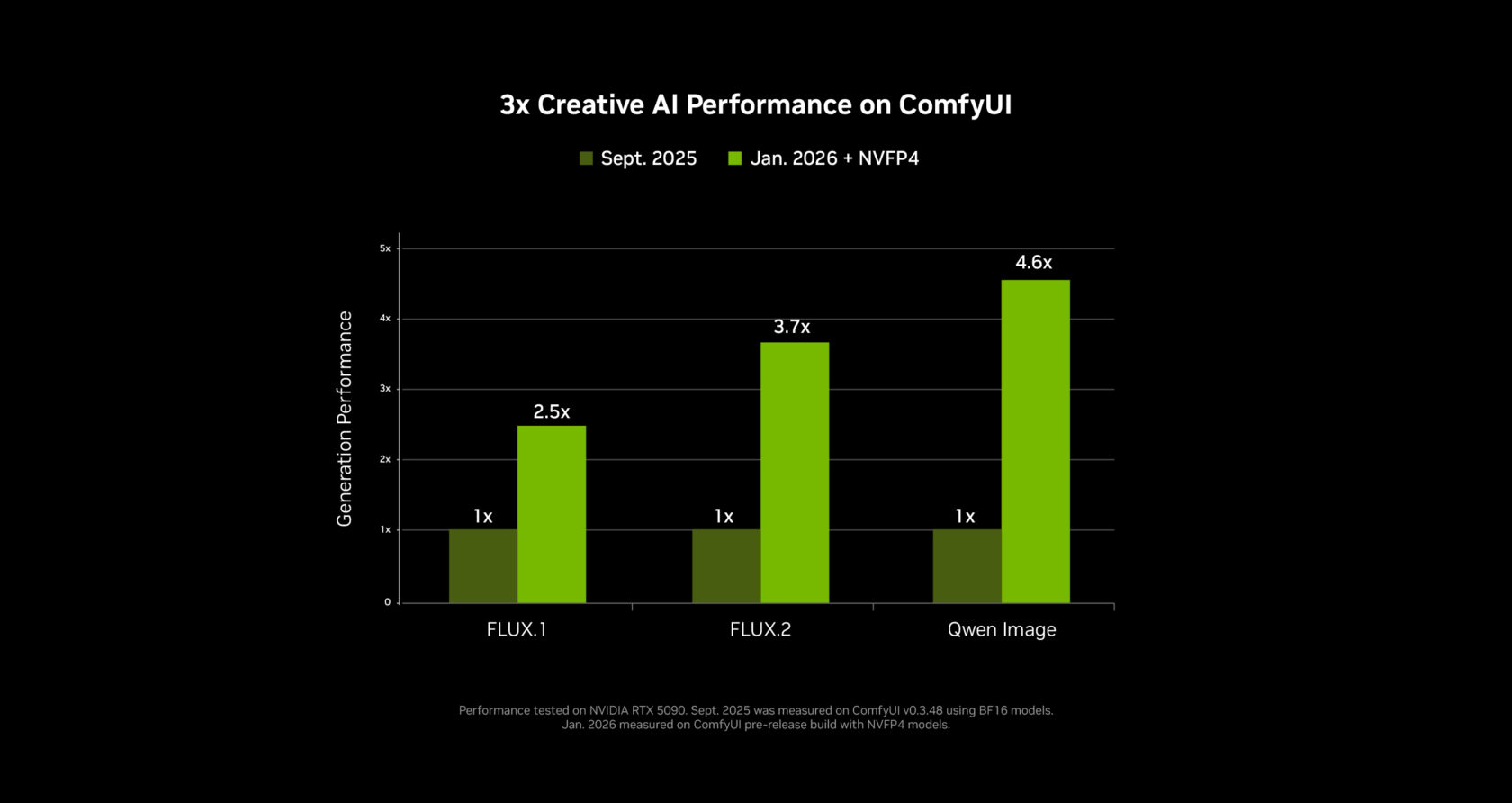
NVFP4 and NVFP8 checkpoints are now available directly in ComfyUI on some higher models. These models include Lightricks' LTX-2, Black Forest Labs' FLUX.1 and FLUX.2, and Alibaba's Qwen-Image and Z-Image. These can be downloaded directly on ComfyUI, and support for additional models will be available soon.
Once a video clip is generated, the video is upscaled to 4K in just a few seconds using ComfyUI's new RTX video node. This upscaler works in real-time to sharpen edges and clean up compression artifacts for a crisp final image. RTX video will be available on ComfyUI next month.
To help users exceed GPU memory limits, NVIDIA has worked with ComfyUI to improve a memory offload feature called weight streaming. Enabling weight streaming allows ComfyUI to use system RAM when you run out of VRAM, allowing for larger models and more complex multi-stage node graphs on midrange RTX GPUs.
The video generation workflow will be available for download next month, with the newly released LTX-2 video model open weight and ComfyUI RTX updates available now.
A new way to find your PC files and videos
Searching for files on your PC has been the same for decades. It still relies mostly on file names and irregular metadata, making tracking down a single document from the past year more difficult than it needs to be.
Hyperlink, Nexa.ai's local search agent, turns your RTX PC into a searchable knowledge base that can answer questions in natural language using inline citations. Scan and index documents, slides, PDFs, and images so you can search based on ideas and content rather than guessing file names. All data is processed locally and remains on your PC for privacy and security. Additionally, with RTX acceleration, text and image files index in 30 seconds per gigabyte and respond in 3 seconds on the RTX 5090 GPU. In contrast, the CPU takes 1 hour per gigabyte to index files and 90 seconds to respond.
At CES, Nexa.ai announced a new beta version of Hyperlink that adds support for video content, allowing users to search for objects, actions, and audio within videos. It's perfect for a variety of users, from video artists looking for B-roll to gamers who want to find and share winning moments in battle royale matches with their friends.
If you would like to try Hyperlink Private Beta, please sign up for access on this webpage. Access will be rolled out starting this month.
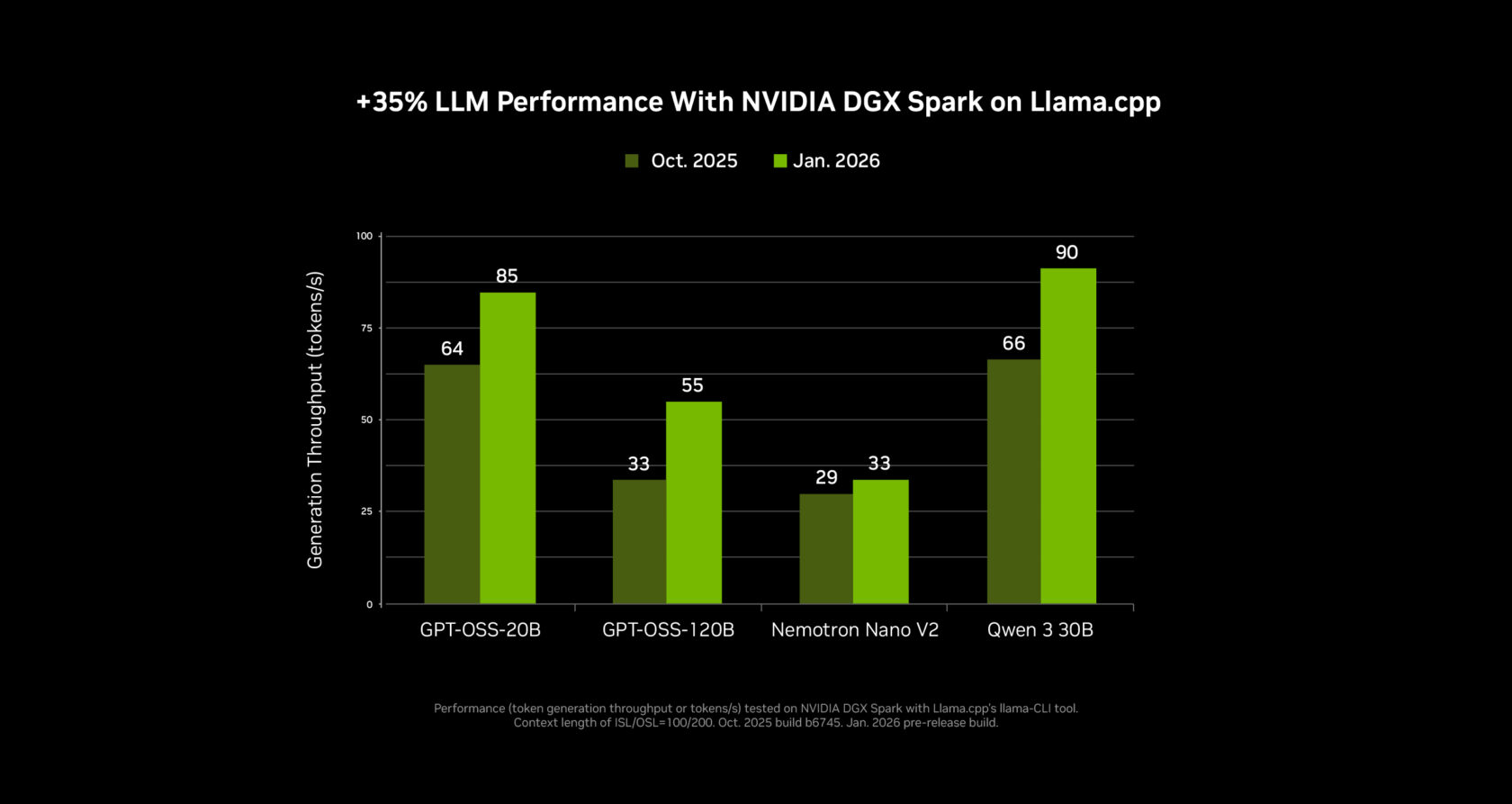
Small language models are 35% faster
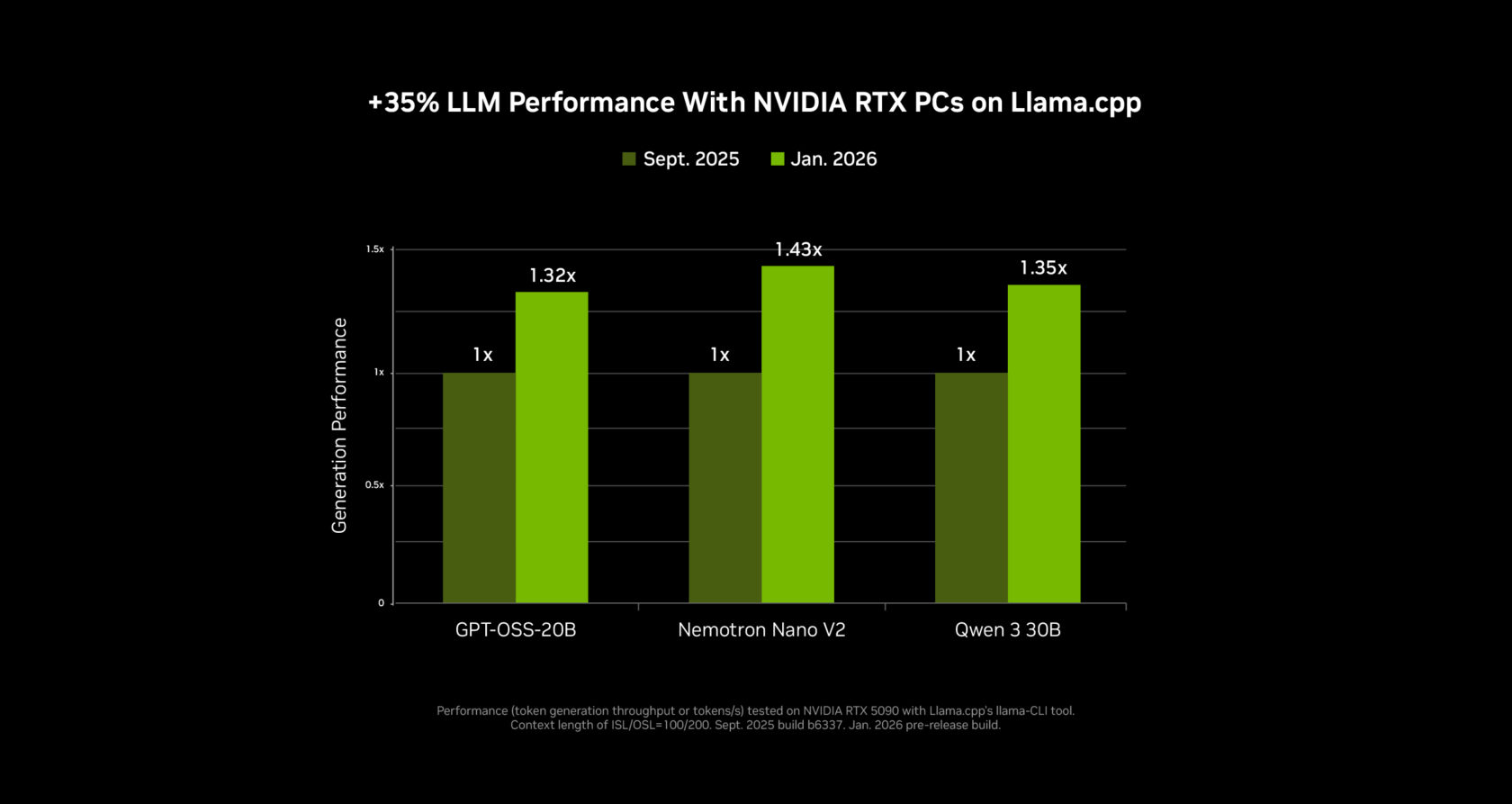
NVIDIA collaborated with the open source community to significantly improve the performance of SLM on RTX GPUs and NVIDIA DGX Spark desktop supercomputers using Llama.cpp and Ollama. The latest changes are especially beneficial for mixed specialist models, such as the open models of the new NVIDIA Nemotron 3 family.
SLM inference performance has improved by 35% and 30% on llama.cpp and Ollama, respectively, over the past four months. These updates are available now, and the quality upgrades to llama.cpp also reduce LLM load times.
These speedups will be available in the next update to LM Studio and will soon be available for agent apps, including the new MSI AI Robot app. The MSI AI Robot app also leverages Llama.cpp optimizations, giving users control over settings on MSI devices, and future releases will include the latest updates.
NVIDIA Broadcast 2.1 brings virtual key light to more PC users
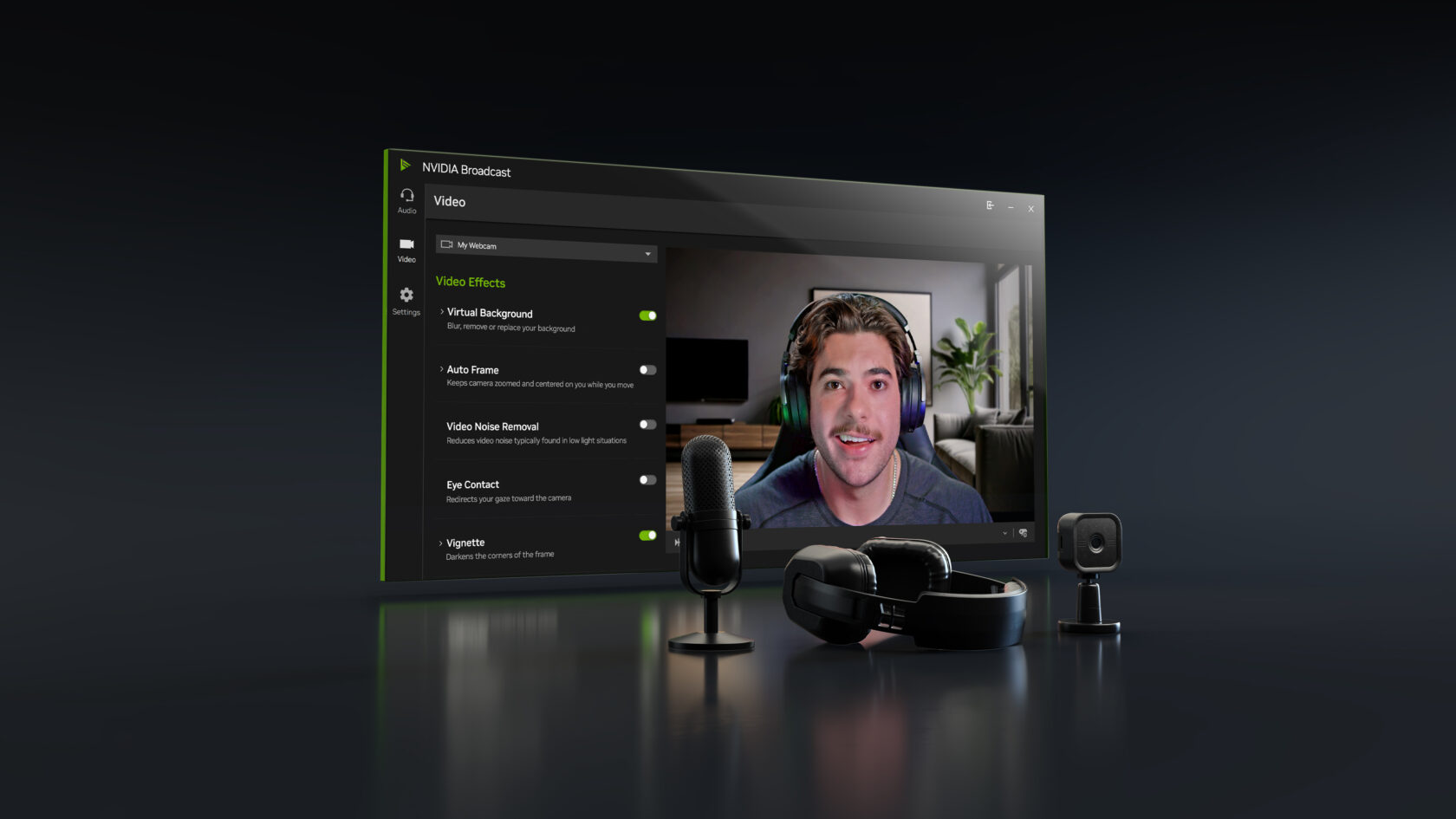
The NVIDIA Broadcast app uses AI effects to improve the quality of your PC microphone and webcam, making it ideal for live streaming and video conferencing.
Version 2.1 updates the virtual key light effect to improve performance, is available on RTX 3060 desktop GPUs and above, handles more lighting conditions, provides broader color temperature control, and uses an updated HDRi base map for two key light styles commonly seen in professional streams. Download the NVIDIA Broadcast Update now.
Turn your home creative studio into an AI powerhouse with DGX Spark
Developer interest in more powerful and flexible local AI setups continues to grow as new and increasingly capable AI models arrive on PCs every month. DGX Spark — a compact AI supercomputer that fits on your desk and pairs seamlessly with your main desktop or laptop — lets you experiment, prototype, and run advanced AI workloads alongside your existing PC.
Spark is perfect for anyone interested in testing LLM or prototyping agent workflows, or for artists who want to generate assets in parallel to their workflow so they can continue editing on their main PC.
At CES, NVIDIA announced major AI performance updates for Spark, delivering up to 2.6x faster performance since its launch just under three months ago.
A new DGX Spark playbook is also available. This includes playbooks for speculative decoding and for fine-tuning the model using two DGX Spark modules.
Plug into your NVIDIA AI PC. facebook, Instagram, TikTok and × — Subscribe to stay up to date RTX AI PC Newsletter. Follow NVIDIA Workstation linkedin and ×.
look news About software product information.


