

AWS recently announced Amazon Bedrock AgentCore. It is a flexible service that allows developers to seamlessly create and manage AI agents across a variety of frameworks and models, whether hosted on Amazon Bedrock or other environments. Specifically, AgentCore Runtime provides a secure, serverless, dedicated hosting environment for deploying and running AI agents or tools. AgentCore Runtime is framework agnostic and works seamlessly with popular frameworks such as LangGraph, Strands, and CrewAI to deploy AI agents and tools with autoscaling and built-in security.
This post shows how to use GitHub Actions workflows to automate AI agent deployment on AgentCore Runtime. This approach provides a scalable solution with enterprise-grade security controls and complete continuous integration and delivery (CI/CD) automation. Implementing a comprehensive pipeline enables seamless agent deployment using AWS best practices such as OpenID Connect (OIDC) authentication, least privilege access control, and environment isolation. Our solution facilitates efficient updates of existing agents and integrates continuous security scanning and rigorous code quality checks. The result is a robust deployment strategy that minimizes operational complexity, increases security, and accelerates AI agent development across enterprise environments.
Benefits of Amazon Bedrock AgentCore runtime
AgentCore Runtime is the perfect service for production agent deployment.
- Provides a framework-agnostic environment for running agents
- Works with large language models (LLMs) such as those provided by Amazon Bedrock and Anthropic Claude
- Achieve session isolation by running each user session in a dedicated microVM with isolated CPU, memory, and file system resources.
- Supports both real-time interactions and long-running workloads of up to 8 hours
- Provides built-in functionality for authentication and observability
Solution overview
We’ve developed a comprehensive CI/CD pipeline with GitHub Actions that adheres to security standards and streamlines agent deployment. Pipelines are available as ready-to-use solutions that integrate seamlessly with your existing development workflows. This solution consists of the following major components:
The following diagram shows the solution architecture.
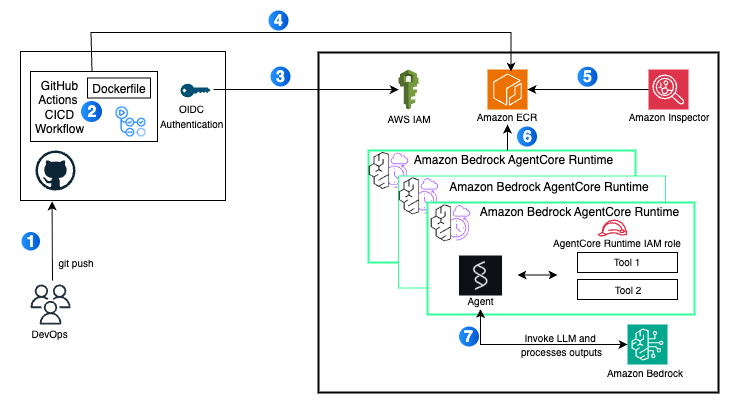
A data flow consists of the following steps:
- Developers commit code changes from their local repository to a GitHub repository. In this solution, GitHub actions are triggered manually, but this can be automated.
- GitHub actions trigger build stages.
- GitHub’s OIDC uses tokens to authenticate with AWS and access your resources.
- GitHub Actions invokes commands that build and push agent container images directly from your Dockerfile to Amazon ECR.
- AWS Inspector triggers advanced security scans when images are uploaded.
- AgentCore Runtime instances are created using container images.
- The agent can also query your Amazon Bedrock model and invoke tools according to its configuration.
The next section provides steps to deploy the solution.
- Download the source code from the GitHub repository.
- Write the agent code.
- Set your GitHub secret.
- Create an IAM role and policy.
- Create a GitHub Actions workflow.
- Trigger and monitor your pipeline.
- Verify your deployment.
Prerequisites
Before using a secure CI/CD pipeline to deploy agents to AgentCore Runtime, ensure that the following prerequisites are met:
Download source code
Clone the source code repository: bedrock-agentcore-runtime-cicd
git clone https://github.com/aws-samples/sample-bedrock-agentcore-runtime-cicd.git
The repository folder consists of the following structure:
Write the agent code
Create an agent with the framework of your choice using the AgentCore Runtime toolkit. This toolkit uses BedrockAgentCoreApp to create applications that provide a standardized way to package AI agent code into containers that can run on the AgentCore Runtime management infrastructure. Also, app.entrypointa Python decorator that marks a function as the main entry point. When the Amazon Bedrock agent receives an incoming API request, this function receives and processes the user’s request. In this sample agent code, when someone calls the Amazon Bedrock agent using the API, the AgentCore runtime automatically calls the structs_agent_bedrock(payload) function.
In this post, agents/strands_agent.py Use the file to create an agent using the Strands Agents framework.
Set up a GitHub secret
GitHub Actions workflows require access to resources in your AWS account. This post uses an IAM OpenID Connect identity provider and an IAM role with an IAM policy to access AWS resources. OIDC allows GitHub Actions workflows to access resources in AWS without having to store AWS credentials as long-lived GitHub secrets. These credentials are stored as GitHub secrets within your GitHub repository. setting under secret option. For more information, see Using secrets with GitHub Actions.
Create an IAM role and policy
To run agents or tools with AgentCore Runtime, you need an IAM execution role. For information about creating an IAM role, see Create an IAM Role.
In this post, we will create the required trust policy and execution role for the AgentCore runtime. For more information, see IAM Permissions for AgentCore Runtime.
The following code is for the AgentCore runtime trust policy.
The following code is for the AgentCore runtime execution role.
Create a GitHub action workflow
See CI/CD workflow files. .github/workflows/deploy-agentcore.yml For more information on how to create a workflow, a workflow performs the following steps:
- The default Ubuntu Github Runner is used for tasks provided in the pipeline.
- The workflow installs the required dependencies described in .
requirement.txtfile. - Build a Docker image and deploy it to your ECR repository.
- Images are scanned with Amazon Inspector to identify potential vulnerabilities.
- AgentCore Runtime deploys agents as endpoints.
- The workflow tests the agent endpoint to verify functionality.
Triggering and monitoring pipelines
This pipeline can be triggered manually by modifying the code in the agent folder or using the workflow dispatch option. This may change further depending on the organization’s branching strategy. Update the code for .github/workflows/deploy-agentcore.yml To change the behavior of this trigger,
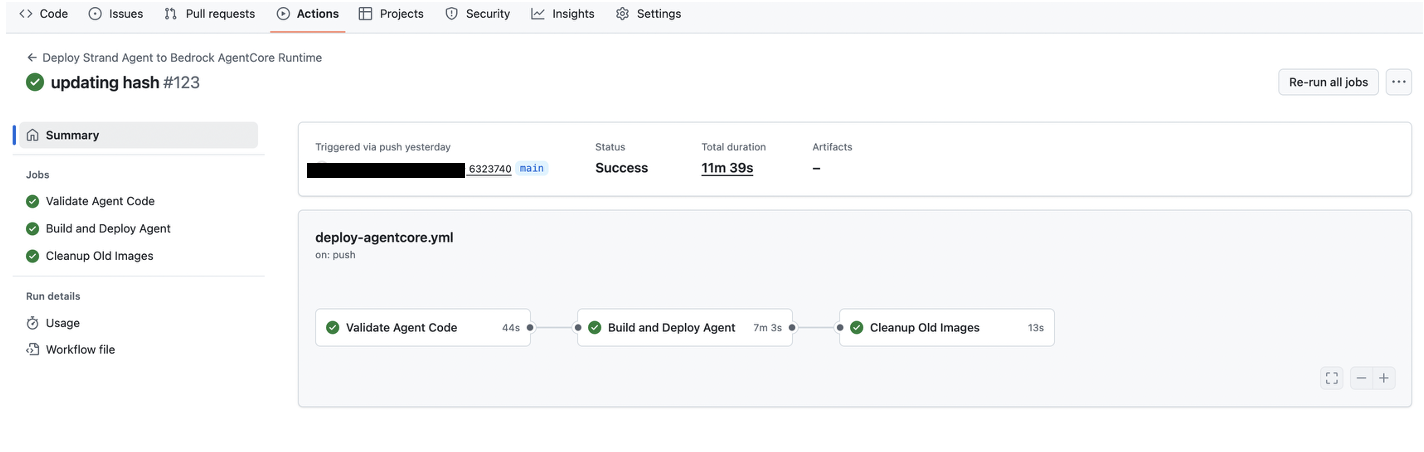
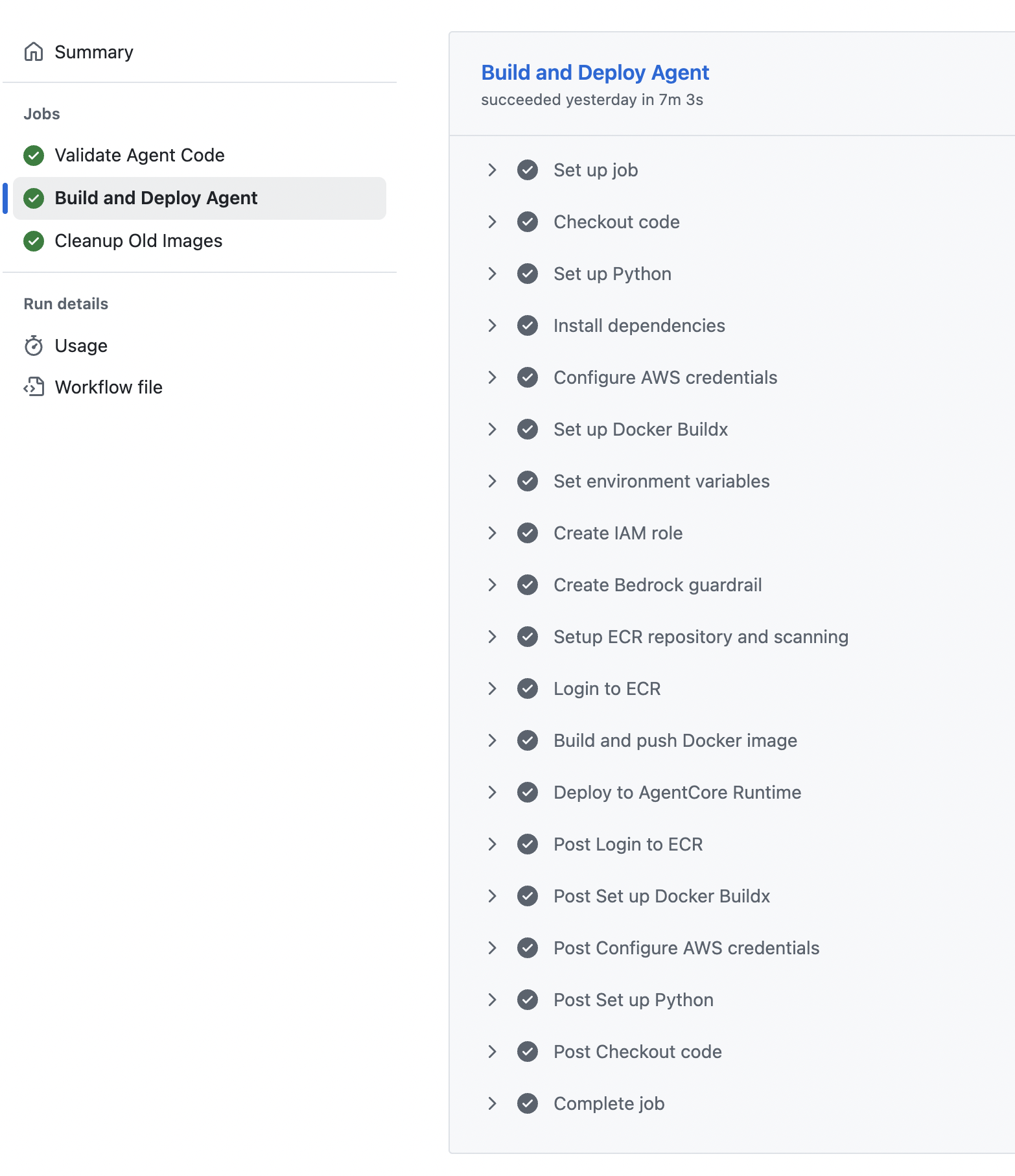
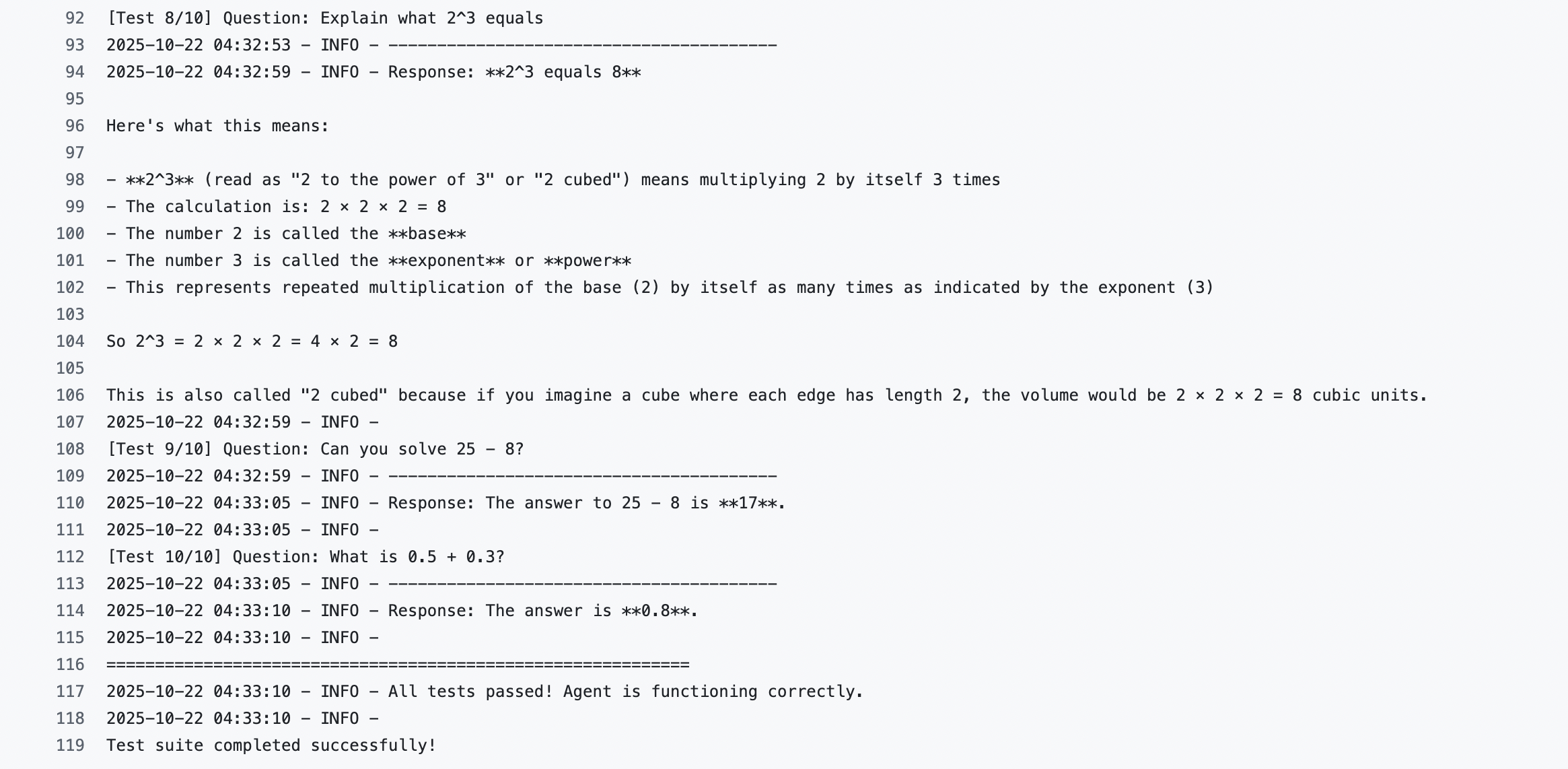
test agent
Once the agent is deployed, test agent Run the workflow manually using the workflow dispatch option.
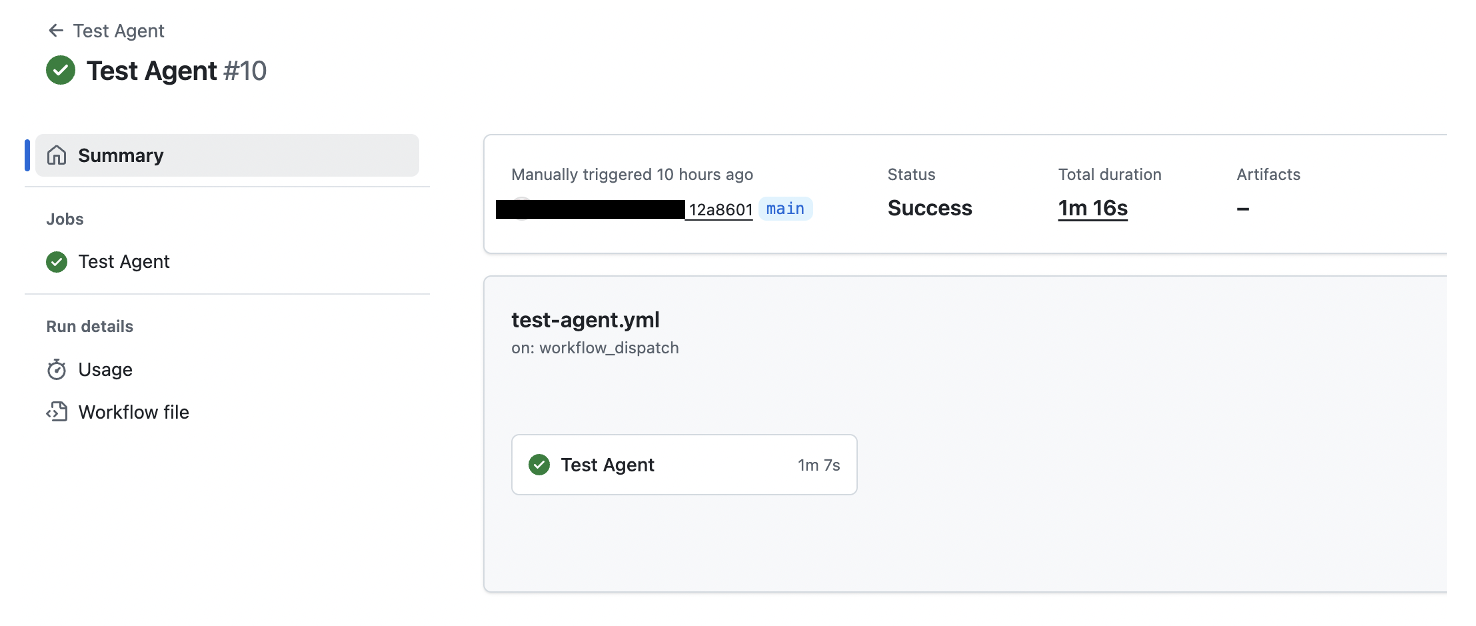
AgentCore runtime versioning and endpoints
Amazon Bedrock AgentCore implements automatic versioning of the AgentCore runtime and allows you to manage various configurations using endpoints. Endpoints provide a way to reference a specific version of AgentCore Runtime. For more information and sample code, see AgentCore Runtime Versioning and Endpoints.
cleaning
To avoid future charges, please take the following steps:
- Use GitHub Actions to delete the ECR image created by your deployment from the Amazon ECR console.
- Delete an agent deployed to AgentCore Runtime.
conclusion
In this post, we demonstrated a comprehensive approach to more securely and scalably deploying AI agents on AgentCore Runtime using GitHub Actions. Our solutions provide a robust, automated, and controlled environment for generative AI applications, addressing key enterprise adoption challenges by automating dependency management, implementing continuous code quality checks, performing comprehensive vulnerability scanning, and facilitating a consistent deployment process. This pipeline provides a framework-agnostic approach that supports seamless management of multiple AI agents at scale while abstracting infrastructure complexity, allowing developers to focus on agent logic and functionality. As AI agents continue to transform enterprise capabilities, this solution is an important step toward streamlining the development and operational management of AI agents, providing a standardized, secure, and efficient deployment mechanism for modern generative AI applications.
As a next step, you can use Amazon Q to intelligently enhance and customize your AI agent deployment pipeline and transform your CI/CD processes with advanced context-aware automation.
About the author
 praful gupta This is Asok. AWS delivery consultant based in Gurugram, India. He started his professional career at Amazon a year ago, specializing in DevOps and generative AI solutions, helping customers navigate their cloud transformation journeys. Outside of work, I enjoy networking with fellow professionals and spending quality time with my family. Connect on LinkedIn: linkedin.com/in/praffulgupta11/
 Anshu Basra He is a principal consultant for SRC at AWS, based in Gurugram, India. He works with customers across a variety of industries to help them harden their security infrastructure and achieve their security goals. Outside of work, Ansh enjoys reading books and gardening in his garden. To connect on LinkedIn: linkedin.com/in/anshu-bathla/


