Have you heard about Meta AI? What is Meta AI? How to turn off Meta AI on Facebook, Instagram, and WhatsApp? Keep reading to find out:
What is Meta AI?
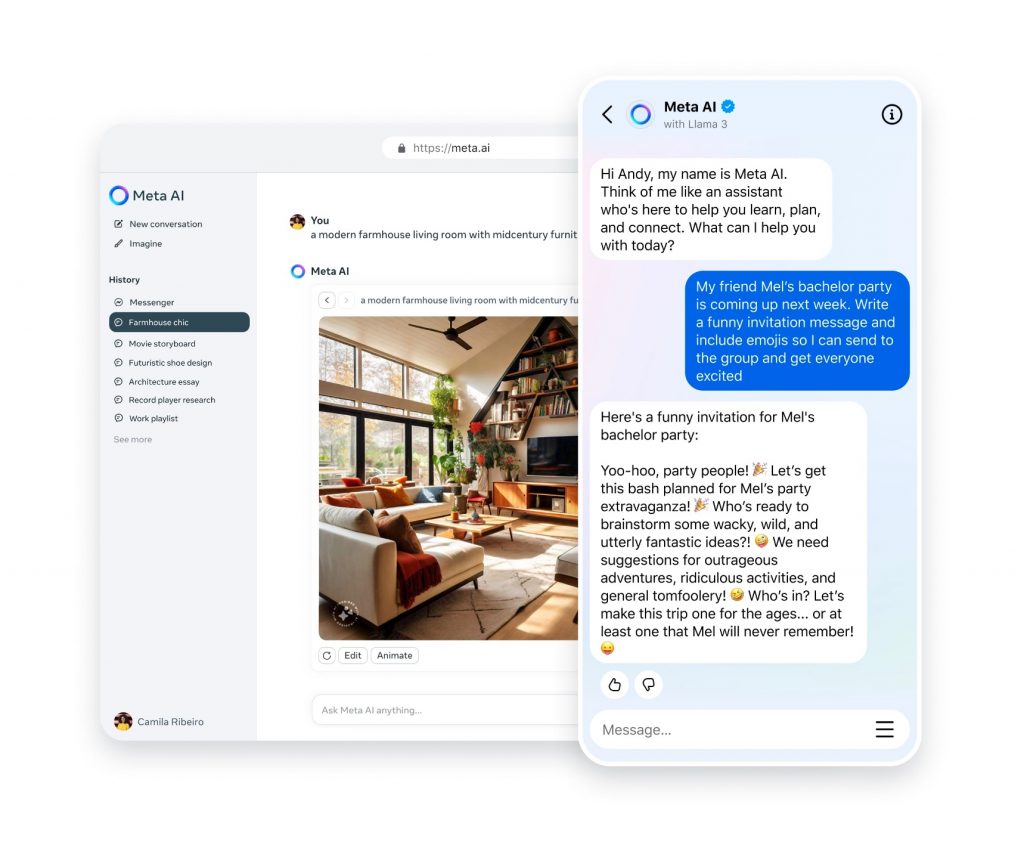
Meta AI is an artificial intelligence system developed by Meta, the parent company of popular social media platforms such as Facebook, Instagram, WhatsApp, and Messenger. The AI initiative aims to improve user experience across Meta's platforms. By leveraging machine learning and data analytics, Meta AI offers features such as personalized content recommendations, automated customer service, and intelligent photo tagging. The AI system learns from vast amounts of user-generated data to improve the accuracy and relevance of its services.
How can I use Meta AI?
Meta AI is integrated into various features across Meta's platform.
- Facebook: Personalized news feed recommendations, content moderation, and improved search capabilities.
- Instagram: Automatic photo tagging, personalized explore tabs, and improved ad targeting.
- WhatsApp: Smart replies, spam detection, and chatbot interactions.
- Messenger: Intelligent customer service bots and improved message filtering.
Additionally, Meta AI will play a key role in other Meta initiatives, including:
- Meta.ai for Web: Enhance your browsing experience with personalized content and intelligent recommendations.
- Quest Meta: Enhances the virtual reality experience by providing intelligent interactions and personalized content on Meta's Quest VR headset.
- Ray-Ban Glasses: Powers Ray-Ban Stories' smart features, including voice commands, photo and video capture, and social media integration.
Meta AI’s widespread integration into these platforms and devices underscores its importance in shaping the future of digital interactions and user experiences.
Where can I access Meta AI?
Meta AI is currently integrated into Facebook, Instagram, WhatsApp and Messenger in many countries. Meta AI features are widely available in many countries, including the US, Canada, UK, Australia, Germany, France, India, Brazil, Japan and South Korea, depending on local regulations and data availability.
Can I turn off Meta AI? How do I turn off Meta AI?
The short answer is no, Meta AI is deeply integrated into the functionality of Meta’s platform. Can not It can't be turned off completely, but you can turn off Meta AI Chat by following the steps below.
How to mute Meta AI chat on Facebook and Instagram
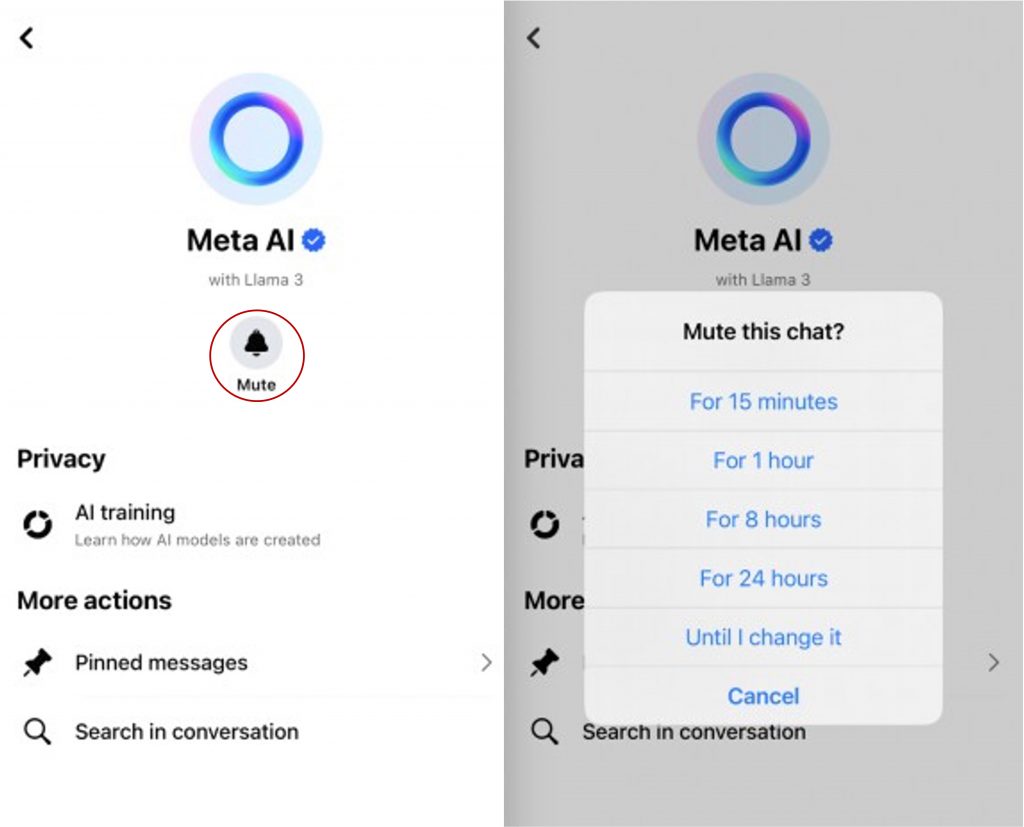
- In the Facebook or Instagram mobile app, tap the messages icon.
- Tap the Meta AI profile (the gradient circle).
- Next, tap the bell icon (Mute) andUntil I change it“.

How to mute Meta AI chats on WhatsApp
- Open WhatsApp and click on the three dots at the top right of the screen.
- select “settingClick ” and scroll down to “chat“.
- Check to see if the following options are available:
- If so, click the sliding toggle to turn off Meta AI.
- If you don't see these options, you'll need to contact Support by submitting a request.

How we protect your data
Meta AI uses user data to train its AI models, raising significant privacy concerns. To protect your data, consider taking the following steps:
- Opting out of sharing data with Meta AI models
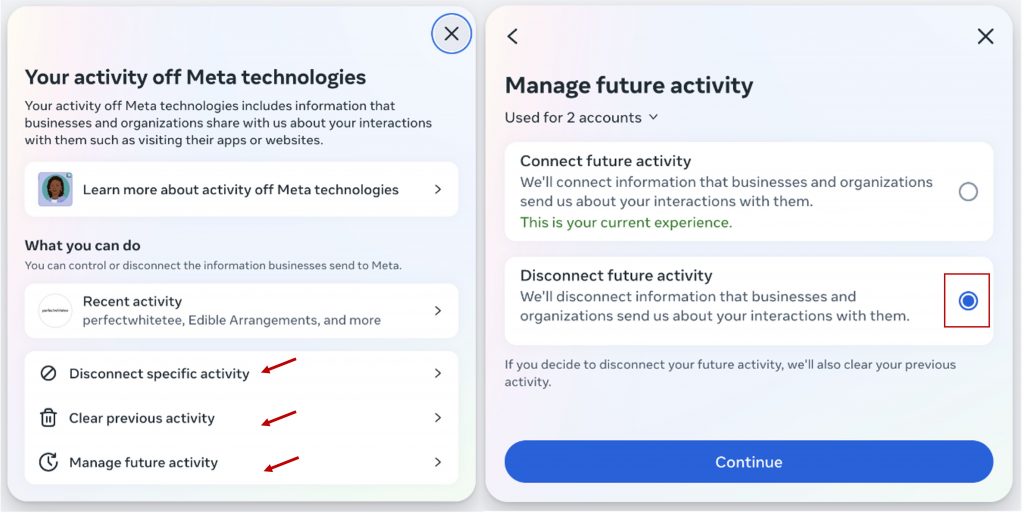
The only surefire way to stop sharing data with Meta is to delete your account, but you can also limit data sharing.- Open the Facebook app and go to Settings or go to the websiteOff-Meta Activity“
- select “Your Facebook information” after that “Off-Facebook Activity.”
- select “Disconnect a specific activity” and “Clear previous activity“.
If you disconnect and clear your previous data activity, any data already collected by Meta will be deleted. However, if you want to prevent your data from being shared with third parties in the future, you can choose to disable this option by clickingManage your upcoming activitySelect “Disconnect future activities“. - “Disconnect future activitiesAfter you click “”, you will be asked to enter your password to confirm the changes.
- Submit a request:
You can also submit a request to access, delete, or complain about your personal information being used in AI development by visiting Meta's Data Privacy Request page and following the instructions. By taking these steps, you can help reduce the amount of your personal information used by Meta AI and enhance your privacy.
Strengthen digital security with identity protection
For an extra layer of digital security, consider using Trend Micro ID Protection, which offers advanced features designed to safeguard your personal information and protect against data breaches.
- Real-time monitoring: We monitor websites to make sure they are safe to visit.
- Dark Web Monitoring: Monitors the dark web for personal information leaks and alerts you if your information is found.
- Identity Theft Protection: Provides warnings and guidance if your identity has been stolen, helping you recover quickly.
- Social Media Privacy Scan: Check your social media accounts for privacy settings that may expose your personal information.
To take advantage of these features, visit ID Protection and click “Start your free trial” to start protecting your data today.
By implementing these security tips and considering solutions like Trend Micro ID Protection, you can strengthen your digital security. Share these insights with others to help create a safer digital environment for everyone. Make this the year you strengthen your cybersecurity!