

By all accounts, Google could have called its 2023 developer conference A/I instead of I/O. Piggybacking on the artificial intelligence hype, Google spent most of its keynote address on AI research, experimentation, and development. But there’s some substance behind the hype of new features for Google services you’re already using on Android, iOS, and desktop.
We’ve rounded up 10 of the most interesting AI-powered features available today and in the near future across Google’s apps and services.
1. Bard
Google has taken Bard, the company’s experimental AI chatbot, off the waitlist, making it available now to anyone with a Google account in over 180 countries. In addition to expanded access, Bard received an immediate upgrade with new features, notably dark mode, the ability to export text to Google Docs or Gmail, and Japanese and Korean language support.
In the “coming soon” timeline, Bard plans to add images to text responses and integrate Google Lens to use images as writing prompts. An additional 40 languages are planned to be supported.
In the future, Google will also integrate many of its own products such as Docs, Drive, Gmail and Maps into Bard, along with third-party services such as Adobe Firefly. The latter partnership will allow Bard to generate images from text prompts, similar to OpenAI’s DALL-E.
2. Search Labs
Google is eager to add AI enhancements to its search engine, much like Microsoft did with Bing. But Google is in no rush to replace existing products. Instead, Android and iOS users will be able to test these features through Search Labs. Initial experiments include Search Generative Experience (SGE), which uses generative AI to generate answers to complex search queries, and Code Tips to help developers working with different coding languages.
To access Search Labs, look for the beaker icon in the top left corner of the Google app home screen. You can join the waiting list here. Once activated, you can turn experimental features on or off.
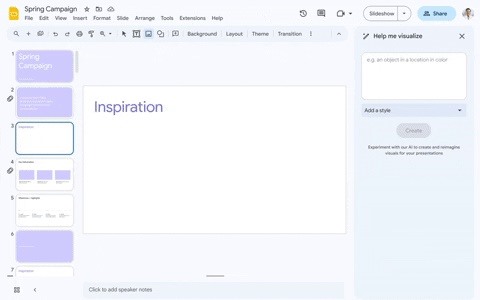
3. Duet AI for Google Workspace Duet
As the saying goes, “Don’t work harder, work smarter.” That’s the gist of the new AI-powered features coming to the Google Workspace app.
Duet AI helps you create text in documents, organize data in spreadsheets, generate images in slides, and create custom backgrounds in Meet. Gmail already includes Smart Reply and Smart Compose among its AI-powered features, and will also add a “Help me write” feature for drafting replies based on prompt creation. Goodbye, fixed letter — hello, AI letter!
These features are tested among a “select group of trusted testers in Google Workspace Labs”. However, you can join the waiting list for consideration.
4. Music LM
We’ve seen generative AI chatbots compose music and lyrics based on prompts, and Google’s MusicLM can compose short music tracks. Prompt MusicLM and after a few seconds he will see two tracks for you to listen to. To help you learn, we recommend clicking the Trophy Her icon next to your favorite track. You can also download tracks to your device.
Once you get access and play around with MusicLM… not bad. Some brutal riffs were given to me based on the prompt “a metal song in drop-A tuning and slow drum beats.”borrow from parks and recreationI also tried “German Death Reggae” but it didn’t return any results.
Join the waiting list to get this fun toy!
5. Project Tailwind
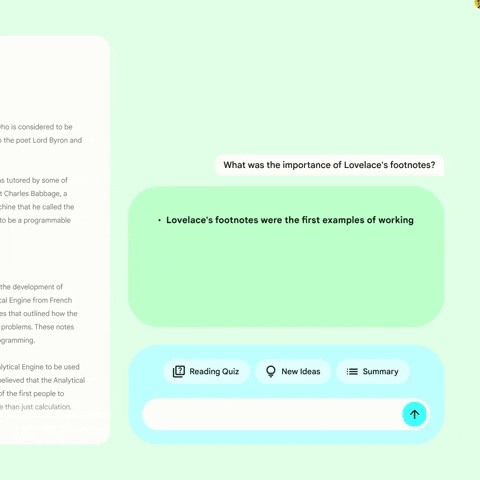
At the more practical end of the Labs portfolio, Project Tailwind is an AI-enhanced notebook. Project Tailwind can use existing texts and documents to summarize sentences and generate quizzes and study guides. This also has a waiting list to join for access.
6. Immersive view of route in Google Maps
Using Google’s extensive Street View library, Immersive View generates a 3D view of a location with options to visualize time and weather conditions. The next iteration, Immersive View of Route, synthesizes a 3D preview of turn-by-turn directions with simulated traffic conditions based on historical data. In addition to weather, you can also view air quality information for specific times of the day.
An immersive view of the route will roll out later this year in 15 cities (Amsterdam, Berlin, Dublin, Florence, Las Vegas, London, Los Angeles, New York, Miami, Paris, Seattle, San Francisco, San Jose, Tokyo and Venice). .

7. Google Photo Magic Editor
Debuting as a Pixel-exclusive feature, Magic Eraser uses artificial intelligence to let you erase people and other objects from the background of your photos. Now, Google is raising the bar for his AI with Magic Editor. This feature allows users to move and resize objects in the image and recreate missing details.
Google plans to launch early access to Magic Editor for select Pixel phones via Google Photos later this year. It may be limited to the expected Pixel 8 series, following the pattern of AI-powered features so far. However, Google recently expanded Magic Eraser’s availability to his other Android devices, as well as his iOS and his iPadOS, so it’s only a matter of time before Magic Editor becomes more widely available. I can’t.
- Install Google Photos: Android (free) | iOS (free)


8. Magic Compose for messages
Google Messages already has a very useful Smart Reply feature that suggests quick replies based on the text you receive. Magic Compose takes your approach to another level, using AI to enhance your text.
With Magic Compose, you can make a mundane phrase more exciting or calming, or transition into a completely different style. If you want your friends to think you’re completely insane, you can use Magic Compose to rewrite your text in a Shakespearean style. Magic Compose is coming to the beta channel of the messaging app this summer.

9. Android New Customization Options
When Apple introduced an emoji wallpaper generator in iOS 16, many Android fans (you included) were jealous.
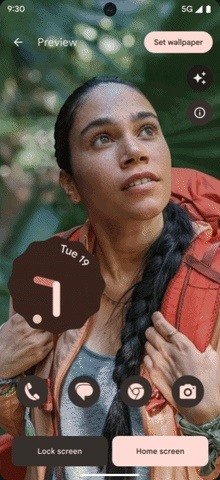
Google is here to quench your thirst for expressive smartphone backgrounds with Android 14. Using AI again, Android 14 will now be able to create colorful wallpapers based on specified or random emojis and selected patterns.
Android 14 boldly copies Apple’s lock screen customization options from iOS 16. Still, Google does get some benefits by offering more customization options with their version of the emoji wallpaper generator. Additionally, the theme engine adds a monochrome option.
Google also adds some unique options. Cinematic Wallpaper applies the cinematic photography feature of Google Photos to add motion to the foreground elements of still photos. Android 14 applies these effects to the background photo of your choice, creating a parallax effect when you unlock or tilt your device (similar to the Live Bloom wallpapers currently available in the Wallpaper app).
You can also conjure up AI-generated images based on text prompts. If you can’t find a wallpaper you like, you can also request a wallpaper.

10. Find Android Devices
Google is adding another page to Apple’s strategy by expanding its Find My Device network. While Apple’s Find My app finds connected Apple devices, accessories, and third-party products, Google’s Find My Device service allows Android users to access Bluetooth devices from third-party manufacturers such as Sony, JBL, and Tile. You can find connected earbuds, headphones and trackers. , others.

Keep your connection secure with no monthly fees. With a one-time purchase from the new Gadget Hacks Shop, get a lifetime VPN Unlimited subscription on all your devices, watch Hulu and Netflix without geo-restrictions, and get extra security when browsing on public networks can.
Buy now (80% off) >
Other valuable deals to check out:


