This post was co-authored by Oumi’s David Stewart and Matthew persons.
Fine-tuning open source large-scale language models (LLMs) is often stuck between experimentation and production. Training configuration, artifact management, and scalable deployment each require different tools, creating friction when moving from rapid experimentation to a secure, enterprise-grade environment.
This post shows you how to fine-tune an Llama model using Oumi on Amazon EC2 (with the option to create synthetic data using Oumi), store the artifacts in Amazon S3, and deploy to Amazon Bedrock using a custom model import for managed inference. This walkthrough uses EC2, but you can complete the fine-tuning with other compute services, such as Amazon SageMaker or Amazon Elastic Kubernetes Service, depending on your needs.
Benefits of Oumi and Amazon Bedrock
Oumi is an open source system that streamlines the lifecycle of foundational models, from data preparation to training and evaluation. Instead of assembling separate tools for each stage, define a single configuration and reuse it across multiple runs.
Key benefits of this workflow:
- Recipe-driven training: Configurations can be defined once and reused across experiments, reducing boilerplate and increasing reproducibility.
- Flexible fine-tuning: Based on constraints, choose a full fine-tuning method or a parameter-efficient method such as LoRA
- Integrated evaluation: Score checkpoints using benchmarks or LLM-as-a-judge without additional tools
- Data synthesis: Generate task-specific datasets when production data is limited
Amazon Bedrock complements this by offering managed serverless inference. After fine-tuning in Oumi, import the model via custom model import in three steps: upload to S3, create an import job, and call. There is no inference infrastructure to manage. The following architecture diagram shows how these components work together.
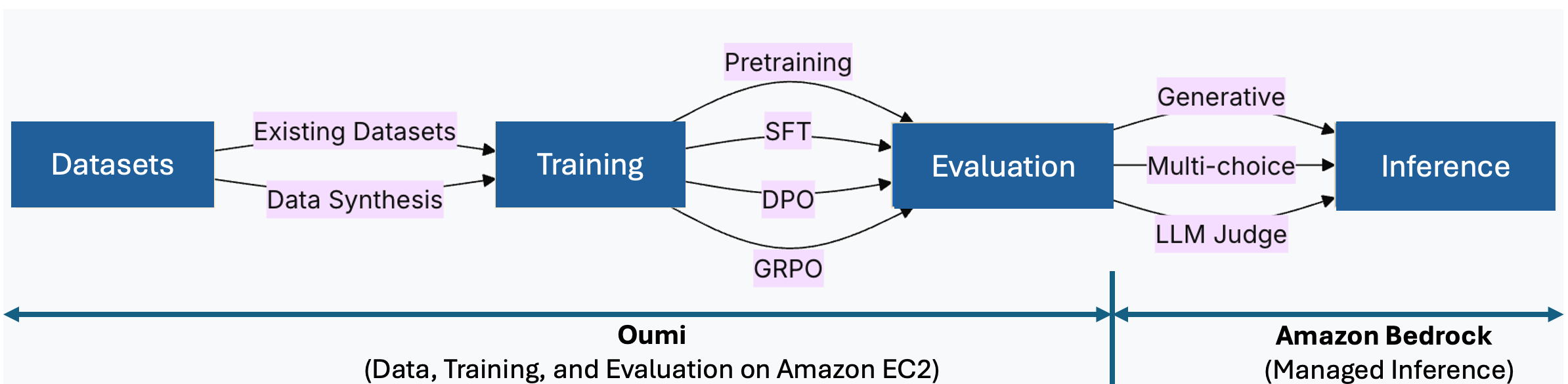
Figure 1: Oumi manages data, training, and evaluation on EC2. Amazon Bedrock provides managed inference through custom model import.
Solution overview
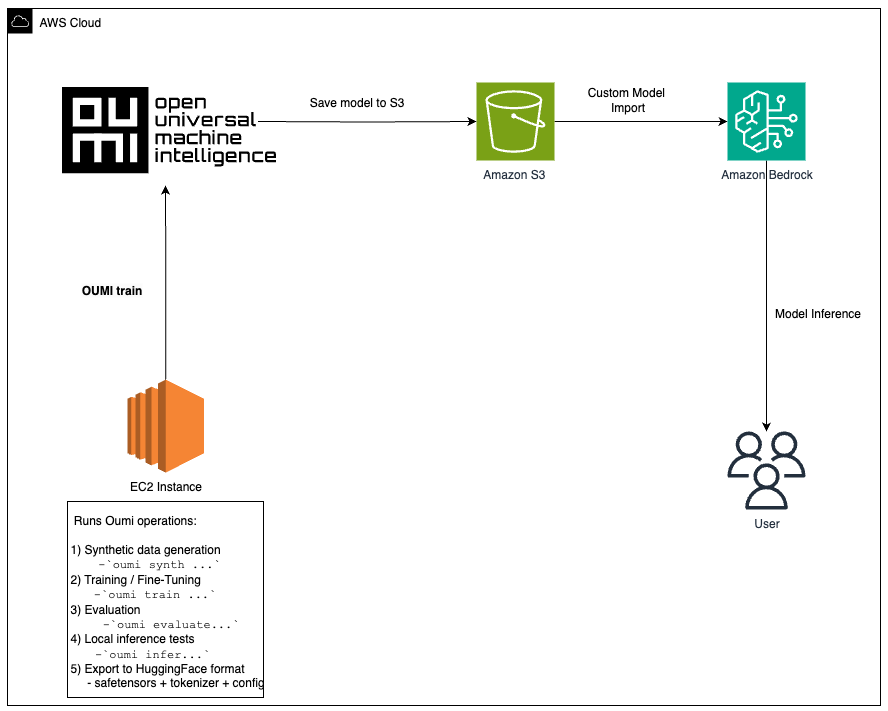
This workflow consists of three stages.
- Fine adjustment Omi For EC2: Launch a GPU-optimized instance (such as g5.12xlarge or p4d.24xlarge), install Oumi, and run training using your settings. For large models, Oumi supports distributed training using fully sharded data parallel (FSDP), DeepSpeed, and distributed data parallel (DDP) strategies across multi-GPU or multi-node setups.
- Store artifacts in S3. Upload model weights, checkpoints, and logs for durable storage.
- Deploy to Amazon Bedrock. Create a custom model import job that points to your S3 artifacts. Amazon Bedrock automatically provisions your inference infrastructure. The client application calls the imported model using the Amazon Bedrock Runtime API.
This architecture addresses common challenges when moving fine-tuned models to production.
technical implementation
Let’s take a look at a practical workflow using the metal-llama/Llama-3.2-1B-Instruct model as an example. We chose this model because it lends itself well to fine-tuning on AWS. g6.12xlarge On EC2 instances, you can replicate the same workflow across many other open source models (note that larger models may require larger instances or distributed training across instances). For more information, see Oumi Model Tweaking Recipe and Amazon Bedrock Custom Model Architecture.
Prerequisites
To complete this tutorial you will need:
Setting up AWS resources
- Clone this repository to your local machine.
git clone https://github.com/aws-samples/sample-oumi-fine-tuning-bedrock-cmi.git
cd sample-oumi-fine-tuning-bedrock-cmi- Run the setup script to create an IAM role, S3 bucket, and launch a GPU-optimized EC2 instance.
./scripts/setup-aws-env.sh [--dry-run]The script prompts for your AWS Region, S3 bucket name, EC2 key pair name, security group ID, and creates all necessary resources. Default: g6.12xlarge instance, Deep Learning Base AMI (Amazon Linux 2023) with single CUDA, and 100 GB gp3 storage. Note: If you don’t have permissions to create an IAM role or launch an EC2 instance, share this repository with your IT administrator and ask them to complete this section to set up your AWS environment.
- Once the instance is running, the script outputs the SSH command and the Amazon Bedrock import role ARN (required in step 5). SSH into your instance and proceed to step 1 below.
For more information about IAM policies, scoping guidance, and validation instructions, see iam/README.md.
Step 1: Set up your EC2 environment
To set up your EC2 environment, follow these steps:
- On your EC2 instance (Amazon Linux 2023), update the system and install the base dependencies.
sudo yum update -y
sudo yum install python3 python3-pip git -y- Clone the companion repository.
git clone https://github.com/aws-samples/sample-oumi-fine-tuning-bedrock-cmi.git
cd sample-oumi-fine-tuning-bedrock-cmi- Configure the environment variables (replace the values with your actual region and bucket name in the setup script).
export AWS_REGION=us-west-2
export S3_BUCKET=your-bucket-name
export S3_PREFIX=your-s3-prefix
aws configure set default.region "$AWS_REGION"- Run the setup script to create a Python virtual environment, install Oumi, verify GPU availability, and configure Hugging Face authentication. See setup-environment.sh for options.
./scripts/setup-environment.sh
source .venv/bin/activate- Authenticate with Hugging Face to access gated model weights. Generate an access token at hugface.co/settings/tokens and run:
hf auth loginStep 2: Configure your training
The default dataset is tatsu-lab/alpaca, configured in configs/oumi-config.yaml. Oumi will download automatically during training. No need to download manually. To use a different dataset, dataset_name Parameters in configs/oumi-config.yaml. See the Oumi dataset documentation for supported formats.
[Optional] Generate synthetic training data using Oumi.
To generate synthetic data using Amazon Bedrock as an inference backend, model_name A placeholder in configs/Synthetic-config.yaml containing an Amazon Bedrock model ID that you have access to, e.g. anthropic.claude-sonnet-4-6). For more information, see the Oumi data synthesis documentation. Then run:
oumi synth -c configs/synthesis-config.yamlStep 3: Fine-tune the model
Fine-tune your model using the built-in training recipes in Oumi’s Llama-3.2-1B-Instruct.
./scripts/fine-tune.sh --config configs/oumi-config.yaml --output-dir models/final [--dry-run]Edit oumi-config.yaml to customize hyperparameters.
Note: If you generated synthetic data in step 2, update the dataset path in your configuration before training.
Monitor GPU usage using nvidia-smi or Amazon CloudWatch Agent. For long-running jobs, configure Amazon EC2 Automatic Instance Recovery to handle instance interruptions.
Step 4: Evaluate the model (optional)
Standard benchmarks can be used to evaluate fine-tuned models.
oumi evaluate -c configs/evaluation-config.yamlThe evaluation configuration specifies the model path and benchmark tasks (such as MMLU). To customize, edit evaluation-config.yaml. See Oumi’s evaluation guide for the LLM-as-a-judge approach and additional benchmarks.
Step 5: Deploy to Amazon Bedrock
To deploy your model to Amazon Bedrock, follow these steps:
- Upload the model artifacts to S3 and import the model to Amazon Bedrock.
./scripts/upload-to-s3.sh --bucket $S3_BUCKET --source models/final --prefix $S3_PREFIX
./scripts/import-to-bedrock.sh --model-name my-fine-tuned-llama --s3-uri s3://$S3_BUCKET/$S3_PREFIX --role-arn $BEDROCK_ROLE_ARN --wait- The import script outputs the model ARN upon completion. set
MODEL_ARNThis value (format:arn:aws:bedrock:).: :imported-model/ - Invoke a model in Amazon Bedrock
./scripts/invoke-model.sh --model-id $MODEL_ARN --prompt "Translate this text to French: What is the capital of France?"- Amazon Bedrock automatically creates a managed inference environment for you. For information about configuring IAM roles, see bedrock-import-role.json.
- To support model revision rollbacks, enable S3 versioning on your bucket. For SSE-KMS encryption and bucket policy hardening, see the security scripts in the companion repository.
Step 6: Clean up
To avoid ongoing costs, delete the resources created during this tutorial.
aws ec2 terminate-instances --instance-ids $INSTANCE_ID
aws s3 rm s3://$S3_BUCKET/$S3_PREFIX/ --recursive
aws bedrock delete-imported-model --model-identifier $MODEL_ARN
conclusion
In this post, you learned how to fine-tune the Llama-3.2-1B-Instruct base model using Oumi on EC2 and deploy it using Amazon Bedrock Custom Model Import. This approach allows you to use managed inference with Amazon Bedrock while still having full control over fine-tuning with your own data.
The companion sample-oumi-fine-tuning-bedrock-cmi repository provides scripts, configuration, and IAM policies to get started. Deploy your custom model to Amazon Bedrock by cloning and exchanging datasets.
Get started by reviewing the resources below to get started building your own tweak-to-deployment pipeline on Oumi and AWS. Happy building!
learn more
understand
We would like to thank Pronoy Chopra and Jon Turdiev for their contributions.
About the author