
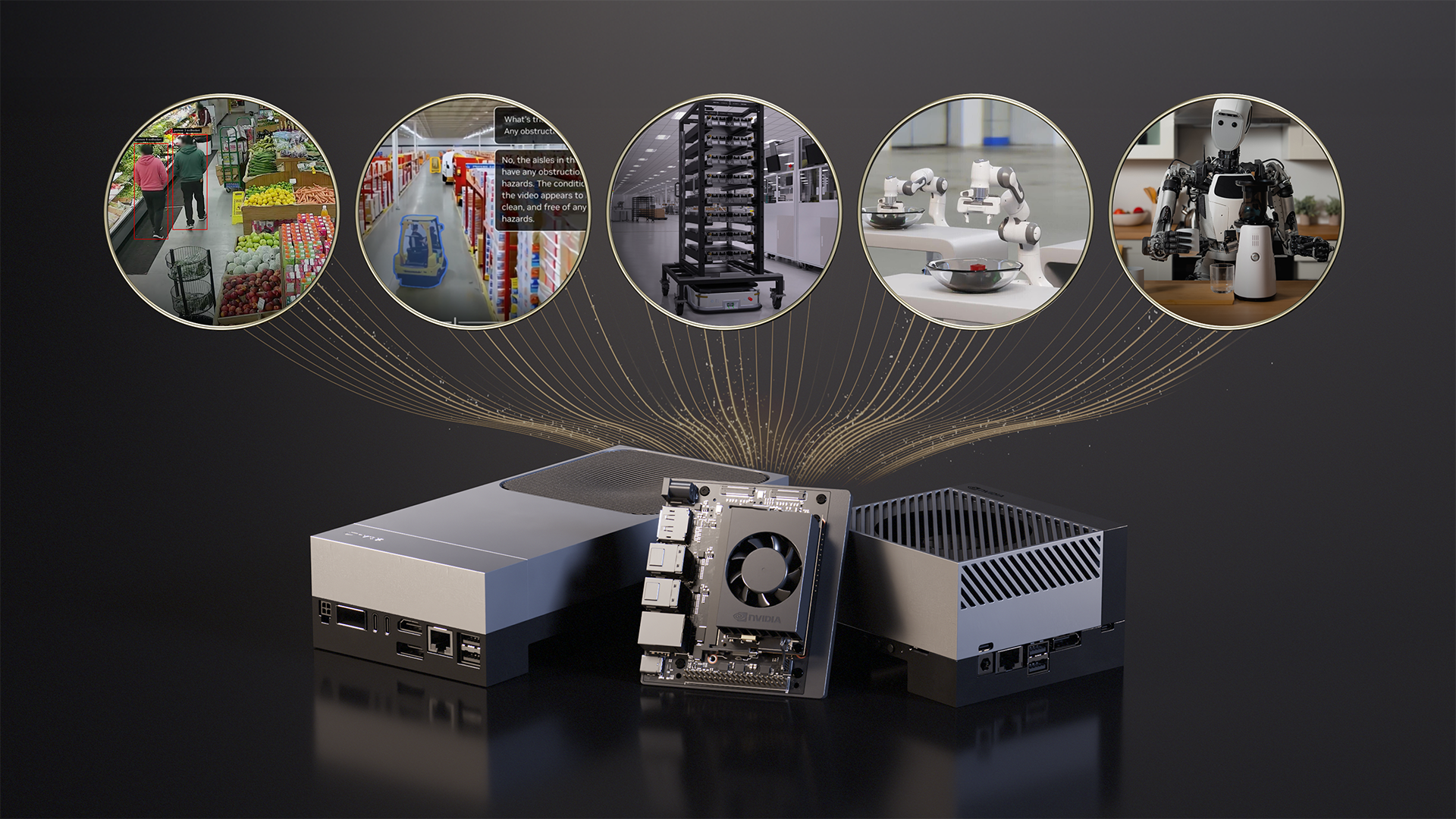
Running advanced AI and computer vision workloads on small, power-efficient devices at the edge is an increasing challenge. Robots, smart cameras, and autonomous machines need real-time intelligence to see, understand, and react without relying on the cloud. The NVIDIA Jetson platform addresses this need with compact GPU acceleration modules and developer kits purpose-built for edge AI and robotics.
The following tutorial shows you how to bring modern open source AI models to life on NVIDIA Jetson, run completely standalone, and be ready to deploy anywhere. Once you understand the basics, you can move quickly from simple demos to building everything from private coding assistants to fully autonomous robots.
Tutorial 1: Personal AI Assistant – Local LLM and Vision Model
A great way to get familiar with edge AI is to run LLM or VLM locally. Running your models on your own hardware provides two important benefits: complete privacy and zero network latency.
Relying on external APIs puts your data out of control. With Jetson, your prompts never leave your device, allowing you to retain full ownership of your information, including personal notes, unique codes, and camera feeds. This local execution also eliminates network bottlenecks and allows interactions to occur instantaneously.
The open source community makes this incredibly accessible, and the Jetson you choose determines the size of the assistant you can run.
- NVIDIA Jetson Orin Nano Super Developer Kit (8GB): Ideal for fast, professional AI assistance. Deploy high-speed SLMs such as Llama 3.2 3B and Phi-3. These models are incredibly efficient, and the community frequently releases new tweaks to Hugging Face that are optimized for specific tasks, from coding to creative writing, that run extremely fast within an 8 GB memory footprint.
- NVIDIA Jetson AGX Orin (64GB): Provides the large memory and advanced AI computing needed to run larger, more complex models such as gpt-oss-20b and quantized Llama 3.1 70B for deep inference.
- NVIDIA Jetson AGX Thor (128GB): Delivers frontier-level performance to run large 100B+ parameter models and bring data center-class intelligence to the edge.
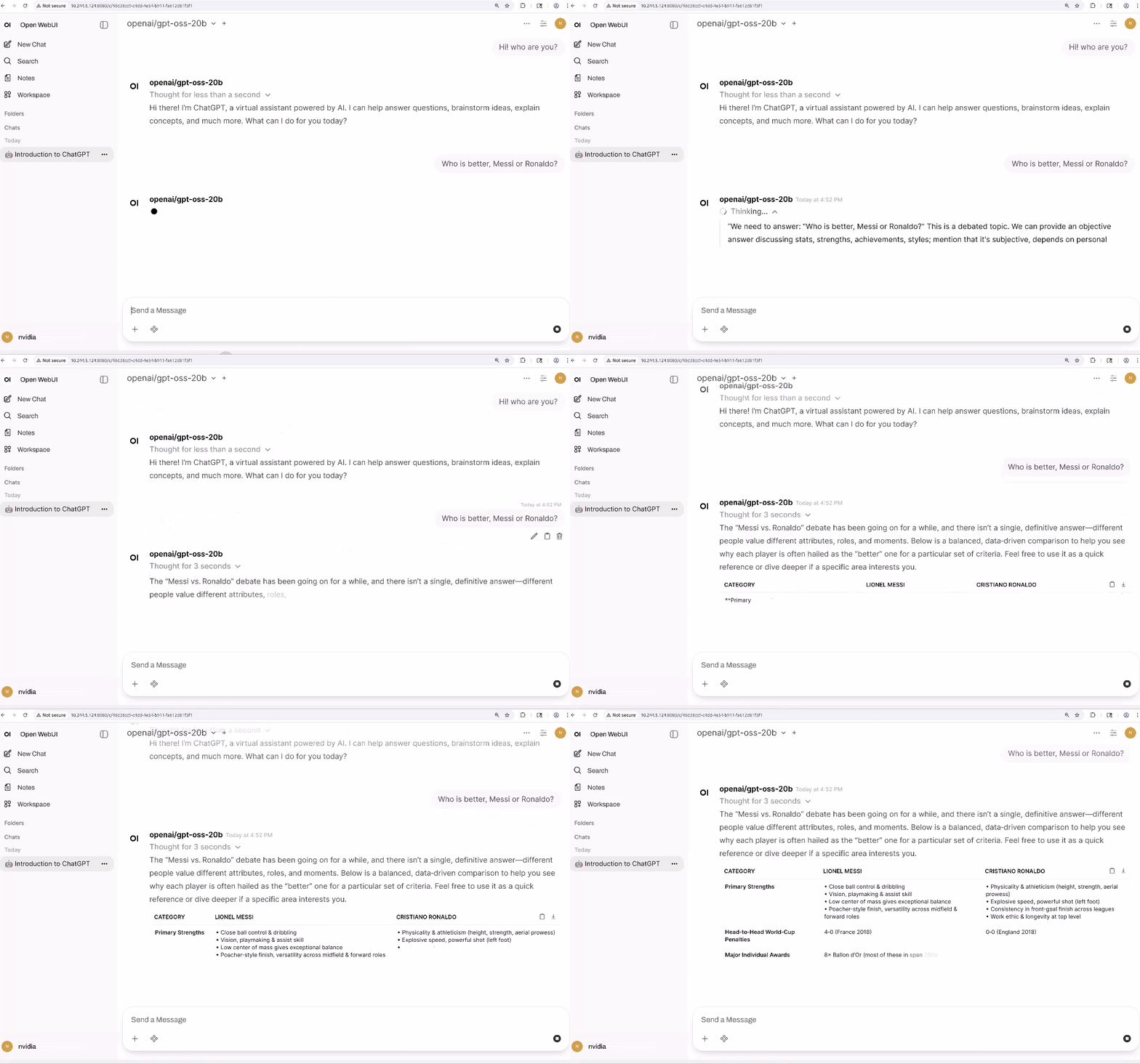
If you have AGX Orin, you can quickly launch a gpt-oss-20b instance using vLLM as the inference engine and Open WebUI as the beautiful and easy-to-use UI.
docker run --rm -it \
  --network host \
  --shm-size=16g \
  --ulimit memlock=-1 \
  --ulimit stack=67108864 \
  --runtime=nvidia \
  --name=vllm \
  -v $HOME/data/models/huggingface:/root/.cache/huggingface \
  -v $HOME/data/vllm_cache:/root/.cache/vllm \
  ghcr.io/nvidia-ai-iot/vllm:latest-jetson-orin

vllm serve openai/gpt-oss-20b
Run Open WebUI in another terminal.
docker run -d \
  --network=host \
  -v ${HOME}/open-webui:/app/backend/data \
  -e OPENAI_API_BASE_URL=http://0.0.0.0:8000/v1 \
  --name open-webui \
  ghcr.io/open-webui/open-webui:main
Next, point your browser to http://localhost:8080.
From here, you can add tools that interact with LLM and provide agent functionality such as search, data analysis, and voice output (TTS).
However, text alone is not enough to build agents that interact with the physical world. They also require multimodal perception. VLMs such as VILA and Qwen2.5-VL are becoming a popular way to add this functionality because they can reason about the entire scene rather than just detecting objects. For example, with a live video feed, you can answer questions like “Is my 3D printing failing?” or “Describe the outdoor traffic pattern.”
Jetson Orin Nano Super can run efficient VLMs such as VILA-2.7B for basic monitoring and simple visual queries. For scenarios that run high-resolution analytics, multiple camera streams, or multiple agents simultaneously, Jetson AGX Orin provides the additional memory and compute headroom needed to scale these workloads.
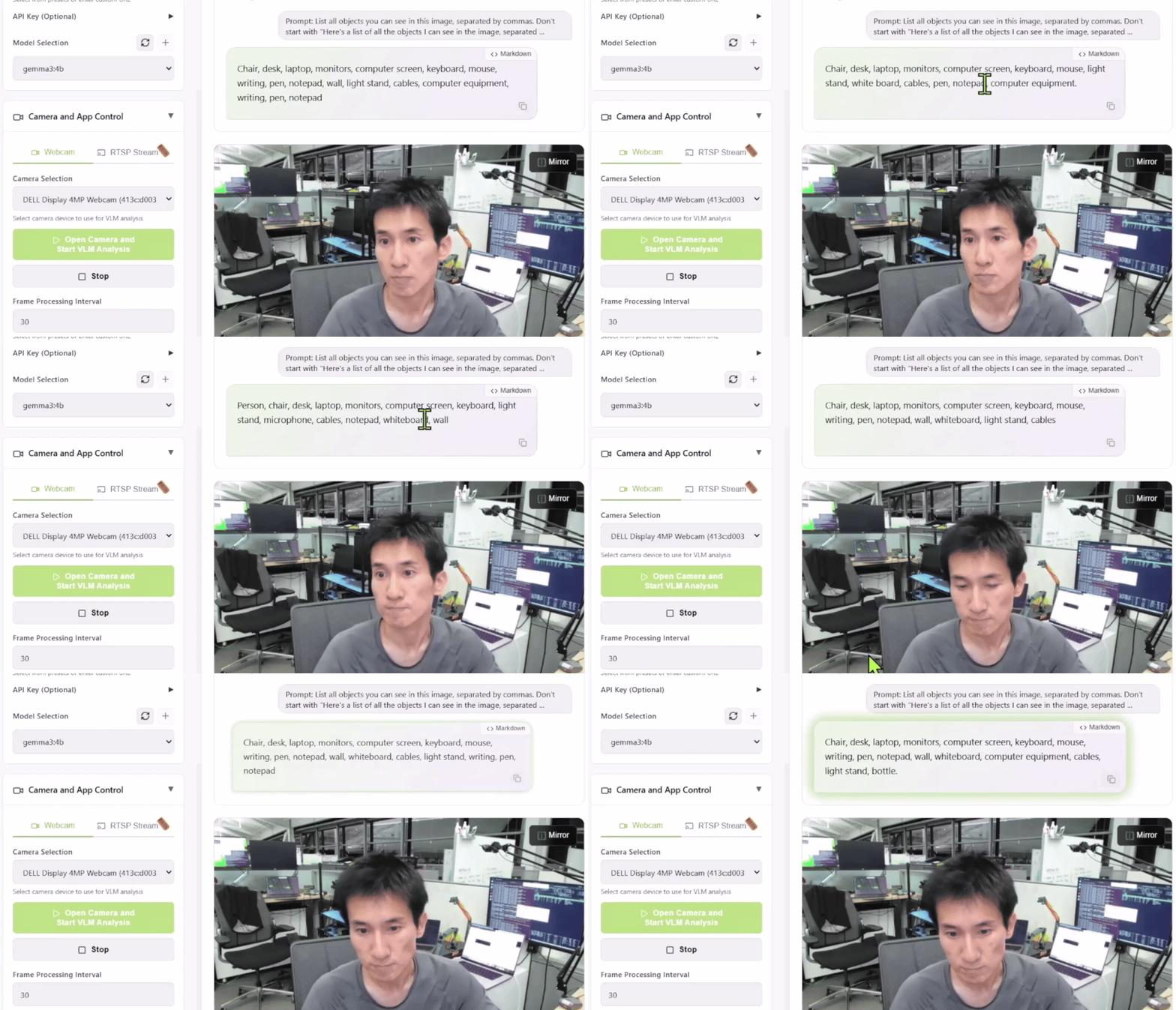
To test this, launch the Live VLM WebUI from Jetson AI Lab. It connects to your laptop’s camera via WebRTC and provides a sandbox that streams live video to your AI model for real-time analysis and explanation.
Live VLM WebUI supports most inference engines that expose Ollama, vLLM, and OpenAI compatible servers.
To start the VLM WebUI using Ollama, follow these steps:
# Install ollama (skip if already installed)
curl -fsSL https://ollama.com/install.sh | sh

# Pull a small VLM-compatible model
ollama pull gemma3:4b

# Clone and start Live VLM WebUI
git clone https://github.com/nvidia-ai-iot/live-vlm-webui.git
cd live-vlm-webui
./scripts/start_container.sh
Then try opening https://localhost:8090 in your browser.
This setup is a powerful starting point for building a smart security system, wildlife monitor, or visual assistant.
What kind of VLM can I run?
Jetson Orin Nano 8GB is suitable for VLM and LLM up to parameters close to 4B, such as Qwen2.5-VL-3B, VILA 1.5–3B, Gemma-3/4B. Jetson AGX Orin 64GB targets mid-sized models in the 4B to 20B range and can run VLMs such as LLaVA-13B, Qwen2.5-VL-7B, or Phi-3.5-Vision. The Jetson AGX Thor 128GB is designed for the largest workloads, supporting multiple simultaneous models or a single model (such as Llama 3.2 Vision 70B or 120B class models) with parameters from approximately 20B up to approximately 120B.
Want to know more? Vision Search and Summarization (VSS) allows you to build intelligent archiving systems. You can search for videos by content instead of file name and automatically generate summaries of long recordings. This is a natural extension of the VLM workflow for anyone who wants to organize and interpret large amounts of visual data.
Tutorial 2: Robotics using basic models
Robotics is undergoing a fundamental architectural change. For decades, robot control has relied on rigorous hard-coded logic and separate perception pipelines to detect objects, calculate trajectories, and execute motions. This approach requires extensive manual tuning and explicit coding for every edge case, making it difficult to automate at scale.
The industry is currently moving towards end-to-end imitation learning. Instead of programming explicit rules, use underlying models such as NVIDIA Isaac GR00T N1 to learn policies directly from demonstrations. These are vision-language-action (VLA) models that fundamentally change the input-output relationship for robot control. In this architecture, the model ingests a continuous stream of visual data from the robot’s camera along with natural language commands (such as “open drawer”). Process this multimodal context to directly predict the required joint positions or motor speeds for the next time step.
However, training these models presents a significant challenge: data bottlenecks. Unlike language models that are trained on Internet text, robots require physical interaction data, which is expensive and time-consuming to obtain. The solution lies in simulation. NVIDIA Isaac Sim allows you to generate synthetic training data and validate policies in physically accurate virtual environments. You can also run hardware-in-the-loop (HIL) tests, where Jetson executes control policies while connected to a simulator equipped with NVIDIA RTX GPUs. This allows you to validate the entire end-to-end system from perception to operation before investing in physical hardware or attempting deployment.
Once validation is complete, the workflow seamlessly transitions into the real world. Deploy optimized policies to the edge. Optimizations such as TensorRT allow heavy transformer-based policies to run with the low latency (less than 30 ms) required for real-time control loops. Whether building simple manipulators or exploring humanoid form factors, this paradigm of learning behavior in simulation and deploying it to the physical edge is now the standard for modern robot development.
You can start trying out these workflows today. The Isaac Lab evaluation tasks repository on GitHub provides pre-built industrial operation benchmarks, such as pouring nuts and sorting exhaust pipes, that you can use to test your policies in simulation before deploying them to hardware. Once validated, the GR00T Jetson Deployment Guide walks you through the process of converting and running these policies on Jetson using optimized TensorRT inference. For users looking to post-train or fine-tune their GR00T models for custom tasks, the integration with LeRobot lets you leverage community datasets and tools for imitation learning, bridging the gap between data collection and deployment.
Join the community: The robot ecosystem is vibrant and growing. From open source robot designs to shared learning resources, you’re not alone on this journey. Forums, GitHub repositories, and community showcases provide both inspiration and practical guidance. Join the LeRobot Discord community to connect with others building the future of robotics.
Yes, building a physical robot requires work such as mechanical design, assembly, and integration with existing platforms. But the intelligence layer is different. What Jetson offers is real-time, powerful, and ready-to-deploy.
Which Jetson is right for you?
If you’re just getting started with local AI, running a small LLM or VLM, or building early-stage robotics or edge prototyping, use the Jetson Orin Nano Super (8GB). This is especially suitable for hobby robotics and embedded projects where cost, simplicity, and compact size are more important than maximum model capacity.
Hobby or independent developers looking to run a capable local assistant, experiment with agent-style workflows, or build deployable personal pipelines should choose Jetson AGX Orin (64GB). 64 GB of memory makes it much easier to combine visual, language, and audio (ASR and TTS) models on a single device without constantly running into memory limitations.
If your use case involves very large models, multiple concurrent models, or strict real-time requirements at the edge, go for Jetson AGX Thor (128GB).
Next steps: Get started
Ready to dive in? Here’s how to get started.
- Please select Jetson: Choose the developer kit that best suits your needs based on your ambitions and budget.
- Flash and setup: Our Getting Started Guide makes setup easy and you can be up and running in less than an hour.
- Explore resources:
- start building: Choose a project, visit the tutorial project on GitHub, see what’s possible, and then move on.
The NVIDIA Jetson family gives developers the tools to design, build, and deploy the next generation of intelligent machines.


