

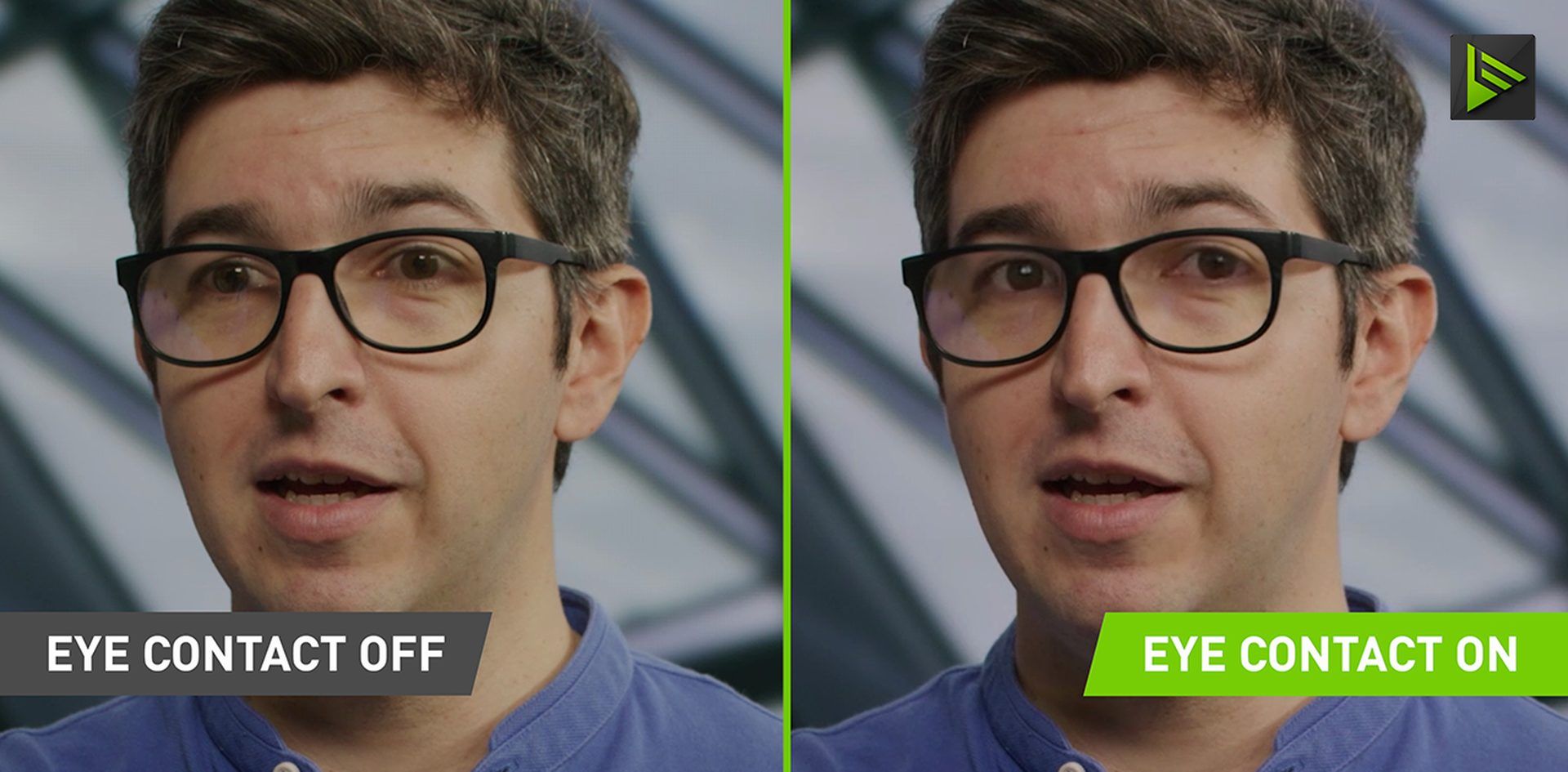
Nvidia Eye Contact AI rocks the streaming world. A new feature in the Nvidia Broadcast app, The Nvidia Eye Contact uses artificial intelligence (AI) to simulate what your eyes would look like if you looked at the camera. AI-powered features edit your video in real time, making it look like you’re looking directly at the camera when you’re distracted.
New to artificial intelligence? Don’t be afraid of AI jargon. Create an in-depth AI glossary of the most commonly used artificial intelligence terms, discuss artificial intelligence basics, and artificial intelligence risks and benefits. Wondering about the impact of artificial intelligence in everyday life?Thanks to Nvidia Eye Contact AI, you can instantly see the effects while watching your favorite girlfriend’s Twitch streamer or even in a Zoom meeting!
What is the Nvidia Eye Contact AI feature?
Nvidia Broadcast 1.4 has a new feature called “Eye Contact” that uses artificial intelligence to replace your eyes with “simulated” eyes aligned with the camera. The Nvidia Eye Contact AI feature makes it look like you’re making eye contact with the camera, even when you’re not.
Nvidia Broadcast, which improves video for live streaming and video conferencing, introduced a new feature called Nvidia Eye Contact AI as part of this month’s 1.4 patch. According to Nvidia’s blog post, Eye Contact is designed for creators who want to look directly at the camera all the time, even when they have to take their eyes away from actions like reading notes or scripts. When it comes to artificial intelligence, eye contact functionality is another example of how it’s used in everyday life.
According to Nvidia, Eye Contact has “an option to disconnect if you look too far,” and will try to match the hue of your virtual eyes to your real eye color.
The Beta badge indicates that Nvidia is actively seeking community feedback for further development and feature improvements.
“There are millions of eye color and lighting combinations,” the company says. “If you test it and find any issues, or if you’d like to help us develop this AI effect further, please send us a quick video here. I really appreciate it!”
-Nvidia
Other artificial intelligence (AI) features in Broadcast include background replacement (sometimes used as a virtual green screen) and the ability to filter out unwanted noise picked up by microphones.
Nvidia’s Broadcast version 1.4 included features other than Eye Contact. In addition to enhancing blur, replace, and remove virtual background effects, the latest update adds a vignette effect that Nvidia claims is similar to Instagram’s. Users who own RTX graphics cards can download the update.
Users have expressed concerns about the new technology, citing its unnatural look and feel. Why not try it yourself?First, check if it can meet your requirements
@oskamattgaming NVIDIA MAXINE. Eye contact AI software! Visit my Youtube for a full installation video. #Nvidiamaxine #nvidia #dazeredirect #AI #eyeredirection #fyp #foryou #software #contentcreation #contentcreator #howtovideos
♬ original sound – Matt
Want to learn how to use ChatGPT effectively? We’ve already covered it. If you want to use AI tools, you may encounter errors such as ChatGPT is currently at capacity. Yes, this is a very annoying error, but don’t worry. I know how to fix it without switching to ChatGPT Professional.
Nvidia eye contact requirements
This software requires at least a GeForce RTX 2060 graphics card (or Quadro compatible alternative) and 8 GB of RAM. NVIDIA recommends Core i5-8600 or Ryzen 5 2600 as a minimum CPU.
Using the Nvidia Eye Contact AI feature can feel unnatural at first. Even the most seasoned presenter looks away from time to time, so being stared at by an artificially perfect avatar can be disconcerting. , helps you connect with your audience.
👁️👁️
I’m not looking at you
Amazing New Machine Learning Techniques from @nvidia so-called eye contact.
As an autistic guy, I wish I had this in real life.I’m testing it live now at https://t.co/fladAbb1Rg.
congratulation @gerdelgado and team. pic.twitter.com/2JV4WBFg— Twitch.tv/1030 (@1030) January 17, 2023
Does your computer meet these requirements? If so, let’s take a closer look at how to get and use it.
How to get the Nvidia Eye Contact AI feature?
Get the latest version of NVIDIA Broadcast (1.4) for your desktop or laptop computer. This update adds the Nvidia Eye Contact feature to the menu.
Find out what ChatGPT Plus is and how it works
How to use the Nvidia Eye Contact AI feature
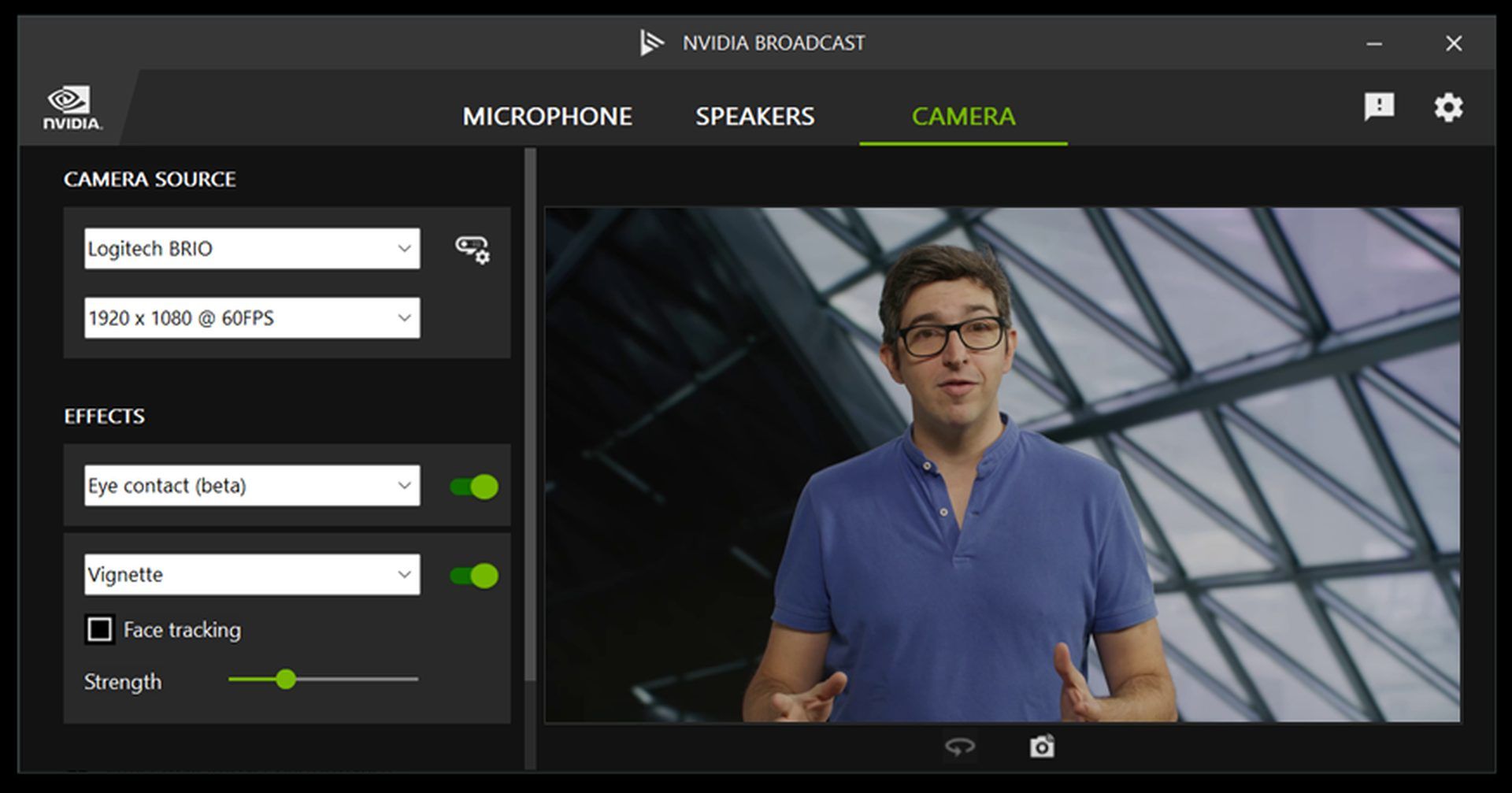
To use the new Nvidia Eye Contact feature, follow these steps:
- Download Nvidia Broadcast if you haven’t already. You can use this link.
- go to camera
- click effect
- Select Eye Contact (Beta)
Nvidia Eye Contact: Zoom Example
During a Zoom meeting, everyone wanted to look away from time to time or read from the notes they took. With Nvidia Eye Contact you can do this without being noticed. See example below.
Want to learn more about Nvidia Broadcast? Watch the video below or visit Nvidia’s official page.
There is still some debate about images generated by artificial intelligence, but people are still looking for the best AI art generator. Will AI replace designers? Keep reading to find out.
Welcome to an AI-driven world
Almost every day, a new tool, model, or feature emerges to change the way we live our lives. We’ve already reviewed some of the best:


