Organizations who want to take advantage of machine learning capabilities need a comprehensive data preparation strategy.
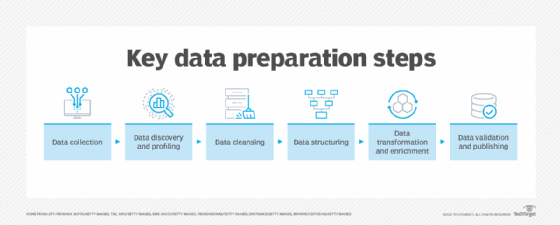
Data preparation consists of making the data set available in the ML algorithm. In many cases, these algorithms require access to large amounts of data. Before these ML algorithms can access that data, they must be imported, processed and stored in a format suitable for analysis. This includes complex processes and large storage and computational capacity.
Here we explore some of the key features of Amazon Athena, EMR, and Redshift. It is three data analytics services that seamlessly integrate with Sagemaker AI to enable IT teams to navigate the data selection process. Understanding the unique strengths of each service enables businesses to provide a more accurate and reliable ML model.
Select the right AWS Analytics Service
Amazon Sagemaker AI is an AWS managed service that provides cloud infrastructure, workflows and development tools to build, train, deploy and maintain ML models in the cloud. Sagemaker AI supports access to multiple tools for data preparation tasks, but the nature of the application and its data requirements determine the best AWS analytics service for your particular ML use case.
Amazon Athena
Athena is a query service that uses SQL statements to analyze S3 data files. It's serverless, so users don't need to configure or manage their infrastructure. It's a cost-effective option as users only pay for queries they run. It also supports files in a variety of formats such as JSON, CSV, Apache Orc, Apache Parquet, and more, making it a flexible service. It is also the best option to perform ad hoc queries on S3 data.
One common use case for Athena is log analysis, which identifies and troubleshoots issues. Queuing log data also helps businesses optimize their processes by analyzing performance metrics.
Amazon EMR
Amazon EMR (formerly Elastic MapReduce) is a big data processing service. Start and manage clusters that run open source data analytics frameworks such as Apache Spark, Apache Hadoop, Apache Flink, Apache Hive, and Trino. EMR can access data on the cluster's local file system, Hadoop distributed file system (HDFS) or S3. EMR uses EC2 instances to manage the computing infrastructure, but also supports serverless configurations. Athena can use Amazon EMR to query data and supports the same data format.
EMR provisioned clusters are a good option for long processing tasks with predictable workloads and jobs that require access to data outside of S3.
Amazon Redshift
Redshift follows the data warehouse model and is able to extract, transform and load large datasets from various sources within a cluster. Once in a cluster, SQL statements can analyze these datasets. A useful tool for running queries that require data to be retrieved and joined from multiple large tables. Redshift also manages the computing infrastructure of clusters that are typically provisioned on EC2 instances. However, there is also the option to configure serverless calculation capacity.
Redshift is a predictable and suitable option for large workloads, using data converted and stored internally in a Redshift cluster.
Integrate AWS Analytics Services
Sagemaker Unified Studio is an integrated development environment (IDE) that allows you to access AWS data, analytics, and AI/ML capabilities on a single platform. Use SQL extensions to integrate with Athena, EMR, and Redshift to facilitate data preparation tasks. In many cases, organizations already use these services for data analysis tasks other than Sagemaker AI. This allows you to reuse existing infrastructure and make it easier to access ML building and training processes.
AWS Glue manages connections and catalogs for data sources queried by Athena, EMR, and Redshift. Users should be able to analyze data from AWS Analytics Services using SQL statements via the IDE interface or the SDK API. Before you run these queries from the Sagemaker AI workflow, we recommend that you first create, run, and tweak these SQL statements from the AWS Analytics service.
Don't forget to grant the necessary ID and access management permissions to the Sagemaker domain that performs these data analysis tasks. These permissions must include access to the associated S3 bucket, AWS adhesive catalog, databases, and permissions to perform tasks on the respective AWS Analytics Services. Users must also configure network access, such as VPC routing and security groups, between the Sagemaker Unified Studio and the Data Analytics platform.
The SQL extension for JupyterLab Notebook is recommended to start these data analysis integrations. It provides a SQL Editor UI, allowing developers to enter specific SQL commands pointing to connections and databases managed by AWS glue. Amazon Q developers are also available to JupyterLab. It is a useful generative AI-based tool that can help and guide developers through the process.
Ernesto Marquez is the owner and project director of Concurrency Labs, helping to launch Startups and grow applications on AWS. He enjoys helping to build serverless architectures, build data analytics solutions, implement automation, and reduce AWS costs.